Disabling the AutoCAD ribbon using .NET

I came across this interesting question on the AutoCAD .NET forum, posted by Pete Elliott:

When AutoCAD is loading, I see that my toolbars are disabled (grayed-out) until the loading has finished.  Our company does some additional data loading after AutoCAD has become idle.  But if the user clicks certain custom toolbar buttons while our additional data is loading, AutoCAD fatal errors.  Is there a way we can disable the toolbars (like AutoCAD does) until our loading is finished, and then enable them?  I haven't been able to locate an API that provides this capability.  Any suggestions greatly appreciated!

It seems this would be a very common requirement. For today's post I'm going to assume that by "toolbars" Pete is actually referring to the ribbon. (It suits my purposes that this be the case, as I've found a way to make it work for the ribbon, but I'll do my best to publish a follow-up post for toolbars, if that turns out to be the actual requirement. 🙂

The basic approach is fairly simple: you get access to the current "ribbon palette set" via the RibbonServices class (we call a method to create a new one, but typically this will just return the existing ribbon as we're calling it from a command). We then use it to disable the "ribbon control" as well as its background tab rendering. We also turn off the display of tooltips while the ribbon is disabled.

Here's the C# code that disables and re-enables the ribbon respectively via DR and ER commands. These commands are really just examples of how you might call the EnableRibbon() function from your own code (you'd typically call EnableRibbon(false); as initializaton starts and EnableRibbon(true); when you're done).

using Autodesk.AutoCAD.Runtime;

using Autodesk.Windows;


namespace UserInterfaceManipulation

{

  public class Commands

  {

    private static bool _showTipsOnDisabled = false;


    [CommandMethod("DR")]

    public static void DisableRibbonCommand()

    {

      EnableRibbon(false);

    }


    [CommandMethod("ER")]

    public static void EnableRibbonCommand()

    {

      EnableRibbon(true);

    }


    public static void EnableRibbon(bool enable)

    {

      // Start by making sure we have a ribbon

      // (if calling from a command this will almost certainly just return

      // the ribbin that already exists)


      var rps = Autodesk.AutoCAD.Ribbon.RibbonServices.CreateRibbonPaletteSet();


      // Enable or disable it


      rps.RibbonControl.IsEnabled = enable;


      if (!enable)

      {

        // Store the current setting for "Show tooltips when the ribbon is disabled"

        // and then modify the setting


        _showTipsOnDisabled = ComponentManager.ToolTipSettings.ShowOnDisabled;

        ComponentManager.ToolTipSettings.ShowOnDisabled = enable;

      }

      else

      {

        // Restore the setting for "Show tooltips when the ribbon is disabled"


        ComponentManager.ToolTipSettings.ShowOnDisabled = _showTipsOnDisabled;

      }


      // Enable or disable background tab rendering


      rps.RibbonControl.IsBackgroundTabRenderingEnabled = enable;

    }

  }

}


Here are the two commands in action:
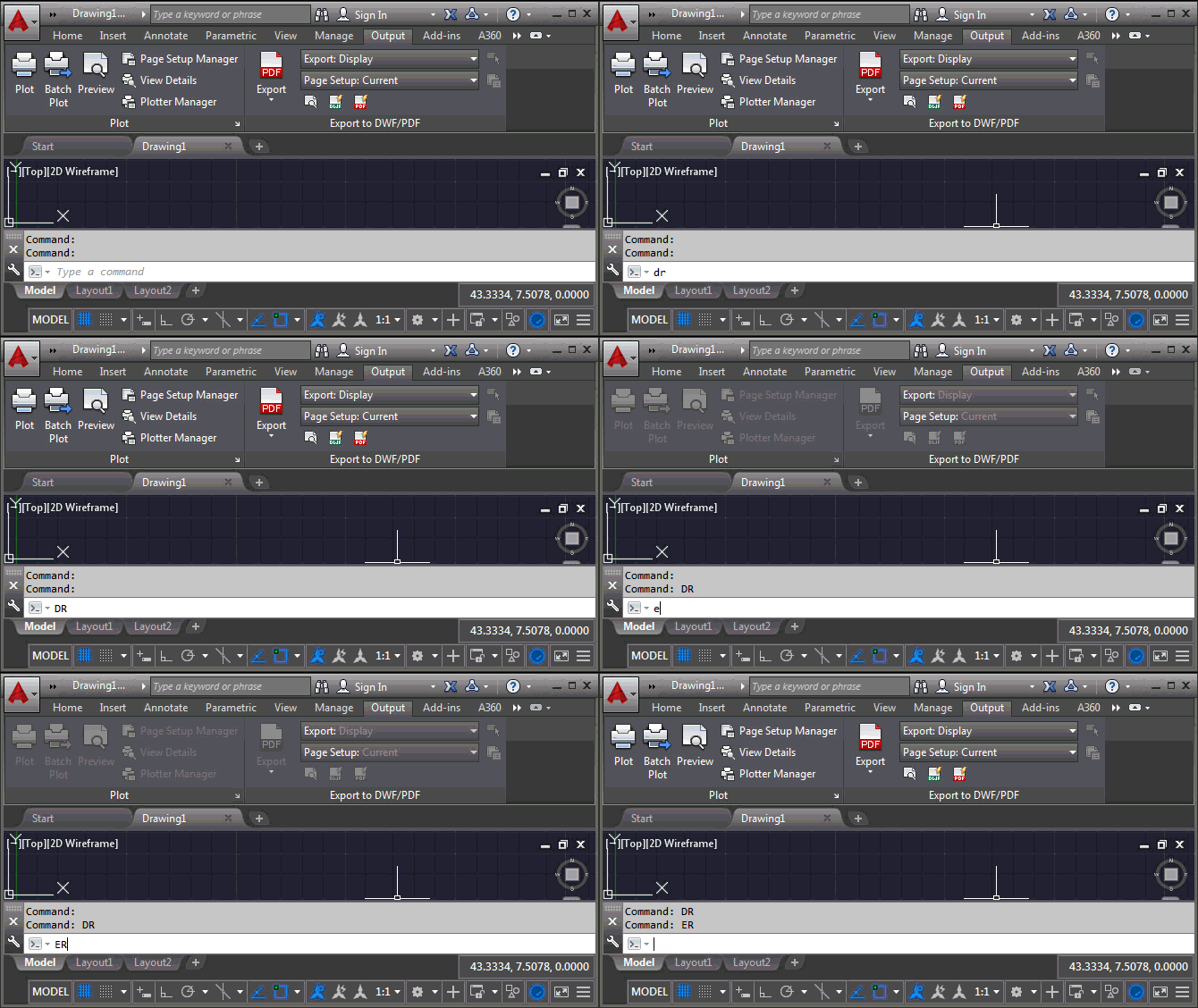
Disabling and re-enabling the ribbon

5 responses to “Disabling the AutoCAD ribbon using .NET”

  1. Kean, this made me think - why does the autocad world still use autodesk's toolbar and ribbon interfaces? Given that the CUI continues to be buggy, and the cuix format is not documented and version specific so you have to be a .net programmer to do anything outside of acad. We still use .mnu for custom menus as they are easy to edit outside acad, and work for all versions. Given all the trouble, you would think someone would write a palette that did some kind of toolbar system, or ribbon like thing and ditch the adesk stuff. For instance, workspaces have never worked in a stable way, and are contained in a menu. So I cannot distribute a workspace to my users without also managing a menu that must be loaded and so on. I had written my own workspace tool but then autodesk broke a key toolbar behavior and said they will not fix it. Of course the c++ version of the function works, but is not exposed. Oops...anyway, is there something special about ribbons or toolbars you can think of, that a .net modeless dialog (or set of dialogs) cannot do? Some third party programmer could make a living by replacing things well.

    1. James,

      There's really nothing stopping someone replacing AutoCAD's UI with their own. (Well, other than the huge amount of work it would take.) For sure there are internal integration points that make it less likely that a complete replacement would succeed, but hey.

      I'm not aware of the specific issues you have with the CUI editor or workspaces (and please don't take this as a request for more information... I'm not going to be able to follow up on them in my new role), but I'd hope you could find a way to make the existing mechanism work. Whether by pushing to get fixes for the things you need or working around the problems. Creating a parallel UI infrastructure for AutoCAD would be much, much harder.

      Kean

      1. I think I have to explore workspaces and .net to make my own toolbar state tool.
        The idea is to make an external file that remembers where toolbars and pulldowns are. Then you can make and restore states in any flavor of acad or version. The biggest complaint I get when switching versions is "how do I get my toolbars back (like the last version)?" You can imagine, if they are asking that, showing them the CUI is not going to solve things.
        Here is a good question for you to observe as you move through circles there, what is the main menu supposed to be for civil3d? I thought you wanted the one with mouse buttons, keyboard shortcuts, and other non-pulldown and toolbar stuff. Nit think about that, the main menu is also what is customizable, and you don't want users customizing the big ol c3d menu which should be OOTB. So should custom.cui be the main to allow for customization separate from the OOTB menu, or c3d so the shortcuts and context menus work right? Still curious to hear about your new role. I never knew exactly what your old role was as it seems like Autodesk has figured out not to put you in a box.

        1. I'm not really aware what's happening with the C3D UI, especially as it relates to CUI. You should ask about that on the forum...

          I'm still settling into the new role. It's really a better fit for me: my previous role gave me a lot of freedom (which I value) but this one also gives me more scope to be involved in interesting and important projects.

          So far, so good!

          Kean

        2. Hi James, as a Civil 3D developer on the Autodesk store and a CAD Manager myself, I'd suggest ditching the main/enterprise CUI system and move to using the new autoloading mechanism. In the past, like you, I've rolled out the main and enterprise cui's to 'lock down' what users can and can't do - but what I've realized over the years is it has caused a lot more trouble than helped. Anytime I rolled out new tools, it may or may not show up.

          Here's what I would look at, either use the new autoloading mechanism to distribute your own partial CUI, and leave the rest as what gets distributed with basic installation

          adndevblog.typepad.com/autocad/

          Or, use a lisp routine like the following to load/unload your partial CUI.

          (defun LoadCustomTools ()

          (if (= nil (menugroup "MyCustomTools"))

          (progn

          ;;Load for first time

          (if (findfile "C:\MY\PATHI\MyCustomTools.cuix")

          (progn

          (command "cuiload" "C:\MY\PATHI\MyCustomTools.cuix")

          (princ "
          Loaded Corporate CUI...
          ")

          );progn

          );if

          );progn

          (progn

          ;;Used for refreshing ribbon in case it is updated. Unload/reload partial CUI.

          (command "cuiunload" "MyCustomTools")

          (if (findfile "C:\MY\PATHI\MyCustomTools.cuix")

          (progn

          (command "cuiload" "C:\MY\PATHI\MyCustomTools.cuix")

          (princ "
          Loaded Corporate CUI...
          ")

          );progn

          );if

          );progn

          );if

          );end defun

          Let the users do what they want with the rest. This way, you can deliver custom tools and not have to deal with CUI issues or workspaces at all.

          Steve
          steve@redtransitconsultants.com

Leave a Reply

Your email address will not be published. Required fields are marked *