Well, I couldn't resist... as I mentioned in the last post - where we looked at creating a simple graph inside AutoCAD as an example of modifying objects inside nested transactions - the idea of graphing inside AutoCAD is a good fit for F#. This is for a number of reasons: F# is very mathematical in nature and excels at processing lists of data. I also spiced it up a bit by adding some code to parallelise some of the mathematical operations, but that didn't turn out to be especially compelling with my dual-core laptop. More on that later.
Here's the F# code:
// Use lightweight F# syntax
#light
// Declare a specific namespace and module name
module Grapher.Commands
// Import managed assemblies
open Autodesk.AutoCAD.Runtime
open Autodesk.AutoCAD.ApplicationServices
open Autodesk.AutoCAD.DatabaseServices
open Autodesk.AutoCAD.Geometry
// Define a common normalization function which makes sure
// our graph gets mapped to our grid
let normalize fn normFn x minInp maxInp maxOut =
let res =
fn ((maxInp - minInp) * x / maxOut)
let normRes = normFn res
if normRes >= 0.0 && normRes <= 1.0 then
normRes * (maxOut - 1.0)
else
-1.0
// Define some shortcuts to the .NET Math library
// trigonometry functions
let sin x = System.Math.Sin x
let cos x = System.Math.Cos x
let tan x = System.Math.Tan x
// Implement our own normalized trig functions
// which each map to the size of the grid passed in
let normSin max x =
let nf a = (a + 1.0) / 2.0 // Normalise to 0-1
let res =
normalize
sin nf (Int32.to_float x)
0.0 (2.0 * System.Math.PI) (Int32.to_float max)
Int32.of_float res
let normCos max x =
let nf a = (a + 1.0) / 2.0 // Normalise to 0-1
let res =
normalize
cos nf (Int32.to_float x)
0.0 (2.0 * System.Math.PI) (Int32.to_float max)
Int32.of_float res
let normTan max x =
let nf a = (a + 3.0) / 6.0 // Normalise differently for tan
let res =
normalize
tan nf (Int32.to_float x)
0.0 (2.0 * System.Math.PI) (Int32.to_float max)
Int32.of_float res
// Now we declare our command
[<CommandMethod("graph")>]
let gridCommand() =
// We'll time the command, so we can check the
// sync vs. async efficiency
let starttime = System.DateTime.Now
// Let's get the usual helpful AutoCAD objects
let doc =
Application.DocumentManager.MdiActiveDocument
let ed = doc.Editor
let db = doc.Database
// "use" has the same effect as "using" in C#
use tr =
db.TransactionManager.StartTransaction()
// Get appropriately-typed BlockTable and BTRs
let bt =
tr.GetObject
(db.BlockTableId,OpenMode.ForRead)
:?> BlockTable
let ms =
tr.GetObject
(bt.[BlockTableRecord.ModelSpace],
OpenMode.ForWrite)
:?> BlockTableRecord
// Function to create a filled circle (hatch) at a
// specific location
// Note the valid use of tr and ms, as they are in scope
let createCircle pt rad =
let hat = new Hatch()
hat.SetDatabaseDefau
lts();
hat.SetHatchPattern
(HatchPatternType.PreDefined,
"SOLID")
let id = ms.AppendEntity(hat)
tr.AddNewlyCreatedDBObject(hat, true)
// Now we create the loop, which we make db-resident
// (appending a transient loop caused problems, so
// we're going to use the circle and then erase it)
let cir = new Circle()
cir.Radius <- rad
cir.Center <- pt
let lid = ms.AppendEntity(cir)
tr.AddNewlyCreatedDBObject(cir, true)
// Have the hatch use the loop we created
let loops = new ObjectIdCollection()
loops.Add(lid) |> ignore
hat.AppendLoop(HatchLoopTypes.Default, loops)
hat.EvaluateHatch(true)
// Now we erase the loop
cir.Erase()
id
// Function to create our grid of circles
let createGrid size rad offset =
let ids = new ObjectIdCollection()
for i = 0 to size - 1 do
for j = 0 to size - 1 do
let pt =
new Point3d
(offset * (Int32.to_float i),
offset * (Int32.to_float j),
0.0)
let id = createCircle pt rad
ids.Add(id) |> ignore
ids
// Function to change the colour of an entity
let changeColour col (id : ObjectId) =
if id.IsValid then
let ent =
tr.GetObject(id, OpenMode.ForWrite) :?> Entity
ent.ColorIndex <- col
// Shortcuts to make objects red and yellow
let makeRed = changeColour 1
let makeYellow = changeColour 2
// Function to retrieve the contents of our
// array of object IDs - this just calculates
// the index based on the x & y values
let getIndex fn size i =
let res = fn size i
if res >= 0 then
(i * size) + res
else
-1
// Apply our function synchronously for each value of x
let applySyncBelowMax size fn =
[| for i in [0..size-1] ->
getIndex fn size i |]
// Apply our function asynchronously for each value of x
let applyAsyncBelowMax size fn =
Async.Run
(Async.Parallel
[ for i in [0..size-1] ->
async { return getIndex fn size i } ])
// Hardcode the size of the grid and create it
let size = 50
let ids = createGrid size 0.5 1.2
// Make the circles all red to start with
Seq.iter makeRed (Seq.cast ids)
// From a certain index in the list, get an object ID
let getId i =
if i >= 0 then
ids.[i]
else
�
160; ObjectId.Null
// Apply one of our trig functions, synchronously or
// otherwise, to our grid
applySyncBelowMax size normSin |>
Array.map getId |>
Array.iter makeYellow
// Commit the transaction
tr.Commit()
// Check how long it took
let elapsed =
System.DateTime.op_Subtraction
(System.DateTime.Now, starttime)
ed.WriteMessage
("\nElapsed time: " +
elapsed.ToString())
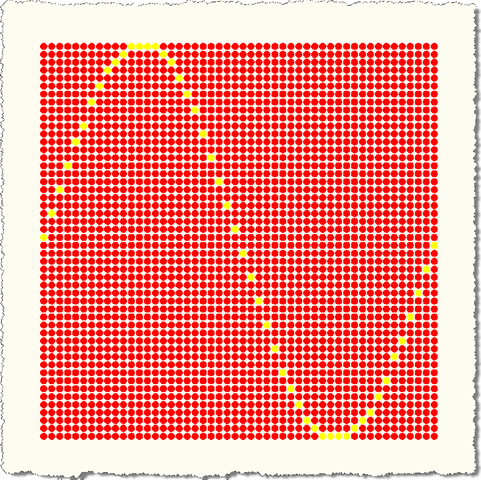
Here's what you see on AutoCAD's drawing canvas when you run the GRAPH command as it stands:
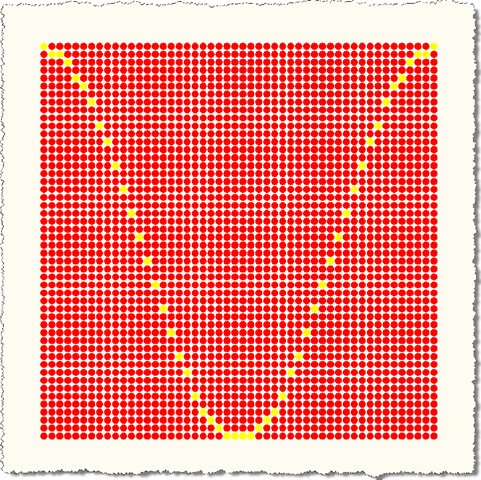
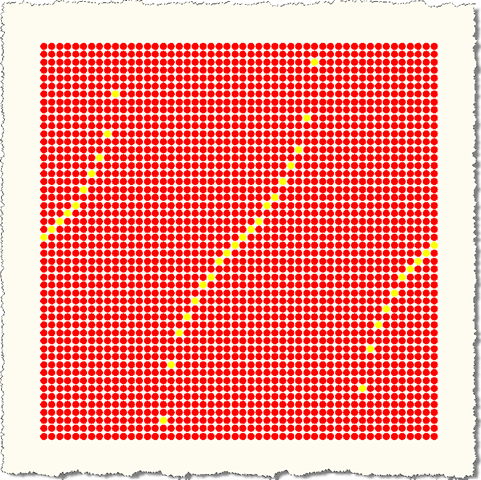
If you want to play around with other functions, you can edit the call to applySyncBelowMax to pass normCos or normTan instead of normSin.
As I mentioned earlier, if you swap the call to be applyAsyncBelowMax instead of applySyncBelowMax you will actually run the mathematics piece as asynchronous tasks. These are CPU-bound operations - they don't call across the network or write to a hard-drive, which might have increased the benefit of calling them asynchronously - so right now the async version actually runs more slowly than the sync version. If I were to have more processing cores available to me, it might also give us more benefit, but right now with my dual-core machine there's more effort spent coordinating the tasks than you gain from the parallelism. But I'll let you play around with that yourselves... you may get better results. One other note on that piece of the code: at some point I'd like to make use of the Parallel Extensions for .NET (in particular the Task Parallel Library (TPL)), but for now I've continued with what I know, the asynchronous worklows capability which is now standard in F#.
I'm travelling in India this week (and working from our Bangalore office next week), so this is likely to be my last post of the week.
Leave a Reply