Thanks to Gopinath Taget, from DevTech Americas, for letting me know of this tool's existence.
I've often battled to create Platform Invoke signatures for unmanaged C(++) APIs in .NET applications, and it seems this tool is likely to save me some future pain. The tool was introduced in an edition of MSDN Magazine, earlier this year.
[For those unfamiliar with P/Invoke, I recommend this previous post.]
While the Interop Assistant can be used for creating function signatures to call into .NET assemblies from unmanaged applications, I'm usually more interested in the reverse: calling unmanaged functions from .NET.
Let's take a quick spin with the tool, working with some functions from the ObjectARX includes folder...
A great place to start is the aced.h file, as it contains quite a few C-standard functions that are callable via P/Invoke.
After installing and launching the tool, the third tab can be used for generation of C# (DllImport) or VB.NET (Declare) signatures for unmanaged function(s). To get started we'll go with an easy one:
void acedPostCommandPrompt();
After posting the code into the "Native Code Snippet" window, we can generate the results for C#:
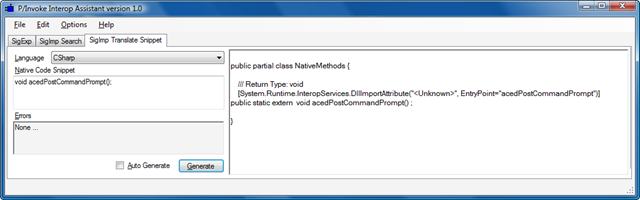
And for VB.NET:

Taking a quick look at the generated signature (I'll choose the C# one, as usual), we can see it's slightly incomplete:
public partial class NativeMethods
{
/// Return Type: void
[System.Runtime.InteropServices.DllImportAttribute(
"<Unknown>",
EntryPoint = "acedPostCommandPrompt")
]
public static extern void acedPostCommandPrompt();
}
We need to replace "<Unknown>" with the name of the EXE or DLL from which this function is exported: this is information that was not made available to the tool, as we simply copy & pasted a function signature from a header file. This previous post (the one that gives an introduction to P/Invoke) shows a technique for identifying the appropriate module to use.
Now let's try an altogether more complicated header:
int acedCmdLookup(const ACHAR* cmdStr, int globalLookup,
AcEdCommandStruc* retStruc,
int skipUndef = FALSE);
To get started, we simply paste this into the "Native Code Snippet" window, once again:
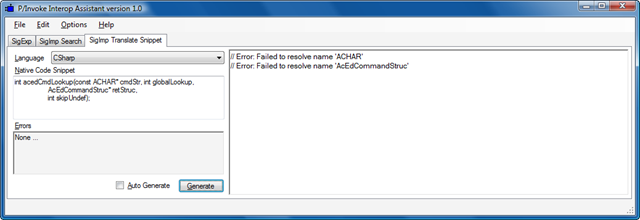
There are a few problems. Copying in the definition for ACHAR (from AdAChar.h), solves the first issue, but copying in the definition for AcEdCommandStruc (from accmd.h) identifies two further issues:
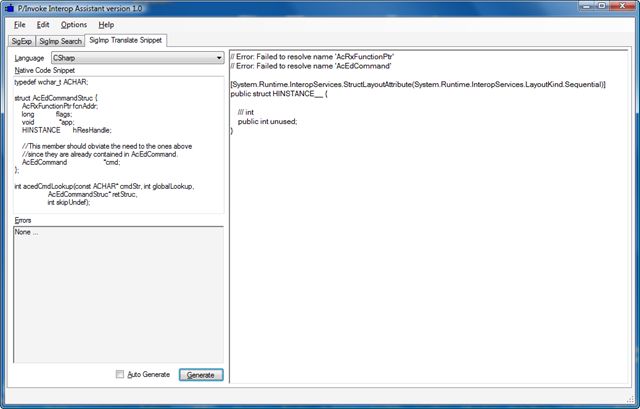
The first is easy to fix - we just copy and paste the definition of AcRxFunctionPtr from accmd.h. The second issue - defining AcEdCommand - is much more complicated, and in this case there isn't a pressing need for us to bother as the information contained in the rest of the AcEdCommandStruc structure is sufficient for this example. So we can simple set this to a void* in the structure:
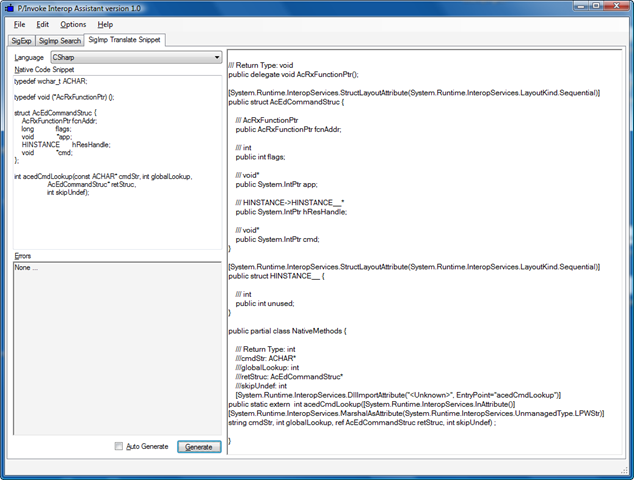
OK, so we now have our valid P/Invoke signature, which we can integrate into a C# test application:
using Autodesk.AutoCAD.ApplicationServices;
using Autodesk.AutoCAD.DatabaseServices;
using Autodesk.AutoCAD.EditorInput;
using Autodesk.AutoCAD.Runtime;
using System.Runtime.InteropServices;
namespace PInvokeTest
{
public delegate void AcRxFunctionPtr();
[StructLayoutAttribute(LayoutKind.Sequential)]
public struct AcEdCommandStruc
{
public AcRxFunctionPtr fcnAddr;
public int flags;
public System.IntPtr app;
public System.IntPtr hResHandle;
public System.IntPtr cmd;
}
[StructLayoutAttribute(LayoutKind.Sequential)]
public struct HINSTANCE__
{
public int unused;
}
public class Commands
{
[DllImportAttribute(
"acad.exe",
EntryPoint = "acedCmdLookup")
]
public static extern int acedCmdLookup(
[InAttribute()]
[MarshalAsAttribute(UnmanagedType.LPWStr)] string cmdStr,
int globalLookup,
ref AcEdCommandStruc retStruc,
int skipUndef
);
[CommandMethod("LC")]
static public void LookupCommand()
{
Document doc =
Application.DocumentManager.MdiActiveDocument;
Database db = doc.Database;
Editor ed = doc.Editor;
PromptStringOptions pso =
new PromptStringOptions(
"\nEnter name of command to look-up: "
);
PromptResult pr = ed.GetString(pso);
if (pr.Status != PromptStatus.OK)
return;
AcEdCommandStruc cs = new AcEdCommandStruc();
int res =
acedCmdLookup(pr.StringResult, 1, ref cs, 1);
if (res == 0)
ed.WriteMessage(
"\nCould not find command definition." +
" It may not be defined in ObjectARX."
);
else
{
CommandFlags cf = (CommandFlags)cs.flags;
ed.WriteMessage(
"\nFound the definition of {0} command. " +
" It has command-flags value of \"{1}\".",
pr.StringResult.ToUpper(),
cf
);
PromptKeywordOptions pko =
new PromptKeywordOptions(
"\nAttempt to invoke this command?"
);
pko.AllowNone = true;
pko.Keywords.Add("Yes");
pko.Keywords.Add("No");
pko.Keywords.Default = "No";
PromptResult pkr =
ed.GetKeywords(pko);
if (pkr.Status == PromptStatus.OK)
{
if (pkr.StringResult == "Yes")
{
// Not a recommended way of invoking
// commands. Use SendCommand() or
// SendStringToExecute()
cs.fcnAddr.Invoke();
}
}
}
}
}
}
Our LC command looks up a command based on its command-name and tells us the flags that were used to define it (Modal, Session, Transparent, UsePickSet, etc.). It will then offer the option to invoke it, as we have the function address as another member of the AcEdCommandStruc populated by the acedCmdLookup() function. I do not recommend using this approach for calling commands - not only are we relying on a ill-advised mechanism in ObjectARX for doing so, we're calling through to it from managed code - we're just using this as a more complicated P/Invoke example and investigating what can (in theory) be achieved with the results. If you're interested in calling commands from .NET, see this post.
By the way, if you're trying to get hold of P/Invoke signature for the Win32 API, I recommend checking here first.


Leave a Reply