Embedding AutoCAD 2009 in a standalone dialog

This post takes a look at another topic outlined in this overview of the new API features in AutoCAD 2009.

AutoCAD 2009 introduces the ability to embed the application in a standalone dialog or form via an ActiveX control. This capability has been around for a number of releases of AutoCAD OEM, but this feature has now been made available in the main AutoCAD product.

The way the control works is to launch an instance of AutoCAD in the background (it should go without saying that AutoCAD needs to be installed on the system, but I've said it, anyway 🙂 and it then pipes the graphics generated by AutoCAD into the area specified by the bounds of the control. It also then pipes back any mouse movements or keystrokes, to allow the embedded AutoCAD to be controlled. It's pretty neat: you'll see the standard cursor, be able to enter commands via dynamic input, and more-or-less do whatever can be done inside the full product.

The control is especially handy if you want to present a reduced user-interface to the people using the product (which is really what AutoCAD OEM is for, in a nutshell, although the development effort involved in creating a full AutoCAD OEM application makes it inappropriate for quick & easy UI streamlining).

Let's start our look at this control by creating a new C# Windows Application project in Visual Studio 2005 (you can use whatever ActiveX container you like, though - it should even work from a web-page or an Office document):
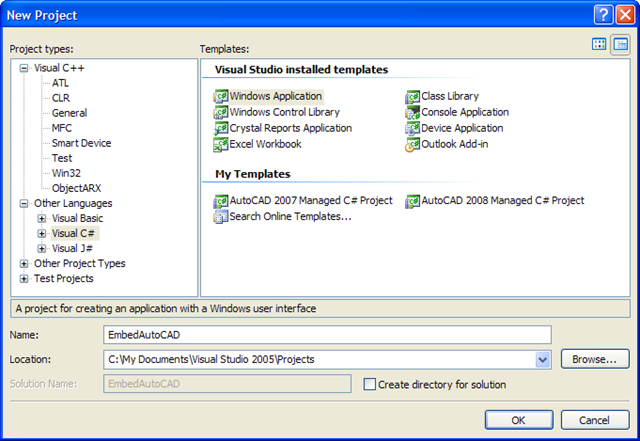
New application project

Once Visual Studio has created the new project, we need to add our control to the toolbox. If you right-click on the toolbox, you'll be able to select "Choose Items...".
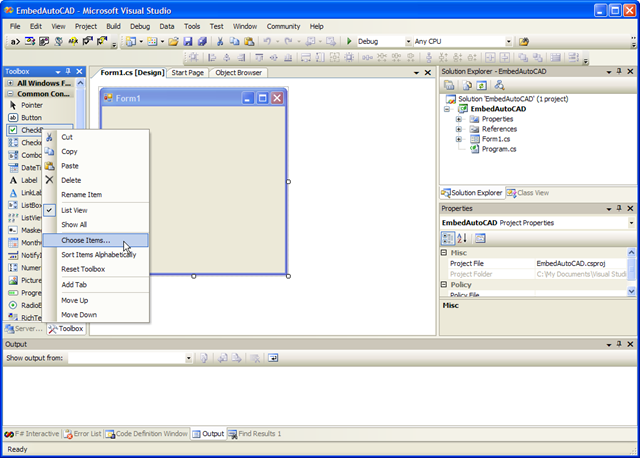
Add to toolbox

From here, there should be an item "AcCtrl" in the list of COM Components. Otherwise you can browse to it in c:\Program Files\Common Files\Autodesk Shared\AcCtrl.dll.
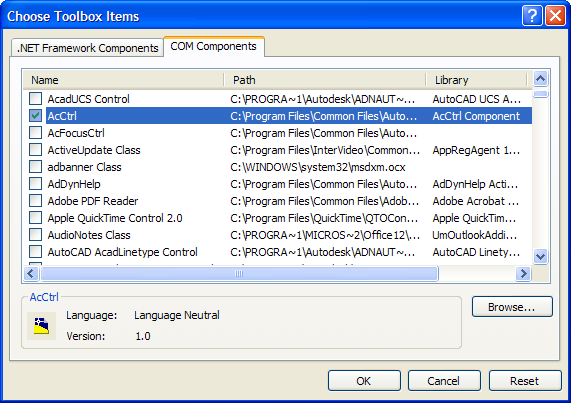
Add control to toolbox

Then you simply need to place the control on your form.
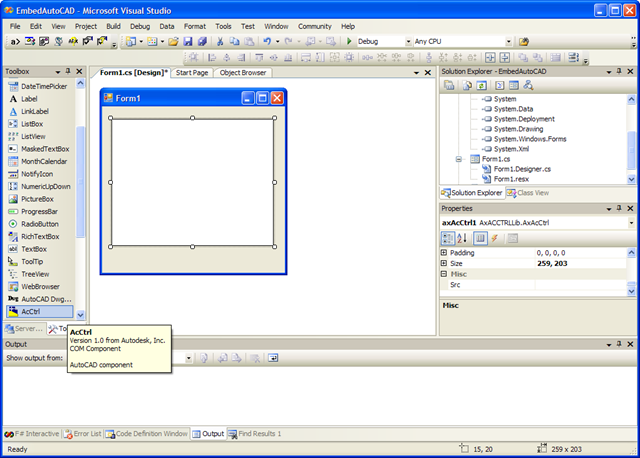
Add control to form

Once we've done that, we're going to add a few more controls - for the drawing path, and a text string for commands we want to try "posting" to the embedded AutoCAD application.
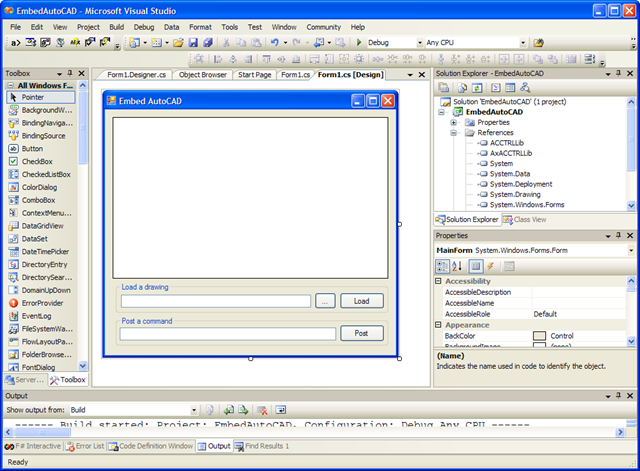
Design our form

Here's the C# code we'll use to drive the embedded control from the form. You should be able to work out what the various controls have been called in the project by looking at the code.

using System;

using System.Windows.Forms;

namespace EmbedAutoCAD

{

  public partial class MainForm : Form

  {

    public MainForm()

    {

      InitializeComponent();

    }

    private void browseButton_Click(

      object sender, EventArgs e)

    {

      OpenFileDialog dlg =

        new OpenFileDialog();

      dlg.InitialDirectory =

        System.Environment.CurrentDirectory;

      dlg.Filter =

        "DWG files (*.dwg)|*.dwg|All files (*.*)|*.*";

      Cursor oc = Cursor;

      String fn = "";

      if (dlg.ShowDialog() ==

        DialogResult.OK)

      {

        Cursor = Cursors.WaitCursor;

        fn = dlg.FileName;

        Refresh();

      }

      if (fn != "")

        this.drawingPath.Text = fn;

      Cursor = oc;

    }

    private void loadButton_Click(

      object sender, EventArgs e)

    {

      if (System.IO.File.Exists(drawingPath.Text))

        axAcCtrl1.Src = drawingPath.Text;

      else

        MessageBox.Show("File does not exist");

    }

    private void postButton_Click(

      object sender, EventArgs e)

    {

      axAcCtrl1.PostCommand(cmdString.Text);

    }

  }

}

Finally, when we run the application and load a drawing via the browse/load buttons, the real fun starts. 🙂
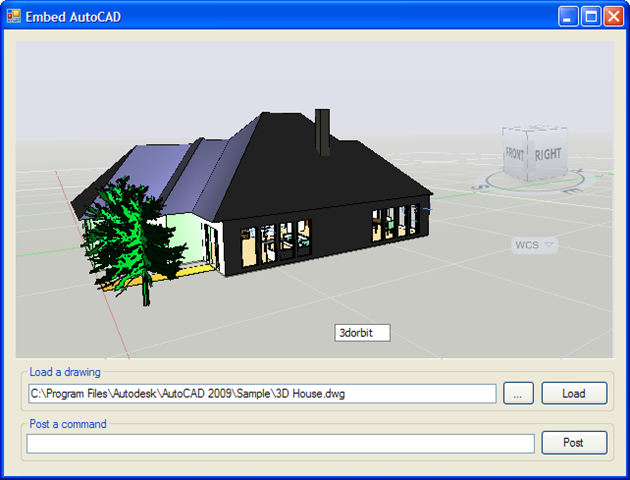
Embedded AutoCAD 2009

Try entering commands via dynamic input, or via the "Post a command" textbox. You might feel a little disorientated due to the lack of a command-line (I do love my command-line ;-), but dynamic input allows you to at least see what you're typing.

Here's the C# project for you to download.

63 responses to “Embedding AutoCAD 2009 in a standalone dialog”

  1. Please tell me how to get xrefs to show up using the AcCtrl.dll control from 2009 TruEView via VB.

  2. Kean Walmsley Avatar

    Do your xrefs get loaded when launching the DWG TrueView executable directly?

    I haven't yet looked into xref support when TrueView is hosted by the control, but I thought I'd start by asking this question.

    Kean

  3. Markus Hannweber Avatar
    Markus Hannweber

    Hi Kean,
    nice tool. But on some occacions, the whole ACAD frame comes up, with all menus, icons, ribbons, commandline and so on.
    This happens e.g. when a message on the commandline is printed or a dialgbox opens. And when you work with additional DBX/ARX loaded, this happen nearly every time. How to avoid this?

    Greetings
    Markus

  4. Hi Markus,

    Please submit a reproducible case via the ADN site, and we'll look into it.

    Regards,

    Kean

  5. Hi Kean,
    While in a AutoCAD session, I wrote a command that displays the above as a (modal) form. When exiting i get an error from AcVBA.arx (access violation reading ...).

    My questions:
    - is there another way to display entities in a separate window/control, or is AcCtrl the way to go? (I need zoom/pan/selection functionality from the window)
    - is there a way to display the control without starting another instance of AutoCAD?

    Thanks,
    Harrie

  6. Hi Harrie,

    I would recommend against using the AcCtrl control in-process to AutoCAD: this effectively fires up and drives a separate instance of AutoCAD behind the scenes.

    You will hopefully find the BlockView control more interesting, as mentioned in this previous post.

    Regards,

    Kean

  7. Hi Kean:

    A DWG file with XREF displays well on the stand alone DWG TrueView 2009 but not when using DWG TrueView 2009 as an ActiveX control. Does this feature work when used as an ActiveX control?

    (The layer manager dialog invoked from the activeX control still lists all the layers just like the stand alone does.)

    Thanks,
    Bala

  8. Hi Bala,

    This issue has now been mentioned a couple of times in comments on this post...

    I've just tried it myself, and can see the behaviour you're describing. Running SysInternals' ProcessMonitor shows that the xrefed DWG files are being accessed, but it's true that they aren't being displayed.

    I recommend submitting the issue via the ADN site, if you're a member (this blog isn't a forum to get support... I unfortunately don't have time to investigate issues in depth unless they relate specifically to code I've posted).

    Regards,

    Kean

  9. Hi Kean

    I've been trying this with AutoCAD 2010 and get the following error ...

    "Class not registered (Exception from HRESULT: 0x80040154 (REGDB_E_CLASSNOTREG))"

    at the line ...

    axAcCtrl1.Src = drawingPath.Text;

    I've tried REGSVR32 AcCtrl.dll, with no effect

    Have you any ideas/pointers ?

    Thanks in advance,
    Nick

  10. Kean Walmsley Avatar

    Hi Nick,

    I'm not going to be able to look into this anytime soon - would you mind submitting it via ADN?

    Thanks & regards,

    Kean

  11. Hi Kean,

    How can it use specific version of AutoCad product with the control?

    thanks in advance

  12. Hi Juan,

    That's a very good question, and I'm afraid I don't know the answer (and am unlikely to find out this side of AU).

    If you're an Autodesk Developer Network member please submit your question via the ADN site.

    Regards,

    Kean

  13. devulapally_vijay@yahoo.co.in Avatar
    devulapally_vijay@yahoo.co.in

    hi kean

    i followed the steps what you mentioned in this article
    but when i run it ,it is showing the following error
    please can u help

    Server execution failed (Exception from HRESULT: 0x80080005 (CO_E_SERVER_EXEC_FAILURE))

  14. I'm sorry I'm not able to help you with this: I suggest posting more details of the problem to the ADN team, if you're a member, or otherwise the appropriate online discussion forum.

    Regards,

    Kean

  15. Hi kean,
    I'm an architecture student trying to develop a small application and as someone with no programming knowledge your site has helped me tremendously.
    Can you show me how to add in the command line into this type of standalone window? or to take the text from the command line to a message box or label using c#.net in VS 2005.
    Great blog!
    Thanks
    nick

  16. Kean Walmsley Avatar

    Hi Nick,

    You would probably want to have some kind of TextBox for your command history/output, and then an EditBox for entry of new commands. What gets entered would then be sendt to the application using PostCommand().

    I'm sure "the devil is in the detail", but this is how I'd start, at least.

    Regards,

    Kean

  17. what i have are buttons which reference the commands I’d previously built up such as;

    //once the dwg is loaded and the button is clicked then;
    MessageBox.Show("Insert object ");
    axAcCtrl1.PostCommand("obj ");
    //at which point a user prompt should appear in the command line to ask the user which object but this is where i am stuck

    So these buttons run through but if I require user input half way through the command, such as a multiple choice prompt, then I loose the ability to prompt the user for more information.

    thanks
    nick

  18. Kean Walmsley Avatar

    There's that devil. 🙂 🙁

    It's going to be very hard (perhaps impossible) to implement this type of fine-grained interaction between a host application and an embedded instance of AutoCAD. Very basic, high-level command-calling can work, but other interactions are clearly much trickier.

    Regards,

    Kean

  19. Can we print with this .com control ? If yes can we change the paper size and print silently ?

  20. Sorry, Alex - I don't know if this is possible. I suggest posting your question via ADN or to the appropriate online discussion group.

    Kean

  21. Hi Kean!

    How I do that using vb6 ?

    "AcCtrl1.PostCommand(cmdString.Text)" in acad 2010 which I'm using.

    *J*

  22. Hi Xavier,

    You should be able to embed the control in a VB6 dialog just as well as with .NET. Not sure what's not working for you.

    I suggest posting follow-up questions to the AutoCAD .NET or VBA discussion groups.

    Regards,

    Kean

  23. Ok Kean !

    Thanks for your atention.
    In this case, worked very well in vb6.
    Is it possible to embeded autocad's prompt too ?

    *J*

  24. Hi Kean !

    AcCtrl1 is a componente. Is necessary autocad instaled to work ?

    Other question is about "PostCommand". Calling cad function by textfield, is it seems a command prompt ?

    Thanks!

  25. Sorry - not that I'm aware of.

    Kean

  26. Yes, it is.

    And yes - you can implement your own command-line via an edit box (although the command-line is much more than that, these days, with auto-complete etc.).

    Kean

  27. Hi Kean:

    I'm trying to use this idea in my system (Acad2004 + Acad2008 + Dwg True View 2012) and I'm getting compiler errors:
    Error1'AxACCTRLLib.AxAcCtrl' does not contain a definition for 'Src'
    Error2'AxACCTRLLib.AxAcCtrl' does not contain a definition for 'PostCommand'
    Were there any changes in the DwgTrueView control from 2008 to 2012?
    Is there any documentation? I can't seem to be able to find any.
    BTW, your sample code won't compile too.

    Thanks

  28. Hi Alex,

    Hmm - this capability was introduced inside AutoCAD in 2009... the code really shouldn't work on versions prior to that (or DWG TrueView, for that matter).

    DWG TrueView has a much more limited, undocumented API (at least far as I'm aware - things may have changed). Here's a little info on it:

    keanw.com/2007/10/au-handouts-t-1.html

    Regards,

    Kean

  29. Hi Kean
    Thanks for answering.
    I had a look at your "AU Handouts: There's More to .DWG Than AutoCAD® - Part 2": Figure 8 shows the acctrl.dll control located in the TrueView2008 folder, and I assumed TrueView2012 would also work with Acad2008 (after all, it works without any Autocad at all).
    Apparently I was wrong.
    Does that mean that each TrueView version needs its parallel Autocad to function?
    If this is so, can you point me to a TrueView2008 download?

    Thanks

  30. Hi Alex,

    TrueView 2012 should indeed work when installed on the same system as AutoCAD 2008, if that's what you mean... if it doesn't, there's some kind of issue. Although whether it's a bug in TrueView or a now-unsupported version of AutoCAD remains to be seen.

    I don't think there's any way to get hold of TrueView 2008, at this stage.

    Regards,

    Kean

  31. I mean embedding acctrl.dll which came with TrueView 2012.
    When I use like this:
    int i = axCtrl1.PutSourcePath(path);
    it raises an InvalidCastException.
    Using it like in this post (axAcCtrl1.Src = ...) won't compile.
    Any ideas?
    Thanks

  32. Sorry - I don't know what's wrong. The only thing I an think of is to make sure the "path" variable is a valid text string. Otherwise you should post a reproducible sample to the appropriate online discussion forum.

    Kean

  33. OK I got it:
    It was a 'simple' matter of versions. It seems that the control tries to load the specific version of Autocad it was built with, so the Trueview 2012 looked for Acad 2012 which wasn't installed.
    I succeeded getting a copy of Trueview 2008 and used the control that came with it, and all is fine.
    The lack of any API documentation is a pity though, as we have to guess our way in the dark.
    Regards
    alex

  34. Glad to know you have it working.

    Kean

  35. Hi Kean.I've tryed this and its working fine.
    My question is how do i save what i've done?

    I've tried command save and Qsave but i only get COMEXCPTION.

    Thanks,
    Moniz

  36. Hi Moniz,

    How about sending this?

    -SAVEAS c:\\temp\\my.dwg

    I haven't tried it, but would expect it to work.

    Regards,

    Kean

  37. Hi Kean!
    That is problem! When a load autocad environment, if I press "f2", it trhough total autocad to front and lock.
    How do I do to avoid this event? Is possible cancel "f2" using AcCtrl1?

    Thanks,
    Xavier.

  38. Hi Xavier,

    So the AutoCAD control has focus and is absorbing the F2 keystroke? You'd rather that be handled by your HTML container?

    (If the answer is "yes" to both, then I'll probably still tell you to post your question via ADN or the discussion group, but I did want to just clarify those points.)

    Regards,

    Kean

  39. Hey Kean,

    Long story short, any idea to make AutoCad stop reading at "C:/EVH" as the filename and interpret the rest as coordinates in the -INSERT command?

    Long story:
    I've been trying to work out the -INSERT trough PostComand, but AutoCad reads till the end of the line as the filename, where I also inputed the coordinate entries, as follow:

    If I type:
    ^C ^C -INSERT C:/EVH

    It results in me just pressing enter and the file ready to be inserted in the drawing.

    But if I give it the coordinates to insert:
    ^C ^C -INSERT C:/EVH 0,0 1 1 0

    It gives the error that can't find the file "C:/EVH 0,0 1 1 0.dwg".
    I also tried to add the .dwg after EVH and adding ; or ^M for enter but with no luck.

    Thanks.

  40. Does enclosing the filename in quotes help?

    Kean

  41. Tried all special enclosing chars, <> [] {} () '' "", they all get interpreted as the filename resulting in error "Invalid Filename".

  42. How about inserting \n into the string?

    Kean

  43. WORKS!

    Not when posted trough the textbox, put perfectly when inserted as a string in the source code, but that's exactly what I needed, many thanks!

    For future reference:
    this.axAcCtrl1.PostCommand("^C ^C -INSERT C:\\EVH.dwg \n 0,0 \n 1 \n 1 \n 0 ^C ^C");

  44. Hi Kean,
    I'm with AutoCAD 2012 X64. I am able to add acctrl.dll in References, but while adding this to ToolBox, got this message:

    Self-registration for C:\Program Files\Common Files\Autodesk Shared\AcCtrl.dll failed.

    Seems like Autodesk is not supporting this anymore ...

    Using Visual Studio 2008.

  45. I suggest posting your question to the ADN team or one of the discussion groups: someone there will have more insight, I'm sure.

    Kean

  46. Hi Kean,
    How get the MidiActiveDocument property with this control ? I would like to add objects dynamicly. Is it possible ?

    Benjamin

  47. Hi Benjamin,

    As far as I recall you can't just use a document pointer: you would need to do so via commands.

    Regards,

    Kean

  48. Is it possible to get a coordinate of a selected point of the loaded dwg file using AcCtrl in C# using Visual Studio 2010

    1. Kean Walmsley Avatar

      Not that I can recall. The API is quite limited.

      Kean

      1. Thank you very much for the reply. The is it possible for us to give a particular coordinate and zoom the area using AcCtrl in C# using Visual Studio 2010

  49. Hi Kean, I am trying to open your application in VS2010 and autocad 2014.I am getting 'AxACCTRLLib' could not found.while adding reference 'AcCtrl.dll' i am unable to get in the ''C:\Program Files\Autodesk\AutoCAD 2014' even i try to add 'AxACCTRLLib.dll' that one also not available my system. How can i resolve this issue?
    Thanks Advance,
    Riyaz Mohammad

    1. Hi Riyaz,

      Sorry - I don't know what's going on. Please post to the relevant Autodesk discussion group.

      Regards,

      Kean

  50. Hi Kean, thanks for this sample...

    I have one question:
    It's possible to import the Measure Tool into VB.net form using the AcCtrl.dll, or detect the mouse position on model space to calculate the dimension of drawing.

    I tried to import other *.dll for review if is possible to measure the drawing but I can't found a solution.

    1. Hi Zeus,

      I'm afraid I don't know, off the top of my head. Although I doubt it's possible.

      In any case, please post your question to the AutoCAD .NET Discussion Group:

      forums.autodesk.com/

      Thanks & regards,

      Kean

      1. Hi Zeus,
        Do you find any solution?
        I am facing the same as you.
        can you please email me banna.kbet@gmail.com?
        I hope you solve the issue.

    2. Hi Zeus,
      can you please help me?
      Do you find any solution?
      I am facing the same as you.
      can you please email me banna.kbet@gmail.com?
      I hope you solve the issue.

  51. I had installed DWG TrueView 2017 and I follow the steps in "visual studio 2012 ultimate" as you mentioned in this post.
    I am able to place the control in a "Windows form". But if I try to place it in a "Web form", that control was disabled in toolbox. How to fix this issue?

    1. Kean Walmsley Avatar

      I'm sorry - I can no longer answer this. Please try the relevant online discussion group.

      Kean

      1. Please, could tell me when use the file .dll from AutoCAD 2013
        Which command will be for
        axAcCtrl1.PostCommand =

  52. Hi Kean,

    Do you know if it is possible to display the TrueView ribbon or command line inside the axAcCtrl hosted in a Win form?

    I'd like to be able to use the measure tool (MEASUREGEOM command) normally found in the TrueView 2017 ribbon. Alternatively is there any other way to measure - the .PostCommand(cmdStr) method seems to be missing in 2017 version.

    Thanks,

    Graham

    1. Hi Graham,

      There may be a way to do this, but I haven't looked at it myself for so long I can't really help.

      I don't think you can show the UI, but calling the command should be possible, I believe (unless it was TrueView-specific functionality).

      I suggest posting to the discussion groups - someone there may be able to help.

      Best,

      Kean

  53. Hello Kean,

    I'm using Visual Studio 2017. How will I get the files- AxACCTRLLib and ACCTRLLib?

    Faster reply would be appreciated.

    1. Please post your support questions to the relevant Autodesk forum.

      Kean

Leave a Reply

Your email address will not be published. Required fields are marked *