Getting started with AutoCAD and .NET

To get started with writing a .NET app for AutoCAD, download the ObjectARX SDK for AutoCAD 2007. Contained within the samples/dotNet folder of the SDK are a number of helpful samples showing how to use various features of the managed API to AutoCAD.

Incidentally, the project files etc. are generally saved in the version of Visual Studio that is recommended to build ObjectARX (C++) apps for that version of AutoCAD. So the projects in the ObjectARX 2006 SDK will be for Visual Studio .NET 2002, and in ObjectARX 2007 they will be for Visual Studio 2005. These specific Visual Studio versions are not strictly necessary to use the managed APIs for the respective versions of AutoCAD (that's one of the beauties of .NET, in that it helps decouple you from needing a specific compiler version), but for consistency and our own testing we maintain the parity with the version needed to build ObjectARX/C++ applications to work with AutoCAD.

The simplest sample to get started with is the classically named "Hello World" sample, which in this case is a VB.NET sample. I won't talk in depth about any of the samples at this stage; I'm going to focus more on how to use the ObjectARX Wizard to create a VB.NET application.

In the utils\ObjARXWiz folder of the ObjectARX SDK, you'll find the installer for the ObjectARX Wizards (ArxWizards.msi). I'm using the Wizard provided with the ObjectARX SDK for AutoCAD 2007.

Once installed, you can, of course, create new ObjectARX/C++ projects; we use this tool all the time in DevTech to help generate new SDK samples as well as diagnose API issues reported to us. A relatively new feature is the AppWizard for VB.NET and C#. This is visible when you ask Visual Studio 2005 to create a new project:
Vb_appwizard

Once you select "OK", you will be shown a single page to configure your project settings - all very simple stuff:
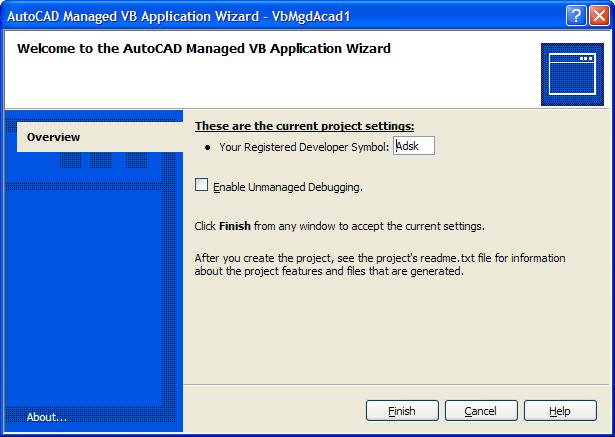
Vb_appwizard_2

Selecting "Finish" will set up the required project settings and generate the basic code needed for your application to define a single command called "Asdkcmd1".

Before we look into the code, what has the Wizard done? It has created a Class Library project, adding a couple of references to the DLLs defining the managed API to AutoCAD. If you select "Add Reference" on the created project, you can see them in the "Recent" list:
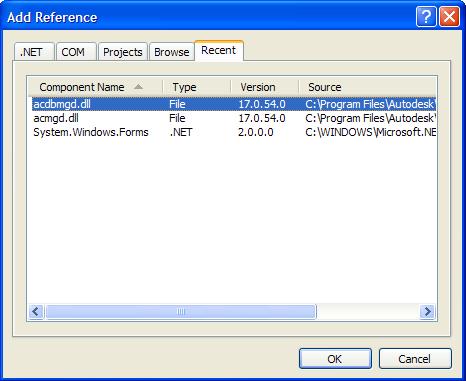
Vb_project_references

There are two AutoCAD-centric references listed here: acdbmgd.dll, which exposes the internal AcDb and supporting classes (common to both AutoCAD and RealDWG), and acmgd.dll, which exposes classes that are specific to the AutoCAD application.

So now let's look at the code. It's really very straighforward - it imports a namespace (which saves us from prefixing certain keywords such as CommandMethod with "Autodesk.AutoCAD.Runtime.") and then defines a class to represent our application module. This class (AdskClass) defines callbacks that can be declared as commands. This is enough to tell AutoCAD that the Asdkcmd1 method needs to be registered as a command and should be executed when someone types that string at the command-line.

    Imports Autodesk.AutoCAD.Runtime

    Public Class AdskClass

        ' Define command 'Asdkcmd1'

        <CommandMethod("Asdkcmd1")> _

        Public Sub Asdkcmd1()

            ' Type your code here

        End Sub

    End Class

And that's really all there is to it. To see it working, add a function call to the command function, such as MsgBox("Hello!"), build the app, and use AutoCAD's NETLOAD command to load the resultant DLL. When you type in ASDKCMD1 at the command line, your custom command defined by VB.NET should be called.

Time for some quick credits: a number of the DevTech team have been involved over the years in developing the ObjectARX Wizard (including the recent versions that support .NET) but the chief architect of the tool is Cyrille Fauvel, who is part of the DevTech EMEA team and is based in France.

One response to “Getting started with AutoCAD and .NET”

  1. ... thank you for getting me started in Object ARX! I've used AutoLISP since '93, VB/VBA since 2000, and stated using .NET in 2002. I've always want to use ARX and can't wait to get going -- thanks again!

  2. My pleasure, Lanny! 🙂

    Kean

  3. Hi Kean,
    Great post, I'm new in developing programs in Visual Studio for using in Autocad and I would like to know the other way around, i.e, if it's possible to programme in .NET in the AutoCad environment...until now we had had always to use VBA or LISP, but I don't know if we can use VB.NET and use all the power of the .NET Framework in Autocad.
    Best Regards
    Juan Carlos

  4. Hi Juan,

    You can absolutely use Visual Studio - even one of the Express Editions - to write managed assemblies that load and run inside AutoCAD.

    There currently isn't an Integrated Development Environment (IDE) inside AutoCAD that supports .NET development (such as VSTA - Microsoft's version of Visual Studio that can be embedded by applications), but that shouldn't stop you from writing and debugging .NET code inside AutoCAD.

    Best regards,

    Kean

  5. Marcel Prösch Avatar
    Marcel Prösch

    Hi Kean,

    Can i create dockable forms this way also?
    In the past i used delphi to develop activex components and accont16.arx to run them.
    Now i have to pay for accont17.arx so i'm looking for something else.

    Marcel

  6. Kean Walmsley Avatar
    Kean Walmsley

    Hi Marcel,

    Check out the DockingPalette sample on the ObjectARX SDK - this will show you how to create a dockable window through .NET. I believe the .NET Labs on the AutoCAD Developer Center (autodesk.com/dev...) also covers this topic.

    Regards,

    Kean

  7. Senthil Prabu B R Avatar
    Senthil Prabu B R

    Hi Kean,

    Since from 3 years i am using Lisp, VBA. Now i would like to create AutoCAD Customize Programs through VB.Net, Is there any Complete reference for Beginners? Because i gone threw your post's its very use full for experienced .Net Programmers.

    Please give me an idea ASAP.

    Thanks,
    Senthil Prabu B R
    Banglore.

  8. Sunilkumar Shinde Avatar
    Sunilkumar Shinde

    Gr8 tut.... I did worked on this tech during 2000. Easily recollect with this stuff...

    ThanX...
    Sunilkumar S.
    Mumbai-India

  9. how can getting start autocad.....?

  10. Can you rephrase the question?

    Kean

  11. Good stuff Kean,
    You've been kicked (a good thing) - Trackback from CadKicks.com
    cadkicks.com/adk...

  12. I just stated learning VB.net the past couple weeks after just learning some AutoLisp a few months ago. I liked the article and hope to read more like it to help me along the way. It was very easy to read and started with the basic which I need.

  13. Hi Kean!

    I am working in the C#.net applications and we need to know how to import the autocad files like DWG files and also we want to load the dwg files into the .net applications..

    Any ideas?

    Thanks in Advance!

  14. There are two ways to "import" DWG files to be accessible in a .NET application: one is to load them in the editor (use the DocumentManager for that) the other is to create a Database object and use ReadDWG file to load it in. This second approach creates an "in-memory" or "side" database - the DWG is loaded and accessible but not open in the editor. With either approach you can then open the various objects in the DWG file - most commonly by getting the block table and then the model-/paper-space block table records.

    I hope this helps,

    Kean

  15. Kean, just getting started. Installed Visual Studio 2008, downloaded ObjectARX 2008 SDK. Ran the "ArxWizards.msi" file, it said it was looking for Visual Studio 2005 only.

    Can I use VS2008 for Vb.NET development?

  16. You certainly can, but the Wizard is primarily for ObjectARX development and so only installs on Visual Studio 2005. You could probably fool the installer using the technique in this post, and then just use the VB.NET project template (the current .NET portion of the Wizard is very basic - just project setup, which is already straightforward in .NET).

    I probably wouldn't bother, on balance - there's not much to gain for all that effort. This post may actually be of more use to you.

    Kean

  17. Is there a way to dynamically create commandsmethods at runtime in VB.Net?

  18. There are two ways I know of to do this:

    1. P/Invoke the C++ API.
    2. Use the unsupported Autodesk.AutoCAD.Internals.Utils.Add/RemoveCommand (from acdbmgdinternal.dll).

    Kean

  19. Hi Kean,
    Love the blogs, I have spent a lot of time reading through them lately.
    This topic covers opening .net from AutoCAD and creating a new command. I want to do the opposite, open AutoCAD 2008 from a .net (3.5)/VB Express form and issue existing AutoCAD commands to create and populate a 2-3 page .dwg based on user input from the form. I am relatively new to both AutoCAD and VB, any idea where I can find information or tutorials that would help me along this path? I already have Jerry Winters book and have covered about the first 7 chapters, but it seems to also work from the AutoCAD side. Or am I missing something?
    Thanks.

  20. Hi Joey,

    This post should be of help.

    Kean

  21. Hi Kean,

    I want to use parameters for this function. How i can declare parameters in the CommandMethod instruction ?

    [Autodesk.AutoCAD.Runtime.CommandMethod("SetCustom")]

    public void SetCustom(string varName, string varValue)
    {
    Database db = Application.DocumentManager.MdiActiveDocument.Database;

    DatabaseSummaryInfoBuilder infoBuilder = new DatabaseSummaryInfoBuilder(db.SummaryInfo);

    infoBuilder.CustomPropertyTable.Add(varName, varValue);

    db.SummaryInfo = infoBuilder.ToDatabaseSummaryInfo();
    }

    Thank you.

  22. Hi Marcel,

    This question comes up from time to time (which makes me think it deserves a dedicated post).

    You have a choice: you can use the LispFunction attribute to create a LISP-callable function - which means you would need to call it using (setcustom "name" "value") - or otherwise you can use the Get* functions (as described in this comment) to let you pass the arguments using SendStringToExecute() or SendCommand().

    Regards,

    Kean

  23. I am starting on a project in autocad and have try VB & C++ helloworld in dotNet and can't get them to work I am using 2008 AutoCAD & DotNet. Is there anything in these version that is keeping these from working? Could you send me a completed program that works in C++.

  24. Kean Walmsley Avatar

    There's nothing that should be a problem, assuming you're creating a Class Library (a .DLL for .NET and a .ARX for C++) and are loading them via NETLOAD or ARXLOAD (there are other ways, but I won't go into them here).

    I suggest working through the resources provided on the AutoCAD Developer Center, especially the ObjectARX and AutoCAD .NET Labs and all the samples that ship with the ObjectARX SDK.

    Kean

  25. I need to define a command that selects and zooms to a block using xdata (group 1071).. any suggestions im using vb 2008 thanks

  26. I suggest posting your future questions to the AutoCAD .NET Discussion Group (assuming you're not an ADN member).

    You should be able to search the drawing for BlockReferences with your XData attached (using a Editor.SelectAll with a SelectionFilter) and then iterate through looking for the specific one of interest. You should then be able to zoom to the object's extents using this approach (or search my blog for posts containing ZoomWin for related posts).

    Kean

  27. with netload dll's can be loaded, which command is used to unload the dll ?

    I'm using sharpdevelop with a 64bit cad station.
    sharpdevelop isn't debugging 64bit so i need to manualy unload the dll.

    gr. ivo

  28. Hi Ivo,

    Sorry - there is no NETUNLOAD.

    Regards,

    Kean

  29. Hi Kean,
    I am starting on a project in autocad and have try VB.Net. I have one issue to solve in and hopefully u can guide me on it.

    When user click button save in AutoCAD 2011, the system will pushed the drawing file to be save in "only in set directory". that's mean the directory already set by administrator. And only admin will change the directory destination.

    Any idea to do it? should i use action listener or whatever?

    Please guide me..

  30. Hi Ros,

    Sorry - I don't fully understand what you want, and, besides, I really don't have time to provide support unrelated to my posts.

    Please submit your question to the ADN team, if you're a member, or otherwise the AutoCAD .NET Discussion Group.

    Regards,

    Kean

  31. Hello!
    I am trying to get *this to work and get a mesh from points that are the z height for some terrain.
    (*Triangulating an AutoCAD polyface mesh from a set of points using .NET)

    However i am pretty clueless as to what i need installed and what not. I am trying to get this working on a pc that has autocad 2012 64 bit and Windows 7. I tried the stuff from this post, but the post is from 2006, the ObjectARX mentioned here asks for Visual studio 2005 (i think), i tried getting that but it ended messing up my Microsoft Visual C++ that some apps depended on and i had to use repair :). ObjectArx for Autocad 2012 does not have that ArxWizards.msi in utils\ObjARXWiz and i cant find a working solution. Any suggestions ?

  32. I suggest going through some of the resources on the AutoCAD Developer Center, including My First AutoCAD Plug-In, the AutoCAD .NET Labs and installing the AutoCAD .NET Wizards.

    You can use a more recent version of Visual Studio (Express) - for AutoCAD 2012 you should be targeting the .NET Framework version 3.5 or earlier, if I recall correctly.

    Kean

  33. Ok, i got everything going, made my first plugin the example gives, build succeeded, but when i tried building the code in the post mentioned in the first reply i receiver a lot of errors starting with this.

    ErrorStatement cannot appear outside of a method body/multiline lambda.

    I think i should be compiling code for C# and the documentation is for Visual Basic, i`m stuck.

  34. Kean Walmsley Avatar

    Hmm - did you copy & paste the code into a .cs file, rather than a .vb one?

    Kean

  35. It works now, i loaded the *.dll into autocad , the command worked and the mesh was created. Thank you very much for the help!

  36. Hi Kean, I'would like to learn more about programming Autocad with VbNet. Have you a good book to suggest me?

  37. Hi Gianni,

    I'd suggest starting here:

    autodesk.com/myfirstautocadplugin

    Regards,

    Kean

  38. I am using VB.net 2010.
    I have project that is doing following:

    I open the template.dwg file and I cannot find any code on how to switch/change active window in AutoCAD.
    Also is it possible to rename open file in AutoCAD?

    Dj..

  39. Hi Dj,

    I suggest asking at the AutoCAD .NET Discussion Group (this blog isn't a support forum).

    Best regards,

    Kean

  40. Hi Kean, I am working on AutoCAD 2014 with .NET(VB.NET/C#), I usually check your POSTS.

    Can you help me on below issue by giving the Idea or solution?

    1) Picking choices in UI from external database/ text file in AutoCAD.

    2) In AutoCAD the list of folders for network drives or local will be part of configuration XML. User should just modify the XML and AutoCAD would set the folders in options during startup. The XML would contain data for different profiles.

    3) Move top level UI to Ribbons in AutoCAD through .net programming.

  41. Hi Vivek,

    Sorry - these are fairly specific requests. I suggest posting your questions to the AutoCAD .NET Discussion Group, to see whether someone there has some guidance for you.

    Regards,

    Kean

  42. Hi Kean, Thanks for your quick response.
    Can you please list out the thinks which are required to creating plug-in for AutoCAD in .NET.

    That plug-in will extend the AutoCAD functionality such as adding menus with submenu(Command), customize the UI, by uploading DLL using NETLOAD command.

    Thanks in advance.

  43. Hi Vivek,

    I'm afraid not. All that information is here, somewhere, but at the moment I'm tied up with other things. Google is your friend, in this case (and the discussion groups are, too).

    Regards,

    Kean

  44. Kean Walmsley you have a sequence of development tutorials for C # Auto Cad?

    Where can I find video development classes C # to Auto CAD, like this, here this in Visual Studio I want in C #
    usa.autodesk.com/ads...

    You're developing more pugins development topics for AutoCad?
    You can show me documentation?

    I'm waiting
    Thank you

    1. Kean Walmsley Avatar

      I seem to recall there was a C# version of the My First Plugin project available. You should try emailing the feedback alias - myfirstplugin@autodesk.com - to see if anyone has one they can send you.

      This blog covers a number of topics that will interest you, but isn't structured as a tutorial in the way you seem to be looking for.

      Kean

  45. Por favor me ajudem...existe a possibilidade de desenvolver um plug-in da mesma forma que é criado programas independentes...sempre desenvolvi programas no C# porém criava seu formulário, e através dele desenvolvia toda a programação. Como é possível criar botões, paletas no menu do AutoCad sem criar um formulário? e como criar um programa executável no qual eu posso instalar ao invés de utilizar o comando NETLOAD do AutoCad para inserir minha programação.

  46. Queria desenvolver um programa dentro do AutoCad no qual pudesse atreves de um executavel instalar... como normalmente é feito em outros programas isso é possivel? e como desenvolver um barra ferramentas com botões, desenhando como é feito em um programa normal.?

    1. Tudo isso é possível, mas tenho medo de não ter tempo para oferecer suporte. Por favor, veja as publicações deste blog e poste suas perguntas para os fóruns online.

      Kean

      1. Muito obrigado Kean...já comecei a desenvolver o meu primeiro primeiro plug-in. claro com um pouco de dificuldades mas estou caminhando...Não sei aonde fica esse fórum poderia me informar? Além dese blog você teria algum material que possa me ajudar, algo para iniciantes em plug-in para AutoCad.

  47. me pdoria dar informacion por adquirir mi correo potencia2_31@hotmail.com

  48. Jhon Gesell Villanueva Avatar
    Jhon Gesell Villanueva

    gracias por compartir la presente entrada

Leave a Reply to Gianni Cancel reply

Your email address will not be published. Required fields are marked *