Migrating ObjectARX applications to support Unicode - some resources

The work we did to migrate AutoCAD 2007 to use Unicode (rather than MBCS), has impacted many developers around the world. For those that are yet to go through the pain themselves, I thought I'd talk about the resources that are available to ObjectARX developers needing to port their applications to Unicode.

Firstly, you should check out the Migration Guide that ships with the ObjectARX 2007 SDK (docs/acad_xmg.chm):
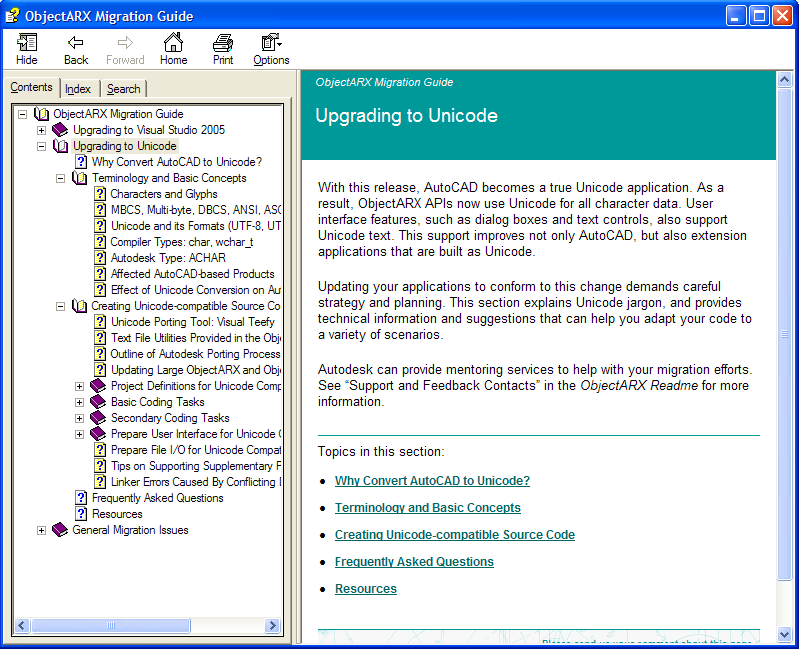
Unicode_migration_docs

There's a whole section called "Upgrading to Unicode", with lots of useful information. A good deal of the material in the guide was compiled during the development phase of AutoCAD 2007, as our own engineering teams got to grips with porting AutoCAD to support Unicode.

Here's a quick outline listing of the topics, to give you a feel for the contents:

  • Upgrading to Unicode
    • Why Convert AutoCAD to Unicode?
    • Terminology and Basic Concepts
      • Characters and Glyphs
      • MBCS, Multi-byte, DBCS, ANSI, ASCII, and Code Pages
      • Unicode and its Formats (UTF-8, UTF-16, and UTF-32)
      • Compiler Types: char, wchar_t
      • Autodesk Type: ACHAR
      • Affected AutoCAD-based Products
      • Effect of Unicode Conversion on AutoCAD File Types
    • Creating Unicode-compatible Source Code
      • Unicode Porting Tool: Visual Teefy
      • Text File Utilities Provided in the ObjectARX SDK
      • Outline of Autodesk Porting Process
      • Updating Large ObjectARX and ObjectDBX Applications
      • Project Definitions for Unicode Compilation
        • Command Line Processing Tip
      • Basic Coding Tasks
        • Change char to ACHAR or TCHAR for ObjectARX APIs
        • Guidelines for Using TCHAR and ACHAR
        • Wrap Literal Strings and Characters with _T() or ACRX_T()
        • Replace ANSI String Pointer Types
        • Update String Formatting Functions
        • Check String Allocations for TCHAR Compatibility
        • Check Usage of Win32 APIs With No Unicode Equivalents
        • Check Usage of Lead Byte APIs
        • Use _TUCHAR in Unicode Character Classification Functions
        • Use #ifdef to Call the Correct Unicode Function
        • Replace strlen() With _tcslen, Rather Than _tcsclen, in Dual Build Code
        • Use Unicode Code Page Descriptors in Win32 APIs
        • Use Native wchar_t
        • AcArray of std::wstring Type Requires Special Allocator Argument
        • DCL Dialogs Use Unicode, but Definition Files are ANSI
      • Secondary Coding Tasks
        • Centralize Recurring Literal Strings
        • Replace Char Buffers with String Classes
        • Revisit Low-Level Win32 API Calls
        • Avoid Calling CRichEditCtrl::GetSelText()
        • Evaluate Usage of wctombs() And mbstowcs()
      • Prepare User Interface for Unicode Compatibility
        • Fine-Tuning System Font Usage for Special Cases
      • Prepare File I/O for Unicode Compatibility
      • Tips on Supporting Supplementary Plane (UTF-32) Characters
      • Linker Errors Caused By Conflicting Definitions of wchar_t
    • Frequently Asked Questions
    • Resources

Additionally I'd recommend using a tool called Visual Teefy, which is distributed via the ADN website. The name comes from the fact it helps add the T() macro into string literals (among other things), hence "T()-ify" => Teefy. The tool hooks off the Visual Studio IDE's search & replace mechanism to find potentially problematic pieces of code, and provide suggestions on how to address them. It's not recommended to use the automatic settings (Teefy really just makes suggestions), as clearly a  search & replace-based tool is inevitably going to have trouble - as an example - differentiating a string literal in a compiler directive (such as #include "acdb.h" - which does not need any modification) from a string literal that does require the use of the T() macro.

As for other resources, I'd recommend searching the ADN KB, if you have access to it, or submitting your questions via the ObjectARX discussion group or DevHelp Online: at this stage it's almost certain that someone in our development community has experienced the same migration issues you're hitting, and it can certainly save time to ask.

14 responses to “Migrating ObjectARX applications to support Unicode - some resources”

  1. Zoltán Török Avatar
    Zoltán Török

    Hello,

    Why some of the ObjectARX include files contains deprecated CRT functions ?

    ex: acdmmutils.h, asdkpromptbase.h contains ::wcscpy

    Regards
    Zoltán

  2. Kean Walmsley Avatar

    Hi Zoltan,

    I think it's a question of timing: for the majority of the AutoCAD 2007 development cycle we were building with VC7.1 - VC8 only showed up quite late in the day (and it's in VC8 that the _s functions were introduced). So I think it's most likely an oversight due to the timing of the Visual Studio release.

    If this impacts your use of the ObjectARX headers, please submit your request via DevHelp Online (as I see you're an ADN member). I'd pass it on myself, but I don't want to encourage the use of this blog as a channel for support.

    Regards,

    Kean

  3. Török Zoltán Avatar
    Török Zoltán

    Dear Kean,

    I was just curious. This isn't affecting my development process.

    Regards,
    Zoltán

  4. Hi Kean,

    Great blog. Even though I only understand a small amount of your blog, it can only help people like myself learn better techniques in less time. Not to mention that it's about time the guys behind the programs had their say!

    Col.

  5. Thanks for your support, Col, it's much appreciated.

    Regards,

    Kean

  6. (1)how to concat two ACHAR strings?

    (2)when I tried to write ACHAR characters in file(created using fstream) junk characters are displayed? how to make files compitable(text file) with ACHAR?

  7. 1. You'll find in AdAChar.h that ACHAR is just a typedef to wchar_t:

    typedef wchar_t ACHAR;

    So you should be able to use wcscat and related string manipulation functions:

    wchar_t *wcscat(
    wchar_t *strDestination,
    const wchar_t *strSource
    );

    I haven't made substantial use of ACHAR myself, though, so there may be a more elegant way to do this.

    2. I have no idea how you're writing the file, and probably wouldn't be able to help if I did: I suggest you post your question to the ObjectARX Discussion Group.

    Kean

  8. Thanks for reply.

    how to convert ACHAR to Char?

  9. As mentioned, an ACHAR is just a wchar_t, so I suggest searching MSDN for information on conversion between wchar_t and char.

    Kean

  10. Hi ,

    Can u suggest me how to call ObjectArx function from AutoLISP Function .

    regards,
    Chandu

  11. Register the command using acedDefun(), then you can simply call it from LISP (with a little work to marshall the parameters).

    Please direct further off-topic questions to the appropriate discussion group.

    Kean

  12. Hi folks,

    I'm about to migrate to ObjectARX 2010 from 2000. I'm aware that there is a long road ahead. Can you please give me some hints about the steps that must be taken to acomplish this tough task (or point me some documentation).

    Thanks in advance.

    Plais.

  13. Hi Plais,

    The biggest change is likely to be Unicode, which came during the migration from 2004-6 to 2007-9. Otherwise the moves from 2000-2 to 2004-6 and from 2009-10 were mostly related to language changes in the compiler (unless you have custom objects, which would make the change to 2010 a little more arduous).

    Your best bets are to work through the Migration Guides in the ObjectARX SDKs for AutoCAD 2004 (if you can find it), AutoCAD 2007 and AutoCAD 2010.

    Good luck!

    Kean

  14. Hi Kean,

    Thank you for your hints. I'm already going through the process o checking the 2004 and the 2007 migration guides. Yes, I do have some custom objects, so I have a lot of work to do. But as always, I will count on the help of the ADN's professionals. I'm having some chat with Augusto from São Paulo office and It's been of great help.

    Plais.

Leave a Reply to ravindra Cancel reply

Your email address will not be published. Required fields are marked *