AutoCAD 2008 – 64-bit application migration

We've been talking to ADN members (under non-disclosure agreements) for a number of months about the 2008 family of Autodesk products, and with these products officially announced I can now talk more publicly about their features and APIs.

This week I'll focus on AutoCAD, but I plan to describe the new feature-/API-sets of other Autodesk products over the coming weeks.

So what's new in AutoCAD 2008? There are a number of very interesting new features and APIs, which I'll talk about in coming posts, but for now I want to address the more fundamental question around application migration. Firstly, AutoCAD 2008 is a binary application compatible release, so applications built for AutoCAD 2007 should just work with AutoCAD 2008 (with the exception of needing to update installers to deal with the new Registry location - under "R17.1" - for demand loading keys etc.). For some background information on binary compatible releases, see this previous post.

One of the big news items for some users of AutoCAD is the availability of a 64-bit version of the product. 64-bit AutoCAD 2008 will behave almost identically to the 32-bit version, but will allow users to work with much larger datasets.

Developers and beta-testers have so far been downloading separate 32-bit and 64-bit versions of AutoCAD 2008, but the plan is to ship a single DVD that will install 32-bit AutoCAD 2008 on supported 32-bit Operating Systems and 64-bit AutoCAD 2008 on supported 64-bit Operating Systems.

One issue hit during development was around the use of VBA, which is simply not available as a 64-bit component. 64-bit AutoCAD runs VBA in a separate 32-bit process, which does have some impact on the performance of VBA applications.

I'm sure many of you are interested in the impact on your code of supporting a 64-bit platform. Here's a brief synopsis:

  • LISP                     No impact – neither for LSP nor FAS files
  • .NET                     No impact – assemblies are platform independent
  • VBA                      Some impact – minor code changes + performance
  • ObjectARX            Some impact – minor code changes

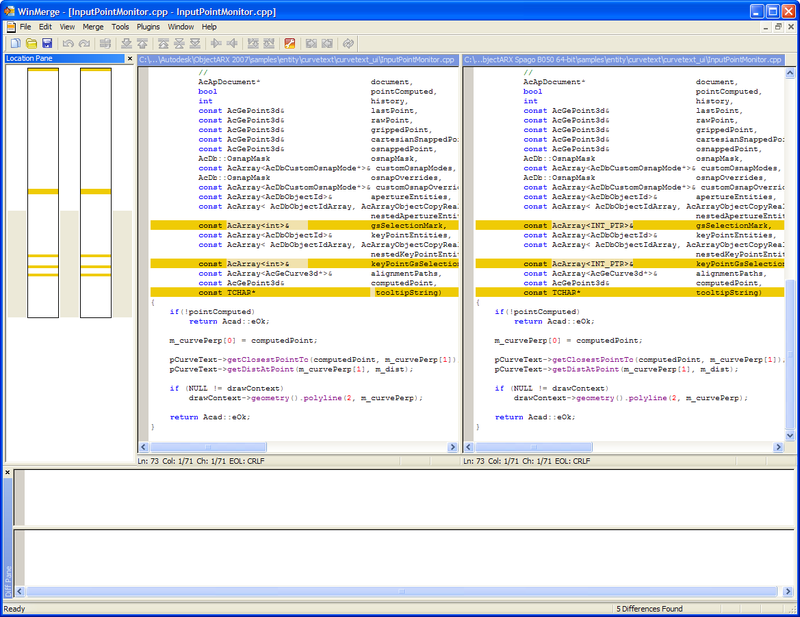
Let's now take a closer look at the changes to ObjectARX. One thing I do as a matter of course when looking into a new version of AutoCAD is to perform a "diff" on the API headers and samples in the ObjectARX SDK. The tool I've used for a number of years now is called WinMerge.

The process gives you a really good feel for a few things:

  • Diffing the API headers points you to the new APIs and also to the APIs that have been updated – or require migration changes – with the new release.
  • Diffing the samples gives you a qualitative feel for the specific types of changes that need to be made to real code from one release to the next. For example, when looking at the differences between the 2006 and 2007 SDKs, it was quite clear that the vast majority of the work required was around the move to UNICODE (and to some degree to Visual Studio 2005). With 2008 it's about 64-bit (as all our samples are written to be buildable for both Win32 and Win64 platforms).

The good news is that the changes needed in ObjectARX code to support 64-bit are actually very minor (honest!). A number of datatypes have changed to become "polymorphic", which means their underlying datatype depends on the platform.

This is copied from the 64-Bit Migration Guide that ships as part of the 64-bit ObjectARX SDK:

In many cases, ObjectARX function signatures have been changed to use polymorphic types. For instance, long types that store pointers have been changed to the LONG_PTR pointer precision type. LONG_PTR remains long for 32-bit API usage and becomes __int64 in 64-bit builds. Similarly, types that represent legacy (or "old") object IDs change from LONG_PTR to Adesk::Int-DbId. Graphics system (GS) and selection markers have been changed from int to Adesk::GsMarker.

The following list summarizes additional changes from 32-bit types to polymorphic types in ObjectARX function signatures:

  • Adesk::Int32 changes to Adesk::LongPtr
  • Adesk::UInt32 changes to Adesk::ULongPtr
  • DWORD changes to DWORD_PTR
  • unsigned long changes to ULONG_PTR
  • unsigned int changes to UINT_PTR

Here's a quick snapshot of the aforementioned guide – it's quite comprehensive (which is great), but you shouldn't assume this means 64-bit migration is very complicated: almost everyone who has so far undertaken a port to 64-bit of their ObjectARX applications has found it to be a straightforward process.
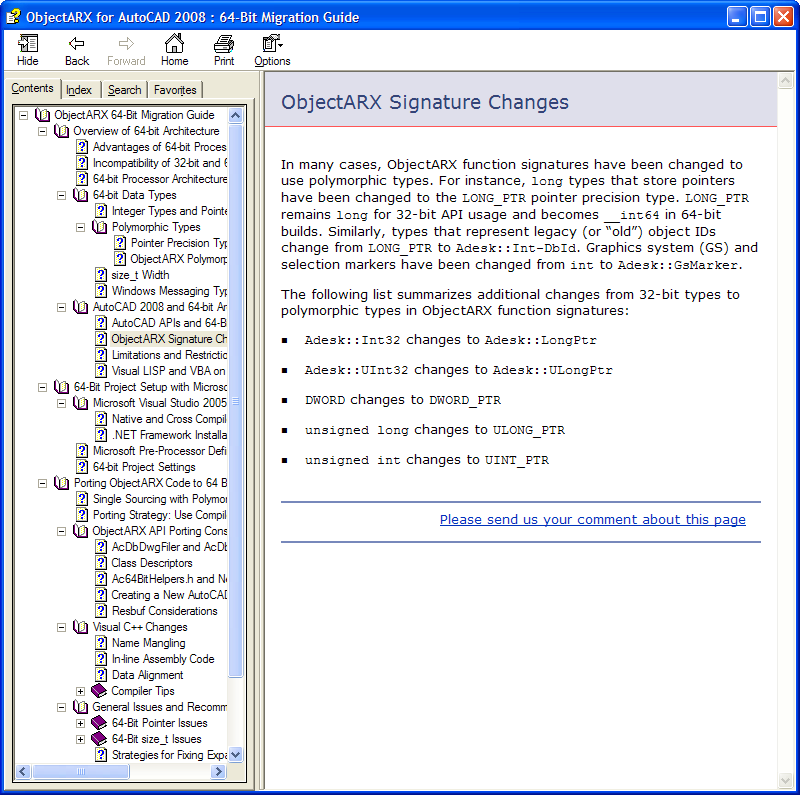
64bit_objectarx_migration_guide

To give you an idea of some of the changes, here are some (somewhat randomly) selected - but quite representative - snapshots of differences between the samples on the 2007 and 2008 SDKs:
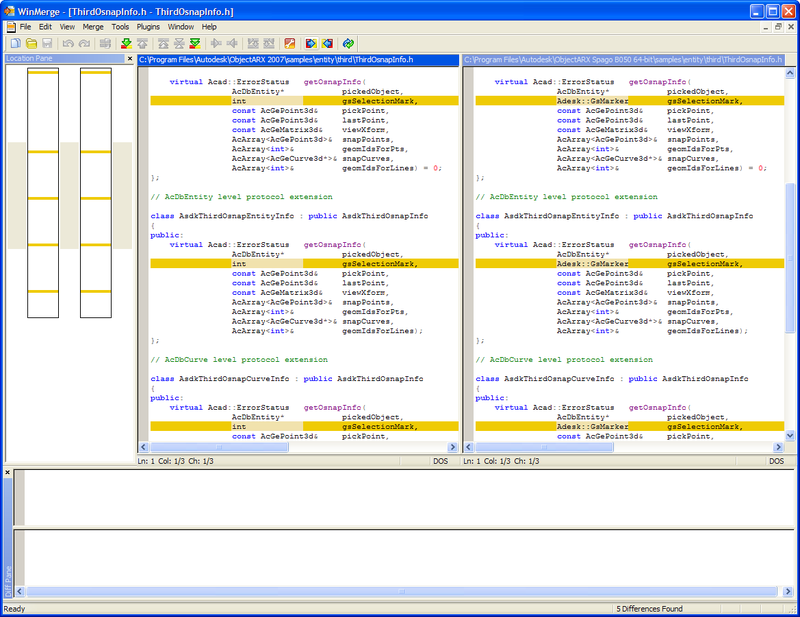
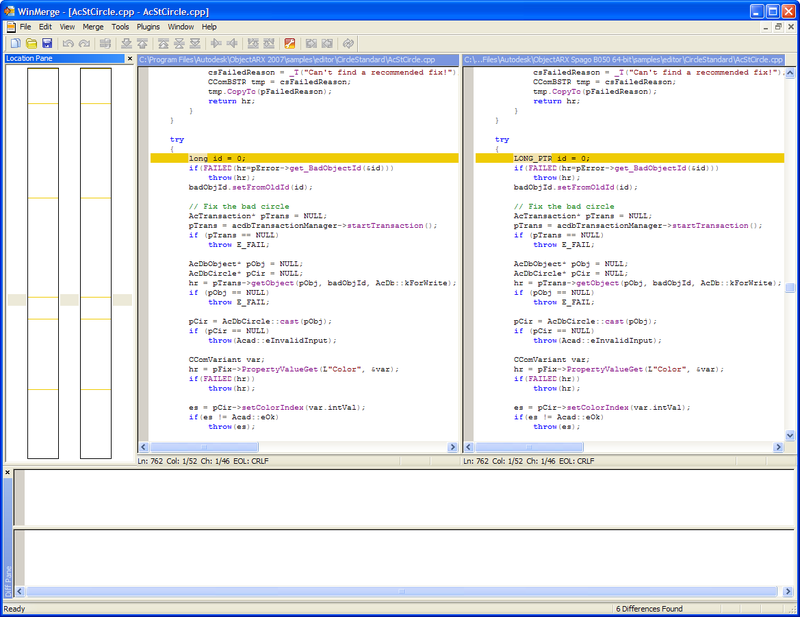
Winmerge_1

Winmerge_2

Winmerge_3

For a more comprehensive look at the migration requirements around 64-bit – including information on VBA and ObjectARX – please watch this presentation: AutoCAD 2008 - 64-bit Porting Considerations. The slides in the recorded presentation include some confidentiality notices which can now safely be ignored. Oh, and for those of you who prefer to watch this offline, here's the presentation as a download (at about 26 MB)

My team is working hard to capture more of the content we presented at our recent DevDays events – I'd be very interested to hear any feedback you have regarding how useful you find this presentation recording.

In my next post we'll look at some of the new APIs available in AutoCAD 2008 and corresponding samples available with the new ObjectARX SDK.

52 responses to “AutoCAD 2008 – 64-bit application migration”

  1. Hi,Kean
    Will the .Net support custom object in AutoCAD2008?

  2. Hi csharpbird,

    No - as mentioned in this previous post (and the comments afterwards), managed custom objects were not on our roadmap for AutoCAD 2008.

    keanw.com/...

    Regards,

    Kean

  3. Hi Kean,

    What about saved 32-bit integers? How the DWG filer will deal saved values as 32-bit and loaded values on 64-bit version of AutoCAD2008?

    Suppose I have saved a number as an Adesk::Int32 on my 2007 (or 32-bit 2008) application and then the same application will load this DWG into 2008 64-bit. Will be this value correctly loaded as Adesk::LongPtr?

    I have experienced some problems with CTime due its 32/64-bit change during some UNICODE migrations I have made...hope the ObjectARX 2008 does not bring new issues like this.

    As you said, the types are polymorphic but the DWG files is binary and should be compatible with both 32-bit (2008 and 2007) and 64-bit (2008) versions.

    Thank you.
    Fernando.

  4. Hi Fernando,

    There should be no change to what is stored in the DWG format - it doesn't change at all between 32- and 64-bit versions. This should be automatic for ObjectARX applications saving native datatypes.

    If you're saving a custom datatype (one that we do not handle natively) that changes in size between 32- and 64-bit environments, then you will need to adapt your code to make sure a consistently sized value is stored to the DWG, otherwise it will be very hard to transfer files between users on different platforms.

    Regards,

    Kean

  5. Donald E. Burkett Avatar
    Donald E. Burkett

    Will this 64 bit application correct the problem that I have with running the 32 bit version of ACAD LT 2007 on windows xp professional +64. I cannot get it to recognize the 64 bit driver downloaded for my designjet 430 plotter. is their a work around for this problem

  6. usa.autodesk.com/ads...

    AutoCAD [LT] 2007 is not supported on 64-bit platforms (and neither will the 32-bit version of AutoCAD 2008 be: the native 64-bit version is the way to go, moving forward).

    As for your specific problem, I'd suggest posting on the relevant discussion group - my team has no experience with such issues (we focus on supporting the APIs to Autodesk products).

    Regards,

    Kean

  7. "..My team is working hard to capture more of the content we presented at our recent DevDays events – I’d be very interested to hear any feedback you have regarding how useful you find this presentation recording..."

    Yes Kean, this presentation with the audio explanation and video clip of the actual demonstration of the code conversion was very useful in par with the plain PPT presentation of the same. We really look forward to have such a kind of recorded and offline presentation with audio and video recordings.

    Thanks,
    Narayanan

  8. Hi Narayanan,

    Thank you for the feedback.

    Regards,

    Kean

  9. There exists no special ObjectARX for Civil 2006-2007, so I do not know how to treat "black" and "red" surfaces in the way I need!
    Ther are no classes to deal with AutoDesk slides: to see them on form, to put on a button and so ...

  10. Kean Walmsley Avatar

    Hi Valdemar,

    I'm afraid I don't understand the problem - I'd suggest posting it to the Civil 3D Customization discussion group: http://discussion.autodesk....

    Regards,

    Kean

  11. I need to customize Autocad

    It looks like pop downs are on their way out
    VBA is on it's way out
    I heard Lisp is also on it's way out.

    What manner of customization will have the longest life?

  12. Kean Walmsley Avatar

    Hi Donald,

    MNU files have a somewhat limited future, but CUI files are very much part of AutoCAD's future. Which includes toolbars, pull-down menus, etc.

    VBA has a limited future, given Microsoft's plan not to provide a 64-bit version, but LISP is likely to be around - there are no plans to remove it (just no big plans to enhance it).

    Of the customization technologies, .NET currently seems to have the greatest potential in the future.

    Regards,

    Kean

  13. Do you have any idea when applications built on top of acad (eg ACA) will be available in 64 bit?

  14. The situation depends on the product. ACA will not have a 64-bit version available as ACA 2008 ships (and I can't yet comment on when it will be available, unfortunately). If you're ADN member, you should submit the question via DevHelp Online.

  15. autocad2008

  16. autocad2008

  17. If you use C++ for create 64-bit app and work with big data, I propose article to you:
    "20 issues of porting C++ code on the 64-bit platform"
    http://www.Viva64.com/artic...

    And same interesting links:
    http://www.Viva64.com/links...

  18. Hi;

    I used Autocad 2007 32-bit and never tried 64-bit. I want to try Autocad 2008-trial 64-bit and I want to migrate my DWG 32-bit to 64-bit. Can I open back my DWG in 32-bit platform after migration to 64?

    Please give us your comment before i start migration.

  19. Kean Walmsley Avatar
    Kean Walmsley

    DWGs are the same between 32- and 64-bit versions of AutoCAD - the file format has not changed - so this will not be an issue.

    Kean

  20. I´ve Windows XP Pro 64 bit, can I install the Autocad 2008 32 bit in my PC ?

  21. Object ARX2007 32 bit gives access voilation error.

  22. Kean Walmsley Avatar

    Ricardo -

    The AutoCAD 2008 installer automatically installs the correct version for the OS (which happens to match the number of bits the OS supports - the installer doesn't allow installation of 32-bit AutoCAD on 64-bit Windows).

    Nagraj -

    Sorry, you have not provided enough info for me to help you.

    Regards,

    Kean

  23. Is anyone out there running AutoCAD-14 on a 64 bit platform?

  24. Riff Masteroff Avatar
    Riff Masteroff

    Oh my. I didn't suspect that Autodesk would actually produce 64bit products in my lifetime.

    I installed an upgrade to Revit9-ACAD2007 combination pack last night. The ACAD2008 installation gave me no clue that a 64bit version was on its installation disk. The way I found out was to download 3DSOUT after the installation. That comes in both a 32bit & 64bit flavor. So....I searched today to find out what is going on.

    I have been using, out of necessity and for a few years, XP64 both at work and at home. I have been half-way satisfied that many Autodesk products would run as 32bit programs in a 64bit environment.

    Question: I can find no reference to whether the ACAD2008 install is really & truly a 64bit version. How do I tell?

    Question: Since the installer made no reference to a 64bit version possibility, I configured it to install into the x86 program directory. Should I reinstall into the program directory?

    Thanks in advance,

    Riff Masteroff

  25. Hi Riff,

    The information in this post should be of use - you can use (getenv "PROCESSOR_ARCHITECTURE") to find out what type of process AutoCAD is running as.

    The choice of version installed is generally made automatically, to the best of my knowledge. It may well be that the version you have on your system is actually native 64-bit.

    Regards,

    Kean

  26. Riff Masteroff Avatar
    Riff Masteroff

    Hello Kean,

    Thanks, that worked just fine. The command returns (in my case): "AMD 64". I assume it is referencing both the physical CPU and the software type (compiled for 64bit).

    Now I should really reinstall it to the proper director structure ((D:Program Files/whatever and NOT D:Program Files(x86)).

    Riff Masteroff

  27. hello
    Does somebody know if Autocad 2008 LT (32 bit) runs on Windows Vista Ultimate 64 bit.?

  28. With this upgrade to 64 bit, are there a lot of changes to the base ARG and CUI file? I have customized ones for the 32 bit version of ACAD 08, but am curious if I need to recreate everything from scratch for the 64 bit users?

    Am also glad to hear that lisp is not affected, that'll save me time!

    Thanks

  29. Most supporting files, such as CUI, should not need any changes to work in a 64-bit environment. ARG files are really Registry files, so some change *may* be needed (I haven't looked into it - perhaps the Registry paths are different on 64-bit machines, for instance).

    Regards,

    Kean

  30. hello!! Please give me answer.
    Does somebody know if Autocad 2008 LT (32 bit) runs on Windows Vista Ultimate 64 bit.?
    How to do this?
    Thankyou.

  31. I'd suggest posting your question to the AutoCAD LT Discussion Group.

    Kean

  32. Kean,
    Do you know if AutoCAD MEP 2008 has a 64 bit version? If so, are there a lot of known problems?
    Earlier in the discussion, it was mentioned (I understood) that you can't install the 32 bit version on a 64 bit machine. What happens with network deployments? If the deployment was made by a 32 bit machine, would the deployment know to install the 64 bit version on a 64 bit machine?
    Thanks,
    Ben

  33. Kean Walmsley Avatar

    Ben,

    From what I can tell on the Autodesk website, AutoCAD MEP 2009 now comes with a native 64-bit version. If I recall correctly the 2008 version did not. But I could be wrong.

    I'm not aware of any issues, but then it's not my area of expertise.

    Also I'm afraid I don't know enough about network deployments to help: I'd suggest contacting your reseller or posting to one of the discussion groups.

    Regards,

    Kean

  34. Hi Kean,

    I have read the ObjectARX migration guide for 64 bit support. Well I'm afraid about the serialization. The guide says I need to call Adesk::Int32 twice. But how should I be reading the value back. Is there any sample which could give me all such intricacies especially with serialization. Please help.

    Regards,
    Kannan

  35. Hi Kannan,

    You shouldn't have to serialize differently for 64-bit (especially as drawings should remain consistent between 32- and 64-bit platforms), but I suggest you submit your question via the ADN website, to confirm.

    Regards,

    Kean

  36. I came across a few problems when porting our application to 64bit Autocad. Could anyone please help out?

    1. VBA doesn't support type LONG_PTR, AcadEntity has an ObjectID32 property for VBA, how do we write an ObjectID32 interface for custom object in its COM wrapper?

    2. Thisdrawing.ModelSpace.AddCustomObject fails on 64 bit Autocad2008. Same code can be run on 32bit version happily. Is there any hidden trick here to make it work on 64bit Autocad?

    Any answers are appreciated!

    Thanks in advance.

    Simon

  37. Kean Walmsley Avatar

    Hi Simon,

    These are really questions that need to be asked of the ADN team... are you an ADN member?

    Regards,

    Kean

  38. Hi Kean,

    I am not an ADN member. Any chance you can find out answers for me?

    Thanks,
    Simon

  39. Kean Walmsley Avatar

    Sorry - you might try submitting your question to the ObjectARX or AutoCAD .NET Discussion groups.

    Kean

  40. i have autocad 2008 worked on a 32 bit till now i got a new computer which is 64bit os how can i download autocad on the new computer
    ben

  41. It should be on the same media as the 32-bit version (it just auto-installs the 64-bit version on 64-bit systems).

    But this really isn't the right forum for the question - I suggest trying the discussion groups or contacting your reseller.

    Regards,

    Kean

  42. I have AutoCAD 2009 software,there have two options 32-bit and 64-bit,but can't active 64-bit.How can active the 64-bit ?

  43. If you have a supported 64-bit OS installed, then the 64-bit version will get installed automatically. The choice is not presented to the person installing the software.

    Kean

  44. hi kean,

    excellent stuff, have been searching for this, thanks. Also, please write a book on ACAD development.

  45. Hi Kean!
    You write, that 64-bit has no effect on AutoLISP. Does that also include no effect on ActiveX in AutoLISP? According to this post: discussion.autodesk.... at the Autodesk Discussion Groups, the last poster obviously has a different opinion.

  46. Right - the post should probably say "no impact to 99.9% of LISP applications". 🙂

    Kean

  47. je m aimerai avoir les instructions de autocad2oo8 merci de votre incomprehension.

  48. dear kean
    I have been working with VBA autocad for a long time. I've recently upgraded to a 64bit os and a 64 bit autocad. when I'm debuging the program hangs, specially on a GETXXX command. Is this normal??

  49. Dear Pedrum,

    I don't know - I'm still on 32-bit Windows and also rarely use VBA.

    I do know that VBA is currently a 32-bit process that talks to 64-bit AutoCAD using (the typically inefficient) inter-process communication.

    I don't know if this causes an issue with debugging: I suggest posting your question to ADN or the appropriate discussions group.

    Regards,

    Kean

  50. hi kean,

    excellent stuff, have been searching for this, thanks. Also, please write a book on ACAD development.

  51. Thanks!

    That isn't the first time I've heard this. It's unlikely to happen, though: a book would take too much linear thinking on my part, and by the time I'd completed it paper books would probably have been banned for being unecological. 🙂

    Kean

  52. منتظر عادل Avatar
    منتظر عادل

    please how to find autocad for windows 8 system 64 bit

Leave a Reply to منتظر عادل Cancel reply

Your email address will not be published. Required fields are marked *