Adding a context menu to AutoCAD objects using .NET

It's been quite a week - between interviews for a DevTech position we're working to fill in Beijing and AU proposals (my team managed to pull together and submit nearly 60 API class proposals at the beginning of the week) life has been extremely hectic.

Thankfully we're now in the middle of the "May Day Golden Week" here in China. The Chinese government schedules three Golden Weeks every year - one for Spring Festival, one for Labour Day (also known as May Day) and one for the National Day. They're basically week-long holidays formed by a few standard holidays and mandating that people work through an adjacent weekend, grouping together the holidays with the days that are freed up into a contiguous week-long break. These weeks are designed to promote domestic tourism, by allowing people to plan vacations well in advance, and they seem to be working, apparently 25% of domestic tourism in China is due to these three Golden Weeks.

Anyway - I've been working, on and off, as my team isn't all based in China, but I did get to spend some quality time with my family. All this to say it's been a week since my last post, so I'm up late on Friday night to assuage my guilt. 🙂

I threw some simple code together to show how to add your own custom context menu to a particular type of AutoCAD object using .NET. The below code adds a new context menu at the "Entity" level, which means that as long as only entities are selected in the editor, the context menu will appear. As objects have to be of type Entity to be selectable, I think it's safe to say the context menu will always be accessible. 🙂

You could very easily modify the code to only show the menu for a concrete class of object (Lines, Circles, etc.), of course.

So what does this new context menu do? In this case it simply fires off a command, which then selects our entities by accessing the pickfirst selection set, and does something with the selected entities. The actual command I implemented was very simple, indeed: it simply counts the entities selected and writes a message to the command-line.

Here's the C# code:


using Autodesk.AutoCAD.ApplicationServices;

using Autodesk.AutoCAD.DatabaseServices;

using Autodesk.AutoCAD.EditorInput;

using Autodesk.AutoCAD.Runtime;

using Autodesk.AutoCAD.Windows;

using System;

namespace ContextMenuApplication

{

  public class Commands : IExtensionApplication

  {

    public void Initialize()

    {

      CountMenu.Attach();

    }

    public void Terminate()

    {

      CountMenu.Detach();

    }

    [CommandMethod("COUNT", CommandFlags.UsePickSet)]

    static public void CountSelection()

    {

      Editor ed =

        Application.DocumentManager.MdiActiveDocument.Editor;

      PromptSelectionResult psr = ed.GetSelection();

      if (psr.Status == PromptStatus.OK)

      {

        ed.WriteMessage(

          "\nSelected {0} entities.",

          psr.Value.Count

        );

      }

    }

  }

  public class CountMenu

  {

    private static ContextMenuExtension cme;

    public static void Attach()

    {

      cme = new ContextMenuExtension();

      MenuItem mi = new MenuItem("Count");

      mi.Click += new EventHandler(OnCount);

      cme.MenuItems.Add(mi);

      RXClass rxc = Entity.GetClass(typeof(Entity));

      Application.AddObjectContextMenuExtension(rxc, cme);

    }

    public static void Detach()

    {

      RXClass rxc = Entity.GetClass(typeof(Entity));

      Application.RemoveObjectContextMenuExtension(rxc, cme);

    }

    private static void OnCount(Object o, EventArgs e)

    {

      Document doc =

        Application.DocumentManager.MdiActiveDocument;

      doc.SendStringToExecute("_.COUNT ", true, false, false);

    }

  }

}

And here's what we see when we have our application loaded, right-clicking after selecting some AutoCAD objects:
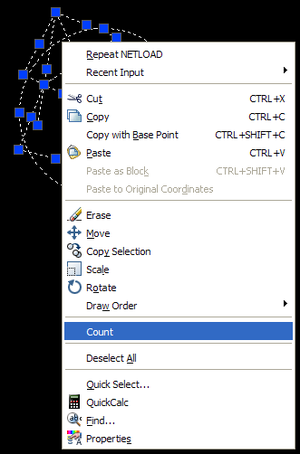
Object_context_menu

Followed by the somewhat mundane result:

Selected 10 entities.

Update:

As an alternative, it's worth looking at these posts which show how to add context menus for AutoCAD objects using CUI.

49 responses to “Adding a context menu to AutoCAD objects using .NET”

  1. Fernando Malard Avatar
    Fernando Malard

    Great!

    Is this possible through ObjectARX C++ too?

    Regards.

  2. Kean Walmsley Avatar
    Kean Walmsley

    Hi Fernando,

    Sure - if you grep the ObjectARX samples folder for "acedAddObjectContextMenu", you'll find a few samples demonstrating this feature (CurveText, SubEntity & contextmenu).

    Regards,

    Kean

  3. I noticed that after I call 'PromptSelectionResult psr = ed.GetSelection()' my selection is reset. Is there a way to leave the current selection unchanged?

    I played a bit with 'PromptSelectionOptions' but... nothing! ):

    TIA,
    Cabbi

  4. Kean Walmsley Avatar

    The technique in this post should help.

    Kean

  5. Hey there. My question is: Can we insert a command in the LAYOUT(sheet) context menu ( in C++) ? And can that command be executed without clearing the layout selection?

    10x,
    gabriel

  6. Kean Walmsley Avatar

    Hi Gabriel,

    Sorry - I'm not aware of any way to do this.

    Regards,

    Kean

  7. I converted the code to VB.net. It compiled well, but did not add context menu on right click... What can be the reason??
    Best regards,
    Sajjad

    Here is the code:

    Namespace ContextMenuApplication

    Public Class Commands
    Implements IExtensionApplication

    Public Sub Initialize() Implements Autodesk.AutoCAD.Runtime.IExtensionApplication.Initialize
    CountMenu.Attach()
    End Sub

    Public Sub Terminate() Implements Autodesk.AutoCAD.Runtime.IExtensionApplication.Terminate
    CountMenu.Detach()
    End Sub

    <commandmethod("count", commandflags.usepickset)=""> Public Sub CountSelection()
    Dim ed As Editor = Application.DocumentManager.MdiActiveDocument.Editor
    Dim psr As PromptSelectionResult = ed.GetSelection()
    If (psr.Status = PromptStatus.OK) Then
    ed.WriteMessage("\nSelected {0} entities.", psr.Value.Count())
    End If

    End Sub
    End Class

    Public Class CountMenu
    Private Shared cme As ContextMenuExtension

    Public Shared Sub Attach()
    cme = New ContextMenuExtension
    Dim mi As MenuItem = New MenuItem("Count")
    AddHandler mi.Click, AddressOf OnCount
    cme.MenuItems.Add(mi)
    Dim rxc As RXClass = Entity.GetClass(GetType(Entity))
    Application.AddObjectContextMenuExtension(rxc, cme)
    End Sub

    Public Shared Sub Detach()
    Dim rxc As RXClass = Entity.GetClass(GetType(Entity))
    Application.RemoveObjectContextMenuExtension(rxc, cme)
    End Sub

    Private Shared Sub OnCount(ByVal o As Object, ByVal e As EventArgs)
    Dim doc As Document = Application.DocumentManager.MdiActiveDocument
    doc.SendStringToExecute("_.COUNT ", True, False, False)
    End Sub

    End Class

    End Namespace

  8. Sajjad,

    It works for me. What type of entity are you clicking on to get the menu to appear?

    If you're just right-clicking on the drawing (not an entity) then you won't get the menu item - it's registered against the Entity class.

    Kean

  9. I learned that if system variable PICKFIRST=0 then custom context menu does not show up. I set it to 1 and it worked.

    Sajjad

  10. SUBIR KUMAR DUTTA Avatar
    SUBIR KUMAR DUTTA

    all this discussion helped me a lot.

    can you please provide a code snippet to display the short cut menu corresponding the selected entity using autocad vba

  11. Hi,

    It's Possible to have the new context menu without select a object ?

  12. Hi Thib,

    Yes - see this post.

    Kean

  13. Hi Kean,

    Can we add or remove the contextmenu in runtime, I'm working with entities that have special xrecords, my contextmenu should appear depending on what's in the xrecord?

    Do you see a way to achieve this?

    Thanks
    Kristof

    1. Hi, I see this is a veeery old post.... 🙂
      However if you implement an OnSelectionchange-Event (Editorevents), there you could check the xrecord of the selection, then call Attach/Detach.... Not tested but should work
      BR,
      D

      1. Interesting suggestion - thanks, D!

        Kean

  14. Hi Kristof,

    Sorry - I don't see how that's possible with the existing mechanism.

    Regards,

    Kean

  15. "Can we add or remove the contextmenu in runtime?" - What about using Popup event of myContextMenuExtension object?

  16. Kean Walmsley Avatar

    I'm actually thinking about making this a subject of a post. You should be able to use one of these COM (not .NET) events from the Document object:

    BeginShortcutMenuCommand event

    Triggered after the user right-clicks on the drawing window, and before the shortcut menu appears in command mode.

    BeginShortcutMenuDefault event

    Triggered after the user right-clicks on the drawing window, and before the shortcut menu appears in default mode.

    BeginShortcutMenuEdit event

    Triggered after the user right-clicks on the drawing window, and before the shortcut menu appears in edit mode.

    BeginShortcutMenuGrip event

    Triggered after the user right-clicks on the drawing window, and before the shortcut menu appears in grip mode.

    BeginShortcutMenuOSnap event

    Triggered after the user right-clicks on the drawing window, and before the shortcut menu appears in osnap mode.

    Kean

  17. Hi Kean,

    What about using Popup event of ContextMenuExtension object in .NET?

    Test my code.

    public class CountMenu

    {

    private static ContextMenuExtension cme;

    public static void Attach()

    {

    cme = new ContextMenuExtension();

    cme.Popup += new EventHandler(OnPopup);

    RXClass rxc = Entity.GetClass(typeof(Entity));

    Application.AddObjectContextMenuExtension(rxc, cme);

    }

    public static void Detach()

    {

    RXClass rxc = Entity.GetClass(typeof(Entity));

    Application.RemoveObjectContextMenuExtension(rxc, cme);

    }

    private static void OnCount(Object o, EventArgs e)

    {

    Document doc =

    Application.DocumentManager.MdiActiveDocument;

    doc.SendStringToExecute("_.COUNT ", true, false, false);

    }

    private static void OnPopup(Object o, EventArgs e)

    {
    cme.MenuItems.Clear();

    if (Analyse Something)
    {

    MenuItem mi = new MenuItem("Count");

    mi.Click += new EventHandler(OnCount);

    cme.MenuItems.Add(mi);
    }
    }

    }

    }

    That`s all 🙂

  18. Kean Walmsley Avatar

    That seems to work very well - thanks, al!

    Kean

  19. Gérald Lemoine Avatar

    Hello,
    i've translated to VB.net, but it doesn't work.
    I don't understand the way you make the difference between default, command, osnap popupmenu.
    With vba, it was simple, using :
    Sub AcadDocument_BeginShortcutMenuOsnap(ShortcutMenu As AutoCAD.AcadPopupMenu)

    or
    Sub AcadDocument_BeginShortcutMenuEdit(scMenu As AutoCAD.IAcadPopupMenu, SelectionSet As AutoCAD.IAcadSelectionSet)

    I don't find the equivalent in VB.net, but this sample seems to be closed to ?

    Here my translated code, unworking :


    Public Class CountMenu
    Private Shared cme As ContextMenuExtension
    Public Shared Sub Attach()
    cme = New ContextMenuExtension()
    'cme.Popup += New EventHandler(OnPopup)
    AddHandler cme.Popup, AddressOf OnPopup

    Dim rxc As RXClass = Entity.GetClass(GetType(Entity))
    Application.AddObjectContextMenuExtension(rxc, cme)

    End Sub

    Public Shared Sub Detach()
    Dim rxc As RXClass = Entity.GetClass(GetType(Entity))

    Application.RemoveObjectContextMenuExtension(rxc, cme)

    End Sub

    Private Shared Sub OnCount(ByVal o As Object, ByVal e As EventArgs)

    Dim doc As Document = Application.DocumentManager.MdiActiveDocument()

    doc.SendStringToExecute("COUNT ", True, False, False)

    End Sub

    Private Shared Sub OnPopup(ByVal o As Object, ByVal e As EventArgs)
    cme.MenuItems.Clear()

    'If Analyse Something Then
    'If True Then

    Dim mi As MenuItem = New MenuItem("compter")
    AddHandler mi.Click, AddressOf OnCount

    cme.MenuItems.Add(mi)
    ' End If
    End Sub

    End Class

  20. It looks as though you are converting the code someone else posted as a comment, rather than my original code. Your code doesn't call Attach() at any point, whether from a command or the Initialize() method of an application.

    I suggest starting with my code, and adding in additional enhancements (such as the PopUp capability) once that's working.

    Kean

  21. Gérald Lemoine Avatar

    Hello Kean, thanks for the fast reply for an old topic ...
    You're right, i've translated the code of Al, because it was based on the onPopPup event, that is equivalent of my old VBA code "AcadDocument_BeginShortcutMenuEdit".

    I've also successfuly translated and adapted to my need your 2 samples, and 'ive understand were the choice is made for the menu :
    Extending the default context (shortcut) menu: Application.AddDefaultContextMenuExtension
    'Extending the object context (shortcut) menu: Application.AddObjectContextMenuExtension
    'Extending the command context (shortcut) menu: CommandMethod.ContextMenuExtension

    (eq to CMDEFAULT, CMEDIT, CMCOMMAND in VBA)

    But i don't find the way to manage GRIPS and RESOL(Osnap) menus
    the problem is that i don't know what name they have now ...
    Any help is welcome ...
    Gérald

  22. I don't know of a way to do this either: you might try contacting the ADN team, if you're a member, or otherwise posting to the AutoCAD .NET Discussion Group.

    Kean

  23. bikelink@tiscali.it Avatar
    bikelink@tiscali.it

    that's also my trouble! have You got something about it ?

  24. Hi, Kean. A have a litle question - how add icon to context menu?

  25. Have you tried setting the MenuItem's Icon property with an appropriately sized (probably 16x16) icon?

    Kean

  26. I am having the same trouble getting the context menu to appear. I am using AutoCAD Map 3D 2009 and have the "noun/verb seletion" checkbox checked (which I understand is the way to toggle the PICKFIRST system variable.

    Can anyone assist?!

    Cars

  27. You might try posting a more complete code sample, with instructions to reproduce the problem, to the ADN team, if you're a member, or otherwise the AutoCAD .NET Discussion Group.

    Kean

  28. Yes of course. Nothing happened. At one forum I was told that this is not possible at all

  29. Hi Modis. I got an icon to work for me. Try this code snippet:

    --------------------------------------
    MenuItem mi = new MenuItem("Print");

    System.Drawing.Icon myPrintIcon = new System.Drawing.Icon(@"C:\Print.ico"));

    mi.Icon = myPrintIcon;
    --------------------------------------

    You'll need to add a project reference to the System.Drawing.dll and of course provide the correct type of *.ico file. I think mine was a 16x16 icon as Kean suggested.

    Note that for me the icon doesn't perfectly align with the default AutoCAD menu item icons.

  30. Hi Kean,

    I have tried the code but for reference, but it doesn't in a separte group, how to implement this?

  31. Hi Lavie,

    I just tried it again and it worked as shown in this post.

    You can't group items on per-object context menus - as far as I'm aware - but you can add multiple items to your particular section of the menu.

    Regards,

    Kean

  32. Thanks Kean,

    This is stange, what i got when i select a line is the "count" menu will be with "Object Viewer..." menu.

  33. Hmm - that sounds like an AutoCAD Architecture command... it could well be that if ACA is using the same mechanism to add an item to this menu then it appears in the same group.

    Kean

  34. Yes, I am using ACA not vanila AutoCAD.
    So What I got is the context menu is not always in its own separate group.
    Any other ways to make it in a separate group?

    Thanks
    Lavie

  35. Not that I'm aware of: try posting to the discussion groups or to the ADN team.

    Kean

    1. Hi Kean, I see from this post you can add a nested context menu for the App. How do you do this for the object?

      1. Hi Paul,

        I haven't done this, myself.

        Have you tried looking at the CUIX-related posts linked to in the "Update" at the end?

        Regards,

        Kean

        1. Looks like this works:

          public class CountMenu

          {

          private static ContextMenuExtension cme;

          public static void Attach()

          {

          if (cme == null)

          {

          cme = new ContextMenuExtension();

          MenuItem mi = new MenuItem("Paul's menu");

          cme.MenuItems.Add(mi);

          MenuItem mi_1 = new MenuItem("..Item 1");

          mi_1.Click += OnItem1;

          mi.MenuItems.Add(mi_1);

          MenuItem mi_2 = new MenuItem("..Item 2");

          mi_2.Click += OnItem2;

          mi.MenuItems.Add(mi_2);

          RXClass rxc = Entity.GetClass(typeof(Entity));

          Application.AddObjectContextMenuExtension(rxc, cme);

          }

          }

          public static void Detach()

          {

          RXClass rxc = Entity.GetClass(typeof(Entity));

          Application.RemoveObjectContextMenuExtension(rxc, cme);

          }

          private static void OnItem1(Object o, EventArgs e)

          {

          Document doc = Application.DocumentManager.MdiActiveDocument;

          doc.SendStringToExecute("_.COUNT ", true, false, false);

          }

          private static void OnItem2(Object o, EventArgs e)

          {

          Document doc = Application.DocumentManager.MdiActiveDocument;

          doc.SendStringToExecute("_.COUNT ", true, false, false);

          }

          }

  36. Great!

    Kean

  37. Hi. Nice to meet you.
    Your blog is helpful to me.
    I'm coming here everyday~!

    I have a question.
    How to make mainmenu?
    I want to make mainmenu like this picture.

    Please, give me hint.
    Thank you!!!

    I use AutoCad ver. 2006 ~ 2017.

    [AutoCad 2006 MainMenu]
    1 mainmenu

  38. Hi. Nice to meet you.
    Your blog is helpful to me.
    I'm coming here everyday~!

    I have a question.
    How to make mainmenu?
    I want to make mainmenu like this picture.

    Please, give me hint.
    Thank you!!!

    I use AutoCad ver. 2006 ~ 2017.

    [AutoCad 2006 MainMenu] 1

  39. Hi thank you Mr Kean for this article. Wondering what the difference is between adding context method with the approach used in your code example above vs using CUI - and advantages/disadvantages of doing so?

    1. Hi Ben,

      I'm on an extended trip with my family: please post your question via the AutoCAD .NET forum to get help with this.

      Best,

      Kean

  40. Dear Kean Walmsley,
    Is there any API to implement custom "Marking Menu" in AutoCAD using .NET?
    Thanks,
    Muthukumar Gopal

    1. Not that I'm aware of. I suggest asking via the AutoCAD .NET forum, in case.

      Kean

Leave a Reply to bikelink@tiscali.it Cancel reply

Your email address will not be published. Required fields are marked *