Creating a partial CUI file using .NET and loading it inside AutoCAD

I started to address this topic during this previous post, but it seemed like it was worth coming back to.

This time I'm looking at a different technique: to create our own partial CUI file programmatically using the Autodesk.AutoCAD.Customization functionality, save it to disk and then make sure it's loaded at the beginning of every subsequent AutoCAD session.

I'm not going to focus on adding menus etc. into AutoCAD's list - that's left for a future post - this is mainly about the logic needed to make sure a CUI is created and loaded.

Here's some C# code I put together (with the help of some pointers I took from Wayne Brill, a member of our DevTech Americas team). There's more than one way to skin a cat, as they say, but this seems a reliable way to make sure our partial menu is created and loaded. By the way, you'll need to add AcCui.dll as an assembly reference to your project for this code to build.

using Autodesk.AutoCAD.ApplicationServices;

using Autodesk.AutoCAD.DatabaseServices;

using Autodesk.AutoCAD.EditorInput;

using Autodesk.AutoCAD.Runtime;

using Autodesk.AutoCAD.Geometry;

using Autodesk.AutoCAD.Customization;

using System;

using System.Collections.Specialized;

namespace PartialCUI

{

  public class Commands : IExtensionApplication

  {

    public void Initialize()

    {

      BuildMenuCUI();

    }

    public void Terminate()

    {

    }

    [CommandMethod("bm")]

    public void BuildMenuCUI()

    {

      const string myCuiFile = "c:\\kean.cui";

      const string myCuiFileToSend = "c:/kean.cui";

      const string myCuiSectionName = "Kean";

      Editor ed =

        Application.DocumentManager.MdiActiveDocument.Editor;

      string mainCui =

        Application.GetSystemVariable("MENUNAME") + ".cui";

      CustomizationSection cs =

        new CustomizationSection(mainCui);

      PartialCuiFileCollection pcfc = cs.PartialCuiFiles;

      if (pcfc.Contains(myCuiFile))

      {

        ed.WriteMessage(

          "\nCustomization file \""

          + myCuiFile

          + "\" already loaded."

        );

      }

      else{

        if (System.IO.File.Exists(myCuiFile))

        {

          ed.WriteMessage(

            "\nCustomization file \""

            + myCuiFile

            + "\" exists - loading it."

          );

          LoadMyCui(myCuiFileToSend);

        }

        else

        {

          ed.WriteMessage(

            "\nCustomization file \""

            + myCuiFile

            + "\" does not exist - building it."

          );

          // Create a customization section for our partial menu

          CustomizationSection pcs = new CustomizationSection();

          pcs.MenuGroupName = myCuiSectionName;

          // Let's add a menu group, with two commands

          MacroGroup mg =

            new MacroGroup(myCuiSectionName, pcs.MenuGroup);

          MenuMacro mm1 =

            new MenuMacro(mg, "Cmd 1", "^C^CCmd1", "ID_MyCmd1");

          MenuMacro mm2 =

            new MenuMacro(mg, "Cmd 2", "^C^CCmd2", "ID_MyCmd2");

          // Now let's add a pull-down menu, with two items

          StringCollection sc = new StringCollection();

          sc.Add("POP15");

          PopMenu pm =

            new PopMenu(

            myCuiSectionName,

            sc,

            "ID_MyPop1",

            pcs.MenuGroup

          );

          PopMenuItem pmi1 =

            new PopMenuItem(mm1, "Pop Cmd 1", pm, -1);

          PopMenuItem pmi2 =

            new PopMenuItem(mm2, "Pop Cmd 2", pm, -1);

          // Finally we save the file and load it

          pcs.SaveAs(myCuiFile);

          LoadMyCui(myCuiFileToSend);

        }

      }

    }

    private void LoadMyCui(string cuiFile)

    {

      // This load technique sends a LISP string to the

      // command line (which avoid us having to set FILEDIA

      // to 0) after setting CMDECHO to 0, to minimize

      // what's displayed.

      // We make sure the LISP string resets the  value of

      // CMDECHO at the end (the string is executed

      // asynchronously, so we don't have the chance to do

      // it in our calling function).

      Document doc =

        Application.DocumentManager.MdiActiveDocument;

      object oldCmdEcho = Application.GetSystemVariable("CMDECHO");

      Application.SetSystemVariable("CMDECHO", 0);

      doc.SendStringToExecute(

        "(command \"_.CUILOAD\" \""

        + cuiFile

        + "\")(setvar \"CMDECHO\" "

        + oldCmdEcho

        + ")(princ) "

        , false, false, false

      );

    }

  }

}

Here's what happens when we first load our module:

Command: netload

Customization file "c:\kean.cui" does not exist - building it.

Command:

Customization file loaded successfully. Customization Group: KEAN

Command:

Here's what happens when we then run our manual command - "bm" - which calls the same code:

Command: bm

Customization file "c:\kean.cui" already loaded.

Command:

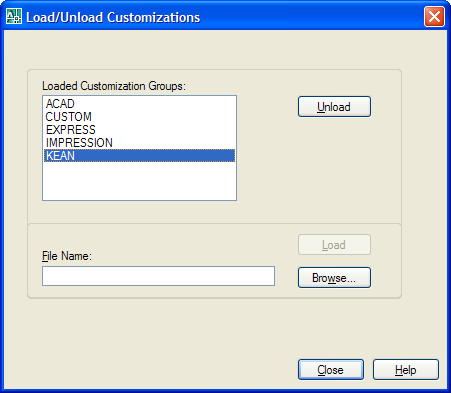
Once created and loaded, the partial menu should be loaded automatically on AutoCAD startup - as shown by the running the CUILOAD command:
Cui_loaded

If we then unload the file and launch AutoCAD again, loading our module, we see this:

Command: netload

Customization file "c:\kean.cui" exists - loading it.

Command:

Customization file loaded successfully. Customization Group: KEAN

Command:

Update:

The above implementation of the LoadMyCui function has some unfortunate behaviour: it doesn't actually cause the menu to be added to the menu bar. Calling CUILOAD from LISP, should be identical to calling the command directly, but in this case it doesn't appear to be. Thanks to Hongxian Qin, from DevTech China, for analysing the problem. The following implementation works as the code was designed to:

private void LoadMyCui(string cuiFile)

{

  Document doc =

    Application.DocumentManager.MdiActiveDocument;

  object oldCmdEcho =

    Application.GetSystemVariable("CMDECHO");

  object oldFileDia =

    Application.GetSystemVariable("FILEDIA");

  Application.SetSystemVariable("CMDECHO", 0);

  Application.SetSystemVariable("FILEDIA", 0);

  doc.SendStringToExecute(

    "_.cuiload "

    + cuiFile

    + " ",

    false, false, false

  );

  doc.SendStringToExecute(

    "(setvar \"FILEDIA\" "

    + oldFileDia.ToString()

    + ")(princ) ",

    false, false, false

  );

  doc.SendStringToExecute(

    "(setvar \"CMDECHO\" "

    + oldCmdEcho.ToString()

    + ")(princ) ",

    false, false, false

  );

}

2 responses to “Creating a partial CUI file using .NET and loading it inside AutoCAD”

  1. amila pradeep Avatar

    i,m not much familiar with auto cad and doing a research.
    may be this is not related to this article.

    my research is retrieve cad information(objects,dimensions,relationships among objects etc...) and store them in RDF file and query RDF to get appropriate information by end users.(this research use sementic technology to query cad information, which has stored as RDF format)

    other parts of research is ok.but there's a problem with how to retrieve information from cad drawing.so i tried to use VBA code and i could get only OBJECT Names like wall,polygon.and i could get object id too. my aim is to code through VBA and access it using my C# code.

    i couldn't find a way to get dimension of objects.may be because of i,m not much familiar with cad.(i,m trying this with auto cad Architectural DT 2007 drawing, because i read somewhere it treat all things as object and so i thought it will be easy to me)

    can anyone help me to retrieve information from cad drawing through VBA code. or give me a link which i can find about this.

  2. Kean Walmsley Avatar

    Hi Amila,

    You might try asking this question at one or other of our discussion groups. Someone there may be able to help.

    Regards,

    Kean

  3. Way back in the day, version 9 thru 12, we used pop menu's to insert blocks when I was at Shell oil.
    Now on version 07 I would like to use simple pop menu's to insert blocks again. I don't want a slide libraries, just simple pull downs.
    The problem is I don't remember the text insert string to accomplish this.
    Can ya help me out please

    1. franciscoandrspinznsantoyo Avatar
      franciscoandrspinznsantoyo

      HI, what are your question?

  4. Hi Vicky,

    I'd suggest posting something on one of the discussion groups - I'm sure someone there will be able to help.

    Do you mean the text string to define a POP menu or the macro string to insert a block?

    Either way, the discussion group is the place to ask.

    Regards,

    Kean

  5. Hello. Just want to ask why the cui did'nt load when I added this line in the customization section.

    //Add Toolbar
    Toolbar newTb = new Toolbar("Sherwin Toolbar", pcs.MenuGroup);
    newTb.ElementID = "EID_NewToolbar";
    newTb.ToolbarOrient = ToolbarOrient.floating;
    newTb.ToolbarVisible = ToolbarVisible.show;

    ToolbarButton tbBtn = new ToolbarButton(newTb, -1);
    tbBtn.Name = "PolyLine";
    tbBtn.MacroID = "ID_Pline";
    ToolbarControl tbCtrl = new ToolbarControl(ControlType.NamedViewControl, newTb, -1);
    ToolbarFlyout tbFlyout = new ToolbarFlyout(newTb, -1);
    tbFlyout.ToolbarReference = "DRAW";

  6. Hi. I am new in cutomizing autocad. I tried above code and load the application on startup. What happen is it skip the LoadMyCui and I need to restart my pc in order to load the cui. Hope you can help.

    Also I have trouble adding a customize toolbar when I add the code fragment
    tbBtn.MacroID = "ID_Pline";
    in the customization section.

    Hope you could help me.

    Thanks

  7. Hi,

    I'm trying to add image to the toolbar but no luck doing it. Hope any can help me.

  8. How do you add small and large icons?

  9. Hi Sherwin,

    One suggestion...

    Did you try the CuiSamp sample on the ObjectARX SDK (under samples/dotNet/CuiSamp)?

    Otherwise, if you're an Autodesk Developer Network member, please submit your questions via the ADN website, or via the AutoCAD .NET Discussion Group, if not.

    Regards,

    Kean

  10. Hi Kean,

    I already discover the solutions. Thanks for the information

    Regards,
    Sherwin

  11. This code not working in autocad 2006.
    i can't find customizationsection .

    please help me ...how to acceess cui file from .net 2005 with autocad2006

  12. This code not working in autocad 2006.
    i can't find customizationsection .

    please help me ...how to acceess cui file from .net 2005 with autocad2006

  13. Have you tried adding a project reference to AcCui.dll? This should get you access to the Autodesk.AutoCAD.Customization namespace. That said, I don't remember whether it was available in AutoCAD 2006 or more recently.

    Kean

  14. I think the equivalent of AcCui.dll in AutoCAD 2006 is AcCustomize.dll

  15. Michael Csikos Avatar
    Michael Csikos

    Hi Kean

    I wish there was a simpler way to reload a modified partial CUI in C#. The process as I see it:
    1. Make changes to partial CUI and save
    2. Remove partial menu from main customization section
    3. Save main section
    4. CuiUnload main CUI
    5. CuiLoad main CUI
    6. CuiLoad partial CUI

    If only there was a Reload() or something. Calling ReplacePartialMenuName() on the main section doesn't refresh the existing menu either. Even a simple Unload() for a partial menu would be great.

    However, I'm having trouble with the process. Unloading and reloading "ACAD" through AutoCAD's dialog correctly removes and replaces the Customization Groups "CUSTOM", "EXPRESSION" and "IMPRESSION". In C#, however, when I call CuiUnload all four groups disappear, but calling CuiLoad on Acad again does not load Custom, Expression or Impression. Why is the behaviour different?

    Thanks
    Mike

  16. Kean Walmsley Avatar

    Hi Mike,

    I'm sorry - I'm not able to spend time looking into this for you.

    Are you an ADN member? If so, please submit your question (and wishlist request) to the ADN website, otherwise I'd suggest posting to the AutoCAD .NET Discussion Group.

    Regards,

    Kean

  17. Michael Csikos Avatar
    Michael Csikos

    Hi Kean

    Yeah, I'm an ADN member, I'll see what they have to say.

    Thanks
    Mike

  18. Hi Kean,

    I've tried to load my own CUI file when Autodcad(2008) is starting. I've set the LOADCTRLS of my registry entry to 2 in order to load my dll-file at ACAD start.

    When the SendStringToExecute() command is called inside the Initialize() sub I always get the "eNoDocument" exception.

    It seems that the document is not yet available for sending commands but writing to the editor works fine.

    Any ideas what's going wrong here??

    Regards,

    Christian

  19. Hi Christian,

    SendStringToExecute is dependent on a document being present, as you've found out. Your choices are to delay loading your DLL in some way (by using LISP's s::startup, for instance), or to use another way to launch your command, such as ads_queueexpr() (see here for the P/Invoke declaration).

    Kean

  20. Gagan Gajabaharia Avatar
    Gagan Gajabaharia

    I am able to run this sample and have the partial CUI load. But where in the menus do I find the commands that are added by this partial CUI? (Pardon my lack of knowledge on customization - last time I customized the menu was in mid 80's using WordStar to edit the .mnu file). Thanks!

  21. The updated version of the LoadMyCui() function - at the bottom of the post, just copy and paste it over the previous function definition in Visual Studio - should cause the menu to be shown to the right of the standard menus.

    If you're using AutoCAD 2009 you may only see them under the menu browser (click the big red "A"), of course.

    Kean

  22. I want to read the object information (say polygon)which is selected from Cad drawing using VBA. But dont find the way to do it.
    Can anybody please suggest me the way for it

  23. Sandip,

    Judging from your email address, you work for an ADN member: please post your question via the ADN website (although you will need to be more clear about your requirements).

    Regards,

    Kean

  24. Kean

    Any chance of seeing a similar post for the ribbon and acad 2009? I have been trying to recreate your script with 2009 AcCui.dll and have found CUIRibbon objects but must be missing something small. There is no <ribbon/> in the cui file when I am done.

    Thanks,

    Joel

  25. Joel,

    I'll add it to my list.

    Kean

  26. Hi Kean,

    I Would like to add some SubMenus in my PopMenu.Can you help me?

    Thanks,

    ismail

  27. Kean Walmsley Avatar

    Ismail,

    While you're waiting for me to cover this topic (which could be some time), please post your question to the the AutoCAD .NET Discussion Group.

    Kean

  28. Hello Mr. Walmsley,
    I know this is very old topic, but I tried my best in reading everything I have found. Even posted a discussion topic (discussion.autodesk.com/forums/thread.jspa?threadID=756171&tstart=0) but nobody answers. I read your blog from 2007 and it is the most useful resource in understanding Acad APIs. If you have time to take a look at it and give me a clue or link to read - I will be most thankful. I don`t want you to do my homework.

  29. Hello Mr. Dimitrov,

    I'm afraid I don't know the solution to this problem: hopefully someone on the discussion forum will repond.

    Regards,

    Kean

  30. Kean, this post is a bit old, and so maybe it was added to the api later, but you do not mention PartialCuiFileCollection.Add(). What is the difference in using this method as opposed to sending strings to the command line? I've been trying to get a partial cui to load at startup by using the reg and the dll's Initialize method.

  31. Also note, for those using this code in 2010, be sure to replace all occurrences of ".cui" with ".cuix". Otherwise the code bombs with no error messages.

  32. Thanks for that note, Ed.

    About PartialCuiFileCollection.Add(): I don't believe - although I could be wrong as I haven't tried it - that using this doesn't actually load the CUI file.

    I would expect the above approach to work, but if it's being called on AutoCAD startup you may need to resort to using ads_queueexpr() instead, as the document may not be available.

    Kean

  33. Hi Kean,
    I found you cann't save the cui file in a path with space,is it? For example, the path "c:\myCui.cui" is ok, but the "c:\program files\myCui.cui" will not work. The SendStringToExecute method will break the path to "c:\program.cui", any suggestion? Thanks.

  34. Have you tried adding additional quotaion marks around the path?

    Kean

  35. Thanks Kean!
    After I add double quotation marks around the path, it works.

  36. Christian Stelzl Avatar
    Christian Stelzl

    Hi Kean,

    is it really necessary to load a cui file? I mean, can't I just create a dropdown menu and insert it at runtime?

    Thanks a lot, Christian

  37. Kean Walmsley Avatar

    Hi Christian,

    I'm afraid I'm not sure what you mean... what steps are you suggesting could be taken by the user/your application?

    Regards,

    Kean

  38. hello kean:
    when I add my dll to regedit(autodesk~~~applications),let my dll autoload when autocad is started,i find it can not work,the exception is enodocment,the mistake source is SendStringToExecute, you can tese yourself, i find adobe pdfmaker can do well,but i do not know how it works, please help me .

  39. Sorry - I don't have time to provide personal debugging services.

    Please submit your problem to the ADN team, if you're a member, or otherwise the AutoCAD .NET Discussion Group.

    Kean

  40. I am very new in Autocad MEP. Pl tell me How to get Device Style Name Property.

  41. This isn't a forum for support.

    Your comment doesn't appear to relate to this post, so please submit your question to the ADN team, if you're a member, or otherwise the AutoCAD .NET Discussion Group.

    Kean

  42. Kean,
    I wonder if there is a redundant way to unload specified partial CUI? For example, if we are uninstalling our plugin extension.

  43. The ideal way to install and uninstall plugins from 2012 onwards is via the Autoloader.

    Kean

  44. Hello Kean,

    I used this code as you indicate but in autocad 2013, shows no errors; but the menus are not displayed; in the code just rename kean.cui by kean.cuix

    How could create a tab as the of Vault for AutoCAD 2013 ...??

    Thanks for your help ...

  45. Hi Blad,

    If you're targeting 2013, you'd be better off using the autoloader feature: this will allow you to have a .cuix loaded automatically.

    Regards,

    Kean

  46. Hi Kean,
    Can u help me? If i have a existing maincui file, now i want to change a command in that, what do i have to do?

    1. Sorry - this request doesn't appear to relate directly to my post. For support, please contact ADN or post to the relevant discussion group.

      Kean

  47. Joshua Clayton Avatar

    Why does the code use LISP to reset the system variables instead of calling Application.SetSystemVariable(x, y) ?

    1. This post is now 16 years old, but from memory it's because SendStringToExecute() runs asynchronously: you need to reset the variable via the command-line for things to work well. Although who knows what might have changed in 16 years? There may now be a better way.

      Kean

Leave a Reply to xuhaiyan Cancel reply

Your email address will not be published. Required fields are marked *