It's all in the context: adding a default menu to your AutoCAD application using .NET

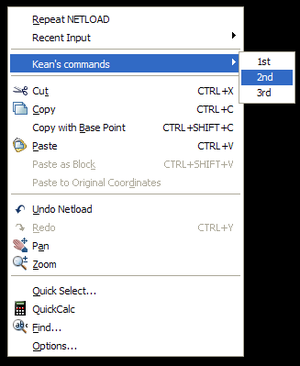
To follow on from the last post, we're now going to take a look at adding custom menu items to the default context menu in AutoCAD. The default menu appears when the user right-clicks on the drawing but has no objects selected. This is a good place to put application commands, for instance.

The approach is very similar to the previous one, although I've added some additional commands to control adding and removing the various menus in addition to relying on the module's initialization callback.

Some other notes:

  • We're not just adding a single menu item, but are using a cascading menu - three menu items underneath a main application menu item.
  • Once again we're using the Autodesk.AutoCAD.Internal namespace (which is unsupported and liable to change, and needs the AcMgdInternal.dll assembly referenced), to use the PostCommandPrompt() function. We would not need this if we called our commands via SendStringToExecute(), of course.

Here's the C# code:

using Autodesk.AutoCAD.ApplicationServices;

using Autodesk.AutoCAD.DatabaseServices;

using Autodesk.AutoCAD.EditorInput;

using Autodesk.AutoCAD.Runtime;

using Autodesk.AutoCAD.Windows;

using Autodesk.AutoCAD.Internal;

using System;

namespace ContextMenuApplication

{

  public class Commands : IExtensionApplication

  {

    public void Initialize()

    {

      CountMenu.Attach();

      ApplicationMenu.Attach();

    }

    public void Terminate()

    {

      CountMenu.Detach();

      ApplicationMenu.Detach();

    }

    [CommandMethod("ADDCONTEXT")]

    static public void AttachContextMenus()

    {

      CountMenu.Attach();

      ApplicationMenu.Attach();

    }

    [CommandMethod("NOCONTEXT")]

    static public void DetachContextMenus()

    {

      CountMenu.Detach();

      ApplicationMenu.Detach();

    }

    [CommandMethod("COUNT", CommandFlags.UsePickSet)]

    static public void CountSelection()

    {

      Editor ed =

        Application.DocumentManager.MdiActiveDocument.Editor;

      PromptSelectionResult psr = ed.GetSelection();

      if (psr.Status == PromptStatus.OK)

      {

        ed.WriteMessage(

          "\nSelected {0} entities.",

          psr.Value.Count

        );

      }

    }

  }

  public class CountMenu

  {

    private static ContextMenuExtension cme;

    public static void Attach()

    {

      if (cme == null)

      {

        cme = new ContextMenuExtension();

        MenuItem mi = new MenuItem("Count");

        mi.Click += new EventHandler(OnCount);

        cme.MenuItems.Add(mi);

      }

      RXClass rxc = Entity.GetClass(typeof(Entity));

      Application.AddObjectContextMenuExtension(rxc, cme);

    }

    public static void Detach()

    {

      RXClass rxc = Entity.GetClass(typeof(Entity));

      Application.RemoveObjectContextMenuExtension(rxc, cme);

    }

    private static void OnCount(Object o, EventArgs e)

    {

      Document doc =

        Application.DocumentManager.MdiActiveDocument;

      doc.SendStringToExecute("_.COUNT ", true, false, false);

    }

  }

  public class ApplicationMenu

  {

    private static ContextMenuExtension cme;

    public static void Attach()

    {

      if (cme == null)

      {

        cme = new ContextMenuExtension();

        cme.Title = "Kean's commands";

        MenuItem mi1 = new MenuItem("1st");

        mi1.Click += new EventHandler(On1st);

        cme.MenuItems.Add(mi1);

        MenuItem mi2 = new MenuItem("2nd");

        mi2.Click += new EventHandler(On2nd);

        cme.MenuItems.Add(mi2);

        MenuItem mi3 = new MenuItem("3rd");

        mi3.Click += new EventHandler(On3rd);

        cme.MenuItems.Add(mi3);

      }

      Application.AddDefaultContextMenuExtension(cme);

    }

    public static void Detach()

    {

      Application.RemoveDefaultContextMenuExtension(cme);

    }

    private static void On1st(Object o, EventArgs e)

    {

      Editor ed =

        Application.DocumentManager.MdiActiveDocument.Editor;

      ed.WriteMessage("\nFirst item selected.");

      Utils.PostCommandPrompt();

    }

    private static void On2nd(Object o, EventArgs e)

    {

      Editor ed =

        Application.DocumentManager.MdiActiveDocument.Editor;

      ed.WriteMessage("\nSecond item selected.");

      Utils.PostCommandPrompt();

    }

    private static void On3rd(Object o, EventArgs e)

    {

      Editor ed =

        Application.DocumentManager.MdiActiveDocument.Editor;

      ed.WriteMessage("\nThird item selected.");

      Utils.PostCommandPrompt();

    }

  }

}

And here are our custom menu items on AutoCAD's default context menu:
Default_context_menu

36 responses to “It's all in the context: adding a default menu to your AutoCAD application using .NET”

  1. Hi Kean,

    I've a question: how do I pass parameters to a command invoked from the context menu?

    I can use 'SendStringToExecute' with a command strings and its parametrs (as string) but how does the invoked command method retrieve those parameters?

    Any other available method than 'SendStringToExecute' to recall methods from a menu?

    TIA,
    Cabbi

  2. Kean Walmsley Avatar

    Hi Cabbi,

    You'd use Editor.GetString()/GetDouble()/GetInteger()/GetPoint() etc. to pick up the command-line input fed in through SendStringToExecute().

    You might opt to call the functions directly, but generally it's safer to use the SendStringToExecute() to invoke commands like this (it helps avoid re-entrancy issues, for example).

    Regards,

    Kean

  3. >You might opt to call the functions directly
    But if I call functions directly from the menu command and do any transaction with the DB I got an AutoCAD crash. I was assuming this is due to the different contexts of the menu and the drawing, isn't it?
    How do I avoid this crash by calling my methods directly?

    TIA,
    Cabbi

  4. Kean Walmsley Avatar

    You might try locking the document, by I *strongly* recommend sticking to using SendStringToExecute. It's a bit more work to expose your functions as commands, but in my opinion the extra effort is worthwhile and they can then be used in many different places (menus, toolbars, etc.).

    Kean

  5. Thanks a lot!

    Yet another stupid question: how do I insert a menu separator?

    I tried with "-", "--", "_" but... nothing. Even Goolgeing around didn't helped.

    Cabbi

  6. Kean Walmsley Avatar

    Try using a blank string:

    MenuItem sep = new MenuItem("");
    cme.MenuItems.Add(sep);

    Regards,

    Kean

  7. Oh, nooooo, the most stupid option I did not try!?!?
    It seems it's time for me to take a little vacation! :oD

    Thanks again,
    Cabbi

  8. Good morning Kean.

    I am new to programming AutoCAD via .NET and I have a question for you. I used to have a custom context menu in ACAD2005. I would like to do the same using the above method, but my inexperience is frustrating me.

    How would I set the on1st method to draw a vertical xline? Or to call any command from the command line. (For example: dist) This would definately reduce my frustration.

    Thanks for your help.

    Jason

  9. Kean Walmsley Avatar

    Hi Jason,

    For calling commands, just search this blog for "SendStringToExecute" - you should find plenty of examples.

    To create an XLine, you should be able to pick up some standard code to create and post another type of entity (a polyline, for instance), and then you modify it to use the Autodesk.AutoCAD.DatabaseServices.Xline class.

    Regards,

    Kean

  10. Thanks for the info. I've got it working now. I am a little more comfortable working with VB.NET. Do you know if someone has converted this to VB at all?

  11. Kean Walmsley Avatar

    These days I generally don't post in both C# and VB, mainly because I prefer C#, myself, and the translation tools available are pretty good.

    Here are two that I've used:

    Carlos Aguilar's "Code Translator"
    Kamal Patel's "Convert C# to VB.NET"

    Neither provide 100% perfect results, but they do get you most of the way there.

    I also use a Visual Studio plugin that uses either of these sites for the conversion directly in Visual Studio 2005.

    Kean

  12. Good morning Kean.

    I do have another question for you. I've got this code working perfectly, just the way I want it. Is there a way to add accelerator keys to the context menu? Just like in the image above, the first letters in Copy and Paste are underlined. Can that be done in this code as well?
    Thanks.

  13. Kean Walmsley Avatar

    Hi Jason,

    Preceding the accelerator character with an ampersand is the typical way to do this. I gave this a try, and found it works, but not perfectly...

    cme = new ContextMenuExtension();
    cme.Title = "&&Kean's commands"
    MenuItem mi1 = new MenuItem("&&1st")
    mi1.Click += new EventHandler(On1st);
    cme.MenuItems.Add(mi1);

    The accelerator works in both cases, but only displays for the menu, not for the menu item. This isn't ideal, but hopefully it's enough for you.

    Regards,

    Kean

  14. Good morning Kean.

    Thanks for that info. I never thought to try two & in front of what I wanted accelerated. I did try one, but that didn't work. Must be a VB thing. (Although I haven't tried there either.)

    Thanks again.

  15. Hello Kean,

    Nice option to create in memory context-menu parts. But the addition will be situated in the lower part of the menu and that's not quit userfriendly for our application. So I was wondering if it's possible to change the order within a context menu.

    Thanks for you input.

  16. Hi John,

    There's no way to control this through the API, although you might be able to do something with some low-level APIs in the OS (I haven't done so, but it *might* be possible, if you don't mind creating a potential future maintenance problem for yourself).

    Regards,

    Kean

  17. Hi Kean,
    Is it possible to have my own menu with out adding to default menu ?
    Regards,
    Razmin.

  18. Hi Razmin,

    Do you mean you want to replace the default context menu, or have your own pull-down menu in the AutoCAD application frame?

    Regards,

    Kean

  19. Hi Kean,
    I'm getting some strange (to me) behavior out of ads_queueexpr...

    When I first translated this example, It triggered the appropriate events, but the SendString wasn't executed... So I tried a couple of other ways. When I tried calling the methods directly, I had lock mode issues, so I tried ads_queueexpr and at first it seemed nothing was happening, then I found that if I clicked one of my menuitems, then (do anything, like ESC, or pick a button, or type a command) and then my "queued expression" would fire. Strange, no?

  20. Depends on how your command string is formatted - have you remembered to call it via "(command \"MYCMD\")" ?

    Kean

  21. I prefer using vl-cmdf, but yes, I called it as a lisp statement.
    ex. ads_queueexpr("(vl-cmdf ""STARTRUN"")")

    I even tried putting a line feed in after the closing paren on the lisp, and just for giggles I tried it with 'command'. No difference.

    I don't really know what was happening with the SendString... because it seems to be working that way now, but this behavior on ads_queueexpr is still repeatable.

    The oddest thing is that I use ads_queueexpr to respond to DocumentActivated in order to get saved values out of an extension dictionary, and it works fine there, though so much is going on at that time, it may be that it's getting flushed out by the things going on after it, just like when I hit ESC or something.

    Anyway, at this point, my stuff is working with SendStringtoExecute, so there's no need for me to waste any more of your time with it, but it is still strange!

  22. Hi Ken, try pass parameters to command, but I can´t because generate an error
    the code is:

    <commandmethod("arma_dado")> _
    Public Sub Arma_Dado(ByVal sss As String)

    code...

    end sub

    how a pass parameter using SendStringtoExecute, for example

    SendStringtoExecute("arma_dado"& chr(13) & "D-1", ???,???,???)

    Can I do this?

  23. You need to use Editor.GetString() (or one of the other GetXXX functions) from within your command to pick up the values passed in via the command-line.

    Kean

  24. Sorry kean, but I need take a value from a usercontrol, when I execute for a first time everything is well, but when I change it on other window and try to run it, don´t recive the parametes: my code is:

    (funtion en the command class)
    Public Class LU01Commands
    <commandmethod("ins_varilla")> _
    Public Sub ins_varilla(ByVal pto As Point3d, ByVal varilla As String)
    Dim doc As Document = Application.DocumentManager.MdiActiveDocument
    Dim db As Database = doc.Database
    Dim ed As Editor = doc.Editor
    Dim tr As Transaction = db.TransactionManager.StartTransaction()
    Dim bt As BlockTable = tr.GetObject(db.BlockTableId, OpenMode.ForRead)
    Dim btr As BlockTableRecord = tr.GetObject(bt(BlockTableRecord.ModelSpace), OpenMode.ForWrite)
    'more code......
    End Sub
    End Class

    And My code on then pallete (user control) is:
    when I press button1.

    Private Sub Button3_Click(ByVal sender As System.Object, ByVal e As System.EventArgs)
    Dim doc As Document = Application.DocumentManager.MdiActiveDocument
    Dim db As Database = doc.Database
    Dim ed As Editor = doc.Editor
    Try
    doc.SendStringToExecute("ins_varilla" & Chr(13), False, False, False)
    ed = Nothing
    db = Nothing
    doc = Nothing
    Catch ex As Exception
    MsgBox(ex.Message)
    End Try

    End Sub

    Can I use the "SendStringtoExecute" to do or there are other way to do.

  25. Luis -

    You can't just declare the function with arguments: it needs to be a standard AutoCAD command (defined as always) and then you use GetString() etc. to retrieve the arguments from the command-line.

    See this post.

    Regards,

    Kean

  26. I understand that there are several types of context menu.
    The next code shows how I create these menus.

    --------------CODE-----------------
    //Default context menu
    ContextMenuExtension cme = new ContextMenuExtension();
    MenuItem miRoomProperties = new MenuItem("Item01");
    miRoomProperties.Click += new EventHandler(Item01_Click);
    cme.MenuItems.Add(miRoomProperties);
    Application.AddDefaultContextMenuExtension(cme);
    //Default context nested menu
    cme = new ContextMenuExtension();
    cme.Title = "MyMenus";
    MenuItem mi1 = new MenuItem("1st");
    mi1.Click += new EventHandler(On1st);
    cme.MenuItems.Add(mi1);
    MenuItem mi2 = new MenuItem("2nd");
    mi2.Click += new EventHandler(On2nd);
    cme.MenuItems.Add(mi2);
    MenuItem mi3 = new MenuItem("3rd");
    mi3.Click += new EventHandler(On3rd);
    cme.MenuItems.Add(mi3);
    Application.AddDefaultContextMenuExtension(cme);
    //Create entity context menu
    cme = new ContextMenuExtension();
    MenuItem mi = new MenuItem("Count");
    mi.Click += new EventHandler(Count_Click);
    cme.MenuItems.Add(mi);
    RXClass rxc = Entity.GetClass(typeof(Entity));
    Application.AddObjectContextMenuExtension(rxc, cme);
    --------------CODE-----------------

    If I will execute this code, when acad.cui loaded, it is all working... No problems.
    BUT I have created my own empty cui file and if I load it and unload acad.cui nothing working.

    --------------CODE-----------------
    string sMyWsName = "ViViWorkspace";
    //Unload main cui
    string sCuiName = cCurrent.CUIFileBaseName;
    Application.SetSystemVariable("FILEDIA", 0);
    CommandLine.Command("._cuiunload", sCuiName);
    string sViViCuiFile = "C:\\Users\\Alex\\AppData\\Roaming\\Autodesk\\AutoCAD 2009\\R17.2\\enu\\Support\\ViVi.cui";
    cCurrent = new CustomizationSection(sViViCuiFile);
    CommandLine.Command("._cuiload", "\"" + sViViCuiFile + "\"");
    CommandLine.Command("._filedia", 1);
    //Create my menu
    PopMenu pmShortcut1 = cCurrent.CreateShortcutMenu();
    MacroGroup mg = cCurrent.MenuGroup.MacroGroups[0];
    MenuMacro mm1 = new MenuMacro(mg, "Cmd 5", "^C^CCmd5", "ID_MyCmd5");
    pmShortcut1.Name = "MyShortcutMenu";
    PopMenuItem pmiShortcut = new PopMenuItem(mm1, "Shortcut", pmShortcut1, 0); Application.SetSystemVariable("WSCURRENT", sMyWsName); //for refresh
    --------------CODE-----------------

    I found the way how can I solve this problem. If I transfer from acad.cui file, from Shortcut Menus next 2 menus: Default Menu and Edit menu my context menu begin to work. Also I found that I can delete everything from that 2 menus and leave any one Item (for example Zoom or any other, or create my own Item, it should not be empty) context menu is working.

    But if I create my shortcut menu (like shown in first post) and add items in it, context menu is not working. Context menu will only work if I transfer these menus from acad.cui file.

    How can I create my own shortcut menu, that gives me oportunity to make my context menu?
    Or maybe I'm wrong? Than what should I do...

  27. Alex,

    I'm afraid I don't have time to research topics that aren't directly related to code that I've posted.

    Please post your question to the ADN website (if you're a member) or to the AutoCAD .NET Discussion Group.

    Regards,

    Kean

  28. Scott Cleveland Avatar
    Scott Cleveland

    Kean - I am trying to add a Context Menu Extension that has menu items - When I create it and say add to menu of object type entity, the menu items show up on the main (autocad ) menu, not w/ a title I have specified - the menus are not on a fly-out the menu. Do you know if this is a problem or bug? Thanks Scott Cleveland

  29. Kean Walmsley Avatar
    Kean Walmsley

    Scott,

    I don't recall the typical behaviour for this scenario and unfortunately don't have time to look into it.

    I suggest submitting a representative sample to the ADN team or to the AutoCAD .NET Discussion Group.

    Regards,

    Kean

  30. Hello Kean,
    Is there anyway to add menu item in deafult context menu, with netload of dll not with some particular command?

    Thanks,
    Pankaj

    1. Hi Pankaj,

      Sure - search for IExtensionApplication and Initialize and Terminate.

      Regards,

      Kean

      1. Thanks Kean,
        I have few more questions,
        1. When I run above code in debug mode, command stated does not appear, but if open autocad directly and then netload dll it works fine. can you please explain this behavior/

        2. If you have doc.closeanddiscard command associated to one of menuitems added autocad crashes with fatal error. I don't know why?

        3. With this class loaded in the VB project, if you have any other commands in any other class they do not appear after netload.

        Can you please help me with this, your help will be highly appreciated

        Thanks,
        Pankaj

        1. Hi Pankaj,

          1. No idea. You're still NETLOADing when debugging, I assume? Is the DLL loaded?
          2. What is it being called on - the active document? That would be a bad thing to do - I suggest calling the QSAVE and CLOSE commands.
          3. I have no idea what is wrong with your VB.NET version (the code I provided was C#).

          Regards,

          Kean

          1. 1. may be something bad with my autocad will search more.

            2. I tried calling doc.CloseAndSave(doc.Name) or doc.closeanddiscard, commands in function on1st in your code.
            I wanted to close document without save when user clicks on one of menuitem, I tested this several times but autocad crashes at close commands. Is it you can not close document when user clicks on added context menu?

            3. Something bad with my VB.net code, will tweak more

            thanks,
            Pankaj

            1. 2. Please post to the discussion group: this is outside the scope of this post and my support.

              Kean

              1. Thanks Kean, I will post in on forum.

Leave a Reply to John Cancel reply

Your email address will not be published. Required fields are marked *