Creating an AutoCAD table containing block images using .NET

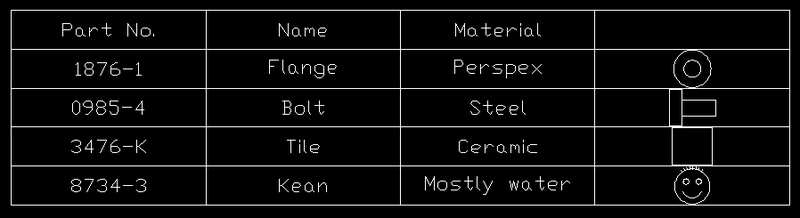
Further to the previous post showing the creation of a simple table, this shows how to add a column that contains a preview image of a particular block definition.

I had to modify the code somewhat to open the block table sooner than we did before (I tend not to leave it open for longer than I have to, but in this case we want to check it for appropriate block definitions earlier on, while we're creating the table). Then I added a simple check, to see whether a block definition corresponding to our "name" field exists for a particular row, and if so, we add a reference to the block table record in the 4th column of the table.

Here's the updated C# code:

using Autodesk.AutoCAD.ApplicationServices;

using Autodesk.AutoCAD.DatabaseServices;

using Autodesk.AutoCAD.EditorInput;

using Autodesk.AutoCAD.Geometry;

using Autodesk.AutoCAD.Runtime;

namespace TableCreation

{

  public class Commands

  {

    [CommandMethod("CRT")]

    static public void CreateTable()

    {

      Document doc =

        Application.DocumentManager.MdiActiveDocument;

      Database db = doc.Database;

      Editor ed = doc.Editor;

      PromptPointResult pr =

        ed.GetPoint("\nEnter table insertion point: ");

      if (pr.Status == PromptStatus.OK)

      {

        Transaction tr =

          doc.TransactionManager.StartTransaction();

        using (tr)

        {

          BlockTable bt =

            (BlockTable)tr.GetObject(

              doc.Database.BlockTableId,

              OpenMode.ForRead

            );

          Table tb = new Table();

          tb.TableStyle = db.Tablestyle;

          tb.NumRows = 5;

          // Added an additional column for the block image

          tb.NumColumns = 4;

          tb.SetRowHeight(3);

          tb.SetColumnWidth(15);

          tb.Position = pr.Value;

          // Create a 2-dimensional array

          // of our table contents

          string[,] str = new string[5, 3];

          str[0, 0] = "Part No.";

          str[0, 1] = "Name ";

          str[0, 2] = "Material ";

          str[1, 0] = "1876-1";

          str[1, 1] = "Flange";

          str[1, 2] = "Perspex";

          str[2, 0] = "0985-4";

          str[2, 1] = "Bolt";

          str[2, 2] = "Steel";

          str[3, 0] = "3476-K";

          str[3, 1] = "Tile";

          str[3, 2] = "Ceramic";

          str[4, 0] = "8734-3";

          str[4, 1] = "Kean";

          str[4, 2] = "Mostly water";

          // Use a nested loop to add and format each cell

          for (int i = 0; i < 5; i++)

          {

            for (int j = 0; j < 3; j++)

            {

              tb.SetTextHeight(i, j, 1);

              tb.SetTextString(i, j, str[i, j]);

              tb.SetAlignment(i, j, CellAlignment.MiddleCenter);

            }

            // If a block definition exists for a block of our

            // "name" field, then let's set it in the 4th column

            if (bt.Has(str[i, 1]))

            {

              tb.SetBlockTableRecordId(i, 3, bt[str[i, 1]], true);

            }

          }

          tb.GenerateLayout();

          BlockTableRecord btr =

            (BlockTableRecord)tr.GetObject(

              bt[BlockTableRecord.ModelSpace],

              OpenMode.ForWrite

            );

          btr.AppendEntity(tb);

          tr.AddNewlyCreatedDBObject(tb, true);

          tr.Commit();

        }

      }

    }

  }

}

And here's what you see if you run the CRT command with some blocks in the current drawing called "FLANGE", "TILE", "BOLT" and "KEAN":
Table_with_block

  1. Kélcyo Pereira Avatar
    Kélcyo Pereira

    Muito bom este exemplo.
    Aguardo um com a manipulação de campos, como criar e alterar campos no documento. Valeu.

    " Very good this sample.
    I wait one with the manipulation of Fields, as to create and to modify fields in the document.
    It was valid."

  2. Nikolay Poleshchuk Avatar
    Nikolay Poleshchuk

    Kean, can you provide an example for putting another block into the same cell and changing cell layout (to horizontal layout or to vertical layout) in 2008?
    Fields and formulas are of great interest too.

  3. Kélcyo Pereira Avatar
    Kélcyo Pereira

    A minha ideia é a seguinte:
    1 - Criar um dialógo para selecionar um arquivo txt delimitado.
    2 - E fazer a inserção dos valores na tabela.
    Sei que isso eh possível no Autocad 2008, inserindo uma planilha do excel. Mais o interesse aqui é manipular via NET.
    Com isso, teriamos abordado 3 conceitos.
    - a utilização de diálogos no cad;
    - a manipulação de dados externos vindo do arquivo txt; e
    - a manipulação da tabela.
    Valeu.

    " My ideia is the following one:
    1 - To create one dialógo to select an archive txt delimited.
    2 - E to make the insertion of the values in the table.
    I know that this eh possible in Autocad 2008, inserting a spread sheet of excel. More the interest is here to manipulate way NET.
    With this, we teriamos boarded 3 concepts.
    - the use of dialogue in cad;
    - the manipulation of external data come of the archive txt;
    - e manipulation of the table.
    It was valid."

  4. Kélcyo,

    Yes, I could certainly show this, but the pieces related to AutoCAD's APIs have already been shown in this code. The additional work (file selection and reading) are standard tasks that are relatively easy to accomplish with the .NET Framework (and I'm sure are covered by blog posts/articles elsewhere). Once you've populated your array of strings, the above code can be hooked in easily enough.

    Thanks for the suggestion, though.

    Regards,

    Kean

  5. Sunilkumar Shinde Avatar
    Sunilkumar Shinde

    OPPPS that's again gr8....

    I did it in 2001 by using VB 6.. Thanks for this tut for Dot Net....

    Sunilkumar S. (SUKU)
    http://www.suncindia.com

  6. hello i found your tutorial very informing but i have a problem applying it...

    when i use the code for typical blocks it works perfectly but when the code works on a block that contains an attribute autocad crashes with an error - handle reentered...
    i tried using the setblockattribute method in hope it will fix it but to no avail.

    i would really apreciate if you could help because i have a complete addon program which is pending on this bug only

  7. Yes... I see the same behaviour: the code wasn't designed to work with blocks with attributes.

    I added some code, after the call to tb.SetBlockTableRecordId():

    BlockTableRecord blockDef =
    (BlockTableRecord)tr.GetObject(
    objId,
    OpenMode.ForRead
    );
    foreach (ObjectId id in blockDef)
    {
    DBObject obj =
    tr.GetObject(id, OpenMode.ForRead);
    AttributeDefinition att =
    obj as AttributeDefinition;
    if (att != null)
    tb.SetBlockAttributeValue(i, 3, id, att.Tag);
    }

    This - as you've noticed - also fails, unless we change the transaction type by calling StartOpenCloseTransaction() instead of StartTransaction(). This creates a transaction type that (under the covers) uses Open & Close to access database-resident objects.

    This type of transaction was added in 2009, so if you're using a previous version your only real option would be to translate all your calls to the transaction into individual ObjectId.Open() and ObjectId.Close() calls.

    Assuming there's no way to get the standard transaction to work (the Open/Close Transaction was added to help deal with situations where finer grained access control is required by AutoCAD, and I suspect this is one of those situations).

    Otherwise you might also try separating the table creation from the code to set the attribute values (by collecting the info in some kind of structure and adding it after the fact). This might also help.

    Good luck,

    Kean

  8. Greeting Kean

    thank you very much for replying

    unfortunately am using autocad 2008 so i had to try replacing transaction calls with open\close methods and it worked great for the task but a side problem happened, it seems that something is not closed in the database so i cannot select the table and cannot save the file, after checking for a bit i found that i didn't close the table object, after i closed it i can select the table but any modification such as moving the table or trying to save the file i get an error eisalready in database.
    here is the code for you so you can get a clear picture

    this is a function i made that creates a table based on a filled array of blocks to generate a legend...

    Public Sub Create_Table(ByVal RowCount As Integer, ByVal RowHeight As Double, ByVal ColumnWidth As Double, ByVal Position As Point3d, ByVal Symbols() As String)
    Dim tb As Table = New Table
    Dim doc As Document = Application.DocumentManager.MdiActiveDocument
    Using db As Database = doc.Database
    Using tr As Transaction = db.TransactionManager.StartTransaction
    Dim Dlock As DocumentLock = Application.DocumentManager.MdiActiveDocument.LockDocument()
    Dim bt As BlockTable = db.BlockTableId.Open(OpenMode.ForRead)
    tb.TableStyle = db.Tablestyle
    tb.NumRows = RowCount + 2
    tb.NumColumns = 2
    tb.SetRowHeight(RowHeight)
    tb.SetColumnWidth(ColumnWidth)
    tb.Position = Position

    tb.SetTextHeight(RowType.DataRow, 2.5)
    tb.SetTextHeight(RowType.HeaderRow, 2.5)
    tb.SetTextHeight(RowType.TitleRow, 1)
    tb.SetAlignment(CellAlignment.MiddleCenter, RowType.DataRow)
    tb.SetAlignment(CellAlignment.MiddleCenter, RowType.HeaderRow)
    tb.SetAlignment(CellAlignment.MiddleCenter, RowType.TitleRow)

    tb.SetTextString(0, 0, "Legend")
    tb.SetTextString(1, 0, "Symbol Name")
    tb.SetTextString(1, 1, "Symbol Image")

    Dim Row As Integer = 1
    Dim i As Integer = 0
    Dim Scaling_Factor As Double = 1

    For i = 0 To RowCount
    If bt.Has(Symbols(i)) Then

    tb.SetBlockTableRecordId(Row, 0, bt(Symbols(i)), True)
    Dim objid As ObjectId = tb.GetBlockTableRecordId(Row, 0, 0)
    Dim blockdef As BlockTableRecord = objid.Open(OpenMode.ForRead)

    For Each id As ObjectId In blockdef
    Dim obj As DBObject = id.Open(OpenMode.ForRead)
    If TypeOf (obj) Is AttributeDefinition Then
    Dim att As AttributeDefinition = obj
    tb.SetBlockAttributeValue(Row, 0, id, att.TextString)
    End If
    obj.Close()
    Next
    Row = Row + 1
    blockdef.Close()
    End If
    Next i
    tb.GenerateLayout()

    Dim btr As BlockTableRecord = bt(BlockTableRecord.PaperSpace).Open(OpenMode.ForWrite)
    'Dim btr As BlockTableRecord = tr.GetObject(bt(BlockTableRecord.PaperSpace), OpenMode.ForWrite)
    btr.AppendEntity(tb)

    tr.Commit()

    btr.Close()
    bt.Close()

    db.Dispose()
    btr.Dispose()
    bt.Dispose()
    Dlock.Dispose()
    tb.Close()
    tb.Dispose()
    tr.Dispose()
    GC.Collect()

    End Using
    End Using

    End Sub

  9. Kean Walmsley Avatar

    One thing I can see straightaway is that you're still creating and committing the transaction - which is both unnecessary and potentially dangerous (you should avoid mixing transactions with open/close).

    Other than that I can't see what the problem is, though you might try reducing the time the various objects are open (the block table could be closed sooner, if you collect the info you need and then close it, for instance).

    Regards,

    Kean

  10. Greetings Kean

    thanks again for your prompt reply

    to tell you the truth i first tried it without using the transaction and i got an access violation error so when i used the transaction it worked...

    for the tr.commit it was the only way for the table to render without the code ran and nothing happened...

    for the block table i'll try to close it sooner and see what happens and as for the tb.close i cannot put it sooner than the document lock or i will get the already in database error at the moment the code is run..

    btw i remember that the code ran correctly when the table doesn't have a blocks with attributes.

  11. I am veteran in working Autocad. I like a lot what you have programmed. It is brilliant. I want to use it but i don t know how to.Can i convert it to autolisp? You can help me if you want.

  12. It should be possible. Unfortunately I don't have time to spend on converting posts to other languages... someone on the AutoLISP Discussion Group may be able to help.

    Kean

  13. I tried the autocad net online guide (why not an offline html or pdf)...
    I googled it (and only found others with the same problem)...
    I searched the civil 3d dev forums (oops i did not try simple autocad dev forums) ...
    and found absolutely nothing .
    Then i did a search in your blog and found the solution .
    Again it was your blog that guided me .
    More solutions found in your blog than googling or C3D forums .
    Finally it is very simple to create a table .

    I cannot understand .
    Why isn't there an offline NET guide .
    And why even this online one is so comprehensive .
    Just for the beginners .
    ActiveX is to be abandonded but it has an excellent guide.
    Autodesk forces us to move to NET but support is far behind LISP or VBA and activeX .
    Not everyone is a pro developer .
    Not everyone can have an ADN membership .
    Next time first search in your blog .

    Tassos

  14. Tassos,

    There is a CHM-based version of the managed class reference (not the Developer's Guide, though) in the ObjectARX SDK, which can be found from the AutoCAD Developer Center.

    It's true that our (user- and developer-focused) documentarion is increasingly heading online, for better or worse.

    Regards,

    Kean

  15. Hello Kean

    (Let me apologize in advance for my poor English)

    First, congratulations for your blog, it's the better source of resources for me.

    I need get the value of blockscale when i put 'autofit' = true

    //Sample 01 (Don't Work)
    ------------------------------------
    myTabla.SetBlockTableRecordId(myRow, myCol,mybloqueDef.ObjectId, true);

    double myBlockScale = myTabla.GetScale(myRow, myCol, 0) //Don't Work, return 1

    myTabla.SetBlockScale(myRow , myCol, 0.9xmyBlockScale);

    //Sample 02
    --------------------------------------
    myTabla.SetBlockTableRecordId(myRow, myCol,mybloqueDef.ObjectId, false);

    myTabla.SetBlockScale(myRow, myCol, 4);

    double myBlockScale = myTabla.GetScale(myRow, myCol, 0) // OK, return 4

    Can I get the value Block scale when Autofit is True?

    Best Regards

  16. Hello,

    I'm afraid I don't know the answer to this one (and don't have time to look into it).

    Please post your question to the ADN team, if you're a member, or otherwise the AutoCAD .NET Discussion Group.

    Regards,

    Kean

  17. I have used the sample as and action to a button in a dialog. I can draw the Table the first time and the second time I get "eLockViolation"
    Any Ideas why this is happing?

    It always happens on:
    btr = CType(tr.GetObject(bt(BlockTableRecord.ModelSpace), OpenMode.ForWrite), BlockTableRecord)

    My Code:

    Dim doc As Document = Application.DocumentManager.MdiActiveDocument
    Dim db As Database = doc.Database
    Dim Ed As Editor = doc.Editor

    Dim obj As Object = Application.GetSystemVariable("DIMSCALE")
    Dim Scaler As Double = System.Convert.ToDouble(obj)

    Dim btr As BlockTableRecord
    Dim bt As BlockTable
    If Scaler = 0 Then Scaler = 1

    Dim tr As Transaction = doc.TransactionManager.StartTransaction()

    Using tr

    Try

    bt = CType(tr.GetObject(doc.Database.BlockTableId, OpenMode.ForRead), BlockTable)

    Dim tb As New Table()

    If mStyleID = ObjectId.Null Then
    tb.TableStyle = db.Tablestyle
    Else
    tb.TableStyle = mStyleID
    End If

    tb.NumRows = mTableData.Rows.Count + 2
    tb.NumColumns = mTableData.Columns.Count
    tb.SetRowHeight(3 * Scaler)
    tb.SetColumnWidth(15 * Scaler)
    tb.Position = mTablePoint

    tb.Cells(0, 0).TextString = mTableHeadingName

    For x As Integer = 0 To mTableData.Rows.Count - 1

    For y As Integer = 0 To mTableData.Columns.Count - 1

    tb.Cells(x + 2, y).TextString = mTableData.Rows(x).Item(y).ToString
    tb.Cells(x + 2, y).Alignment = CellAlignment.MiddleCenter

    Next

    Next

    tb.GenerateLayout()
    btr = CType(tr.GetObject(bt(BlockTableRecord.ModelSpace), OpenMode.ForWrite), BlockTableRecord)
    btr.AppendEntity(tb)
    tr.AddNewlyCreatedDBObject(tb, True)
    tr.Commit()

    Catch ex As Autodesk.AutoCAD.Runtime.Exception
    Ed.WriteMessage(ex.Message.ToString)
    tr.Abort()
    Finally
    tr.Dispose()
    db.Dispose()
    doc.Dispose()
    End Try

    End Using

  18. Is it a modeless dialog?

    If so, either lock the document or (and this is safer) launch a command via SendStringToExecute() that executes the code.

    Kean

  19. Hi, Kean
    Not working for me, if I copy a table from another dwg-file 🙁

  20. Sorry, all works 🙂

  21. Hi Kean,

    This is my first post here, so hopefully I'm doing it correctly.

    I am creating a new block that contains text, linework, and shading. How do I control the draworder when I am creating the block? I need the shading to be at the bottom.

    Coralie

  22. Hi Coralie,

    I hate to discourage you from posting - especially as it's your first time doing so here - but for general support questions you should really post them via the ADN team (if you're a member) or the AutoCAD .NET Discussion Group (otherwise).

    That said, this post may be of some help:

    keanw.com/2007/03/manipulating_th.html

    Regards,

    Kean

  23. Kean I know this is an old post, but I am trying to do this with C++ ObjectARX.

    When I simply try to setBlockTableRecordId, I end up with an invalid drawing. Am I missing something?

    I've tried to set the CellType to kBlockCell first, but it doesn't help.

    Here is my function minus the setTableStyle chunk, my table is fine, just no block

    void CreateTable(AcDbObjectId id)
    {
    AcDbTable *pTable = new AcDbTable();
    int rows = 3;
    int cols = 2;
    pTable->setSize(rows, cols);
    for(int row = 0; row < rows; row++)
    {
    for(int col = 0; col < cols; col++)
    {
    if (row == 1 && col == 1)
    {
    pTable->setBlockTableRecordId(row, col, id, true);
    }
    else
    {
    acutSPrintf(content, ACRX_T("%d-%d"), row+1, col+1);
    pTable->setTextString(row, col, content);
    }
    }
    pTable->generateLayout();
    AcDbBlockTable *pBlockTable;
    pDb->getSymbolTable(pBlockTable, AcDb::kForRead);
    AcDbBlockTableRecord *pBlockTableRecord;
    pBlockTable->getAt(ACDB_MODEL_SPACE,
    pBlockTableRecord, AcDb::kForWrite);
    pBlockTable->close();
    pBlockTableRecord->appendAcDbEntity(pTable);
    pBlockTableRecord->close();
    pTable->close();
    }

    I've also tried...

    if (row == 1 && col == 1)
    {
    ACHAR content[100];
    acutSPrintf(content, ACRX_T("%%<\\AcObjProp Object(%%<\\_ObjId %d>%%>%%"), id);
    pTable->setTextString(row, col, content);
    }

    This results in a valid drawing but no block in cell.
    Just ####, which disappears when I try to resize the cell.

    Thanks
    Eric

  24. Hi Eric,

    I'm really sorry, but I don't have time to troubleshoot a translation into ObjectARX.

    Have you posted to the ObjectARX discussion group or to the ADN team?

    Regards,

    Kean

  25. No, I'll go there next. I think it has something to do with my passed in AcDbObjectId. I'm still looking into it. Thanks for the quick reply.

  26. I got it working...it was my ObjectId. It was a circle instead of a block.

  27. Great!

    Kean

  28. Hi Kean and readers

    I note that in this particular blog post: the block is added to a cell in a table which is empty. As a theoretical question: is it possible to add a block to a cell which is not empty? (perhaps an idea for the next blog post)?

    rgds
    Ben

    1. Kean Walmsley Avatar

      Hi Ben,

      I'll add it to the list. 🙂

      Kean

  29. Kean Walmsley Avatar

    Hi Ben,

    Does this address your question?

    keanw.com/2015/07/adding-a-new-column-to-an-existing-autocad-table-using-net.html

    I'm not fully sure, now that I look at it again... please confirm.

    Thanks,

    Kean

  30. I thought it was a wonderful blog post with plenty of utility. I love working through them.

    I will try to better explain my original question:

    Do you know those no smoking signs commonly seen in public places: a cigarette with a red cross struck through it. Can a similar thing be done programattically in a table with the strike through happening through a number. A picture is worth a 1000 words: imgur.com/gallery/qP...

    In other words, can a block be inserted into a particular cell which already contains a number value? side by side or overlaid perhaps.

    that was what i originally meant by the question.

    neverthless, i thought the blog post is great.

    1. Kean Walmsley Avatar

      Great - thanks for the clarification, Ben!

      I've just put some code together that basically does what you're looking for... I'll try to get it into a blog post for tomorrow.

      Kean

  31. Hi dear Kean,
    At the first Thanks for this useful codes, but as i'm new in this types of codes please help me more for how to load it in autocad?
    I saved this codes in .lsp format and after loading i got error
    Command: _appload Table.lsp successfully loaded.
    Command:
    Error: bad function: "CRT"
    Please help me to use correctly your codes.
    Thank you so much.
    Javid

    1. Kean Walmsley Avatar

      Hi Javid,

      You need to create a Class Library project in Visual Studio and copy the contents into a contained C# file. There's a bit more to it than that, but that's the basics. Search this blog for "NuGet" to find out the simplest way to add the needed .NET libraries.

      Regards,

      Kean

      1. Ok Thanks I'll try if i could!
        🙁

Leave a Reply

Your email address will not be published. Required fields are marked *