Showing a splash-screen from your AutoCAD .NET application

Thanks once again to Viru Aithal for the inspiration behind this post, although I did write most of the code, this time. 🙂

Adding a splash screen can give a touch of class to your application, assuming it's done non-intrusively. This post focuses on how best to do so within AutoCAD, and use the time it's displayed to perform initialization for your application.

The first thing you need to do is add a Windows Form to your project:
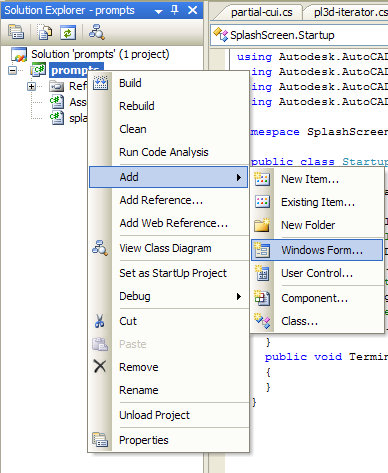
Splash_screen_1

You should select the standard "Windows Form" type, giving an appropriate name (in this case I've used "SplashScreen", imaginatively enough).
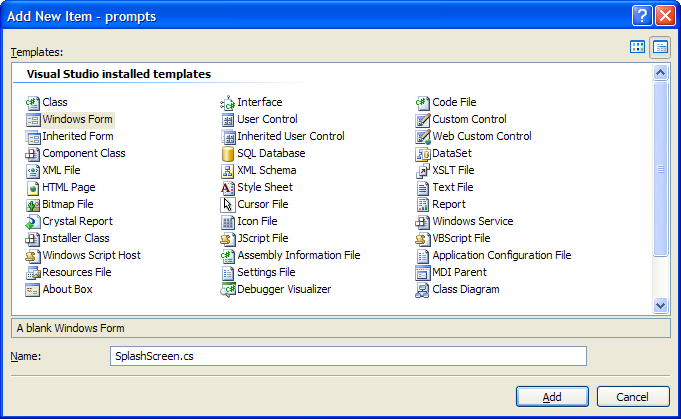
Splash_screen_2

Once this is done, you should set the background for the form to be your preferred bitmap image, by browsing to it from the form's BackgroundImage property:
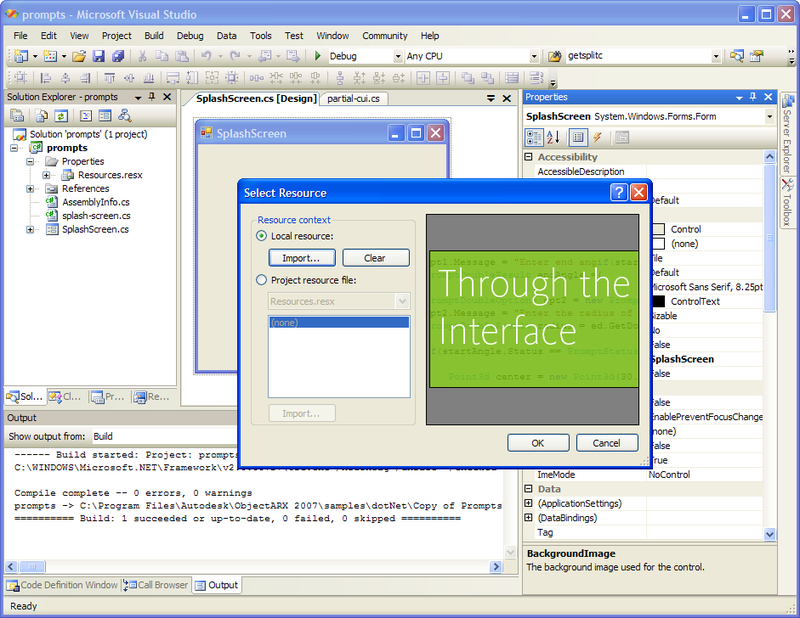
Splash_screen_3

Now we're ready to add some code. Here's some C# code that shows how to show the splash-screen from the Initialize() method:

using Autodesk.AutoCAD.Runtime;

using Autodesk.AutoCAD.ApplicationServices;

using Prompts; // This is the name of the module

namespace SplashScreenTest

{

  public class Startup : IExtensionApplication

  {

    public void Initialize()

    {

      SplashScreen ss = new SplashScreen();

      // Rather than trusting these properties to be set

      // at design-time, let's set them here

      ss.StartPosition =

        System.Windows.Forms.FormStartPosition.CenterScreen;

      ss.FormBorderStyle =

        System.Windows.Forms.FormBorderStyle.None;

      ss.Opacity = 0.8;

      ss.TopMost = true;

      ss.ShowInTaskbar = false;

      // Now let's disply the splash-screen

      Application.ShowModelessDialog(

        Application.MainWindow,

        ss,

        false

      );

      ss.Update();

      // This is where your application should initialise,

      // but in our case let's take a 3-second nap

      System.Threading.Thread.Sleep(3000);

      ss.Close();

    }

    public void Terminate()

    {

    }

  }

}

Some notes on the code:

  • I used a sample application called "Prompts" - you should change the using directive to refer to your own module name.
  • We're setting a number of properties dynamically (at runtime), rather than stepping through how to set them at design-time.
  • We've set the splash screen to be 80% opaque (or 20% transparent). This is easy to adjust.
  • Some of the additional properties may be redundant, but they seemed sensible to set (at least to me).

Here's the result... I've set up my application to demand-load when I invoke a command, which allowed me to load a DWG first to show off the transparency of the splash-screen (even though the above code doesn't actually define a command - so do expect an "Unknown command" message, if you do exactly the same thing as I have). You may prefer to set the module to load on AutoCAD startup, otherwise.
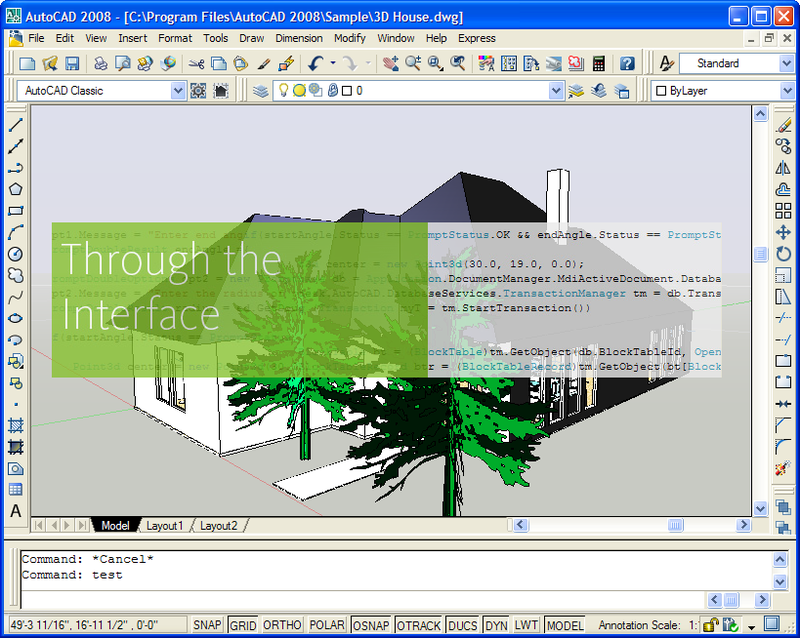
Splash_screen_4 

Update:

Roland Feletic brought it to my attention that this post needed updating for AutoCAD 2010. Thanks, Roland!

I looked into the code, and found that the call to ShowModelessDialog needed changing to this:

      Application.ShowModelessDialog(

        Application.MainWindow.Handle,

        ss,

        false

      );

I also found I had to add an additional assembly reference to PresentationCore (a .NET Framework 3.0 assembly).

13 responses to “Showing a splash-screen from your AutoCAD .NET application”

  1. Kélcyo Pereira Avatar
    Kélcyo Pereira

    Hi Kean,

    Which reference I make for management of the API of the AutoCad.

    Regards.

  2. Kean Walmsley Avatar

    Hi Kélcyo,

    I'm sorry - I don't understand the question...

    If you're asking which assembly references to add to your project, then you need acdbmgd.dll and acmgd.dll.

    Regards,

    Kean

  3. As a non-coder, how do I find out HOW an ex-colleague made a splash screen and then remove it from the launch of AutoCAD?

  4. Kean Walmsley Avatar

    There are many ways he or she may have coded it, so there's no fixed answer, I'm afraid. A programmer should be able to work it out pretty quickly, though, by looking at the project.

    Kean

  5. Kélcyo Pereira Avatar
    Kélcyo Pereira

    My intention is to search given of an archive txt to work in autocad.
    Therefore I do not obtain to make one I dialogue to select the archive.

  6. Kélcyo Pereira Avatar
    Kélcyo Pereira

    Because, when use following code, error?

    Imports Autodesk.AutoCAD.Runtime
    Imports Autodesk.AutoCAD.GraphicsInterface
    Imports Autodesk.AutoCAD.ApplicationServices
    Imports System.Windows.Forms

    Public Class kpsCommands
    Implements Autodesk.AutoCAD.Runtime.IExtensionApplication

    ' Define command 'Asdkcmd1'
    <commandmethod("dsteste")> _
    Public Sub Asdkcmd1()
    Dim ss As FrmSplash = New FrmSplash()
    Autodesk.Autocad.ApplicationServices.Application.ShowModelessDialog(Autodesk.AutoCAD.ApplicationServices.Application.MainWindow, ss, False)

    End Sub
    End Class

    It requests premission! It has some thing with the security reference. System.Security.Permission....

    Regards.

    Kelcyo

  7. Hi Kélcyo,

    I don't know why this is happening on your system. Are you executing code from the dialog itself, rather than just using it as a splashscreen?

    Regards,

    Kean

  8. Hey Kean,

    Thanks for the 2010 update, I had just started to look at migrating my splash to 2010 and was having problems.

    Steve.

  9. Kelcyo,

    Are you loading you dll from a network share? If so you will get this issue. Make sure you build and load your dll from the local drive.

    Steve

  10. Prashant Nilatkar Avatar
    Prashant Nilatkar

    Sir, when I install setup, error massage display:
    "Error 1001. unable to get installer types in the c:\windows\system32\trial.dll
    ...
    ...
    LoaderExceptions property for more information."

    But this will run and show splash screen when I load it
    manualy by giving netload command.

    WHY?

  11. This isn't a forum for support.

    Your comment doesn't appear to relate to this post, so please submit your question to the ADN team, if you're a member, or otherwise the AutoCAD .NET Discussion Group.

    Kean

  12. Hi,

    I am trying to get this to work but the code never runs. It compiles fine but Initialise() never gets called. is there any other considerations?

    1. Never mind... I made a rookie mistake. I declared the functions at the level of the Commands class rather than myPlugin

Leave a Reply to Prashant Nilatkar Cancel reply

Your email address will not be published. Required fields are marked *