Using AutoCAD's file selection dialog from .NET

Today I started putting together some code showing how to link an Excel sheet to an AutoCAD table (watch this space - there should be something posted later this week). As I was working through it I decided enough was enough, and rather than - yet again - using the command-line to get the name of the file, I'd use the opportunity to demonstrate how to make use of AutoCAD's standard file selection dialog in your applications.

At which point I decided to cut the original post short, as I didn't want this useful (but quite short) topic to get swamped by the broader one.

Here's the C# code that asks the user to select an Excel spreadsheet:

using Autodesk.AutoCAD.ApplicationServices;

using Autodesk.AutoCAD.DatabaseServices;

using Autodesk.AutoCAD.EditorInput;

using Autodesk.AutoCAD.Runtime;

using Autodesk.AutoCAD.Windows;

namespace OpenFiles

{

  public class Commands

  {

    [CommandMethod("SS")]

    static public void SelectSpreadsheet()

    {

      Document doc =

        Application.DocumentManager.MdiActiveDocument;

      Database db = doc.Database;

      Editor ed = doc.Editor;

      OpenFileDialog ofd =

        new OpenFileDialog(

          "Select Excel spreadsheet to link",

          null,

          "xls; xlsx",

          "ExcelFileToLink",

          OpenFileDialog.OpenFileDialogFlags.DoNotTransferRemoteFiles

        );

      System.Windows.Forms.DialogResult dr =

        ofd.ShowDialog();

      if (dr != System.Windows.Forms.DialogResult.OK)

        return;

      ed.WriteMessage(

        "\nFile selected was \"{0}\".",

        ofd.Filename

      );

    }

  }

}

A few notes on the arguments to the OpenFileDialog constructor:

  1. The first string is the one shown in the title bar (see below)
  2. You can pass in a default filename in the second argument, but in our case it isn't appropriate
  3. You can provide multiple file extensions upon which to filter in the third argument, separated by semi-colons
  4. The fourth argument is an internal identifier used to store data about the dialog, such as size, position and last navigated path (this data will be picked up automatically the next time the identifier is used)
  5. The fifth argument is for flags: we're choosing not to copy remote files locally if selected via a URL, in this case

If we were opting to allow multiple file selection (passing AllowMultiple as an additional flag to the fifth argument), then we would access the files returned using ofd.GetFileNames() to access an array of strings.

Here's the dialog we see when we run the SS command:
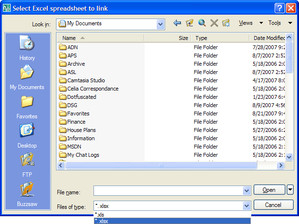
Open_file_dialog

15 responses to “Using AutoCAD's file selection dialog from .NET”

  1. Thank you, Kean.

    Roland

  2. Kean,
    Please don't stop just here. It will be great to see how to open the drawings and update the tables. Would it make a difference if the OpenFileDialog is called from a button on a user form? Thanks.

  3. It's coming, never fear... ๐Ÿ™‚

    I'm not sure what you mean by "open drawings", as I'm going to link in an Excel spreadsheet into the active drawing.

    Yes, you should be able to use an OpenFileDialog from a button on a form - I haven't looked at what happens if it's a modeless dialog, but a modal dialog should just work. A modeless dialog probably does, too, but I'd need to have a play around with it, to make sure. Unless someone else out there has already done this?

    Cheers,

    Kean

  4. My bad. I didn't rialize that you were opening one excel file to update the active drawing. Somehow, I though you were going to open one or more drawings and update them with information stored in an excel file. The years don't pass without damage. Thanks

  5. Danny Polkinhorn Avatar
    Danny Polkinhorn

    Kean, for the file types can you pass strings representing the document types?
    "*.xls Excel 97-2003 document"
    "*.xlsx Excel 2007 document"

    Excellent post, thanks!

    -Danny

  6. Hi Danny,

    Unfortunately not - OpenFileDialog wraps acedGetFileNavDialog(), which doesn't support filter descriptions. At least I'm 85% sure it doesn't. ๐Ÿ™‚

    Regards,

    Kean

  7. Hi Kean, first sorry for my english, I'm peruvian and my question is the next: Do you have an example where show me a form and it returns the corresponding data in a list?, like this for example:

    (15, "Carlos", 25.6, ("Ana", "Luis", "Pedro"), "YES")

  8. sorry, the list will be like this:

    (15 "Carlos" 25.6 ("Ana" "Luis" "Pedro") "YES")

    This list, I want to use it in a LISP aplication.

    Thank you Kean.

  9. Kean,

    I am using the Filedialog with the flags to AllowFoldersOnly. I want to specify the starting folder location. I tried entering it in the 2nd argument but that didn't work. How should I go about doing that in addition to having it allow folders only?

  10. David,

    This worked for me:

    OpenFileDialog ofd =
    new OpenFileDialog(
    "Select Excel spreadsheet",
    "c:\\temp\\",
    "xls; xlsx",
    "ExcelFileToLink",
    OpenFileDialog.OpenFileDialogFlags.AllowFoldersOnly |
    OpenFileDialog.OpenFileDialogFlags.DefaultIsFolder |
    OpenFileDialog.OpenFileDialogFlags.ForceDefaultFolder
    );

    Regards,

    Kean

  11. is there anyway to specify for it to have it filter multiple file types simultaneously? similar to the windows openfiledialog: "Points (*.csv, *.txt)|*.csv;*.txt"

    i might just end up using the windows file dialog...

  12. This will work, otherwise:

    PromptOpenFileOptions pfo = new PromptOpenFileOptions("Select Points file to load");
    pfo.Filter = "Points (*.csv, *.txt)|*.csv;*.txt";
    PromptFileNameResult pr = ed.GetFileNameForOpen(pfo);

    Kean

  13. What are the references being used in this? i think i might be missing some. I get a red squiggly under "forms" at System.Windows.Forms.DialogResult dr = ofd.ShowDialog();

    1. just kidding. found it. it was System.Windows.Forms of course.

Leave a Reply to Kean Walmsley Cancel reply

Your email address will not be published. Required fields are marked *