This question came in via a comment from Danny Polkinhorn on this post:
After AutoCAD has launched, I often have a need to determine the "Start In" directory specified in the shortcut (Right-click AutoCAD shortcut, Properties, Start in). Is there a way to determine what that directory is? I'm thinking I can use the path of the active drawing (either Drawing1 or the drawing they double-clicked on). Is that a fool-proof way?
This is an interesting topic, and raises the questions of what that the "Start In" setting is used for and how it can be modified.
The "Start In" property in a Windows shortcut specifies the initial "current directory" for a process. The concept of a current or working directory is common across the various Operating Systems I've worked with: processes have a current directory which is the default file-system folder used for certain operations (such as opening a drawing inside AutoCAD). It is also used by Windows when attempting to locate DLLs to load.
As Danny mentions, it is possible to specify the current directory for a process when it is launched: common ways are to edit the "Start In" property in the shortcut used to launch the application, to change the current directory (using CHDIR or CD) in a command-prompt window and launch the executable from there, or even to specify the working directory for an application to be launched from the Visual Studio debugger. And while the current directory is generally specified as the process starts, it can also change during execution.
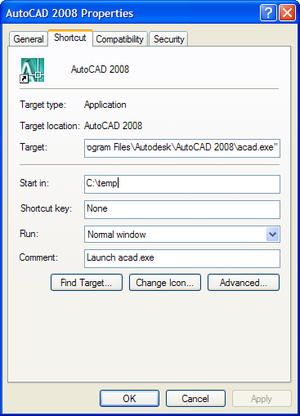
AutoCAD 2008's default "Start In" location is "C:\Program Files\Autodesk\AutoCAD 2008\UserDataCache\". Just to verify the process of querying it from an application, I copied the standard shortcut and modified the property to "c:\temp":
I know of two ways to query this property:
System.Environment.CurrentDirectory
System.IO.Directory.GetCurrentDirectory()
I created a simple command, CURDIR, to query this property and print the results.
using Autodesk.AutoCAD.Runtime;
using Autodesk.AutoCAD.ApplicationServices;
using Autodesk.AutoCAD.DatabaseServices;
using Autodesk.AutoCAD.EditorInput;
namespace CurrentDirectory
{
public class Commands
{
[CommandMethod("CURDIR")]
public void GetCurrentDirectory()
{
Document doc =
Application.DocumentManager.MdiActiveDocument;
Database db = doc.Database;
Editor ed = doc.Editor;
ed.WriteMessage(
"\nSystem.Environment.CurrentDirectory: "
+ System.Environment.CurrentDirectory
+ "\nSystem.IO.Directory.GetCurrentDirectory(): "
+ System.IO.Directory.GetCurrentDirectory()
);
}
}
}
This code works very well, but it may not return the results expected, depending on when the command is executed and - in particular - how the module is loaded. If we use demand-loading to load your module, it will generally returns the results we expect, assuming it runs early enough. Here's what's returned by the CURDIR command once it has demand-loaded our module in the instance of AutoCAD created by the modified shortcut:
Command: curdir
System.Environment.CurrentDirectory: C:\temp
System.IO.Directory.GetCurrentDirectory(): C:\temp
If, on the other hand, we use the NETLOAD command to load our module, we get the directory from which it was loaded:
Command: netload
Command: curdir
System.Environment.CurrentDirectory: C:\Program Files\Autodesk\ObjectARX
2008\samples\dotNet\Prompts\bin\Debug
System.IO.Directory.GetCurrentDirectory(): C:\Program Files\Autodesk\ObjectARX
2008\samples\dotNet\Prompts\bin\Debug
It took me some time to realise what was happening: it appears that the standard "file navigation" dialog inside AutoCAD - whether it's being used to open a drawing, load an application or perform an action on another type of file - sets the current directory to its most
recent location, the first time it is run and closed. So even if you escape from the OPEN command, the location to which you had browsed before cancelling becomes the new current directory.
Whether this is intuitive or expected isn't really for me to say (although I can understand why people might have an opinion). The moral of the story is that you cannot reliably determine the "Start In" folder for AutoCAD (or any other complex application, in reality), unless you ask it very early on in its execution. Code hosted in the process can modify this setting as it feels it needs to.
While not 100% reliable - there are no guarantees some other code has not modified the property beforehand - your best chance at identifying the "Start In" location is to have an application module load on AutoCAD start-up and query it there.
Update:
From AutoCAD 2016 onwards there's now a STARTINFOLDER system variable:
Command: STARTINFOLDER
STARTINFOLDER = "C:\Users\walmslk\Documents\" (read only)


Leave a Reply to Mudi Cancel reply