OK, OK, you are probably thinking "why would anyone ever want to use AutoCAD as an RSS reader?". The answer is, of course, "they wouldn't". The point of the next few posts is not actually to enable AutoCAD to be used to read RSS, but to show how it is possible to use F# and .NET to extract information from RSS feeds and create corresponding AutoCAD entities.
The reason I came onto this subject will also become more clear when you see my next post: I have been researching Asynchronous Workflows in F# - an uber-cool mechanism for managing concurrent, asynchronous tasks - and this seemed like a valid place to start. The problem I was looking for was one where I could simultaneously query and manipulate data from multiple sources, and then use that data to create AutoCAD entities. So, ultimately, the choice of RSS was both logical and completely irrelevant. 🙂
Today I'm going to present code that works synchronously: in a single thread we are going to query website after website to download individual RSS feeds and to process them, extracting information on the various posts listed in the RSS, and create HyperLink objects in AutoCAD attached to DBText entities. These will be laid out such that - if you really, really wanted to - you could use these entities to open the various posts in your internet browser.
The reason I chose F# was really the ability to succinctly launch and coordinate asynchronous tasks - something you'll see in the next post, of course. While I could have used C# or VB.NET, F# is also well suited to dealing with lists of data - such as we'll be extracting from the various RSS feeds.
I used F# 1.9.3.7 to run this code: you will certainly need this version to run the code in the following post, as the asynchronous HTTP request functionality is new to the 1.9.3.7 release.
A few additional notes on the implementation... The below code somehow manages to support various RSS standards: Atom, RSS 1.0, RSS 2.0. But some of it feels like a bit of a "hack". The code queries for the titles, links and descriptions contained in each feed, and does some programmatic manipulation to end up - in the cases I've tested - with equal numbers of each. Feeds that use Feedburner, for instance, contain various types of link, which made this very tricky, but the below code appears to work for most cases. The point of this exercise is not to implement an "all singing, all dancing" implementation for RSS consumption: I simply did what was needed to get a number of different blogs working. If a particular feed you add doesn't work, you will just get a single entry created inside AutoCAD. Please don't expect me to debug why it doesn't work for that feed, as that was never the point of this exercise (and I wasted far too long getting to this point, believe me :-).
Here's the F# code:
// Use lightweight F# syntax
#light
// Declare a specific namespace and module name
module MyNamespace.MyApplication
// Import managed assemblies
#I @"C:\Program Files\Autodesk\AutoCAD 2008"
#r "acdbmgd.dll"
#r "acmgd.dll"
open Autodesk.AutoCAD.Runtime
open Autodesk.AutoCAD.ApplicationServices
open Autodesk.AutoCAD.DatabaseServices
open Autodesk.AutoCAD.Geometry
open System.Xml
open System.Collections
open System.Collections.Generic
open System.IO
open System.Net
open Microsoft.FSharp.Control.CommonExtensions
// The RSS feeds we wish to get. The first two values are
// only used if our code is not able to parse the feed's XML
let feeds =
[ ("Through the Interface",
"http://blogs.autodesk.com/through-the-interface",
"http://through-the-interface.typepad.com/through_the_interface/rss.xml");
("Don Syme's F# blog",
"http://blogs.msdn.com/dsyme/",
"http://blogs.msdn.com/dsyme/rss.xml");
("Shaan Hurley's Between the Lines",
"http://autodesk.blogs.com/between_the_lines",
"http://autodesk.blogs.com/between_the_lines/rss.xml");
("Scott Sheppard's It's Alive in the Lab",
"http://blogs.autodesk.com/labs",
"http://labs.blogs.com/its_alive_in_the_lab/rss.xml");
("Lynn Allen's Blog",
"http://blogs.autodesk.com/lynn",
"http://lynn.blogs.com/lynn_allens_blog/index.rdf");
("Heidi Hewett's AutoCAD Insider",
"http://blogs.autodesk.com/autocadinsider",
"http://heidihewett.blogs.com/my_weblog/index.rdf") ]
// Fetch the contents of a web page, synchronously
let httpSync (url:string) =
let req = WebRequest.Create(url)
use resp = req.GetResponse()
use stream = resp.GetResponseStream()
use reader = new StreamReader(stream)
reader.ReadToEnd()
// Load an RSS feed's contents into an XML document object
// and use it to extract the titles and their links
// Hopefully these always match (this could be coded more
// defensively)
let titlesAndLinks (name, url, xml) =
let xdoc = new XmlDocument()
xdoc.LoadXml(xml)
let titles =
[ for n in xdoc.SelectNodes("//*[name()='title']")
-> n.InnerText ]
let links =
[ for n in xdoc.SelectNodes("//*[name()='link']") ->
let inn = n.InnerText
if inn.Length > 0 then
inn
else
let href = n.Attributes.GetNamedItem("href").Value
let rel = n.Attributes.GetNamedItem("rel").Value
if href.Contains("feedburner") then
""
else
href ]
let descs =
[ for n in xdoc.SelectNodes
("//*[name()='description' or name()='content' or name()='subtitle']")
-> n.InnerText ]
// A local function to filter out duplicate entries in
// a list, maintaining their current order.
// Another way would be to use:
// Set.of_list lst |> Set.to_list
// but that results in a sorted (probably reordered) list.
let rec nub lst =
match lst with
| a::[] -> [a]
| a::b ->
if a = List.hd b then
nub b
else
a::nub b
| [] -> []
// Filter the links to get (hopefully) the same number
// and order as the titles and descriptions
let real = List.filter (fun (x:string) -> x.Length > 0)
let lnks = real links |> nub
// Return a link to the overall blog, if we don't have
// the same numbers of titles, links and descriptions
let lnum = List.length lnks
let tnum = List.length titles
let dnum = List.length descs
if tnum = 0 || lnum = 0 || lnum <> tnum || dnum <> tnum then
[(name,url,url)]
else
List.zip3 titles lnks descs
// For a particular (name,url) pair,
// create an AutoCAD HyperLink object
let hyperlink (name,url,desc) =
let hl = new HyperLink()
hl.Name <- url
hl.Description <- desc
(name, hl)
// Download an RSS feed and return AutoCAD HyperLinks for its posts
let hyperlinksSync (name, url, feed) =
let xml = httpSync feed
let tl = titlesAndLinks (name, url, xml)
List.map hyperlink tl
// Now we declare our command
[<CommandMethod("rss")>]
let createHyperlinksFromRss() =
// Let's get the usual helpful AutoCAD objects
let doc =
Application.DocumentManager.MdiActiveDocument
let db = doc.Database
// "use" has the same effect as "using" in C#
use tr =
db.TransactionManager.StartTransaction()
// Get appropriately-typed BlockTable and BTRs
let bt =
tr.GetObject
(db.BlockTableId,OpenMode.ForRead)
:?> BlockTable
let ms =
tr.GetObject
(bt.[BlockTableRecord.ModelSpace],
OpenMode.ForWrite)
:?> BlockTableRecord
// Add text objects linking to the provided list of
// HyperLinks, starting at the specified location
// Note the valid use of tr and ms, as they are in scope
let addTextObjects pt lst =
// Use a for loop, as we care about the index to
// position the various text items
let len = List.length lst
for index = 0 to len - 1 do
let txt = new DBText()
let (name:string,hl:HyperLink) = List.nth lst index
txt.TextString <- name
let offset =
if index = 0 then
0.0
else
1.0
// This is where you can adjust:
// the initial outdent (x value)
// and the line spacing (y value)
let vec =
new Vector3d
(1.0 * offset,
-0.5 * (Int32.to_float index),
0.0)
let pt2 = pt + vec
txt.Position <- pt2
ms.AppendEntity(txt) |> ignore
tr.AddNewlyCreatedDBObject(txt,true)
txt.Hyperlinks.Add(hl) |> ignore
// Here's where we use the varous functions
// we've defined
let links =
List.map hyperlinksSync feeds
// Add the resulting objects to the model-space
let len = List.length links
for index = 0 to len - 1 do
// This is where you can adjust:
// the column spacing (x value)
// the vertical offset from origin (y axis)
let pt =
new Point3d
(15.0 * (Int32.to_float index),
30.0,
0.0)
addTextObjects pt (List.nth links index)
tr.Commit()
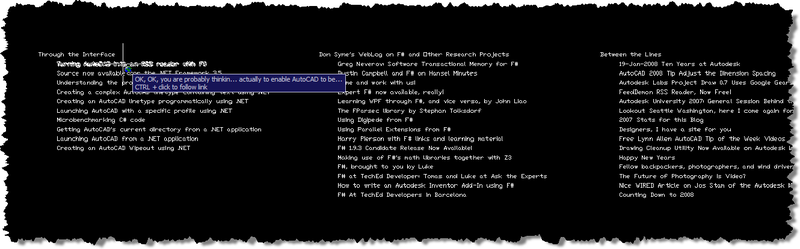
Here's a portion of what gets created when you run the "rss" command:
That's it for today - in the next post we'll look at how to use asynchronous workflows to run RSS extraction tasks in parallel.


Leave a Reply to Kean Walmsley Cancel reply