Showing a balloon notification using the InfoCenter API in AutoCAD 2009

This post is the latest in the series of closer looks at the new APIs in AutoCAD 2009. It dips into the InfoCenter API, a .NET API allowing you to customize and drive the InfoCenter feature inside AutoCAD.

To make use of this API you need to add Project References to two managed assemblies from the AutoCAD 2009 root folder: AcInfoCenterConn.dll and AdInfoCenter.dll.

Here's some C# code that will display a balloon notification to your users:

using Autodesk.AutoCAD.ApplicationServices;

using Autodesk.AutoCAD.Runtime;

using Autodesk.AutoCAD.AcInfoCenterConn;

namespace InfoCenterApp

{

  public class Commands

  {

    [CommandMethod("icb")]

    public void infoCenterBalloon()

    {

      InfoCenterManager icm =

        AcInfoCenterConn.InfoCenterManager;

      Autodesk.InfoCenter.PaletteMgr pm =

        icm.PaletteManager;

      pm.ShowBalloon(

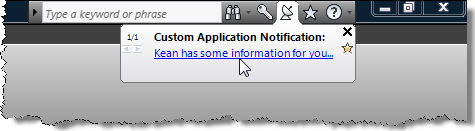
        "Custom Application Notification",

        "Kean has some information for you...",

        null, // Don't provide an icon

        new System.Uri(

          "http://blogs.autodesk.com/through-the-interface"

        ),

        5,   // Show the balloon for 5 seconds

        1    // Make it relatively slow to fade in

      );

    }

  }

}

Here's what you see when you run the ICB command:

Custom balloon notification

Update:

For AutoCAD 2010 things has changed a little. It seems you now need to include project references to AcWindows.dll and AdWindows.dll, as well as making some changes to your code. Some of the required types are now in the Autodesk.Internal namespace, which leads me to believe this may be subject to further change.

Here is some code that worked well for me:

using Autodesk.AutoCAD.ApplicationServices;

using Autodesk.AutoCAD.Runtime;

using Autodesk.AutoCAD.AcInfoCenterConn;

using Autodesk.Internal.InfoCenter;


namespace InfoCenterApp

{

  public class Commands

  {

    [CommandMethod("icb")]

    public void infoCenterBalloon()

    {

      InfoCenterManager icm = new InfoCenterManager();


      ResultItem ri = new ResultItem();

      ri.Category = "Custom Application Notification";

      ri.Title = "Kean has some information for you...";

      ri.Uri =

        new System.Uri(

          "http://blogs.autodesk.com/through-the-interface"

        );

      ri.IsFavorite = true;

      ri.IsNew = true;


      icm.PaletteManager.ShowBalloon(ri);

    }

  }

}

There's a version of the ShowBalloon() function which takes a XAML fragment as a parameter, for those of you into WPF.

Here's the notification it creates in AutoCAD 2010:
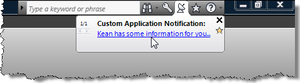
InfoCenter bubble in AutoCAD 2010

9 responses to “Showing a balloon notification using the InfoCenter API in AutoCAD 2009”

  1. Cool, I've been wanting to do that for a while now. Will it work in 2008? I see the DLL's are there.

  2. Sorry - this is a new API in 2009. I'll post something on TrayItem.ShowBubbleWindow() sometime next week, I hope.

    Kean

  3. it works in A2008, however, the balloon notificaction is justified to the left hand side of the screen with the 'communication dish' icon residing over the 'draw' menu even though the communication area is on the right hand side

  4. Thanks, Mark.

    Actually, yes - now that I've tried it in 2008, I see the balloon there, too (and on the right, as in 2009 - not sure what's different about your configuration).

    Our internal design docs implied this was 2009 only, but it seems it was there as an undocumented/unsupported API in 2008.

    Regards,

    Kean

  5. Well - it seems it's even documented (and therefore supported) for 2008.

    Kean

  6. Hi Kean. Everything is working perfectly in
    Civil 3d 2009. I inserted code on initializing my application when loading to AutoCAD. Only I have a little problem.
    It is working only in debug mode after netload.When I make setup to my application,
    a balloon notification not displayed on the start AutoCAD when application loaded.
    What's wrong? Thank you for your advice

  7. Hi Michael,

    I assume you're automatically loading your module at startup of Civil 3D? If so, this kind of thing sometimes happens when an application initialization depends on a document being available when one actually isn't yet there. I'm not 100% sure this is the case, but this is what it feels like based on the information you've provided.

    Why exactly the balloon notification mechanism should depend on a document being available is another question (not one that I have an answer for, off the top of my head).

    One option might be to "queue up" a command as your app initializes, which then executes once a doc is available. Check ads_queueexpr() in this post, to see if that helps.

    Regards,

    Kean

  8. Hi Kean, can you tell me how to make this work in AutoCAD 2010? It looks like the references have changed. I did include ACWindows but I am stuck on the InfoCenterManager.

    Thanks

    Jim Cameron

  9. Hi Jim,

    I've updated the post to include information on getting this to work in AutoCAD 2010.

    Cheers,

    Kean

Leave a Reply to Michael Tint Cancel reply

Your email address will not be published. Required fields are marked *