Some of you may remember my interest in fractals from these two previous posts. Well, while researching a problem in F# (related to the conversion of the last post's code to F#), I stumbled across this post from Luke Hoban, which contains some neat, recursive F# code to generate the Mandelbrot set, sending the result to the console as ASCII text. I couldn't resist modifying the code to generate Solids (filled shapes with 3 or 4 sides, as opposed to Solid3d objects) inside AutoCAD.
Here's the F# code:
#light
module Mandelbrot
#I @"C:\Program Files\Autodesk\AutoCAD 2009"
#r "acdbmgd.dll"
#r "acmgd.dll"
#nowarn "57"
open Autodesk.AutoCAD.Runtime
open Autodesk.AutoCAD.ApplicationServices
open Autodesk.AutoCAD.EditorInput
open Autodesk.AutoCAD.DatabaseServices
open Autodesk.AutoCAD.Geometry
open System
open Microsoft.FSharp.Math
let maxIteration = 50
let granularity = 400
let modSquared (c : Complex) = c.r * c.r + c.i * c.i
type MandelbrotResult =
| DidNotEscape
| Escaped of int
let mandelbrot c =
let rec mandelbrotInner z iterations =
if(modSquared z >= 4.0)
then Escaped iterations
elif iterations = maxIteration
then DidNotEscape
else mandelbrotInner ((z * z) + c) (iterations + 1)
mandelbrotInner c 0
[<CommandMethod("MB")>]
let drawMandelbrot () =
let doc =
Application.DocumentManager.MdiActiveDocument
let ed = doc.Editor
let db = doc.Database
let tm = doc.TransactionManager
use tr =
tm.StartTransaction()
// Get appropriately-typed BlockTable and BTR
let bt =
tr.GetObject
(db.BlockTableId,OpenMode.ForRead)
:?> BlockTable
let ms =
tr.GetObject
(bt.[BlockTableRecord.ModelSpace],
OpenMode.ForWrite)
:?> BlockTableRecord
// Now let's create our geometry
let xgran = 1.0 / Int32.to_float granularity
let ygran = 1.0 / Int32.to_float granularity
for y in [-1.0..xgran..1.0] do
for x in [-2.0..ygran..1.0] do
match mandelbrot (Complex.Create (x, y)) with
| DidNotEscape ->
let pt =
new Solid
(new Point3d(x,y,0.0),
new Point3d(x+xgran,y,0.0),
new Point3d(x,y+ygran,0.0),
new Point3d(x+xgran,y+ygran,0.0))
ms.AppendEntity(pt) |> ignore
tr.AddNewlyCreatedDBObject(pt, true)
| Escaped _ -> ()
tm.QueueForGraphicsFlush()
tm.FlushGraphics()
ed.UpdateScreen()
tr.Commit()
And here's what happens when we run the MB command:
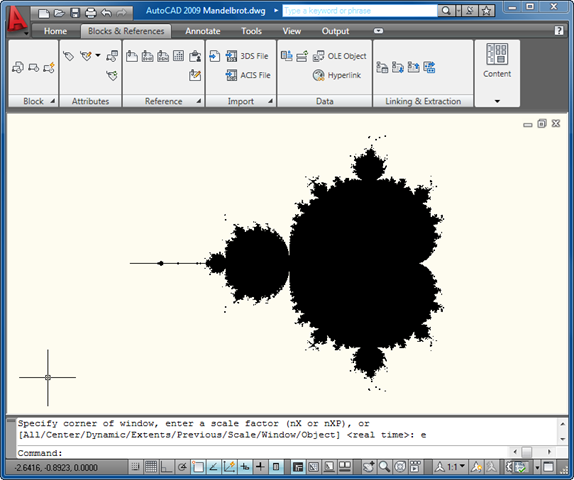
Here's a zoomed in area, so you can see the pixelation effect of using square Solids:

You can, of course, vary the maxIteration and granularity parameters in the code, if you want to play around with the results (or even modify the code to ask for the values at the command-line, to save rebuilding the app all the time).
A quick note: at first the app was running slowly and causing memory issues, before I enabled the 3Gb switch on my Vista machine. Now things are much better, but then that could also be because I've just rebooted. 🙂


Leave a Reply to Kean Walmsley Cancel reply