Implementing a CAD Standards plugin for AutoCAD using .NET

This question came in recently from a developer:

I've noticed a lot of talk about cad standards in my circles - any chance of a post on creating a CAD Standards plugin for use in the AutoCAD CAD Standards checker that companies could take and run with to produce their custom checks? For example, is the titleblock to company standard and inserted in the right space, are the xrefs inserted at 0,0 etc.

I thought this was an interesting one to handle: back when I was based in San Rafael I (along with members of my team) worked closely with the CAD Standards feature team (during the AutoCAD 2004 timeframe, if memory serves me correctly), to develop custom plugin samples showing how to use the CAD Standards API from C++ and Visual Basic. The core requirement was to develop plugins that checked actual geometry in the drawing - something the standard plugins did not, as they focused on symbol table records such as layers and linetypes. The concept we came up with, at the time, was contrived but fun: to compare circles inside a drawing with those stored in the associated CAD Standards template (.DWS) file, and suggest changing the colours of the "incorrect" circles to those of the most similar size in the DWS file.

While this concept is, of course, something that no-one in their right mind would ever want to implement in a real software package, the principles shown are generic enough in nature and (in my opinion, at least) quite relevant to anyone wanting to check geometry using a CAD Standards plugin - something in which the developer asking the above question is clearly interested.

The CAD Standards API is a COM API, so while we implemented the original plugin sample in C++, the main objective at the time was to create a sample in VB6. This meant some changes were needed to the original API implementation, as although it was a COM API, the original API specification relied on datatypes that were not usable from VB6 clients (there was at least one pure COM interface in the API set, and not Automation-compatible, if I recall correctly). That's also why the COM interface we need to implement for a CAD Standards plugin is IAcStPlugin2 rather than IAcStPlugin.

The original VB6 sample, along with an early port to VB.NET (in this case VB7, the first .NET implementation of Visual Basic) are available as part of this DevNote (accessible to ADN members). The DevNote is, admittedly, out-of-date... we're in the process of during a mass refresh of KB content on the ADN site, so this was a very timely request (and allows me to contribute in some way to the content migration effort :-). There's quite a lot to this sample, so here is the source along with the supporting files I created when writing this post.

Here's the C# code:

//

//  AutoCAD CAD Standards API Sample

//

//  CircleStandard.cs : CAD Standards Plugin Sample for C#

//

// This sample adds a custom plugin to the CAD Standards

// Drawing Checker.

//

// The sample plugin tests for a match between the color of a

// circle in the current drawing, and any of the colors of

// circles contained in the specified standards (.DWS) files.

// All the colors of the standard circles are considered as

// fix candidates of the circle being checked. The recommended

// fix object will be the standard circle having the nearest

// radius to the circle being checked.

using AcStMgr;

using Autodesk.AutoCAD.Interop.Common;

using MSXML2;

using System;

using System.Collections.Generic;

using System.Runtime.InteropServices;

namespace CircleStandard

{

  [ProgId("CircleStandard.CircleStandard")]

  public class CircleStandard : IAcStPlugin2

  {

    // Declare variables

    private ContextList m_contexts =

      new ContextList();

    private AcStManager m_mgr;

    private CircleStandard m_plugin;

    private AcadDatabase m_checkDb;

    private AcadDatabase m_dwsDb;

    private AcStError m_err;

    private object m_fixArray;

    private CircleCache[] m_cirCacheArray;

    private int m_recFixIndex;

    private int m_curIndex;

    private int m_fixCnt;

    private string m_propName;

    // Initialize

    // Initializes the plugin

    public void Initialize(AcStManager mgr)

    {

      // This is the only member function in which

      // the interface is passed an IAcStManager interface.

      // Store pointer to Manager object

      m_mgr = mgr;

      m_plugin = this;

    }

    // GetObjectFilter

    // Plugin populates the provided array with class names

    // of objects that it can check

    public object GetObjectFilter()

    {

      // In this case we're only interested in circles

      string[] filtArray = new string[1];

      filtArray[0] = "AcDbCircle";

      return filtArray;

    }

    // SetupForAudit

    // Sets the context for a plugin to check a drawing

    public void SetupForAudit(

      AcadDatabase db,

      string pathName,

      object objNameArray,

      object objPathArray,

      object objDbArray)

    {

      // This method defines the context in which a plug-in

      // will operate, specifically the drawing to check and

      // the DWS files that should be used to check the drawing.

      // Here we cache our DWS standards definitions and make

      // an initial cache of circles in the DWG to be checked.

      // NOTE: AcadDatabase objects contained in objDbArray

      // are ***not*** guaranteed to be valid after this call.

      // They should not be cached!!!

      if (db != null)

      {

        // Cache a pointer to the database

        m_checkDb = db;

        // pDb is the DWG to be checked

        // Store list of circles in drawing in m_ObjIDArray

        if (m_checkDb != null)

        {

          // Cache list of all circles in the current drawing

          foreach (AcadObject obj in

            m_mgr.get_ModelSpaceProxy(m_checkDb))

          {

            if (obj.ObjectName == "AcDbCircle")

            {

              m_contexts.Add(obj.ObjectID, true);

            }

          }

        }

        object[] dbArray = (object[])objDbArray;

        string[] nameArray = (string[])objNameArray;

        string[] pathArray = (string[])objPathArray;

        int i = 0;

        // Iterate over the DWSes and cache properties (color

        // and radius) of standard circles

        for (int iDWS = 0; iDWS < dbArray.Length; iDWS++)

        {

          // Get the DWS database

          m_dwsDb = (AcadDatabase)dbArray[iDWS];

          foreach (AcadCircle stdCircle in

            m_mgr.get_ModelSpaceProxy(m_dwsDb))

          {

            CircleCache cirCache = new CircleCache();

            // CircleCache is utility object for storing

            // properties

            // Cache properties (color and radius) of all

            // circles in the DWS database

            cirCache.color = stdCircle.color;

            cirCache.radius = stdCircle.Radius;

            cirCache.standardFileName = nameArray[iDWS];

            // pFix contains fix information to be passed back

            // to the manager later

            AcStFix fix = new AcStFix();

            fix.Description = "Color fix";

            fix.StandardFileName =

              cirCache.standardFileName;

            fix.FixObjectName =

              "Color: " +

              StripAcPrefix(stdCircle.color.ToString());

            if (fix.PropertyCount == 0)

            {

              fix.PropertyValuePut(

                "Color",

                stdCircle.color

              );

            }

            cirCache.pFix = fix;

            Array.Resize<CircleCache>(

              ref m_cirCacheArray,

              i+1

            );

            m_cirCacheArray[i++] = cirCache;

          }

        }

      }

    }

    // SetContext

    // Sets the objects to examine when iterating over errors

    public void SetContext(object objIdArray, bool useDb)

    {

   &
#160;  // If useDb is set to "true" (default), or if

      // objIdArray is blank, we use the database (we get

      // all ids for the current drawing). Otherwise, we

      // set supplied list of objIdArrays as our list.

      m_contexts.SetContext(useDb, objIdArray);

    }

    // Start

    // Initializes the error iterator mechanism

    public void Start(AcStError err)

    {

      // If pStartError is set to an error object, we should

      // only start checking from that error, not from the

      // beginning. Mostly we will just go the Next item at

      // this point...

      if (err != null)

      {

        long badId;

        badId = err.BadObjectId;

        // Find the index for BadObjectId in m_objIDArray

        for (

          m_curIndex = 0;

          m_curIndex < m_contexts.Count;

          m_curIndex++

        )

        {

          if (m_contexts[m_curIndex] == badId)

          {

            m_curIndex = (m_curIndex - 1);

            Next();

          }

        }

      }

      else

      {

        // No AcStError object was passed in. Start checking

        // from the very begining

        m_curIndex = -1;

        Next();

      }

    }

    // Next

    // Finds the next error in the current context

    public void Next()

    {

      m_err = null;

      if (m_contexts.Count > 0)

      {

        // Drawing contains AcDbCircle objects

        AcadCircle circle;

        bool foundErr;

        if (m_cirCacheArray.Length > 0)

        {

          // If we've not reached end of list, we first

          // increment current list index

          if (m_curIndex < m_contexts.Count - 1)

          {

            m_curIndex++;

            foundErr = false;

            while (m_curIndex < m_contexts.Count)

            {

              // Don't iterate beyond end of list

              // Retrieve object using its ObjectId

              try

              {

                circle =

                  (AcadCircle)m_checkDb.ObjectIdToObject(

                    (int)m_contexts[m_curIndex]

                  );

                // Try to find a circle with the same color from

                // the cached standard circle (Iterate over cached

                // standards)

                for (

                  int iCache = 0;

                  iCache < m_cirCacheArray.Length;

                  iCache++

                )

                {

                  if (circle.color.CompareTo(

                        m_cirCacheArray[iCache].color

                      ) != 0)

                  {

                    // If it doesn't match, we've found a potential

                    // error

                    foundErr = true;

                  }

                  else

                  {

                    // If it matches any one standard, then we can

                    // stop checking

                    foundErr = false;

                    break;

                  }

                }

                // Check for color differences

                if (foundErr)

                {

                  // We found an error so create a local error

                  // object

                  AcStError err = new AcStError();

                  err.Description = "Color is non-standard";

                  err.BadObjectId = circle.ObjectID;

                  err.BadObjectName =

                    StripAcPrefix(

                      circle.color.ToString()

                    );        &#
160;        

                  err.Plugin = m_plugin;

                  err.ErrorTypeName = "Color ";

                  err.ResultStatus =

                    AcStResultStatus.acStResFlagsNone;

                  if (err.PropertyCount == 0)

                  {

                    err.PropertyValuePut(

                      "Color",

                      circle.color

                    );

                  }

                  m_err = err;

                  foundErr = false;

                  break;

                }

              }

              catch

              {

              }             

              m_curIndex = (m_curIndex + 1);

            }

          }

        }

      }

    }

    // Done

    // Returns true if there are no more errors

    public bool Done()

    {

      return (m_err == null);

    }

    // GetError -- Returns the current error

    public AcStError GetError()

    {

      return m_err;

    }

    // GetAllFixes

    // Returns an array of IAcStFix objects for the given

    // error (note: The caller is responsible for releasing

    // the objects in this array)

    public void GetAllFixes(

      AcStError err,

      ref object fixArray,

      ref int recommendedFixIndex

    )

    {

      if (err != null)

      {

        IAcStFix[] arr =

          new IAcStFix[m_cirCacheArray.Length];

        ACAD_COLOR vErrorVal;

        recommendedFixIndex = -1;

        m_fixCnt = 0;

        // If we have a cache of fixes, then use that

        if (m_cirCacheArray.Length > 0)

        {

        &#
160; for (int i = 0; i < m_cirCacheArray.Length; i++)

          {

            vErrorVal =

              (ACAD_COLOR)err.PropertyValueGet("Color");

            if (vErrorVal.CompareTo(

                  m_cirCacheArray[i].color

                ) != 0)

            {

              // If color property of fix matches error, then

              // add to list of fixes.

              arr[i] = m_cirCacheArray[i].pFix;

            }

          }

          fixArray = arr;

          m_fixArray = fixArray;

          // Find the recommendedFixIndex

          // (we call this function to retrieve the index -

          // we don't need the returned fix object here)

          GetRecommendedFix(err);

          recommendedFixIndex = m_recFixIndex;

        }

        // Did we find a recommended fix along the way?

        if (recommendedFixIndex == -1)

        {

          // No recomended fix, so set the proper flag on the

          // error object

          err.ResultStatus =

            AcStResultStatus.acStResNoRecommendedFix;

        }

      }

    }

    // GetRecommendedFix

    // Retrieves a fix object that describes the

    // recommended fix

    public AcStFix GetRecommendedFix(AcStError err)

    {

      AcStFix recFix = new AcStFix();

      if (m_cirCacheArray.Length == 0)

      {

        err.ResultStatus =

          AcStResultStatus.acStResNoRecommendedFix;

      }

      else

      {

        // Get the objectId for this error

        long tmpObjID = err.BadObjectId;

        // Retrieve the object to fix from the DWG

        AcadCircle tmpCircle =

          (AcadCircle)m_checkDb.ObjectIdToObject(

            (int)tmpObjID

          );

        double radiusToBeChecked = tmpCircle.Radius;

        CircleCache cirCache = m_cirCacheArray[0];

        double diff =

          Math.Abs(radiusToBeChecked - cirCache.radius);

        m_recFixIndex = 0;

        // Attempt to get a fix col
or from the cached

        // m_CircleCacheArray

        // Rule: the color of the standard circle with the

        // nearest radius as the one to be fixed

        for (int i = 0; i < m_cirCacheArray.Length; i++)

        {

          if (diff >

              Math.Abs(

                radiusToBeChecked - m_cirCacheArray[i].radius

              )

            )

          {

            cirCache = m_cirCacheArray[i];

            diff =

              Math.Abs(radiusToBeChecked - cirCache.radius);

            m_recFixIndex = i;

          }

        }

        // Populate properties of the recommended fix object

        recFix.Description = "Color fix";

        recFix.StandardFileName =

          m_cirCacheArray[m_recFixIndex].

          standardFileName;

        recFix.FixObjectName = "Color";

        if (recFix.PropertyCount == 0)

        {

          recFix.PropertyValuePut(

            "Color",

            m_cirCacheArray[m_recFixIndex].color

          );

        }

      }

      return recFix;

    }

    // GetPropertyDiffs

    // Populates the provided arrays with the names of

    // properties that are present in the provided

    // error and fix objects (used to populate the fix

    // dialog with 'property name, current value, fix value')

    public void GetPropertyDiffs(

      AcStError err,

      AcStFix fix,

      ref object objPropNames,

      ref object objErrorValues,

      ref object objFixValues,

      ref object objFixableStatuses)

    {

      if (err != null)

      {

        string[] propNames = new string[0];

        string propName = "";

        string[] errorValues = new string[0];

        object objErrorVal = new object();

        string[] fixValues = new string[0];

        object objFixVal = new object();

        bool[] fixableStatuses = new bool[0];

        // Iterate error properties

        for (int i = 0; i < err.PropertyCount; i++)

        {

          err.PropertyGetAt(i, ref propName, ref objErrorVal);

          m_propName = propName;

          // Retrieve corresponding Fix property value

          try

          {

            fix.PropertyValueGet(propName, ref objFixVal);

            ACAD_COLOR errVal = (ACAD_COLOR)objErrorVal;

            ACAD_COLOR fixVal = (ACAD_COLOR)objFixVal;

            // Fix object has the same prop, so see if they match

            if (errVal.CompareTo(fixVal) != 0)

            {

              // Store error and fix properties in array ready to

              // pass back to caller

              Array.Resize<string>(ref propNames, i+1);

              propNames[i] = propName;

              Array.Resize<string>(ref errorValues, i+1);

              errorValues[i] = StripAcPrefix(errVal.ToString());

              Array.Resize<string>(ref fixValues, i+1);

              fixValues[i] = StripAcPrefix(fixVal.ToString());

              Array.Resize<bool>(ref fixableStatuses, i+1);

              fixableStatuses[i] = true;

            }

          }

          catch

          {

          }

        }

        // Initialize the arrays supplied by caller

        objPropNames = propNames;

        objErrorValues = errorValues;

        objFixValues = fixValues;

        objFixableStatuses = fixableStatuses;

        m_fixCnt++;

      }

    }

    // StripAcPrefix

    // Helper function to make color names prettier

    private string StripAcPrefix(string p)

    {

      if (p.StartsWith("ac"))

        return p.Substring(2);

      else

        return p;

    }

    // FixError

    // Takes an error and a fix object and attempts

    // to fix the error

    public void FixError(

      AcStError err,

      AcStFix fix,

      out string failureReason)

    {

      failureReason = "";

      if (err != null)

      {

        long badObjID = err.BadObjectId;

        // Retrieve object to fix from DWG

        AcadCircle badObj =

          (AcadCircle)m_checkDb.ObjectIdToObject(

            (int)badObjID

          );

        if (fix == null)

        {

          // If the fix object is null then attempt to get

          // the recommended fix

          AcStFix tmpFix =

            GetRecommendedFix(err);

          if (tmpFix == null)

          {

            // Set the error's result status to failed and

            // noRecommendedFix

            err.ResultStatus =

              AcStResultStatus.acStResNoRecommendedFix;

          }

          else

          {

            fix = tmpFix;

          }

        }

        if (fix != null)

        {

          // Fix the bad circle

          object sFixVal = new object();

          fix.PropertyValueGet(m_propName, ref sFixVal);

          ACAD_COLOR fixVal = (ACAD_COLOR)sFixVal;

          try

          {

            badObj.color = fixVal;

            err.ResultStatus =

              AcStResultStatus.acStResFixed;

          }

          catch

          {

            err.ResultStatus =

              AcStResultStatus.acStResFixFailed;

          }

        }

      }

    }

    // Clear

    // Clears the plugin state and releases any cached

    // objects

    public void Clear()

    {

      // Called just before a plugin is released.

      // Use this function to tidy up after yourself

      m_plugin = null;

      m_curIndex = -1;

      m_recFixIndex = -1;

      m_fixCnt = 0;

      m_propName = "";

      m_mgr = null;

      m_dwsDb = null;

      m_checkDb = null;

      if (m_err != null)

      {

          m_err.Reset();

          m_err = null;

      }

      if (m_cirCacheArray != null)

      {

        for (int i = 0; i < m_cirCacheArray.Length; i++)

        {

          if (m_cirCacheArray[i].pFix != null)

          {

            m_cirCacheArray[i].pFix.Reset();

            m_cirCacheArray[i].pFix = null;

          }

        }

      }

      m_contexts.Clear();

    }

    // CheckSysvar

    // Checks a system variable

    public void CheckSysvar(

      string sysvarName,

      bool getAllFixes,

      ref bool passFail)

    {

    }

    // StampDatabase

    // Returns whether the plugin uses information

    // from the database for checking

    public void StampDatabase(

      AcadDatabase db,

      ref bool stampIt

    )

    {

      // If the DWS contains circles, we stamp it by

      // returning stampIt as true, otherwise, returning

      // stampIt as false

      stampIt = false;

      foreach (

        AcadObject obj in

        m_mgr.get_ModelSpaceProxy(db)

      )

      {

        if (obj.ObjectName == "AcDbCircle")

        {

          stampIt = true;

          break;

        }

      }

    }

    // UpdateStatus

    // Updates the result status of the provided error

    public void UpdateStatus(AcStError err)

    {

    }

    // WritePluginInfo

    // Takes an AcStPluginInfoSection node and creates a

    // new AcStPluginInfo node below it (note: used by the

    // Batch Standards Checker to get information about the

    // plugin)

    public void WritePluginInfo(object objSectionNode)

    {

      IXMLDOMNode section =

        (IXMLDOMNode)objSectionNode;

      IXMLDOMElement xml =

        section.ownerDocument.createElement(

          "AcStPluginInfo"

        );

      IXMLDOMElement info =

        (IXMLDOMElement)section.appendChild(xml);

      info.setAttribute("PluginName", Name);

      info.setAttribute("Version", Version);

      info.setAttribute(

        "Description",

        Description

      );

      info.setAttribute("Author", Author);

      info.setAttribute("HRef", HRef);

      info.setAttribute("DWSName", "");

      info.setAttribute("Status", "1");

    }

    // Author

    // Returns the name of the plugin's author

    public string Author

    {

      get { return "Kean Walmsley, Autodesk, Inc."; }

    }

    // Description

    // Returns a description of what the plugin checks

    public string Description

    {

      get

      {

        return

          "Checks that circles in a drawing have a color " +

          "that matches those of a similar radius in an " +

          "associated standards file.";

      }

    }

    // HRef

    // Returns a URL where the plugin can be obtained

    public string HRef

    {

      get

      {

        return

          "http://blogs.autodesk.com/through-the-interface";

      }

    }

    // Icon

    // Returns the HICON property Icon

    public int Icon

    {

      get { return 1; }

    }

    // Name

    // Returns the name of the plugin

    public string Name

    {

      get { return "Circle color checker"; }

    }

    // Version

    // Returns the version of the plugin

    public string Version

    {

      get { return "2.0"; }

    }

    // CircleCache

    // Caches "standard" circle properties (Color, Radius)

    // from .DWS files, as well as pointers to the circle's

    // relevant AcStFix object

    private class CircleCache

    {

      public double radius;

      public ACAD_COLOR color;

      public string standardFileName;

      public AcStFix pFix;

    }

    // ContextList

    // Manages list of objects to check - either all in

    // database, or just those recently added or modified

    private class ContextList

    {

      // List of objects to use when not in database context

      List<long> m_altIdArray =

        new List<long>();

      List<long> m_dbIdArray =

        new List<long>();

      // All objects in database

      private bool m_useDb;

      // Return item from correct context list

      public long this[int index]

      {

        get

        {

          if (m_useDb)

            return m_dbIdArray[index];

          else

            return m_altIdArray[index];

        }

      }

      // Number of items in current list

      public int Count

      {

        get

        {

          if (m_useDb)

            return m_dbIdArray.Count;

          else

            return m_altIdArray.Count;

        }

      }

      // Flag to determine which conext list to return element

      // from

      // Select all database or just modified items for checking

      // (but also add any new ids to database array

      public void SetContext(bool useDb, object objContextArray)

      {

        if (!useDb && objContextArray != null)

        {

          m_useDb = false;

          int[] idArray = (int[])objContextArray;

          for (int i = 0; i < idArray.Length; i++)

          {

            long val = (long)idArray[i];

            m_altIdArray.Add(val);

            // Have to keep database list up to date

            m_dbIdArray.Add(val);

          }

        }

        else

        {

          // Clear

          m_useDb = true;

          m_altIdArray.Clear();

        }

      }

      public void Add(long id, bool useDb)

      {

        if (useDb)

          m_dbIdArray.Add(id);

        else

          m_altIdArray.Add(id);

      }

      // Clear both lists

      public void Clear()

      {

        m_altIdArray.Clear();

        m_dbIdArray.Clear();

      }

    }

  }

}

Here are some additional steps to turn the above code into a buildable project and then into a working plugin:

  1. Create a Windows Class Library project (in this case for C#)
  2. Copy and paste the code into a .cs file in the project (whether the default Class1.cs file or a new one)
  3. Add a project reference to the appropriate ObjectDBX Type Library (in this case "AutoCAD/ObjectDBX Common 17.0 Type Library")
  4. Add a project reference to the Microsoft XML Type Library (in my case I used "Microsoft XML, v6.0")
  5. Add a project reference to AcStMgr.dll. This is actually harder than just adding the reference via the IDE by browsing to the Type Library on the ObjectARX SDK. The IDE shows this error:
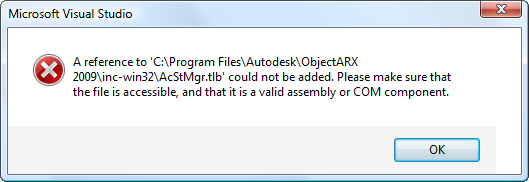
Type library import error

To get around this, we need to use the TLBIMP tool. Launch a "Visual Studio Command Prompt" (in my case by using Start -> All Programs -> Microsoft Visual Studio 2005 -> Visual Studio Tools -> Visual Studio 2005 Command Prompt), from which you should browse to the appropriate ObjectARX SDK include folder (in my case "c:\Program Files\Autodesk\ObjectARX 2009\inc-win32"), and enter "tlbimp acstmgr.tlb" into the command window:

Manual type library import

This creates an interop library (AcStMgr.dll) that can be added as a project reference instead of the original Type Library. When you add it, keep "CopyLocal = True", which will allow the later assembly registration step to work properly. The other assembly references can safely be changed to "CopyLocal = False", if you wish.

At this point the project should now build. Yay! 🙂

For the plugin to be loadable inside AutoCAD, a few more steps are needed, however.

  1. Open the project's AssemblyInfo.cs file (under Properties in the project browser window), and set the ComVisible assembly attribute to true:

// Setting ComVisible to false makes the types in this assembly not visible

// to COM components.  If you need to access a type in this assembly from

// COM, set the ComVisible attribute to true on that type.

[assembly: ComVisible(true)]

  1. From our command prompt, navigate to the location of the built assembly, and run "regasm /codebase CircleStandard.dll" (where CircleStandard.dll is the name of the assembly, whatever you've chosen to call it). Remember to use the /codebase flag - without this the COM information stored in the Registry will not include a reference to our assembly (only to the .NET Framework DLL that takes loads/hosts .NET assemblies that are also COM servers).
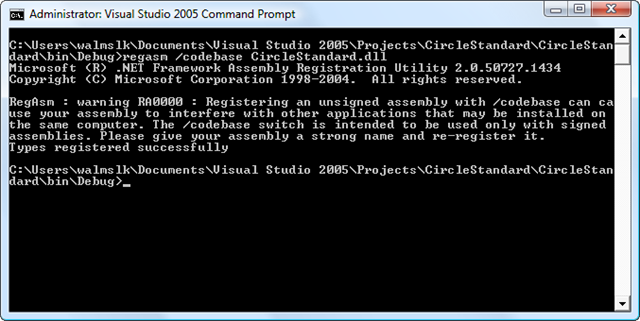
Register assembly for COM

  1. Create a .reg file with the following contents, and merge it into the Registry:

Windows Registry Editor Version 5.00

[HKEY_LOCAL_MACHINE\SOFTWARE\Autodesk\Drawing Check\Plugins2\CircleStandard.CircleStandard]

@="CircleStandard"

Once you've done that, you should now be able to launch AutoCAD and run the STANDARDS command, and check that our plugin exists:
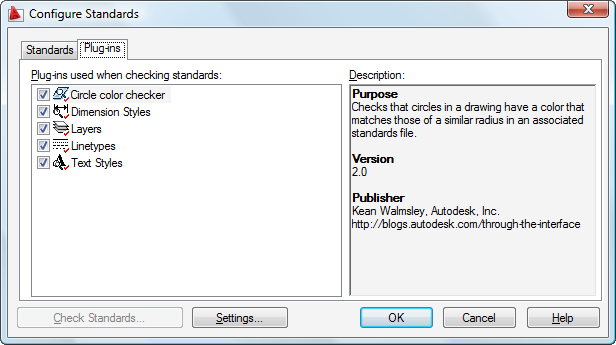
Configure Standards dialog

By the way - all the above steps are needed (at least as far as I'm aware) for the plugin to show up in the list. If you happen to see the "Error obtaining plugin description" message on the command-prompt, the chances are you've missed a step. In these cases I use a SysInternals (now Microsoft) tool called Process Monitor to diagnose the problem. This tool is the combines RegMon and FileMon - two fantastic tools I used to use very regularly, back in the day. It will help you determine whether AutoCAD is failing to find the information it needs from the Registry or from the file system.

Now let's see how we can use this sample.

Let's start by setting up a DWS file...

Inside a blank drawing, create a number of circles, each of different radii and colours. I simply used the colour index corresponding to the radius, but you can use whatever you like:
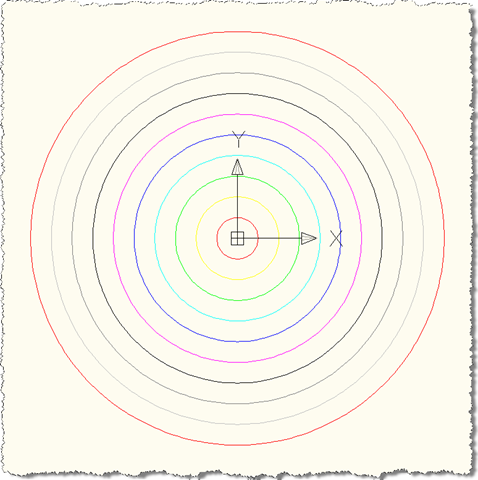
Creating our standards file

Save this as a DWS file (I called mine CircleColors.dws), which you can then add to a DWG containing circles you've created:
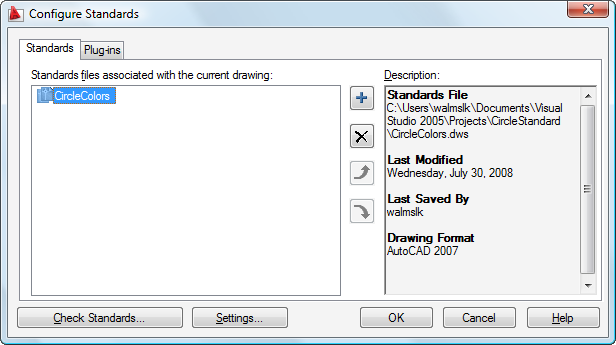
Adding the standards file

Then via the STANDARDS or CHECKSTANDARDS command you can start checking - and fixing - your circles' colours:
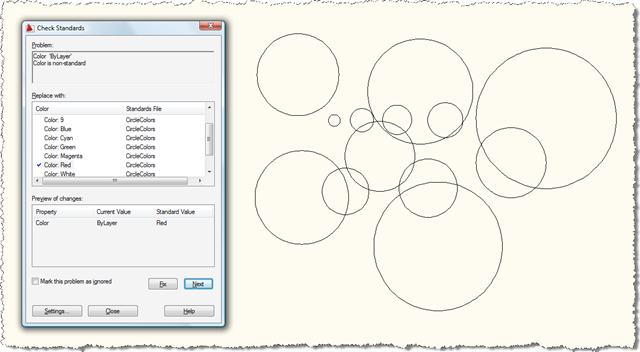
Checking our circle colors

Ending up with a nice set of colourful circles:
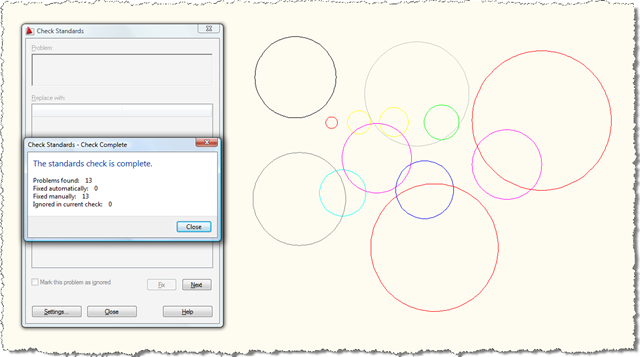
Check complete

You can also change the standards settings to display violation alerts and to automatically fix issues:
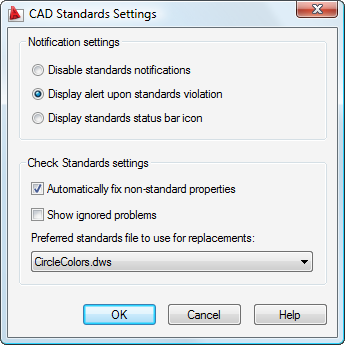
Standards settings dialog

You should now see the alert message when new circles are created that don't have the correct colour:
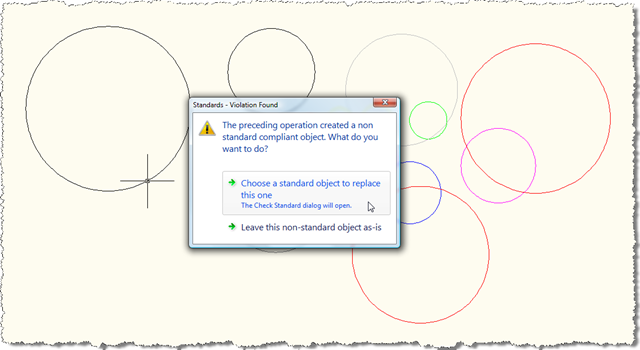
Automatic standards checking

Automatic fixing certainly streamlines the fixing of standards violations - changing the colour to the one recommended by the plugin - but it won't stop the user from having to click through a couple of dialogs.

Well, that's it for today... hopefully you will find this sample a useful basis for implementing more specific requirements for geometry-oriented standards-checking.

Update:

See this more recent blog post for an updated project and set of instructions for AutoCAD 2015.

33 responses to “Implementing a CAD Standards plugin for AutoCAD using .NET”

  1. Fernando Malard Avatar
    Fernando Malard

    Kean, good job.

    Is it possible to add a XData filter?

    Something like filter to select only those AcDbCircle entities who have a specific XData information.

    Further, for the fix routine, is it possible to add some basic user interaction like a dialog for the user enter fixing parameters?

    Regards,
    Fernando.

  2. Fernando Malard Avatar
    Fernando Malard

    Kean, two more questions:

    - Will this work with AutoCAD 2008?
    - Standards check can support custom entities?

    Thank you.

  3. Hey Kean,

    Thanks very much for taking the request and turning it into a post. I did manage, with a bit of head scratching, to translate the old VB.NET sample and the ARX SDK sample, to a C# plugin.

    I've posted this at theswamp here:

    theswamp.org/ind...

    One thing I noticed during this exercise and unless I'm fundamentally missing some key point somewhere in the process, is that for a check to be made and a fix offered up, there must exist an 'object in error' in the drawing you're trying to check.

    As an example, a company might say to a 3rd party subby, 'thou shalt use our titleblock and it must be xrefed into paperspace'...something along those lines. So, you have a company DWS with a titleblock xrefed into paperspace and all that, then you proceed to check a drawing.

    You get back alist of Xrefs (as that was your filter) but none of them are the company titleblock. They might all be in paperspace and pass eveything else, but they are not THE titleblock....does that make sense? You don't have an 'error object' as the titleblock doesn't exist, but the drawing from the subby is clearly in violation.

    Do you have any thoughts?

    Cheers,
    Glenn.

  4. Fernando -

    On XData... I believe filtering is done only on object type, but you could certainly choose only to check (and report errors for) objects with appropriate XData attached.

    On UI... I don't see a way to customize the fix as it's being offered to the user... but you could have configuration settings that your fix routine accesses to help it make decisions.

    On version... yes - it should work with all releases back to 2004, although the alert dialog changed with 2009.

    On custom objects... yes, although I expect they would need to be accessible through COM (although it may be that a .NET interface works as well - the current sample doesn't make use of AutoCAD's .NET API at all, so I haven't tried it).

    Glenn -

    I've been thinking about it, and I don't see a way to do this with the current standards-checking mechanism. I can see how it would be beneficial, though: I suggest submitting a wishlist request via ADN.

    Kean

  5. Kean,

    I suspected this would be the case. Thanks for the suggestion about the wishlist - I will see if I can do so.

    Cheers,
    Glenn.

  6. Hi kean

    I have a question.
    How can I remove a vertex from polyline2d.

    Thanks & regards
    Yogesh sheel mishra

  7. Yogesh,

    In future please post your general questions to the ADN site, if you're a member, or to the AutoCAD .NET Discussion Group.

    If you're using heavyweight Polyline2d objects, you should be able to open the individual vertex (iterating through their ObjectIds using foreach()), and then Erase() the one you wish to remove. At least that's what I recall.

    But again - your next question should go elsewhere if not specifically related to a post.

    Kean

  8. I am very Sorry for this and thanks for this great help.

  9. Dennis M. Knippel Avatar
    Dennis M. Knippel

    Kean,

    At the beginning of this article, you state: "The CAD Standards API is a COM API". Do you know if the AutoCAD/MAP 2009 ObjectARX SDK exposes a managed wrapper for the CAD Standards API? I'm guessing no, because I probably would have found a similiarly named DLL in the SDK directories?

    Also, do you know if AutoCAD MAP 2009 loads the CAD Standards Manager module (or would application be a more appropriate term?) by default or will I need to load it before calling the CHECKSTANDARDS command?

    Lastly, would I be correct to assume that within the context of the CAD Standards Manager Framework, the only way to "check standards" is to call the "CHECKSTANDARDS" command? In other words, is there some CAD Standards Manager API method that will allow me to invoke the checking of standards? (you mentioned in another article that using the command line was not ideal; rather using the API is usually more appropriate except for a few cases in which the API doesn't expose a method corresponding to the command approach --> is this one of those cases?).

    The CAD Standards Manager seems to be a rare bird, at least when it comes to finding detailed documentation. I hope my questions are not to newbie-ish.

    Thank you,
    Dennis

  10. Kean Walmsley Avatar

    Dennis,

    To the best of my knowledge there is no managed wrapper exposed for the CAD Standards engine: as COM is very easily callable from .NET languages, this isn't considered a high priority.

    Looking at the Registry on my system, I can see the "AcadStandards" module is set up to demand-load the first time either of the STANDARDS or CHECKSTANDARDS commands are called. You could modify the Registry to have it loaded on start-up, if you so chose (for more information on demand-loading, this post is likely to be of help), but I don't think it's needed.

    By the way, I don't have Map 3D installed, but I have no reason to suspect it to be any different to vanilla AutoCAD, in this regard.

    Regards,

    Kean

  11. Dennis M. Knippel Avatar
    Dennis M. Knippel

    Kean,

    Thank you so much for your reply! You blog is very useful and your biography is impressive and inspiring. I value your opinion.

    So, was my intuition correct that the only way to programatically "check standards" (within the contexts of the AutoCAD CAD Standards Manager) is to invoke the CHECKSTANDARDS command via the editor command line?

    Also, is it possible to programatically configure the CAD Standards Manager or is this only possible via the UI?

    The drive behind these and the previous questions is that I have a client asking me to develop an automated QA tool to enforce some business rules per DWG. I've presented the option of making use of the existing CAD Standards framework within AutoCAD. However, it's not clear yet how customizable this framework is. For example, is there a way to programatically suppress the UI dialog box yet capture the output of the CHECKSTANDARDS run?

    Thank you,
    Dennis

  12. Kean Walmsley Avatar

    Dennis,

    From what I remember (and it's been a while since I spent much time looking at this), you have a few modes of working:

    1. Interactively via the CHECKSTANDARDS UI.
    2. Automatically as standards violations are detected (automatic fixing also being an option).
    3. Via the Batch Standards Checker (a standalone application not dependent on AutoCAD).

    I suggest investigating these three options, to see which (if any) might allow you to meet your client's requirements.

    Regards,

    Kean

  13. Dennis M. Knippel Avatar
    Dennis M. Knippel

    Kean,

    Under the "Contents" tab of the ObjectARX for AutoCAD 2009 help files, there appears to be two child nodes under the "ObjectARX Reference" parent node. The child nodes in question are:

    eTransmitInterfaces
    CAD Standards Interfaces

    However, the subcategories under each respective child node appear to be "swapped". In other words, under eTransmitInterfaces the reader finds subcategories such as IAcStManager2 Interface while under CAD Standards Interfaces the reader finds subcategories such as ITransmittalFile Interface.

    I'm hoping this is just a bug of the ObjectARX help files in which the children's subcategories are "swapped". If not, then I have a significant misunderstanding of the CAD Standards Framework.

    Could you please advise....

    Thank you,
    Dennis

  14. Dennis,

    I see what you mean - this is indeed a documentation bug.

    I've just checked the ObjectARX Reference on the 2010 SDK and it's been fixed there.

    Regards,

    Kean

  15. Dennis M. Knippel Avatar
    Dennis M. Knippel

    Kean,

    I'm having trouble instantiating the AcStManager object. When I get to the following line of code in my C# class method:

    AcStMgr.AcStManager stdManager = new AcStManagerClass();

    I receive the following error:

    System.Runtime.InteropServices.COMException was unhandled
    Message="Retrieving the COM class factory for component with CLSID {A40F6A0A-CD3E-4439-9425-45A7623EF6B7} failed due to the following error: 800401f9."

    I'm pretty sure I've created the AcStMgr.dll correctly per your aforementioned instructions within this blog post. For example: "tlbimp acstmgr.tlb". After this, I'm able to add a reference to the new AcStMgr.dll and compile.

    Am I doing something fundamentally wrong with regard to instantiating a COM object from C#? (From what I've read, one of the benefits of using the tlbimp tool to create a *.dll is to hide the complexities of using COM objects from within .NET code, yes?)

    OR

    Am I not allowed to use the AcStMgr.AcStManager directly (read: Autodesk doesn't want me messing with this class)?

    If I can't make use of this class directly, then I seem to be left with two options:

    Invoke the STANDARDS or CHECKSTANDARDS commands of the "AcStd.arx" extension.

    However, this then requires UI input, whereas my client would like the respective configuration and execution of these two commands to be done programatically.

    So, can I make use of the AcStMgr.AcStManager class programatically or is this just not part of the public API at this time?

    Again, thank you for your help. The CAD Standards Framework is proving to be a rare bird indeed and finding anyone that knows its inner workings is a challenge.

    Dennis

  16. The AcStManager class is not designed to meant to instantiated and used directly: it gets passed in to your plugin's Initialize function, from where it can be stored and used at the appropriate times.

    I've outlined the options I see for you using the Standards framework in a previous comment. Have you investigated options 2 and 3, as yet? This one is, unfortunately, a dead-end, in my opinion.

    Kean

  17. Dennis M. Knippel Avatar
    Dennis M. Knippel

    Kean,

    I'm really sorry to nag again with these questions, but I'm rackin' me brain trying to finalize a solution to my client's needs --> and you're the only one who seems to have detailed knowledge about the CAD Standards framework, much less even know that AutoCAD has this feature. 😉

    Per your last suggestion:

    Options 3 (Batch Standards Checker) is not promising since the *.exe is not programable (that I know of), and the *.chx configuration file the Batch Standards Checker creates/manages is not supportable.

    Option 2 might possibly work but unfortunately, it makes two key assumptions:

    1. --> The CAD Standards framework has already been configured (e.g.: somehow somebody has already told AutoCAD which Plug-Ins to use and what to do when a violation occurs such as 'Attempt to fix', ignore, etc.). This hurdle could be overcome if I could programatically configure these application settings. Where are these settings stored? I'm guessing the registry --> manipulating these will be a hard sell to my client. Are they set in a User profile somewhere, perhaps?

    2. --> The DWG has already been configured (e.g.: somehow, somebody has already told the DWG to use a particular DWS(s)). This hurdle could be overcome if I could programatically configure these database settings. Where are these settings stored? I'm guessing a symbol table record somewhere? --> manipulating these would be feasible. Could you or your CAD Standards buddies that you worked with in San Francisco provide any clues?

    The AutoCAD and ObjectARX SDK help files claim the CAD Standards framework is ideal for a CAD Manager role in a collaborative design environment, but I'm questioning that claim since it seems to require explicit framework settings to initially be configured interactively on each engineer's workstation. Don't get me wrong, I think the CAD Standards framework is a great idea and the Plug-In feature is the right tool to provide developers. However, the semantics of implementing the framework are limiting to say the least.

    In your last post, you used the term "dead-end". Would it be safe to say at this point that I've discovered the unpleasant limitations of the CAD Standards framework? AND... In light of my client requirements, would I be better off developing my own version of the CAD Standards basic functionality of looping through a filtered set of DWG objects, comparing them to DWS objects, providing a "fix" mechanism, output metrics, etc.? This approach would at least give me the ability to programatically configure all aspects of a QA solution... but I really don't want to reinvent the wheel.

    Again, your advice is greatly appreciated.

    Thank you,
    Dennis

  18. 1. I don't know - I suggest using the Process Monitor from Microsoft Sysinternals to see if the info is persisted anywhere you can access.

    2. I just had a quick look using the ARXDBG tool on the ObjectARX SDK: the STANDARDS command creates a new dictionary off the Named Objects Dictionary and places an XRecord referring to the attached .DWS in it. It's not clear this is something you'll be able to duplicate programmatically, but I thought I'd mention it.

    I'm no expert in configuring or deploying CAD Standards, so please don't assume my advice is definitive in any way.

    As to whether you should roll your own... it depends on how flexible/extensible you need to make it. A lot of companies have their own standards implementations as their requirements are very specific.

    Regards,

    Kean

  19. Dennis M. Knippel Avatar
    Dennis M. Knippel

    Kean,

    Again with the great information! Your blog is one of the 3% of blogs that actually add value.

    Thank you,
    Dennis

  20. Dennis M. Knippel Avatar
    Dennis M. Knippel

    Kean,

    I just wanted to post a quick follow up to a question/statement I made earlier in hopes that it may shed some light to others attempting the same level of insanity as I have been...

    The statement I made was that perhaps the CAD Standards framework was not well suited for a CAD Manager role in a collaborative design environment. I felt this way mainly because of two hurdles I ran up against. The first of these was the inability to programmatically specify which CAD Standards Plug-Ins to use. The second was the inability to programmatically specify which CAD Standards *.DWS file to use. Unfortunately, the ObjectARX SDK does not expose any API's for explicitly setting these. Now, as far as the first point (Plug-In specification), I did find out where in the registry this is found and yes, I could just manipulate this registry entry. And, as you had suggested for the second point (*.DWS specification) I could insert an XRecord into the Named Objects Dictionary. However, here are two more robust ways to achieve points one and two above...

    Point 1 (Plug-In specification) --> This can be automated by loading a CUI profile that explicitly identifies which Plug-In to use. Furthermore, this can be managed at the enterprise level via AutoCAD Enterprise CUI feature.

    Point 2 (*.DWS specification) --> This can be automated by the use of a template that already has the *.DWS(s) identified. Again, like in point 1, this can be managed at the enterprise level.

    OK, that's all. Hope this helps someone out there.

    Good Karma: +1
    Evil Twin Persona: 0

    Prost!
    Dennis

  21. Dennis M. Knippel Avatar
    Dennis M. Knippel

    Kean,

    Long time no chat --> hope all is going great!

    We are the night before a client demo and I have a bizarre bug that has come up in my CAD Standards PlugIn.

    When trying to assign an object ID to the AcStError.BadObjectId property I receive the following error:

    Error HRESULT E_FAIL has been returned from a call to a COM component.

    It is very bizarre and this assignment has worked in the past. And I think I've tried just about every cast I can to assign a value to AcStError.BadObjectId (which appears to be an Int or Int32 under the covers).

    Any ideas?

    Thanks in advance,
    Dennis

  22. Dennis M. Knippel Avatar
    Dennis M. Knippel

    Kean,

    OK, Let's just forget that last post --> I was using a cached DWS object that (as you identified in your sample code) is invalid outstide of the 'SetupForAudit' member. And I definitely was not within the 'SetupForAudit' member.

    Thanks again,
    Dennis

  23. Kean,

    Great article! I was looking for an example, and the only thing I still don't quite understand is what needs to be added in order to work with the Batch Checker. Which method is responsible for writing a node to the chk file?

    Thanks,
    -Robert

  24. Robert,

    I now don't whether recall whether I tried this with the Batch Checker, but I don't believe anything else is needed. Presumably the .chk file gets populated by the existing methods, somehow.

    Have you given it a try, already?

    Regards,

    Kean

  25. Kean,

    The batch checker hangs using your example. The ObjectARX documentation states that the UpdateStatus and WritePluginInfo are the methods which provide data to the Batch Checker. However, I cannot find information on how the UpdateStatus could or would write to the XML node of the chk file. My guess is the IAcStError that is passed into UpdateStatus may need to call it's WriteData method?

    -Robert

  26. Robert,

    You're probably right... this is something that will take some time for me to look into (and I probably won't have any better information on you to work it out, all told).

    If you happen to figure it out before I do, please do post a comment.

    Regards,
    Kean

  27. Kean,

    I know this is an older post, but for the benefit of anyone else who comes along this, you've got an accidentally misleading comment on line 384-385 of the source code. In the method GetAllFixes(), you've got:

    // If color property of fix matches error, then add to list of fixes.
    if (vErrorVal.CompareTo(
    m_cirCacheArray[i].color
    ) != 0)

    While refactoring this for my own use (making a plugin base class to be inherited by more object-type specific plugins), I saw the comment and assumed I'd accidentally flipped the comparison. Because I still had your comment in there, it took quite a while to chase that one down!

  28. Thomas Wegener Avatar
    Thomas Wegener

    Kean,

    great article (as always)!

    Just to provide the community with changes made by me to run it for 2011 64bit:
    - "Any CPU" doesn't work. Built it on a x64 platform
    - Removed the (int) cast in the ObjectIdToObject() calls
    - To get circle changes checked, I changed SetContext() to
    public void SetContext(object objIdArray, bool useDb)
    {
    if (objIdArray == null || objIdArray as long[] == null) {
    m_contexts.SetContext(useDb, objIdArray);
    }
    else {
    m_contexts.Clear();
    foreach (long id in (long[])objIdArray) {
    if (m_checkDb.ObjectIdToObject(id) as AcadCircle != null)
    m_contexts.Add(id, true);
    }
    }
    }

    Best Regards
    Thomas

  29. Kean Walmsley Avatar

    Thomas,

    Thank you - much appreciated, on all fronts! 🙂

    Regards,

    Kean

  30. Kean,
    I have some problem with your plugin example, when i run it in "Batch Standards Checker". It works good in AutoCAD, but in batch checker something wrong. When i start check, checker said something like this(i translate it):
    "Start check
    Check drawing 1 of 1, circles.dwg... Found 13 errors"
    and thats all. But with other plugins checker said "Check is complete" and open a report.
    In debug mode method "WritePluginInfo" was not called, the last method was "Clear".
    In your project i have just add a reference on AcStMgr. AutoCAD version is 17.2

  31. I'm afraid I don't know what's wrong, here: I don't believe I originally tested the plugin thoroughly with the Batch Standards Checker, just with the CHECKSTANDARDS AutoCAD command. And as this post is now a few years old, it would now be hard for me to analyse.

    I suggest posting your question via ADN or to the AutoCAD .NET Discussion Group.

    Best regards,

    Kean

    1. Kean,
      I appreciated your article. One thing that I am noticing is that when we x-reference a base drawing into other drawings, and the base drawing has a CAD Standard affiliated with it, any attempt to change a layer color will result in a standards violation error. Another referred to the CAD Standards as similar to a X-ref. Is there a way to shut-off the Standards check once the file is X-ref'd into another drawing?

      1. Kent,

        This sounds like a question for Product Support, rather than one that relates to custom standards implemented in code. In either case, unless it relates specifically to what I've shown here, then I'm going to have to suggest posting to the relevant discussion forum (I really don't have time to provide support to people).

        Regards,

        Kean

Leave a Reply to Yogesh Cancel reply

Your email address will not be published. Required fields are marked *