Interfacing an external COM application with a .NET module in-process to AutoCAD

This question came in recently by email from Michael Fichter of Superstructures Engineers and Architects:

Could you suggest an approach that would enable me to drive a .NET function (via COM) that could return a value from .NET back to COM? I have used SendCommand in certain instances where return values were not needed.

Michael's referring to a technique used in this previous post, which shows how to launch AutoCAD from a .NET executable via COM and then launch a command which can then safely interface with AutoCAD in-process via its managed API.

And yes, this technique is fine if you don't want to return results, but has limitations if you do. You could populate AutoCAD user variables or create a file for the calling application to read but such approaches are cumbersome.

So… in spite of my initial doubtful reaction I decided to give it a try. Here are the steps I used to get this working…

First we create a Class Library for our in-process component with references to the usual acmgd.dll and acdbmgd.dll assemblies, adding the following C# code:

using Autodesk.AutoCAD.ApplicationServices;

using Autodesk.AutoCAD.EditorInput;

using Autodesk.AutoCAD.DatabaseServices;

using Autodesk.AutoCAD.Runtime;

using Autodesk.AutoCAD.Geometry;

using System.Runtime.InteropServices;


namespace LoadableComponent

{

  [ProgId("LoadableComponent.Commands")]

  public class Commands

  {

    // A simple test command, just to see that commands

    // are loaded properly from the assembly


    [CommandMethod("MYCOMMAND")]

    public void MyCommand()

    {

      Document doc =

        Application.DocumentManager.MdiActiveDocument;

      Editor ed = doc.Editor;

      ed.WriteMessage("\nTest command executed.");

    }


    // A function to add two numbers and create a

    // circle of that radius. It returns a string

    // withthe result of the addition, just to use

    // a different return type


    public string AddNumbers(int arg1, double arg2)

    {

      // During tests it proved unreliable to rely

      // on DocumentManager.MdiActiveDocument

      // (which was null) so we will go from the

      // HostApplicationServices' WorkingDatabase


      Database db =

        HostApplicationServices.WorkingDatabase;

      Document doc =

        Application.DocumentManager.GetDocument(db);


      // Perform our addition


      double res = arg1 + arg2;


      // Lock the document before we access it


      DocumentLock loc = doc.LockDocument();

      using (loc)

      {

        Transaction tr =

          db.TransactionManager.StartTransaction();

        using (tr)

        {

          // Create our circle


          Circle cir =

            new Circle(

              new Point3d(0, 0, 0),

              new Vector3d(0, 0, 1),

              res

            );


          cir.SetDatabaseDefaults(db);


          // Add it to the current space


          BlockTableRecord btr =

            (BlockTableRecord)tr.GetObject(

              db.CurrentSpaceId,

              OpenMode.ForWrite

            );

          btr.AppendEntity(cir);

          tr.AddNewlyCreatedDBObject(cir, true);


          // Commit the transaction


          tr.Commit();

        }

      }


      // Return our string result


      return res.ToString();

    }

  }

}

You'll see we mark our Commands class as having the ProgId of "LoadableComponent.Commands" (this doesn't have to follow the namespace.class-name convention, if you'd rather use something else). Be sure to edit the AssemblyInfo.cs file to make sure the ComVisible assembly attribute is set to true (the default is false), otherwise no classes will be exposed via COM.

The code is mostly pretty simple… it includes a command just to make sure commands are registered when the assembly loads. The AddNumbers() function uses a slightly different technique to get the working database and its document, mainly because I found MdiActiveDocument to be null when I needed it. I suspect this is simply a timing issue, and that if AutoCAD had the time to fully initialize we wouldn't have to code this defensively. There may well be a clean way to wait for this to happen (comments, anyone?).

Once we've built the assembly it needs to be registered via COM. The way I tend to do this is via a "Visual Studio Command Prompt" (which has the path set nicely to call the VS development tools). I browse to the location of my assembly and then run "regasm LoadableComponent.dll" (you can specify the optional /reg parameter if you'd rather create a .reg file rather than modifying the Registry directly).

Now we can create an executable project to drive this component with COM references to the AutoCAD Type Library (I'm using the one for AutoCAD 2010) and the AutoCAD/ObjectDBX Common Type Library (AutoCAD 2010's is version 18.0), as well as a reference to our .NET assembly (which I have called LoadableComponent.dll).

Inside the default form created with the executable project we can add a button behind which we copy the code in the post referred to earlier, adding some logic to load our component and dynamically execute its AddNumbers() function:

using Autodesk.AutoCAD.Interop;

using System.Windows.Forms;

using System.Runtime.InteropServices;

using System.Reflection;

using System;

using LoadableComponent;


namespace DrivingAutoCAD

{

  public partial class Form1 : Form

  {

    public Form1()

    {

      InitializeComponent();

    }


    private void button1_Click(object sender, EventArgs e)

    {

      const string progID = "AutoCAD.Application.18";


      AcadApplication acApp = null;

      try

      {

        acApp =

          (AcadApplication)Marshal.GetActiveObject(progID);

      }

      catch

      {

        try

        {

          Type acType =

            Type.GetTypeFromProgID(progID);

          acApp =

            (AcadApplication)Activator.CreateInstance(

              acType,

              true

            );

        }

        catch

        {

          MessageBox.Show(

            "Cannot create object of type \"" +

            progID + "\""

          );

        }

      }

      if (acApp != null)

      {

        try

        {

          // By the time this is reached AutoCAD is fully

          // functional and can be interacted with through code


          acApp.Visible = true;


          object app =

            acApp.GetInterfaceObject("LoadableComponent.Commands");


          if (app != null)

          {

            // Let's generate the arguments to pass in:

            // an integer and a double


            object[] args = { 5, 6.3 };


            // Now let's call our method dynamically


            object res =

              app.GetType().InvokeMember(

                "AddNumbers",

                BindingFlags.InvokeMethod,

                null,

                app,

                args

              );

            acApp.ZoomAll();

            MessageBox.Show(

              this,

              "AddNumbers returned: " + res.ToString()

            );

          }

        }

        catch (Exception ex)

        {

          MessageBox.Show(

            this,

            "Problem executing component: " +

            ex.Message

          );

        }

      }

    }

  }

}

I decided to try Application.GetInterfaceObject() – the classic way to load an old VB6 ActiveX DLL into AutoCAD from VBA or Visual LISP – to see whether it worked for .NET assemblies that have a ProgId assigned. It not only worked, but the commands contained within the module were registered properly. A nice surprise! 🙂

I started by defining an interface in the Class Library to be used in the Executable, but ended up going with a more dynamic approach, using InvokeMember() on the class of the object returned by GetInterfaceObject(). This avoids having to define and cast to the interface but adds a little uncertainty to the operation (as I've mentioned a number of times in recent weeks when we start getting dynamic we lose most of the compiler crutches we've all become used to :-). I also hit a problem if the command function was declared as static, but presumably that can be resolved with the right arguments to InvokeMember().

When we run this code and select the button, we see a circle get created with the radius of 11.3, the result of adding the integer (5) and double (6.3) we passed to the AddNumbers() function:
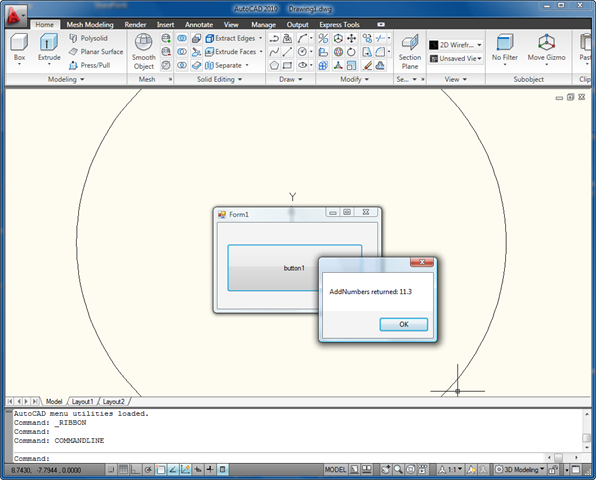
Result of driving AutoCAD via in- and out-of-proc code

The combination of COM for out-of-process control with .NET for in-process power and performance will hopefully be a useful technique for many of you needing to automate AutoCAD from an external executable. Be sure to post comments if any of you have things to share on this topic. Thanks for the question, Michael! 🙂

Update:

A much-improved implementation of this application can be found in this post.

4 responses to “Interfacing an external COM application with a .NET module in-process to AutoCAD”

  1. Mike Robertson Avatar
    Mike Robertson

    Keen,
    I'm getting the following error when I try to use RegAsm:
    RegAsm : error RA0000 : Could not load file or assembly ' acmgd, Version=18.0.0., Culture=neutral, PublicKeyToken=null' or one of its dependencies. The system cannot find the file specified.

    3 differnent programmers have tried your code above and all get the same error. Any ideas?

    Thanks,
    Mike

    1. hi,I encountered the same situation,do you solve the problem? if you do,can you tell me?thanks in advance.

  2. Kean Walmsley Avatar

    Mike,

    Does the problem occur if the LodableComponent.dll (or whatever you've called yours) is in the same folder as acad.exe? I should have mentioned this is worth doing - it drastically decreases the chances of hitting obscure .NET assembly loading issues.

    Regards,

    Kean

  3. Tony Tanzillo Avatar

    "It not only worked, but the commands contained within the module were registered properly. A nice surprise! :-)"

    You might want to consider making your command method static. If it's not static, AutoCAD creates a seperate instance of the class declaring it for each open document.

  4. Tony Tanzillo Avatar

    "Once we’ve built the assembly it needs to be registered via COM. The way I tend to do this is via a “Visual Studio Command Prompt” (which has the path set nicely to call the VS development tools)...."

    Hi Kean.

    I think the issues your readers may be having has to do with the fact that you may be using the specially-modified versions of the AutoCAD managed assemblies that ship with the SDK.

    Those assemblies have been specially modified to eliminate any dependence on AutoCAD's native dlls (e.g., acdb18.dll), which is what allows them to be loaded into other processes, like regsvr32.exe.

    If you try to register a COM server that references the standard acdbmgd.dll or acmdg.dll from the AutoCAD root folder, it will fail because those assemblies cannot be loaded into any process (such as regsrv32.exe) other than acad.exe.

  5. Paul Hoenecke Avatar

    Hi Kean,
    I just started experimenting with a similar approach using .NET Remoting. I created an assembly that registers a well-known object when it is netloaded. Then the driver exe can find that object and call methods on it. It sort of works... but I was having some problems.

    I had the same problem you had with the MdiActiveDocument being null. When I inspect it, it says there was a CrossThreadMessagingException. I use your workaround of getting the doc from the db, but then doc.Editor.WriteMessage() fails. I tried adding a WriteMessage to your code and it fails as well. Maybe I am just missing something with that.

    It seems certain things just don't like being poked from outside AutoCAD. Thanks.

    I put my experimental project at:
    http://www.paulhoenecke.com/downlo...

  6. Paul Hoenecke Avatar

    More info:

    It seems that database related stuff works from outside AutoCAD, but anything Doc related fails (maybe anything in AcMgd).

    If I try to create a Database and read an existing dwg file, it will work ONLY if I pass true for noDocument when creating the database.

    This fails:
    using (Database db = new Database(false, false))
    {
    db.ReadDwgFile(@"C:\Test.dwg", FileOpenMode.OpenForReadAndAllShare, true, "");
    }

    This succeeds:
    using (Database db = new Database(false, true))
    {
    db.ReadDwgFile(@"C:\Test.dwg", FileOpenMode.OpenForReadAndAllShare, true, "");
    }

    I have tried this using the COM way, and also using Remote Objects.
    Thanks.

  7. Paul Hoenecke Avatar

    Ok, I think I figured out my problems.

    When using either the Remoting way or the InvokeMember way to talk to Acad, I can get return values, but I have threading problems. The easiest way to see this is to try to write to the command line in Acad from the external driver app.

    I made a simple test, spawning a simple thread from an AutoCAD CommandMethod and trying to write to the Editor from there. That also failed.

    The SendCommand method used in your original article doesn't have this limitation, but obviously has the return value limitation.

    So... I think I have a way of solving this, giving me both return values and access to the doc and editor, but I think it may be a slightly complicated solution involving both Remoting and SendCommand.

  8. Andrew Fuller Avatar

    Hello Keen, I have implemented this example and it works correctly but then I tried to return a Data Class instead of a string or other native type and am unable to make it work.

    Have you tried returning a Class of other user defined Data Structure?

    My problem seems to be in returning a COM object and trying to Type Cast it into a Interface for application access. This is most likely my lack of experience with COM, Interfaces, and the like, as I normally develop in .NET.

    I seem to be very close but can’t break through that last Type Casting to get at the data from the calling application. Can you give it a try or lend some insight into how to return a Class object back to the calling application and retrieval of the data therein?

    Thank You,
    Andrew Fuller

  9. Renze de Waal Avatar

    Hello Kean,

    The problem with the mdiactivedocument can be solved by adding a reference to system.enterpriceservices.dll and letting the class "Commands" inherit from System.EnterpriseServices.ServicedComponent. This (and why it should be done) can be read on ADN if you look for TS88407.

    If I remember correctly, my experience with Autocad 2007 was that creating a lot of CAD entities (1000+) in a method called via COM this way was considerably slower than the same code run as an Autocad command from the command line. Do you have any experience with this?

    Thanks,

    Renze de Waal.

  10. Kean Walmsley Avatar

    Tony -

    Yes, I removed the static keyword from the command at the same time as the AddNumbers function - I'll add it back in for my next post.

    I'm pretty sure I built this app with the assemblies from the AutoCAD program folder, and then I ran regasm.exe from within that folder (which may have helped the assemblies load/register). But then I may be mis-rembering.

    Renze -

    Fantastic, thank you. I'm not sure how I missed this one (shame on me), so I am very pleased you pointed it out. I'll publish something updated based on this today.

    Paul/Andrew -

    I'm pretty sure the post based on the document pointed out by Renze will answer all your questions. Watch this space!

    Kean

  11. hey Kean I m working on a software in VB.Net it is related to Autocad like change of size of door and its design its just kinda clone of karona if you have heard of it so need your guidance to that to enhance my knowledge and skills to it as i am not getting the exact starting point of it and this is the first group which i have ever spoken

    Thanks & Regards

    Frank

  12. Hi Frank,

    I'm not exactly sure what you're asking, but I suggest working through the relevant resources and material posted on the AutoCAD Developer Center.

    Regards,

    Kean

  13. nlvvch@gmail.com Avatar

    db.ReadDwgFile(res.StringResult, System.IO.FileShare.Read, true, "");
    Iam unable to run this lines
    Iam getting follwoing errore screen:

    an unhandled exception of type 'system.stackoverflowexception' occurred in mscorlib.dll

    can u please solution for it, it most help full for us.

    nlvvch@gmail.com

  14. Hi,
    I have installed Architecture 2009 standalone version on my local machine. I am calling autocad document from Windows C# and getting the following error. Can you help me to fix this error?

    "Retrieving the COM class factory for component with CLSID {28B7AA99-C0F9-4C47-995E-8A8D729603A1} failed due to the following error: 80080005."

    My Code is:

    try
    {
    acadapp = (AcadApplication)Marshal.GetActiveObject("AutoCAD.Application");
    }
    catch
    {
    try
    {
    Type acType = Type.GetTypeFromProgID("AutoCAD.Application");
    acadapp = (AcadApplication)Activator.CreateInstance(acType, true);
    }
    catch (System.Exception ex)
    {

    };

    }

  15. You might want to download and use the ProcessMonitor (search for it on MSDN) and use it to see what is failing, whether Registry or file system accesses.

    Otherwise I don't have much advice to provide, I'm afraid (other than trying to reinstall).

    Kean

  16. Hey Kean,

    I have one question.
    Is this the only way to execute some "standard" AutoCads command or API? What I mean - now (as you show us) we have to load assembly if we want to execute "AddNumbers" method.

    So my question is - can I use "AutoCAD's API" direct in my winform/wpf application or this is impossible?

  17. The only way to drive AutoCAD from another process is via COM (assuming DDE doesn't work anymore, but then I haven't tried that in the longest time).

    You can certainly use standard COM methods and drive standard commands, if you don't want an in-process component of your own.

    Kean

  18. Thank you very much.

    I have one more question - I'm making my software designed for AutoCAD 2011. But I want also to use this software on AutoCAD 2007.

    How can I set up conditional references? Depending on OS (x86, gx64) and/or AutoCAD 2007/2011? Is this possible?

  19. If you're talking about COM, then you may want to look at Type Embedding (that should help work across versions). Beyond that I suggest posting to the discussion group (or to ADN), as you'll get good advice there.

    Kean

  20. Have you an example where second part of your code is VC++ writes? Exactly "AddNumbers() function".
    I need run my C# DLL in VC++ project, and I don't know, how it's do it.

  21. Hi Zibi,

    Sorry - I don't have a sample for this. It's simple enough to register a command using C++ (all the ObjectARX samples do this) but then to expose the underlying function via .NET or COM will require a bit more work.

    Someone on the ObjectARX Discussion Group may be able to help. And please post a more complete description there - I suspect I may have misunderstood what you've posted here.

    Regards,

    Kean

  22. Hi Kean,

    I couldn't get this line of code working:
    After lunching new instance of autocad through(which works fine) :
    acApp =(AcadApplication)Activator.CreateInstance(
    acType,
    true
    );
    The visibility seems not to work:
    acApp.Visible = true;

  23. Sorry,
    Indeed couldn't set the visibily to false.

  24. Hi ali,

    Could you describe exactly what is happening? Does AutoCAD launch but its visibility isn't affected by the call, or does it throw some kind of error?

    Regards,

    Kean

  25. Hi Kean,

    Thanks for the reply,
    The autocad lunches properly and works fine but the thing is the Autocad application is visible though the acApp.Visible is set to false.
    So, yes "its visibility isn't affected by the call".

    Many Thanks,

  26. Hi ali,

    OK, thanks. I haven't seen this myself (but then I don't recall trying this in recent years).

    I suggest posting your problem to the AutoCAD .NET Discussion Group (or the ADN team, if you're a member).

    Regards,

    Kean

  27. Hi Kean,

    Is it possible to send autocad commands in background, but not via creating another AcadApplication? At first I came across ReadDwg function but it only gives access to Database object not the Document. Then I saw plot/publish functionality in Cad, which it seems jobs[sending commands?] are being done in background.

    Thanks,

  28. Hi Ali,

    The best is to use the Core Console in AutoCAD 2013:

    keanw.com/2012/02/the-autocad-2013-core-console.html

    Regards,

    Kean

  29. Pierre Cardinal Avatar

    DocumentCollection acDocMgr = Application.DocumentManager;
    Document acNewDoc = DocumentCollectionExtension.Add acDocMgr, "acad.dwt");
    DocumentExtension.CloseAndDiscard(acNewDoc);

    What is wrong with MyCode when I put it inside the function AddNumbers

    public string AddNumbers(int arg1, double arg2)
    {
    ...
    MyCode
    ...
    }

    MyCode produce an exception when run from the COM but not if run standalone in AutoCAD.

  30. I can see how this might prove problematic: I believe the code is running in session (rather than document) context, but that shouldn't necessarily be a problem for this particular code. AutoCAD's probably just not ready for someone to be opening new drawings when called in this way.

    What kind of exception do you get? Have you tried running the same code in a session context command, rather than a document context one (the default)?

    Kean

  31. Brian Stafford Avatar
    Brian Stafford

    Hi Kean,

    I have a question on a slight variation of this post for those "legacy" folks out there.

    I have an external VB6 COM application which loads a VB6 ActiveX DLL into AutoCAD using GetInterfaceObject(). This has worked beautifully for years with AutoCAD 2005.

    We are now in the process of upgrading to AutoCAD 2014 64-bit on Windows 7, and GetInterfaceObject() fails with error "-2147221164 Problem in loading application".

    Is there even a chance of this working? Your recommendations either way are appreciated.

    Brian

  32. Brian Stafford Avatar
    Brian Stafford

    Kean,

    I tried the ideas shown in the link, substituting regsvr32 for regasm. I ran both the 32-bit and 64-bit version of regsvr32 with the same error as I described.

    Can a 32-bit VB6 ActiveX DLL run inside of AutoCAD 2014? If so, will there be a performance hit?

    Thanks for your time,

    Brian

  33. Kean Walmsley Avatar

    Hi Brian,

    I haven't tried it, but perhaps this workaround might help:

    gfi.com/blog/32bit-object-64bit-environment

    In terms of performance: there'll be some thunking overhead to go between the two memory models but I wouldn't expect it to be too bad. A lot will depend on the data you need to marshal between the two.

    I hope this helps,

    Kean

  34. Sourabh Mahindrakar Avatar
    Sourabh Mahindrakar

    Kean,

    This post is incredibly valuable, and many, including myself, have used it to implement ActiveX in AutoCAD. Unfortunately, the solution no longer works with .NET Core plugins and AutoCAD 2025.

    The primary issue is that, unlike .NET Framework 4.x, .NET Core (8.0) lacks a straightforward way to export Type Libraries (.tlb) and register custom AutoCAD plugins with REGASM (COM registration).

    A workaround is to create a PluginName.comhost.dll by setting the project property <EnableComHosting>true</EnableComHosting> in Visual Studio. We then use regsvr (instead of regasm in .NET 4.x) to register the PluginName.comhost.dll for the custom AutoCAD plugin. However, there’s a problem: when the class implements the IExtension interface from the AutoCAD runtime, registering the .comhost.dll fails.

    In contrast, Inventor and Revit plugins can be loaded registry-free using a manifest file. A similar registry-free approach for loading the COM interface would be highly beneficial.

    It would be fantastic if you could update this post—or create a new one—to show a working .NET Core example, ideally with a registry-free approach.

    1. Unfortunately I'm no longer working with AutoCAD, so am not in a position to do this research and update the post. Frankly it's done well to remain basically valid for 15 years.

      Kean

  35. Antonio Cersosimo Avatar

    Hi I was wondering was is the current way of implementing a connection between Autocad and external process, I been able to test this for 2025, thanks to this guide but still is that correct way....could I use Named Pipes for this? chuongmep.com/posts/2024-05-02-use-com-api-autocad-netcore.html

    1. Please post this question to the AutoCAD .NET forum - somewhere there will be able to answer it.

      Thanks,

      Kean

Leave a Reply to Kean Walmsley Cancel reply

Your email address will not be published. Required fields are marked *