While I was preparing this recent post I put together a simple project which registered localized names for commands, to make sure they were picked up and used to create the appropriate demand-loading Registry keys. It was a little tricky to do this from the current documentation, so thankfully I had access to this DevNote on the ADN site which helped a great deal (this is only available to ADN members but don't worry if you're not one: this post should provide equivalent information and in certain ways goes beyond the original example).
Anyway, it seemed a relevant topic to cover in its own post, so here we are today looking at this question: how to register localized command-names – possibly for multiple target languages – for your AutoCAD commands.
First of all we need to register some commands, the code for which proves to be pretty straightforward. Here's the C# code defining our commands, which we will save in a file named Commands.cs:
using Autodesk.AutoCAD.ApplicationServices;
using Autodesk.AutoCAD.Runtime;
namespace LocalizedCommands
{
public class LocCmds
{
[CommandMethod(
"LOCCMDS", "HELLO", "helloCmdId", CommandFlags.Modal
)]
public void HelloCommand()
{
Application.DocumentManager.MdiActiveDocument.Editor.
WriteMessage("\nHello!");
}
[CommandMethod(
"LOCCMDS", "GOODBYE", "goodbyeCmdId", CommandFlags.Modal
)]
public void GoodbyeCommand()
{
Application.DocumentManager.MdiActiveDocument.Editor.
WriteMessage("\nGoodbye!");
}
}
}
You'll notice straight away that we're using a special version of the CommandMethod attribute which specifies more than the usual items (command name and flags are the most common ones). We start with the command group ("LOCCMDS"), the global names ("HELLO" and "GOODBYE"), the localized resource IDs ("helloCmdId" and "goodbyeCmdId") and then come the flags (CommandFlags.Modal).
The localized command name is provided as a resource ID to aid localization. Let's see how this helps… we'll add some resources to the project for our neutral culture (US English) and for two additional cultures (French and German).
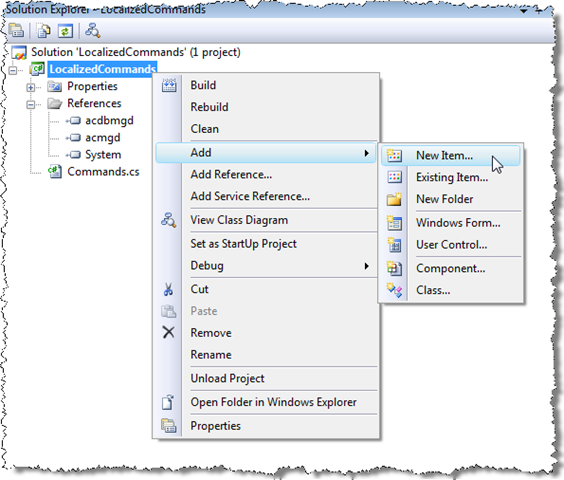
We can add resource files by right-clicking the project and selecting Add –> New Item:
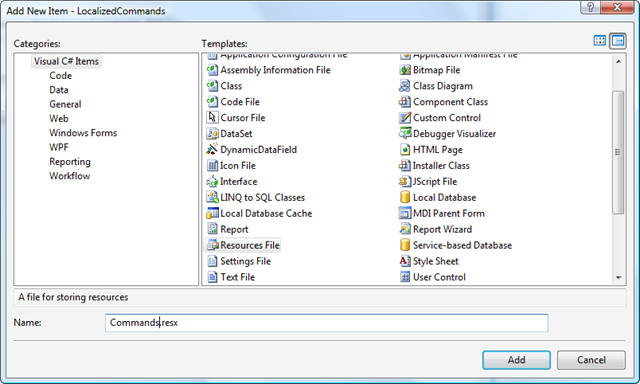
From here we can use the Add New Item dialog to add new resource files with the names "Commands.resx" (which is for the neutral culture, US English), "Commands.fr-FR.resx" and "Commands.de-DE.resx" (these three files will need to be added one-by-one). It's important that the resource files use the same base name as the .cs file (they do not have to use the class name – LocCmds – and, in fact, you may run into name collisions if you attempt to do so).
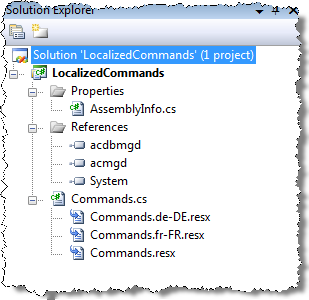
So far, so good. We should now see the resultant files in our solution explorer, and be able to open them by double-clicking them.
The files will be blank initially, and we will want to add two string resources to each, one for each of our commands, using the IDs "helloCmdId" and "goodbyeCmdId".
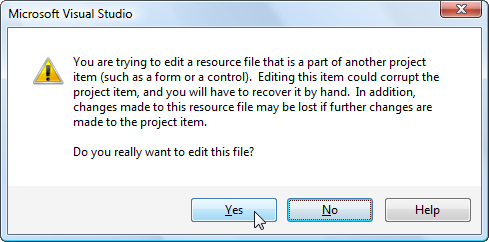
When we come to edit the individual string resources, we may be presented with a warning dialog (it is safe to select Yes):
Now we can go ahead and add localized string resources for our two commands in each of the three cultures:
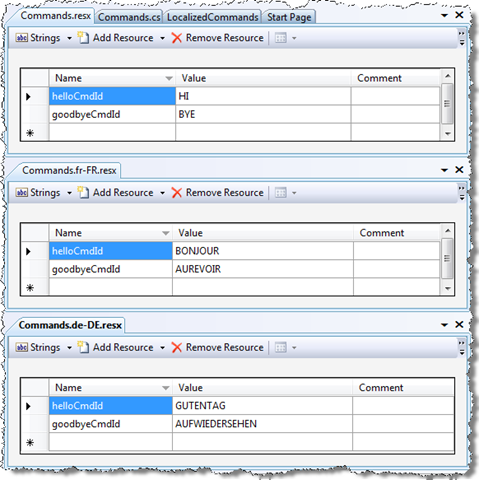
It should now be possible to build our application. If we take a look at the output folder, we should see sub-folders for each of our cultures:
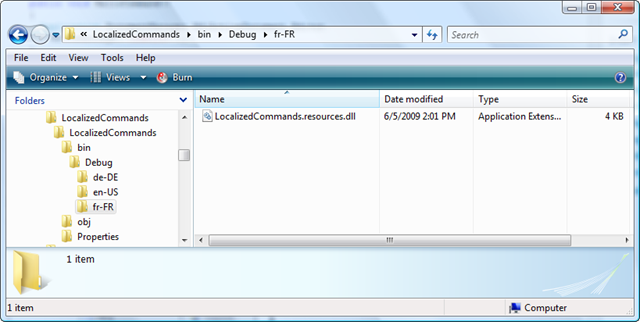
The en-US folder will be empty, as we've included that as our base culture, but the other two will contain resource DLLs (also known as satellite assemblies) containing our localized strings for that target culture.
Now to see these in action. In order to fake the loading of our assembly into different language versions of AutoCAD, I put together a simple application to change the UI culture (the one used by the resource manager to choose the resources to load) of the current thread. This clearly needs to be in a separate assembly, as we want to change the culture before we use NETLOAD to load the assembly containing our localized commands.
Here's the C# code:
using Autodesk.AutoCAD.ApplicationServices;
using Autodesk.AutoCAD.Runtime;
using System.Threading;
using System.Globalization;
namespace CultureShift
{
public class Commands
{
private void setCulture(string culture)
{
Thread.CurrentThread.CurrentUICulture =
new CultureInfo(culture);
}
private void setNeutralCulture(string neutCult)
{
Thread.CurrentThread.CurrentUICulture =
CultureInfo.CreateSpecificCulture(neutCult);
}
[CommandMethod("SETFR")]
public void SetFrenchCulture()
{
setNeutralCulture("fr"); // or setCulture("fr-FR&qu
ot;);
GetCulture();
}
[CommandMethod("SETDE")]
public void SetGermanCulture()
{
setNeutralCulture("de"); // or setCulture("de-DE");
GetCulture();
}
[CommandMethod("SETEN")]
public void SetEnglishCulture()
{
setNeutralCulture("en"); // or setCulture("en-US");
GetCulture();
}
[CommandMethod("GETCUL")]
public void GetCulture()
{
Application.DocumentManager.MdiActiveDocument.Editor.
WriteMessage(
"\nCurrent UI culture is {0}.",
Thread.CurrentThread.CurrentUICulture.Name
);
}
}
}
This code implements a number of commands to set the UI culture to US English (SETEN), French (SETFR) and German (SETDE) as well as to check the current UI culture (GETCUL). The code chooses to set the culture neutrally – which sets the language but not the location – but the end result is the same for the cultures we've chosen. One thing to bear in mind: this code only actually works if running from the debugger. It doesn't crash, otherwise, but the current UI culture always ends up as "en-US". I assume this is a threading issue, but as this is really only for testing purposes it's a tolerable requirement to run everything from the debugger.
Here's what happens when (launching AutoCAD from the Visual Studio 2009 debugger) we load our test code, set the current UI culture to French and then load the main application, checking which commands work and which do not:
Command: NETLOAD
Command: GETCUL
Current UI culture is en-US.
Command: SETFR
Current UI culture is fr-FR.
Command: GETCUL
Current UI culture is fr-FR.
Command: NETLOAD
Command: HELLO
Hello!
Command: GOODBYE
Goodbye!
Command: BONJOUR
Hello!
Command: AUREVOIR
Goodbye!
Comm
and: GUTENTAG Unknown command "GUTENTAG". Press F1 for help.
Command: BYE Unknown command "BYE". Press F1 for help.
We can see that the global and the French-localized commands have indeed worked, while the German and US ones have not.
Let's do the same for German:
Command: NETLOAD
Command: GETCUL
Current UI culture is en-US.
Command: SETDE
Current UI culture is de-DE.
Command: GETCUL
Current UI culture is de-DE.
Command: NETLOAD
Command: HELLO
Hello!
Command: GOODBYE
Goodbye!
Command: BONJOUR Unknown command "BONJOUR". Press F1 for help.
Command: GUTENTAG
Hello!
Command: AUFWIEDERSEHEN
Goodbye!
Command: BYE Unknown command "BYE". Press F1 for help.
And sure enough, while the German and global commands work, the others do not.
For completeness, if we just load our application – without either launching from the debugger or loading our test application to change the current UI culture – and run the commands, here's what we see:
Command: NETLOAD
Command: HELLO
Hello!
Command: GOODBYE
Goodbye!
Command: HI
Hello!
Command: BYE
Goodbye!
Command: BONJOUR Unknown command "BONJOUR". Press F1 for help.
Command: AUREVOIR Unknown command "AUREVOIR". Press F1 for help.
Command: GUTENTAG Unknown command "GUTENTAG". Press F1 for help.
Command: AUFWIEDERSEHEN Unknown command "AUFWIEDERSEHEN". Press F1 for help.
My assumption is that the current UI culture will be set appropriately in the different language versions of AutoCAD, and so the localized resources will be chosen correctly. If someone trying the technique for real were able to confirm, I'd certainly appreciate it. 🙂


Leave a Reply