Future Plugin of the Month to embed QR Codes in AutoCAD drawings?

I've been having a fun discussion with Augusto Gonçalves, based in São Paulo working for our DevTech Americas team, on the subject of QR Codes. Augusto's a technology junky – like many members of DevTech – and has been playing around decoding QR Codes with his mobile phone.

QR (from "Quick Response") Codes are two-dimensional bar codes which encode data for later decoding using – veSample QR Codery often, at least –  some kind of handheld, mobile device. The most common reader applications use your device's camera to detect and analyse the composition of the QR Code, providing you with the decoded information for you to use as you wish.

These codes really seem to be taking off, and are used to encode a wide variety of data: plain text, URLs, contact information, even GPS coordinates. QR Codes are cropping up on printed documents, advertising billboards and T-shirts (to name but a few places you'll find them :-). Oh, and it seems Facebook is also getting in on the action.

The QR Code format itself, while originally developed by a company in Japan, apparently remains free of any license costs. There are a number of freely available libraries and web services that can be used to generate QR Codes, such as this one from Google, which was used to develop their Zebra Crossing online generator form (in case you missed the reference, zebra crossing is the term used to describe pedestrian crossings – at least in the UK – which have a one-dimensional, barcode-like pattern :-).

Using Google Chart's underlying web service it's trivial to generate a barcode directly from a URL (clicking this one will generate a medium-sized QR Code containing the URL of this blog):

http://chart.apis.google.com/chart?cht=qr&chs=230x230&chl=http%3A%2F%2Fblogs.autodesk.com%2Fthrough-the-interface

And if you want to decode an QR Code embedded in an image (but you don't happen to have a SmartPhone handy with a camera and a QR Code reader application installed) then you can also upload an image or provide its URL (if the image is already online) to the Zebra Crossing online decoder. Try it with the image at the top of this post: if you paste the URL to the image into decoder form, you'll find a hidden message.

Augusto's question to me was whether it was worth developing a Plugin of the Month to allow people to help embed QR Codes in AutoCAD drawings. Sounds like a great idea, to me! 🙂

I can well imagine workflows where people label site plans with geo-location information, for instance, and I'm sure that introducing this capability would enable far more innovative uses for it.
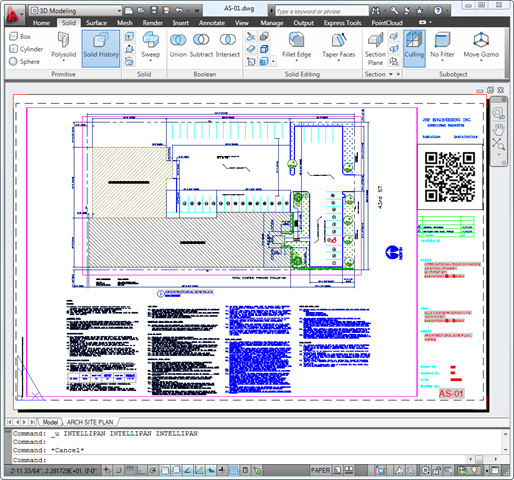
QR Code in an AutoCAD drawing

Augusto and I have exchanged a few emails on some possible implementation details for this plugin, but there are a number of outstanding questions that I'm hoping this blog's readership will be able to provide input on.

  1. What uses would you make of this, and therefore what kinds of data should be supported?
    • Geo-location seems a no-brainer, as does contact information (email address, physical address, phone number), URLs, plain text…
  2. What kind of features would you like to see? Some thoughts…
    • Ability to create a QR Code at a certain location
    • Ability to manage previously embedded QR Codes' and edit their contents
    • Ability to create a QR Code based on dynamic data such as a string containing fields (date/time or publishing, etc.)
  3. Would it be preferable to have the resulting code as an embedded raster image or as native AutoCAD geometry?
    • It's possible to do either, but each has advantages/disadvantages…
    • Raster images are not embedded directly in the DWG
      • They can be defined by a URL, but the file will end up being copied locally to a temporary folder, which would need to happen on each machine
    • Native geometry can apparently be determined/created using a library such as this one
      • The geometry – probably a series of AutoCAD 2D SOLID objects – is more easily scaled, but also more prone to corruption (at the very least it would need to be grouped in some way)
      • There would be no downstream dependency on a web service to generate the image

While you can get QR Codes in your drawing today using IMAGEATTACH and pasting the QR Code's URL (as generated by your preferred web service), there does seem to be an opportunity to streamline this process and to take it further. Please post a comment and let us know what you're thinking. 🙂

15 responses to “Future Plugin of the Month to embed QR Codes in AutoCAD drawings?”

  1. Hi, I tested that in september 2009: exmateria.com/index.php?topic=1501.0
    This is a great innovation I guess and far from being a gadget. I can see a bright future for visual codes in CAD drawings (as soon as we will be able to use standardized format)

  2. Hi Kean,

    This looks really interesting, and, as I've said in the past (regarding other Plugin of the month posts), it would I think be of benefit in Inventor 2011 onwards.

    Which is doable, because if you were to create these QR Codes as native AutoCAD geometry, and then store them as a block, they could easily be inserted into Inventor .idw drawing files?

    How useful would it be to my specific line of work? I'm not entirely sure; as these codes can be read by anyone with a fairly recent internet-enabled camera-phone, it seems to me that the information encoded within them could be viewed in one of two frames-of-mind:

    It's either non-specific so that only we would know what it means. For internal record keeping/Document Control/QA purposes etc.

    OR

    It becomes a way of showing off to those in the know just what is possible these days.

    Either way, I think it's something that I would personally make use of once it's available.

    Thanks,

    Alex.

  3. Kean Walmsley Avatar

    Great input - thank you, Alex & Patrick.

    Keep it coming! 🙂

    Kean

  4. Daniele Piazza Avatar
    Daniele Piazza

    Interesting. A couple of months ago I found an interesting post on the American Mathematical Society.

    www1.ams.org/samplings/feature-column/fcarc-data-matrix

  5. This could be very useful for manufacturing companies that use this barcode format in their operations. I.e. for pulling up CNC programs. An example would be, custom machining work orders.

  6. Stephen Preston Avatar
    Stephen Preston

    Seems a good use for overrules if you ask me - but then I always say that :-).

  7. I think this could be a great way for document control to inventory their drawings.

  8. I recently wrote an Autocad plug-in in Lisp to create QR codes based on Solid entities.

    Right now, I'm too lazy to write the whole algorithm to generate the Qrcode in AutoCAD. I have modified an existing PHP script so that instead of an image, it returns a sequence of 1 and 0 which is then easy to convert to vector graphics.
    It works well, but it's quite dirty and needs curl exe files.
    I'll post the code as soon as soon as I'll have it cleaned.

    More stuff on my test page : xcad.ch/tests/qrcode.html

  9. Interesting - thanks, Ian!

    There appear to be a number of open source libraries out there to generate QR Codes locally... the question I'm still asking myself is whether it's worth building in. I do like the idea of relying on a trustworthy external service (such as Google's), as I know it will be updated as the QR technology evolves.

    I'm also not yet convinced of the benefits of having individual entities vs. a single raster image (although interop with other products may be tip the balance - I still need to check how the DWGs with embedded raster QR Codes look inside Inventor, for instance).

    Kean

  10. A LISP program to generate Qrcodes in AutoCAD exmateria.com/index.php?topic=1501.0#msg2673

  11. Ramiro Doporto Avatar
    Ramiro Doporto

    I have given this much thought in the last few months, as they have now taken off more than ever, It is a no brainer that this needs to
    be incorporated into autocad, simplifying and coding drawing information has been necessary for sometime for security purposes. What I would love to see happen is to have this plug-in AutoGenerate with checkmark options of all the criteria described up above. My company would use this at time of Final Sign offs and Final prints, Furthermore I would incorporate this into Autocad WS, In which I can upload to my WS foldercreating a link to the online file as well as embedding that link into the QR code that can be available to parties with proper passcode verification.I would like it to be able to also creat a secondary QR code that is customizable specifically for my companies contact information. Seperating thesetwo would be crucial. One for vcard or mecard contact info and the other for Drawing download and data information. This could be a very easily incorporatedidea, now that WS is taking off. Thank you for considering my thoughts.

    Miro Doporto

  12. Thanks for the feedback, Miro. I'll certainly pass it on internally for consideration.

    Kean

  13. I would love to have it dynamic, like a text field, able to auto update, say, a layout name

  14. Interesting: so you'd want the QR code to auto-generate as the base information in the drawing was modified?

    You could probably do this via some notification events without too much trouble (the source is all there for you to take and extend).

    Regards,

    Kean

Leave a Reply to Daniel Cancel reply

Your email address will not be published. Required fields are marked *