Well, it's finally been announced. After months (probably ev en more) of intense speculation, Autodesk has just announced that after a break of several (perhaps 15, depending on how you count them) releases, we're planning to deliver a version of AutoCAD that once again works natively on Mac machines. [For some history regarding the original Mac port of AutoCAD, see the first part of my interview with John Walker – you'll need to scroll way down or just search for "Macintosh".]
To clarify something about this release, it is not AutoCAD LT – it has full 3D editing capabilities and support for applications. For now that means a subset of ObjectARX and AutoLISP will be available to developers and customers working on AutoCAD for Mac: we'll see how that changes, over time.
The overall feature set is pretty comparable with that of AutoCAD 2011 for Windows, although you will clearly find some gaps, for now. Notable omissions include layer states, layer filters, the Sheet Set Manager and DWF/DGN/PDF underlay support. But we're doing our best to provide a core set of features that will allow Mac users to take full advantage of AutoCAD running natively on OSX.
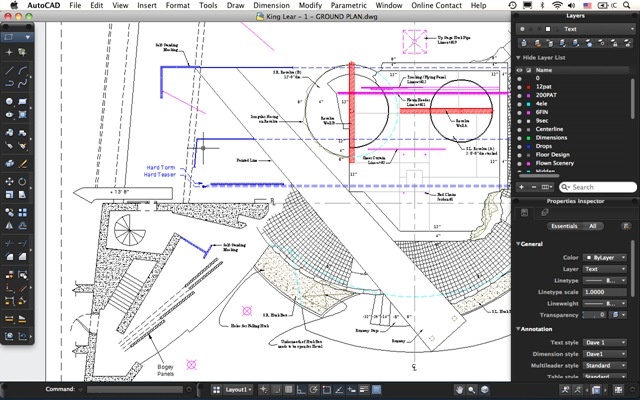
Another significant change: the user interface has been modified to suit the platform. I don't yet have a Mac, myself – although I'm about to buy a new system and suspect that the sensible choice, at this stage, would be to get a Mac (albeit one that makes heavy use of Boot Camp 🙂 - so I've had to borrow the below image to show you what it looks like.
And here's the launch video accompanying the announcement, for your viewing pleasure.
With the same breath – well, in the same Press Release, at least – we announced a product called AutoCAD WS, a new incarnation of Project Butterfly for iPhone, iPad and iPad Touch.
I have a call scheduled with Tal Weiss, who kindly shared some information once before on the nature of Project Butterly, to understand the architectural differences that have come with the move to iOS. I'll be publishing the details of that discussion in the coming weeks.



Leave a Reply