Updated Clipboard Manager – now with preview!

As mentioned yesterday, I went ahead and integrated previewing into the Clipboard Manager Plugin of the Month. I won't include the code directly in the post – it's fundamentally similar in nature to that posted yesterday and is, in any case, included in the project. There were a few additional tricks needed, such as modifying the SplitterDistance property of a SplitContainer to make sure the aspect ratio of the image gets maintained, but nothing particularly earth-shattering.

Here's the updated project – I'll be looking into the "save between session" feature (which I suspect is going to morph into a "save to DWG file" feature, as that feels like the simplest and safest to implement) before posting a new version on Autodesk Labs.

Here's this version in action:
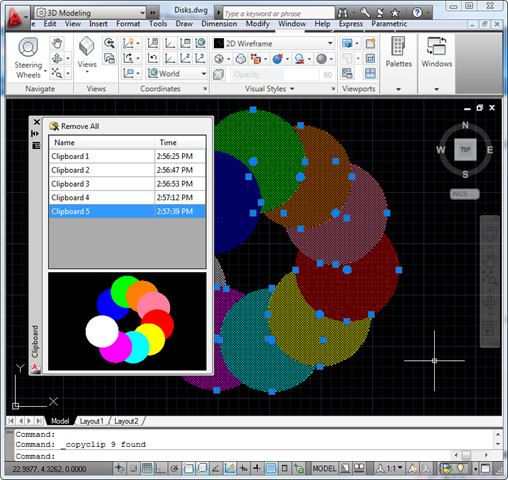
Clipboard Manager with previewI'm pleased with how the preview adjusts in size according to the image contained by the selected item. I'd be happy to hear from people who've given it a try and formed an opinion, one way or another. 🙂

6 responses to “Updated Clipboard Manager – now with preview!”

  1. What an awesome tool. Thanks!
    I did find a few issues.

    1. You mention the aspect ration being maintained but when I stretch the dialog or the splitter the image just stretches to fill the space which distorts it.
    2. You mention the preview adjusting to the size of the selected item but I don't see that. The preview always represents the full drawing window at the time of the clip. If I'm zoomed out to the entire model (drawing) and copy a small part to the clipboard, the preview shows the small part in it's relative size and location. It would be more useful if the selected items filled the preview screen.
    3. If my cursor is over the *grid* when I select an "insert" option from the context menu the dialog does not release my cursor and the drawing window does not become active until I click on it. It's odd that if my cursor is over the preview when I select one of the insert options from the context menu everything works fine.

    The version number of the dll I'm using is 1.0.4.0.

  2. I have no clue how to do those types of things on a computer. I'm a student though so I'll be taking those classes here pretty soon. I'm pretty excited.

  3. Very nice!

    But I also think, that it's more usable, if the preview area shows only the copied items, instead of the whole screen.

    And I found a bug. When I start the copy command and the palettes width is too large, I get an error because of the recalculation of the splitter distance.

  4. Thanks, Matthias!

    I ended up spending a bit of time this weekend to implement an "auto-crop" of the preview image (more in today's post). And in the process I came across the same bug and fixed it.

    Kean

  5. Massimo Cicognani Avatar
    Massimo Cicognani

    Very nice tool indeed, I didn't know the clipboard would contain a bitmap preview...

    Speaking of... I noticed that sometimes the Bitmap object returned by GetData("Bitmap") does not return anything. This often happens while copying blocks with attributes or dynamick blocks, but not always...
    I haven't figured out why yet.
    Is something by design?
    Does it happen to anyone else?

    I also noticed that GetFormats() returns both 'Bitmap' and 'System.Drawing.Bitmap' items.
    They seems to be just aliases, is that true or there is any difference?

  6. I was made aware of the issue with blocks, but couldn't reproduce it (but then I didn't try with attributes). In the end I just changed the code to make sure we don't try to process and use an empty bitmap.

    I haven't looked into Bitmap vs. System.Drawing.Bitmap - although I did notice the two formats were available - I'm guessing they're simple synonyms.

    Kean

Leave a Reply to Mark Johnston Cancel reply

Your email address will not be published. Required fields are marked *