Better information when debugging .NET and ObjectARX applications has been a long-standing request from our developer community. I'm happy to say that this week we've posted a set of public debugging symbols (in the form of stripped PDB files) to our new corporate symbol server, http://symbols.autodesk.com/symbols. For now' we've posted the 32- and 64-bit PDBs for AutoCAD 2012, and will continue to update them with symbols for our public releases.
Before going too much further, it's worth looking at some background information on debugging symbols and how to make use of a symbol server from Visual Studio.
Now let's look at en example of debugging with and without the Autodesk symbol server added to your Visual Studio debugging options.
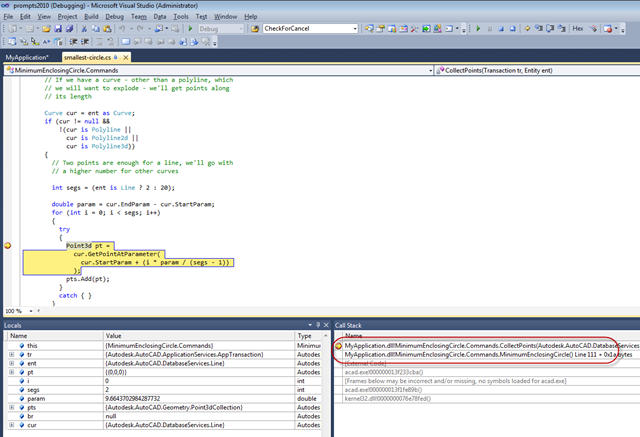
Without symbols, you have little visibility on the call stack beneath your own code:
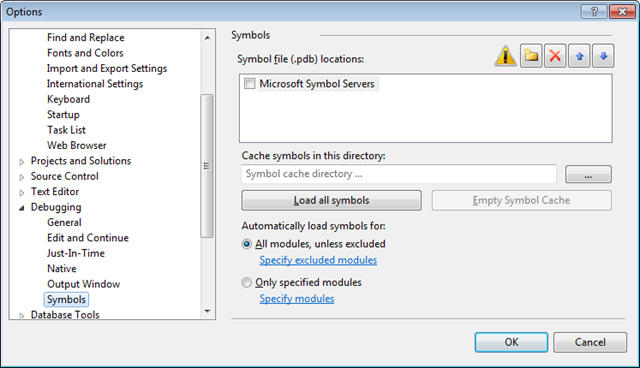
If we follow the process linked to above, we bring up the Visual Studio debugging options:
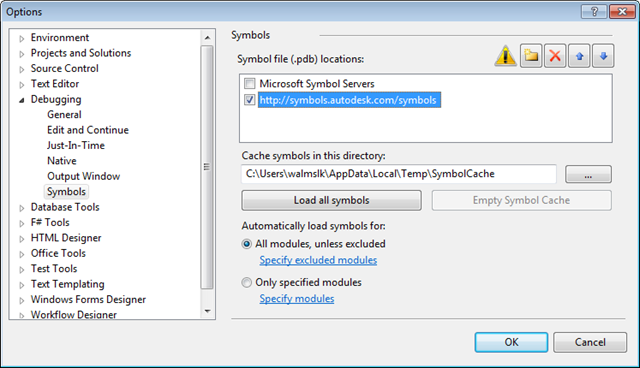
And then add our symbol server, accepting the default caching location:
Then when we next run a debugging session for our project, you'll notice a lag while the various symbol files are downloaded locally. I also enabled unmanaged debugging in my project settings, so that we see the symbols for native code inside AutoCAD, too.
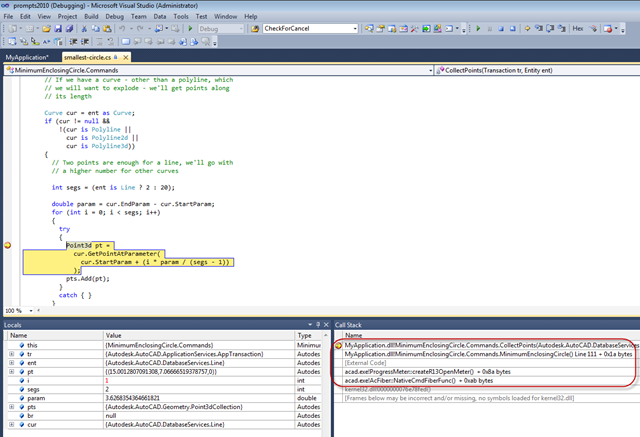
There doesn't quite appear to be a complete stack – the symbols I'm seeing are in native code, so it may be the managed symbols were not fully resolved, I need to do some more checking – but we do have more than we had.
You may find the function names at times surprising: AutoCAD is a product with a complex (and often highly efficient) architecture, and it may not always be clear what functions are performing which functions. But this additional call-stack information should certainly be of help to you when troubleshooting coding problems (whether on your side or ours).
Update
A couple of additional notes:
You shouldn't be surprised if you see a "403 – Forbidden: Access is denied" error when you try to load the symbol server link in a web browser. There is nothing publicly visible ("nothing to see here, folks" :-), as the content is just used by development environments that are able to make use of the PDB information.
The other point is about my call stack comment: the call stack is fairly complete – there may be a few calls missing – and the issue is not around managed calls. When I thought about it a bit more, I realised that with standard commands you would very rarely see managed calls above you in the call stack: you are called pretty directly by native code. Some UI framework code may exist above you if you're inside a palette implementation (for instance), but otherwise I think it's pretty rare you'll see symbols from AcMgd.dll and AcDbMgd.dll.
You will probably find these symbols of use if analysing minidumps (which can be located on your system when AutoCAD crashes via the Error Reporting tool in AutoCAD without too much difficulty). Which would probably be a good topic for a subsequent post.


Leave a Reply to Youli Bai Cancel reply