Help for AutoCAD 2013 updated

For the first time ever (apparently – I don't remember this kind of detail) there has been a mid-cycle update to AutoCAD 2013's online Help system (comparable updates have been made for AutoCAD LT 2013 and AutoCAD Mechanical 2013).

The updates include more than just new content – there have been significant enhancements made to the search mechanism, for instance.

One feature I think readers of this blog will find particularly helpful is the ability to filter for developer-oriented content:
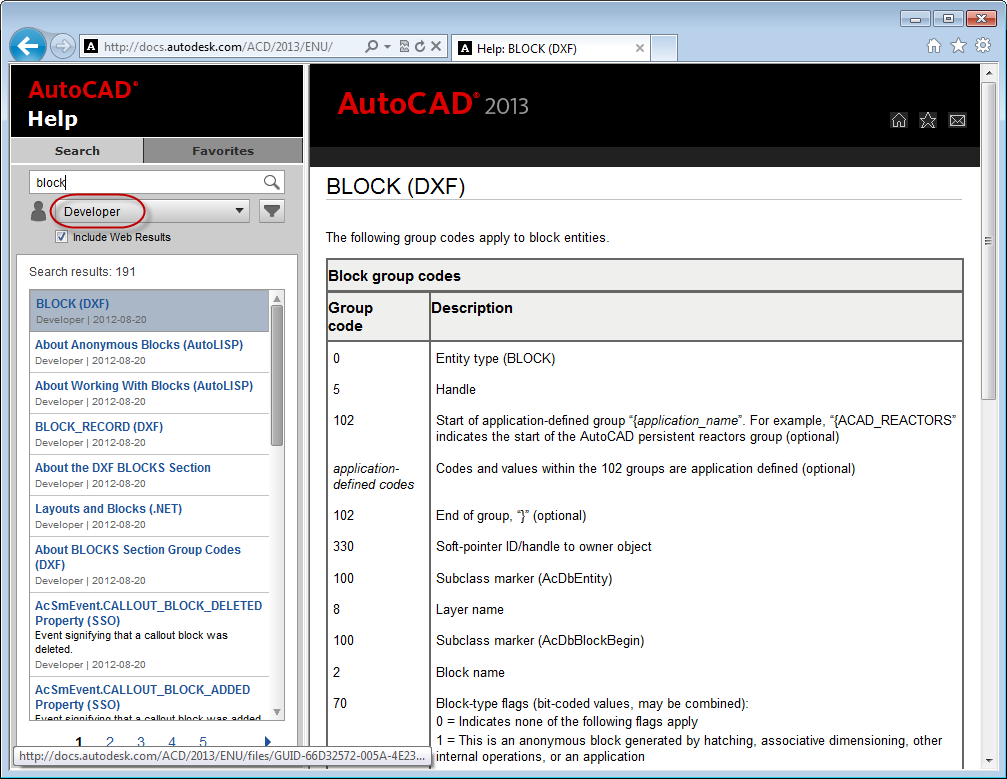
Filter for developer content in AutoCAD 2013's updated online Help

And be sure to "Include Web Results" if you want the results to include content from this blog, of course. 🙂

You'll find there's a really handy filtering mechanism you can use to just pull up user documentation on commands and/or system variables, or – and this is where things get even cooler – once you've selected "Developer" you can, for instance, just choose to get information on .NET:
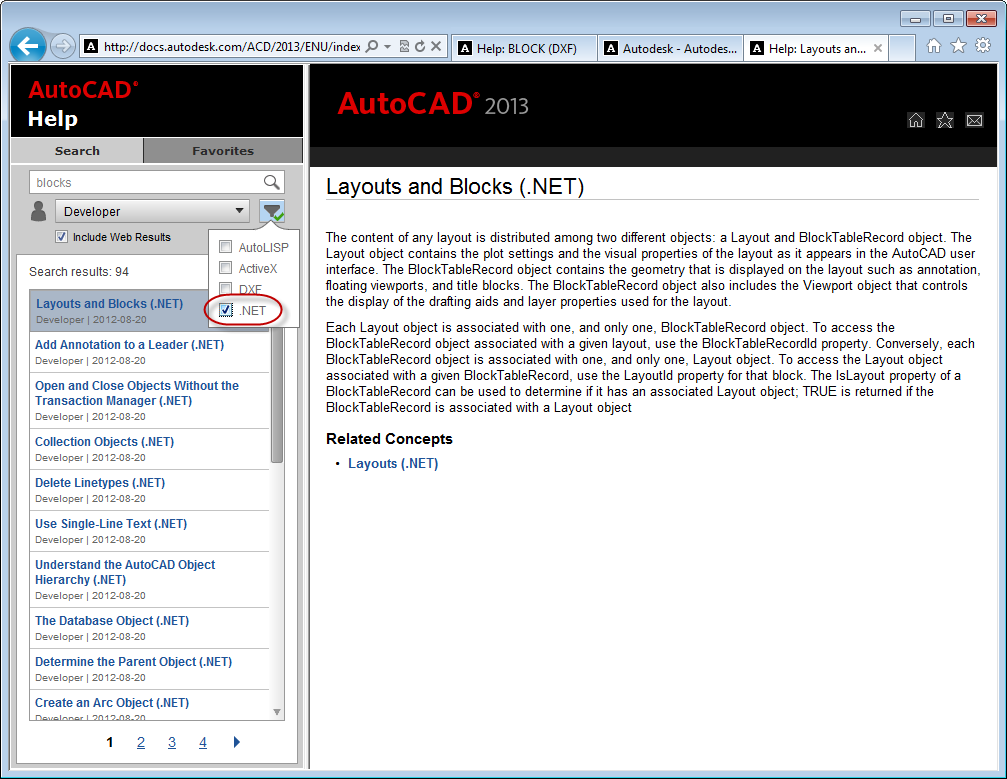
And with additional API-centric filters

For more information on this update, check out this video or head on over to this AutoCAD Insider blog post.

I'm not sure whether this is really related, as such, but it's certainly on the same topic: there has also been an update to the AutoCAD 2013 ActiveX Developer Documentation (which for me means the documentation we provide on our COM Automation API, but even that term may well now have been superseded), this time made available via the AutoCAD Developer Center. Find out more on Lee Ambrosius' blog post.

10 responses to “Help for AutoCAD 2013 updated”

  1. Hi,

    How to know if a entry in the search result pane is a "web result"? Please do a search for "Jig". The problem seems to be that the search engine make first a search in the official AutoCAD docs, if there is no entry there, then there is no web search, so if you search for Jig, there is no results.
    If you make a search for "VLAX-" and filter on developer and Autolisp, you obtain a list of vlax-functions, but the order is random, and there is no way to sort the result. What we need is a content tree in the left pane, and at least a way to sort the results, an alphabetic list of function is almost impossible to obtain.
    Why not to copy the MSDN style and that's it.

  2. Hi Gaston,

    I'll pass your feedback on to the TechPubs team.

    This isn't an area I'm very familiar with, personally, so I won't try to address your points myself.

    Regards,

    Kean

  3. yah, the lack of a contents tree on left is critical as lots of "about" pages do not have links to the actual content they are introducing.
    This kind of improvement really should be happening all the time. Things like help and DG interface format are never mission critical so adesk should be aggressive in evolving them.

  4. This is great! As a developer I always found it difficult to find the information I need, but this looks really helpful 🙂 And the first few queries I fired off gave me good results \o/

  5. how can I change this with me always comes the old Help

    wie kann ich das ändern bei mir kommt immer die alte Hilfe

  6. According to the comments in this blog post, we're not updating the offline Help mid-cycle.

    But here's a link to the offline Help that was originally delivered with AutoCAD 2013:

    http://www.autodesk.com/acd-2013-helpdownload-enu

    Kean

  7. Hi Kean,
    I had an unrelated question to this topic, so please do accept my apology.

    Is it possible to export a .dwg file to .fbx file through Autocad .Net Api?

  8. Hi Ali,

    I don't know - it may be possible to script the FBXEXPORT command (assuming that's what it's called), if not.

    You might try asking on the AutoCAD .NET Discussion Group.

    Regards,

    Kean

  9. Hi,

    Im having trouble converting my Autocad 2013 file into photoshop. I came across this tutorial (1 I wanted to follow the 'plotting to EPS' instruction however Autocad 2013 didn't give me the option of 'adding a plotter wizard'. do you have any idea on how i can open my cad files into Photoshop?

    Thanks

  10. Hi Mirna,

    Have you looked at other import formats Photoshop supports? I'm sure there are better formats than EPS, but then I'm not a Photoshop users. I would have thought DXF worked...

    Regards,

    Kean

Leave a Reply to James Maeding Cancel reply

Your email address will not be published. Required fields are marked *