Purging unwanted DGN linestyle data from an AutoCAD drawing using .NET

I had an interesting question from a member of our Product Support team, last week. They've been working with a number of customers regarding large files resulting from importing DGN data into AutoCAD: it turns out that the internal structure for complex DGN linestyles created by the DGNIMPORT command – while working very well when the data is "live" – makes the data difficult to remove once no longer needed.

[Quickly, a big "thank you" to a couple of old friends and colleagues. Firstly to Markus Kraus, who helped explain the data structure created by DGNIMPORT, and then to Albert Rius, who provided the inspiration for the project and helped test the code against some DGN data imported into DWG files.]

Here's my attempt at showing the types of object that participate in the display of DGN linestyle data inside AutoCAD:
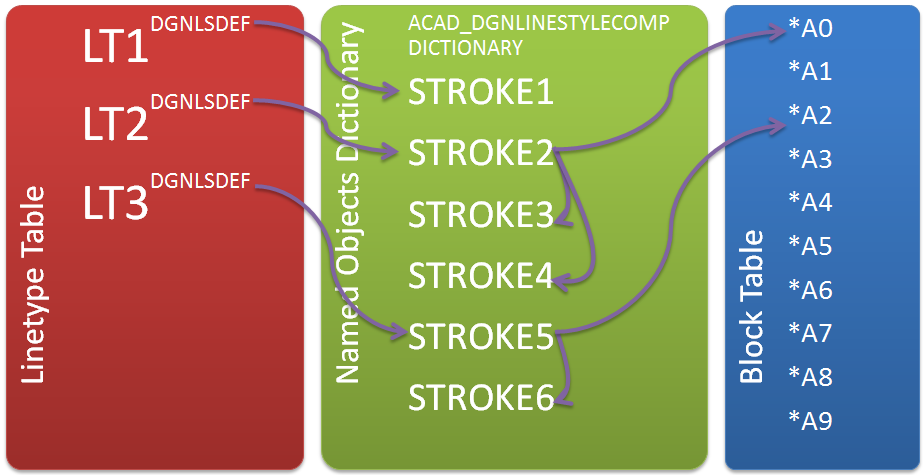
DGN linestyle data inside a DWG

(This is meant to be representative, of course – and is actually somewhat simplified.)

Basically the entities created by the DGNIMPORT command have references to entries in the Linetype Table – just as any standard AutoCAD entities do. Complex DGN linestyles – that presumably cannot be mapped directly to standard AutoCAD linetypes – have entries in their Extension Dictionaries named "DGNLSDEF". These objects contain references to objects in the "ACAD_DGNLINESTYLECOMP" dictionary (which is inside the root Named Objects Dictionary).

The objects in this dictionary represent the "strokes" in the linetype. They might be simple (in the case of STROKE1, above) or more complex. Complex strokes can refer to each other and also to anonymous blocks in the Block Table.

All in all a little complicated, as you can tell. The main issue with this picture is that all these "hard" references between objects prevent them from being purged, even when the entities that refer to them have been erased. Which can be a problem as it turns out they can occupy quite a lot of space, as linestyles can often require lots of different strokes.

So what can be done to help purge the various unwanted objects?

Here's the approach I took:

  1. Find out the "unreferenced" DGN linestyles in the drawing.
    1. Collect a list of the linetype records containing the tell-tale DGNLSDEF entry in the extension dictionary.
    2. Iterate through all the objects in the drawing, and if you find one that contains a hard reference to an entry in the list of linetypes, remove that linetype from the list (as long as it doesn't come from an object inside an anonymous block – we can safely ignore those references) and add it to a list of "keepers".
  2. Find out the "unreferenced" strokes in the drawing.
    1. Collect a list of the entries in the ACAD_DGNLINESTYLECOMP dictionary.
    2. Go through the list of linetypes we want to keep, following their object references recursively through the dictionary of strokes: any objects that inside this reference network gets removed from the stroke list.
  3. Erase the linetypes and the strokes that are safe to remove.
  4. Erase the containing stroke dictionary, if it now happens to be empty.

There were two main problems that Philippe Leefsma helped me solve (as mentioned earlier this week). The first one was iterating through all the objects in the drawing: Philippe has posted a handy solution to this that works by iterating through the possible handle space and attempting to open the object associated with that particular handle. This is generally more efficient – and a lot simpler – than opening the various entity containers, etc.

The second issue was to collect the object references from the various dictionary objects (whether in the linetype's extension dictionary of the stroke dictionary inside the NOD) that do not have manage wrappers. The technique is an old one – I've used it in the past from ObjectARX but didn't have any equivalent .NET code handy, which is where Philippe came in – that involves defining a DwgFiler and passing it to the object's DwgOutFields() method. The DwgFiler has its methods called for the various types of data that would typically get stored in the DWG file: in our case we simply store the reference data passed in.

Here's the source for that file, which I've named ReferenceFiler.cs:

using System;

using Autodesk.AutoCAD.DatabaseServices;

using Autodesk.AutoCAD.Geometry;

using Autodesk.AutoCAD.Runtime;


namespace DgnPurger

{

  public class ReferenceFiler : DwgFiler

  {

    public ObjectIdCollection HardPointerIds;

    public ObjectIdCollection SoftPointerIds;

    public ObjectIdCollection HardOwnershipIds;

    public ObjectIdCollection SoftOwnershipIds;


    public ReferenceFiler()

    {

      HardPointerIds = new ObjectIdCollection();

      SoftPointerIds = new ObjectIdCollection();

      HardOwnershipIds = new ObjectIdCollection();

      SoftOwnershipIds = new ObjectIdCollection();

    }


    public override ErrorStatus FilerStatus

    {

      get { return ErrorStatus.OK; }


      set { }

    }


    public override FilerType FilerType

    {

      get { return FilerType.IdFiler; }

    }


    public override long Position

    {

      get { return 0; }

    }


    public override IntPtr ReadAddress() { return new IntPtr(); }

    public override byte[] ReadBinaryChunk() { return null; }

    public override bool ReadBoolean() { return true; }

    public override byte ReadByte() { return new byte(); }

    public override void ReadBytes(byte[] value) { }

    public override double ReadDouble() { return 0.0; }

    public override Handle ReadHandle() { return new Handle(); }

    public override ObjectId ReadHardOwnershipId()

    {

      return ObjectId.Null;

    }

    public override ObjectId ReadHardPointerId()

    {

      return ObjectId.Null;

    }

    public override short ReadInt16() { return 0; }

    public override int ReadInt32() { return 0; }

    public override long ReadInt64() { return 0; }

    public override Point2d ReadPoint2d() { return new Point2d(); }

    public override Point3d ReadPoint3d() { return new Point3d(); }

    public override Scale3d ReadScale3d() { return new Scale3d(); }

    public override ObjectId ReadSoftOwnershipId()

    {

      return ObjectId.Null;

    }

    public override ObjectId ReadSoftPointerId()

    {

      return ObjectId.Null;

    }

    public override string ReadString() { return null; }

    public override ushort ReadUInt16() { return 0; }

    public override uint ReadUInt32() { return 0; }

    public override ulong ReadUInt64() { return 0; }

    public override Vector2d ReadVector2d()

    {

      return new Vector2d();

    }

    public override Vector3d ReadVector3d()

    {

      return new Vector3d();

    }


    public override void ResetFilerStatus() { }

    public override void Seek(long offset, int method) { }


    public override void WriteAddress(IntPtr value) { }

    public override void WriteBinaryChunk(byte[] chunk) { }

    public override void WriteBoolean(bool value) { }

    public override void WriteByte(byte value) { }

    public override void WriteBytes(byte[] value) { }

    public override void WriteDouble(double value) { }

    public override void WriteHandle(Handle handle) { }

    public override void WriteInt16(short value) { }

    public override void WriteInt32(int value) { }

    public override void WriteInt64(long value) { }

    public override void WritePoint2d(Point2d value) { }

    public override void WritePoint3d(Point3d value) { }

    public override void WriteScale3d(Scale3d value) { }

    public override void WriteString(string value) { }

    public override void WriteUInt16(ushort value) { }

    public override void WriteUInt32(uint value) { }

    public override void WriteUInt64(ulong value) { }

    public override void WriteVector2d(Vector2d value) { }

    public override void WriteVector3d(Vector3d value) { }


    public override void WriteHardOwnershipId(ObjectId value)

    {

      HardOwnershipIds.Add(value);

    }


    public override void WriteHardPointerId(ObjectId value)

    {

      HardPointerIds.Add(value);

    }


    public override void WriteSoftOwnershipId(ObjectId value)

    {

      SoftOwnershipIds.Add(value);

    }


    public override void WriteSoftPointerId(ObjectId value)

    {

      SoftPointerIds.Add(value);

    }


    public void reset()

    {

      HardPointerIds.Clear();

      SoftPointerIds.Clear();

      HardOwnershipIds.Clear();

      SoftOwnershipIds.Clear();

    }

  }

}

And here's the source for the main command implementation:

using System;

using System.Runtime.InteropServices;

using Autodesk.AutoCAD.ApplicationServices.Core;

using Autodesk.AutoCAD.DatabaseServices;

using Autodesk.AutoCAD.Runtime;


namespace DgnPurger

{

  public class Commands

  {

    const string dgnLsDefName = "DGNLSDEF";

    const string dgnLsDictName = "ACAD_DGNLINESTYLECOMP";


    public struct ads_name

    {

      public IntPtr a;

      public IntPtr b;

    };


    [DllImport("acdb19.dll",

      CharSet = CharSet.Unicode,

      CallingConvention = CallingConvention.Cdecl,

      EntryPoint = "acdbHandEnt")]

    public static extern int acdbHandEnt(string h, ref ads_name n);


    [CommandMethod("DGNPURGE")]

    public void PurgeDgnLinetypes()

    {

      var doc =

        Application.DocumentManager.MdiActiveDocument;

      var db = doc.Database;

      var ed = doc.Editor;


      using (var tr = doc.TransactionManager.StartTransaction())

      {

        // Start by getting all the "complex" DGN linetypes

        // from the linetype table


        var linetypes = CollectComplexLinetypeIds(db, tr);


        // Store a count before we start removing the ones

        // that are referenced


        var ltcnt = linetypes.Count;


        // Remove any from the "to remove" list that need to be

        // kept (as they have references from objects other

        // than anonymous blocks)


        var ltsToKeep =

          PurgeLinetypesReferencedNotByAnonBlocks(db, tr, linetypes);


        // Now we collect the DGN stroke entries from the NOD


        var strokes = CollectStrokeIds(db, tr);


        // Store a count before we start removing the ones

        // that are referenced


        var strkcnt = strokes.Count;


        // Open up each of the "keeper" linetypes, and go through

        // their data, removing any NOD entries from the "to

        // remove" list that are referenced


        PurgeStrokesReferencedByLinetypes(tr, ltsToKeep, strokes);


        // Erase each of the NOD entries that are safe to remove


        foreach (ObjectId id in strokes)

        {

          var obj = tr.GetObject(id, OpenMode.ForWrite);

          obj.Erase();

        }


        // And the same for the complex linetypes


        foreach (ObjectId id in linetypes)

        {

          var obj = tr.GetObject(id, OpenMode.ForWrite);

          obj.Erase();

        }


        // Remove the DGN stroke dictionary from the NOD if empty


        var nod =

          (DBDictionary)tr.GetObject(

            db.NamedObjectsDictionaryId, OpenMode.ForRead

          );


        ed.WriteMessage(

          "\nPurged {0} unreferenced complex linetype records" +

          " (of {1}).",

          linetypes.Count, ltcnt

        );


        ed.WriteMessage(

          "\nPurged {0} unreferenced strokes (of {1}).",

          strokes.Count, strkcnt

        );


        if (nod.Contains(dgnLsDictName))

        {

          var dgnLsDict =

            (DBDictionary)tr.GetObject(

              (ObjectId)nod[dgnLsDictName],

              OpenMode.ForRead

            );


          if (dgnLsDict.Count == 0)

          {

            dgnLsDict.UpgradeOpen();

            dgnLsDict.Erase();


            ed.WriteMessage(

              "\nRemoved the empty DGN linetype stroke dictionary."

            );

          }

        }


        tr.Commit();

      }

    }


    // Collect the complex DGN linetypes from the linetype table


    private static ObjectIdCollection CollectComplexLinetypeIds(

      Database db, Transaction tr

    )

    {

      var ids = new ObjectIdCollection();


      var lt =

        (LinetypeTable)tr.GetObject(

          db.LinetypeTableId, OpenMode.ForRead

        );

      foreach (var ltId in lt)

      {

        // Complex DGN linetypes have an extension dictionary

        // with a certain record inside


        var obj = tr.GetObject(ltId, OpenMode.ForRead);

        if (obj.ExtensionDictionary != ObjectId.Null)

        {

          var exd =

            (DBDictionary)tr.GetObject(

              obj.ExtensionDictionary, OpenMode.ForRead

            );

          if (exd.Contains(dgnLsDefName))

          {

            ids.Add(ltId);

          }

        }

      }

      return ids;

    }


    // Collect the DGN stroke entries from the NOD


    private static ObjectIdCollection CollectStrokeIds(

      Database db, Transaction tr

    )

    {

      var ids = new ObjectIdCollection();


      var nod =

        (DBDictionary)tr.GetObject(

          db.NamedObjectsDictionaryId, OpenMode.ForRead

        );


      // Strokes are stored in a particular dictionary


      if (nod.Contains(dgnLsDictName))

      {

        var dgnDict =

          (DBDictionary)tr.GetObject(

            (ObjectId)nod[dgnLsDictName],

            OpenMode.ForRead

          );


        foreach (var item in dgnDict)

        {

          ids.Add(item.Value);

        }

      }


      return ids;

    }


    // Remove the linetype IDs that have references from objects

    // other than anonymous blocks from the list passed in,

    // returning the ones removed in a separate list


    private static ObjectIdCollection

      PurgeLinetypesReferencedNotByAnonBlocks(

        Database db, Transaction tr, ObjectIdCollection ids

      )

    {

      var keepers = new ObjectIdCollection();


      // To determine the references from objects in the database,

      // we need to open every object. One reasonably efficient way

      // to do so is to loop through all handles in the possible

      // handle space for this drawing (starting with 1, ending with

      // the value of "HANDSEED") and open each object we can


      // Get the last handle in the db


      var handseed = db.Handseed;


      // Copy the handseed total into an efficient raw datatype


      var handseedTotal = handseed.Value;


      // Loop from 1 to the last handle (could be a big loop)


      var ename = new ads_name();


      for (long i = 1; i < handseedTotal; i++)

      {

        // Get a handle from the counter


        var handle = Convert.ToString(i, 16);


        // Get the entity name using acdbHandEnt()


        var res = acdbHandEnt(handle, ref ename);


        if (res != 5100) // RTNORM

          continue;


        // Convert the entity name to an ObjectId


        var id = new ObjectId(ename.a);


        // Open the object and check its linetype


        var obj = tr.GetObject(id, OpenMode.ForRead, true);

        var ent = obj as Entity;

        if (ent != null && !ent.IsErased)

        {

          if (ids.Contains(ent.LinetypeId))

          {

            // If the owner does not belong to an anonymous

            // block, then we take it seriously as a reference


            var owner =

              (BlockTableRecord)tr.GetObject(

                ent.OwnerId, OpenMode.ForRead

              );

            if (

              !owner.Name.StartsWith("*") ||

              owner.Name.ToUpper() == BlockTableRecord.ModelSpace ||

              owner.Name.ToUpper().StartsWith(

                BlockTableRecord.PaperSpace

              )

            )

            {

              // Move the linetype ID from the "to remove" list

              // to the "to keep" list


              ids.Remove(ent.LinetypeId);

              keepers.Add(ent.LinetypeId);

            }

          }

        }

      }

      return keepers;

    }


    // Remove the stroke objects that have references from

    // complex linetypes (or from other stroke objects, as we

    // recurse) from the list passed in


    private static void PurgeStrokesReferencedByLinetypes(

      Transaction tr,

      ObjectIdCollection tokeep,

      ObjectIdCollection nodtoremove

    )

    {

      foreach (ObjectId id in tokeep)

      {

        PurgeStrokesReferencedByObject(tr, nodtoremove, id);

      }

    }


    // Remove the stroke objects that have references from this

    // particular complex linetype or stroke object from the list

    // passed in


    private static void PurgeStrokesReferencedByObject(

      Transaction tr, ObjectIdCollection nodIds, ObjectId id

    )

    {

      var obj = tr.GetObject(id, OpenMode.ForRead);

      if (obj.ExtensionDictionary != ObjectId.Null)

      {

        // Get the extension dictionary


        var exd =

          (DBDictionary)tr.GetObject(

            obj.ExtensionDictionary, OpenMode.ForRead

          );


        // And the "DGN Linestyle Definition" object


        if (exd.Contains(dgnLsDefName))

        {

          var lsdef =

            tr.GetObject(

              exd.GetAt(dgnLsDefName), OpenMode.ForRead

            );


          // Use a DWG filer to extract the references


          var refFiler = new ReferenceFiler();

          lsdef.DwgOut(refFiler);


          // Loop through the references and remove any from the

          // list passed in


          foreach (ObjectId refid in refFiler.HardPointerIds)

          {

            if (nodIds.Contains(refid))

            {

              nodIds.Remove(refid);

            }


            // We need to recurse, as linetype strokes can reference

            // other linetype strokes


            PurgeStrokesReferencedByObject(tr, nodIds, refid);

          }

        }

      }

    }

  }

}

When we run the DGNPURGE command, we should see some information on the number of linetypes and strokes that have been discovered, and how many of them were considered unreferenced enough to purge. 🙂

Once completed, you should save and reopen the DWG – which will result in the various, now-unreferenced anonymous blocks being removed – at which point you can PURGE any remaining simple linetypes.

As mentioned earlier, Albert has been very helpful testing this code against a number of DWG files that contain imported DGN data. But I suspect there are cases we're missing: if you have DWGs that feel unnecessarily large due to DGN linestyle data, it would be great if you could give this tool a try (feel free to ping me if you have trouble building the above code into a working, NETLOADable DLL). Be sure to try it on a copy of your data, of course.

If we can get this working to everyone's satisfaction, I'll probably send this over to the ADN team for consideration as a "Plugin of the Month", which will make it easier for people to get hold of a compiled version of the code.

Update:

It seems that some drawings – which I assume to have suffered from some kind of corruption, as the ones I've tested against certainly need to be AUDITed/RECOVERed – have their DGN strokes converted to proxies. This may be due to round-trip with older product versions (or non-Autodesk products), but it leads the original implementation to throw an exception.

The below version doesn't fix the drawing corruption, but it does catch the exception (which is thrown when a proxy is attempted to be erased) and maintains a count of the strokes and linetypes that have been successfully erased.

Here's the updated code:

using System;

using System.Runtime.InteropServices;

using Autodesk.AutoCAD.ApplicationServices.Core;

using Autodesk.AutoCAD.DatabaseServices;

using Autodesk.AutoCAD.Runtime;


namespace DgnPurger

{

  public class Commands

  {

    const string dgnLsDefName = "DGNLSDEF";

    const string dgnLsDictName = "ACAD_DGNLINESTYLECOMP";


    public struct ads_name

    {

      public IntPtr a;

      public IntPtr b;

    };


    [DllImport("acdb19.dll",

      CharSet = CharSet.Unicode,

      CallingConvention = CallingConvention.Cdecl,

      EntryPoint = "acdbHandEnt")]

    public static extern int acdbHandEnt(string h, ref ads_name n);


    [CommandMethod("DGNPURGE")]

    public void PurgeDgnLinetypes()

    {

      var doc =

        Application.DocumentManager.MdiActiveDocument;

      var db = doc.Database;

      var ed = doc.Editor;


      using (var tr = doc.TransactionManager.StartTransaction())

      {

        // Start by getting all the "complex" DGN linetypes

        // from the linetype table


        var linetypes = CollectComplexLinetypeIds(db, tr);


        // Store a count before we start removing the ones

        // that are referenced


        var ltcnt = linetypes.Count;


        // Remove any from the "to remove" list that need to be

        // kept (as they have references from objects other

        // than anonymous blocks)


        var ltsToKeep =

          PurgeLinetypesReferencedNotByAnonBlocks(db, tr, linetypes);


        // Now we collect the DGN stroke entries from the NOD


        var strokes = CollectStrokeIds(db, tr);


        // Store a count before we start removing the ones

        // that are referenced


        var strkcnt = strokes.Count;


        // Open up each of the "keeper" linetypes, and go through

        // their data, removing any NOD entries from the "to

        // remove" list that are referenced


        PurgeStrokesReferencedByLinetypes(tr, ltsToKeep, strokes);


        // Erase each of the NOD entries that are safe to remove


        int erasedStrokes = 0;


        foreach (ObjectId id in strokes)

        {

          try

          {

            var obj = tr.GetObject(id, OpenMode.ForWrite);

            obj.Erase();

            erasedStrokes++;

          }

          catch (System.Exception ex)

          {

            ed.WriteMessage(

              "\nUnable to erase stroke ({0}): {1}",

              id.ObjectClass.Name,

              ex.Message

            );

          }

        }


        // And the same for the complex linetypes


        int erasedLinetypes = 0;


        foreach (ObjectId id in linetypes)

        {

          try

          {

            var obj = tr.GetObject(id, OpenMode.ForWrite);

            obj.Erase();

            erasedLinetypes++;

          }

          catch (System.Exception ex)

          {

            ed.WriteMessage(

              "\nUnable to erase linetype ({0}): {1}",

              id.ObjectClass.Name,

              ex.Message

            );

          }

        }


        // Remove the DGN stroke dictionary from the NOD if empty


        var nod =

          (DBDictionary)tr.GetObject(

            db.NamedObjectsDictionaryId, OpenMode.ForRead

          );


        ed.WriteMessage(

          "\nPurged {0} unreferenced complex linetype records" +

          " (of {1}).",

          erasedLinetypes, ltcnt

        );


        ed.WriteMessage(

          "\nPurged {0} unreferenced strokes (of {1}).",

          erasedStrokes, strkcnt

        );


        if (nod.Contains(dgnLsDictName))

        {

          var dgnLsDict =

            (DBDictionary)tr.GetObject(

              (ObjectId)nod[dgnLsDictName],

              OpenMode.ForRead

            );


          if (dgnLsDict.Count == 0)

          {

            dgnLsDict.UpgradeOpen();

            dgnLsDict.Erase();


            ed.WriteMessage(

              "\nRemoved the empty DGN linetype stroke dictionary."

            );

          }

        }


        tr.Commit();

      }

    }


    // Collect the complex DGN linetypes from the linetype table


    private static ObjectIdCollection CollectComplexLinetypeIds(

      Database db, Transaction tr

    )

    {

      var ids = new ObjectIdCollection();


      var lt =

        (LinetypeTable)tr.GetObject(

          db.LinetypeTableId, OpenMode.ForRead

        );

      foreach (var ltId in lt)

      {

        // Complex DGN linetypes have an extension dictionary

        // with a certain record inside


        var obj = tr.GetObject(ltId, OpenMode.ForRead);

        if (obj.ExtensionDictionary != ObjectId.Null)

        {

          var exd =

            (DBDictionary)tr.GetObject(

              obj.ExtensionDictionary, OpenMode.ForRead

            );

          if (exd.Contains(dgnLsDefName))

          {

            ids.Add(ltId);

          }

        }

      }

      return ids;

    }


    // Collect the DGN stroke entries from the NOD


    private static ObjectIdCollection CollectStrokeIds(

      Database db, Transaction tr

    )

    {

      var ids = new ObjectIdCollection();


      var nod =

        (DBDictionary)tr.GetObject(

          db.NamedObjectsDictionaryId, OpenMode.ForRead

        );


      // Strokes are stored in a particular dictionary


      if (nod.Contains(dgnLsDictName))

      {

        var dgnDict =

          (DBDictionary)tr.GetObject(

            (ObjectId)nod[dgnLsDictName],

            OpenMode.ForRead

          );


        foreach (var item in dgnDict)

        {

          ids.Add(item.Value);

        }

      }


      return ids;

    }


    // Remove the linetype IDs that have references from objects

    // other than anonymous blocks from the list passed in,

    // returning the ones removed in a separate list


    private static ObjectIdCollection

      PurgeLinetypesReferencedNotByAnonBlocks(

        Database db, Transaction tr, ObjectIdCollection ids

      )

    {

      var keepers = new ObjectIdCollection();


      // To determine the references from objects in the database,

      // we need to open every object. One reasonably efficient way

      // to do so is to loop through all handles in the possible

      // handle space for this drawing (starting with 1, ending with

      // the value of "HANDSEED") and open each object we can


      // Get the last handle in the db


      var handseed = db.Handseed;


      // Copy the handseed total into an efficient raw datatype


      var handseedTotal = handseed.Value;


      // Loop from 1 to the last handle (could be a big loop)


      var ename = new ads_name();


      for (long i = 1; i < handseedTotal; i++)

      {

        // Get a handle from the counter


        var handle = Convert.ToString(i, 16);


        // Get the entity name using acdbHandEnt()


        var res = acdbHandEnt(handle, ref ename);


        if (res != 5100) // RTNORM

          continue;


        // Convert the entity name to an ObjectId


        var id = new ObjectId(ename.a);


        // Open the object and check its linetype


        var obj = tr.GetObject(id, OpenMode.ForRead, true);

        var ent = obj as Entity;

        if (ent != null && !ent.IsErased)

        {

          if (ids.Contains(ent.LinetypeId))

          {

            // If the owner does not belong to an anonymous

            // block, then we take it seriously as a reference


            var owner =

              (BlockTableRecord)tr.GetObject(

                ent.OwnerId, OpenMode.ForRead

              );

            if (

              !owner.Name.StartsWith("*") ||

              owner.Name.ToUpper() == BlockTableRecord.ModelSpace ||

              owner.Name.ToUpper().StartsWith(

                BlockTableRecord.PaperSpace

              )

            )

            {

              // Move the linetype ID from the "to remove" list

              // to the "to keep" list


              ids.Remove(ent.LinetypeId);

              keepers.Add(ent.LinetypeId);

            }

          }

        }

      }

      return keepers;

    }


    // Remove the stroke objects that have references from

    // complex linetypes (or from other stroke objects, as we

    // recurse) from the list passed in


    private static void PurgeStrokesReferencedByLinetypes(

      Transaction tr,

      ObjectIdCollection tokeep,

      ObjectIdCollection nodtoremove

    )

    {

      foreach (ObjectId id in tokeep)

      {

        PurgeStrokesReferencedByObject(tr, nodtoremove, id);

      }

    }


    // Remove the stroke objects that have references from this

    // particular complex linetype or stroke object from the list

    // passed in


    private static void PurgeStrokesReferencedByObject(

      Transaction tr, ObjectIdCollection nodIds, ObjectId id

    )

    {

      var obj = tr.GetObject(id, OpenMode.ForRead);

      if (obj.ExtensionDictionary != ObjectId.Null)

      {

        // Get the extension dictionary


        var exd =

          (DBDictionary)tr.GetObject(

            obj.ExtensionDictionary, OpenMode.ForRead

          );


        // And the "DGN Linestyle Definition" object


        if (exd.Contains(dgnLsDefName))

        {

          var lsdef =

            tr.GetObject(

              exd.GetAt(dgnLsDefName), OpenMode.ForRead

            );


          // Use a DWG filer to extract the references


          var refFiler = new ReferenceFiler();

          lsdef.DwgOut(refFiler);


          // Loop through the references and remove any from the

          // list passed in


          foreach (ObjectId refid in refFiler.HardPointerIds)

          {

            if (nodIds.Contains(refid))

            {

              nodIds.Remove(refid);

            }


            // We need to recurse, as linetype strokes can reference

            // other linetype strokes


            PurgeStrokesReferencedByObject(tr, nodIds, refid);

          }

        }

      }

    }

  }

}

Update 2:

The code from this post has now been turned into an officially-supported tool.

Update 3:

It seems there's an issue with compound components in DGN linestyles being purged inappropriately when they're actually in use. I've coded a fix, but it will need to get integrated, tested and re-released. I suggest holding off on using the above tool, for now – I'll post another update when a new version is available. Many thanks to Jimmy Bergmark for pointing out the issue.

Update 4:

We're getting closer to publishing an updated tool. The reviewed code has been posted here.

Update 5:

The AutoCAD DGN Hotfix has now been posted. See this post for more details.

77 responses to “Purging unwanted DGN linestyle data from an AutoCAD drawing using .NET”

  1. Uncanny timing...

  2. Either that or I'm secretly scanning my blog readers' email... 🙂

    Let me know how it works out!

    Kean

  3. Hi Kean,

    Thanks for posting this wonderful post.

    This is the one we have a major issue on our projects.
    As suddenly all of our drawings started to display excessive linetypes.

    Meantime , I have created a .NET routine to look for all the anonymous blocks starting with *A and delete it.

    Can you explain bit more about these Anonymous Group blocks as I am wondering my routine is deleting any objects we using.

  4. Hi Ajilal,

    It's pretty risky to arbitrarily erase any data inside the DWG, unless it's unreferenced (something you can typically check using Database.Purge()).

    The baove code removes any unnecessary references to anonymous blocks, which means they simply won't be written out to disk when saved/re-oepened.

    I do recommend taking a slightly more measure approach than you've been doing, as anonymous blocks might be used validly (and relied upon) for various reasons.

    Cheers,

    Kean

  5. Thanks Kean,

    I am trying to use your code , but I am not able to find the reference for
    using Autodesk.AutoCAD.ApplicationServices.Core;

    Which reference I should use ?

  6. That's in AcCoreMgd.dll. If you're using AutoCAD 2012 or earlier, just change line that to to "using Autodesk.AutoCAD.ApplicationServices;", instead.

    Kean

  7. Success !!

    Its working. Thanks

    How about a batch process of this code ?
    Because the attached xref files are also having these complex linetypes.

  8. Absolutely...

    My advice would be to get ScriptPro 2.0 from autodesk.com (or from Autodesk Labs, where it's posted as a "Plugin of the Month" with full source code) and then use it either to drive full AutoCAD or the Core Console in AutoCAD 2013, using a script to run DGNPURGE and then save back the drawing.

    Be sure to run it on a copy of your drawings, of course.

    Kean

  9. Hi. Ajilal,
    We have a big problem about growing autocad files.
    And I think this plug-in is our solution.
    But I have no idea C#. Can you send me this plugin.
    I'm sorry my language 🙁

  10. Hi,
    If you are looking for the compiled version of the code , I think its better to ask to Kean.

  11. I make a point of not providing compiled versions of features that could conceivably one day end up in the product (which would be a bad thing for the company from a fiscal perspective).

    I suggest posting a link to this post on the AutoCAD .NET Discussion Group and seeing whether someone there is able to help.

    Thanks for understanding,

    Kean

  12. Kean,

    I was trying to run this routine on a drawing which was about 65mb.
    Autocad hangs and nothing happened and I forced to close CAD after waiting for 1 hour.

    So I modified the code to work on a side database and its done after 3-5 minutes and now the drawing size is 1.2mb.

  13. Ajilal,

    Great information - thank you. The code will also build into a DLL as it stands that can be loaded into a Core Console instance (from AutoCAD 2013 onwards). This should give almost as good performance as the side-database approach (without any GUI being displayed).

    Please do confirm that the reduced DWG works well for you - I'm keen to make sure the code works well with real-world data.

    Regards,

    Kean

  14. Kean,

    Right now I am using 2012 and dont know when I will be able to use 2013.

    Yes..the drawing works excellent after Purging.
    I should say after purging these DGN data the drawing consumes less time for opening/editing/saving.

    Again thanks for publishing this post !!

  15. Hello Kean,

    Thank you VERY MUCH for this plug-in! In our
    company there is a BIG trouble with those huge files in Civil3D. We contact Autodesk support, at the end support team redirects to your post. I had empty file with all objects deleted/purged/audited - 25Mb. After applying this utility / usual purge - 412kB! All garbage objects are unreferenced strokes.
    How they are generated in our drawing? We don't use any DGN import/export commands. Is it possible to explain why this happens and how to avoid this? I did not marked those problems in 2012 version of C3D, it becomes only in C3D 2013.

    Thank you!

  16. Hello Ruslan,

    It's great to know it helped!

    It's possible that the stroke information somehow got added to that drawing when data was Xrefed or Wblocked in from elsewhere (I haven't specifically looked into the scenarios where that might occur, but I recall hearing similar stories from others).

    Best regards,

    Kean

  17. Hello Kean,

    Definitely that unreferenced strokes were intruded from
    one of geodetic XRefs.
    Is any possible way to prevent this issue in future AutoCAD releases by Autodesk Developers Team?

    For now - before using any XRefs, I process them by this great DGNPURGE utility. It would be nice if it's possible to include this functionality (dgnpurge checkbox) to XRef dwg command in future AutoCAD releases.

    This small utility is very important and helpful!

    Thank you!

    Best regards,
    Ruslan

  18. Hello Ruslan,

    I'll pass on this feedback (as I know Product Support will also do).

    Regards,

    Kean

  19. Hello Kean,

    Could you give me a range of how to use this source code, I see two files but not that kind of application I created in C # and how to implement it,

    could you please help me with that.

    thank you very much

  20. Hi Bladimir,

    Perhaps this post will help:

    keanw.com/2006/07/getting_started.html

    If not, please let me know what exactly you're struggling with and I'll see if I can help.

    Regards,

    Kean

  21. Hey Kean - Fantastic tool. I am using it at the moment and has ended my frustration. I only found out about the issue from using the MgdDbg.dll from
    keanw.com/2010/02/the-stephen-and-fenton-show-adn-devcast-episode-1.html

  22. HiKean,
    Please help how it works. I have a big problem with my drawings. They are nearly 98 mbs each other, I can't progress this command. Could you send me lsp file, please?

  23. Hi Haluk,

    I'm not currently providing the compiled DLL: you should be able to build it using Visual C# Express (referencing a few reference DLLs - search for "Getting Started" on this blog), or you might ask someone on the discussion groups to provide it to you.

    Regards,

    Kean

  24. Kean, This is becoming a serious viral issue. I hope that it has been addressed in AutoCAD 2014. Thank you very much for the invaluable code and insight.

  25. I started to notice this several months ago and at that time I wrote a few lines of lisp to respond to it when it was encountered.

    (if (dictsearch (namedobjdict) "acad_dgnlinestylecomp")
    (dictremove (namedobjdict) "acad_dgnlinestylecomp")
    (command "._purge" "a" "*" "n")
    )

    Granted, it's not as elegant as Kean's dotnet/c# method, but it does appear to be effective. Can someone please verify that the code above is safe?

    As Dale mentioned, this problem is snowballing. It appears that ANY copy and paste of any simple entity will infect the destination drawing with ALL of the DGN linetypes from the source drawing. Since each original DGN import operation is unique, the linetypes compound vey quickly. We've caught them second and third hand from clients, vendors, partners, subs, and everyone else who we exchange files with.

    This is all very similar to how named layer filters, regapps/appids, and scale lists have behaved in the past. Ideally, these objects wouldn't be contagious in the first place. At the very least, AutoCAD's own purge command should catch them in the near future.

  26. Hi Ralph,

    I suspect the brute force approach of nuking the directionary is going to negatively impact valid DGN linestyles (assuming you have some in the drawing).

    I've passed your comments on - thanks for reinforcing Dale's feedback.

    Regards,

    Kean

  27. Thanks for the quick reply, Kean.

    Luckily, we very rarely import DGN data ourselves and when we do, it's just for the geometry.

    Just for thorough testing of my lisp code, I drew some lines using one of the 4,000+ DGN linestyles in one of our affected DWG files. Then I ran my code, saved, and reopened. At that point the lines remained, as did the name of the linetype that they use. The only difference is that the lines now appeared as normal continuous lines despite the name of their linetypes. For me, this result is perfectly fine. Most importantly, geometry of the lines was accurate, the bloat was gone, and the DWG file passed an Audit.

    I'm certain that all of our infected DWG files "caught" the DGN linestyles from simple copyclip actions from files provided by others. This is easy to tell because the original DGN names are usually in the prefix of the linestyle names, and none of them follow our naming convention.

    As more files came in and more entities were copyclipped, the problem grew very quickly and the DGN linetyles were being contracted from inter and intra office DWG files. These bloated files were first brought to my attention about six months ago, but I suspect that we'd been unknowingly passing these lintypes from DWG to DWG for quite a while before we noticed it. I'm also fairly certain that the people who passed them on to us don't even realize that their files are infected. Again, this is very similar to other types of contagious data over the years.

    I will compile and deploy your solution this afternoon since, as I mentioned, it does appear to be more elegant than my brute force method. Thanks for doing the hard part and sharing with the community.

    [Getting a little off topic, I have to admit that some of these DGN linestyles are pretty slick. They do things that AutoCAD's own linetypes should have been able to do fifteen years ago, ie, parallel lines, etc.]

  28. Makes sense - thanks for the update, Ralph!

    Kean

  29. Since this has been on my mind again today, I realized that the logic is slightly broken in my lisp. For anyone who cares, it's missing a progn and should have always been:

    (if (dictsearch (namedobjdict) "acad_dgnlinestylecomp")
    (progn
    (dictremove namedobjdict) "acad_dgnlinestylecomp")
    (command "._purge" "a" "*" "n")
    )
    )

  30. Hi Kean can you e-mail me the compiled dll file for dgn purger with some instructions on how to use it. I have been having problems with the copy and paste ever since I installed ACAD 2013 and would love to solve this problem as soon as I can. It has caused problems on almost every job that I receive from Architects.

    Thanks

  31. Hi Mike,

    I'm working with our Product Support team to find a way for this to be made available externally. I'm not able to send out a compiled version myself, unfortunately.

    You should be able to build your own using Visual C# Express if you need it more urgently (or perhaps someone on the AutoCAD .NET Discussion Group can help, otherwise).

    Regards,

    Kean

  32. Hi Kean,

    Thanks a lot for the great code!!
    Please note that I am getting the below error when running the tool on some computers. Yet, I don't get this error on other computers. Any idea?

    The error is: Autodesk.AutoCAD.Runtime.Exception: eNotAllowedForThisProxy at Autodesk.AutoCAD.DatabaseServices.DBObject.Erase()

    Thanks,
    Mona

  33. Kean Walmsley Avatar

    Hi Mona,

    This problem was reported by our Product Support team just last week, so I had some code that handles the problem more gracefully just sitting there. Thanks for the prompt to post it!

    I've updated the post - hopefully this version will work better for you (even if it doesn't fix the drawing corruption).

    Regards,

    Kean

  34. Thank you, Kean. I also found in the following thread that wBlock with the Entire Drawing option effectively purges the bloat. Either method seems to work for us.
    forums.autodesk.com/t5/AutoCAD-LT/Linetypes-Will-not-Purge/td-p/3236334

    That is especially interesting to me since for years I've used wBlock with the selection option (using a window) in an automated fashion specifically to avoid catching various invisible object... So I guess now it takes both - for a regular user.

    I can't get 2014 just yet, any word on if this got built into something more apparent - say Purge, Audit, or Recover?

    Respectfully,

    James

  35. Kean Walmsley Avatar

    Hi James,

    Thanks for that. Yes, WBLOCK should help you take only the geometry and specifically-related data into another drawing, should this code not work for you.

    I don't believe comparable functionality was included in 2014 (this blog post was published very late in the release cycle). Product Support is certainly providing input to help Engineering understand the priority of this issue, so we'll see what can be done moving forwards.

    Regards,

    Kean

  36. Stuart Elvers Avatar
    Stuart Elvers

    Anyone else looking to build this to 2012 or previous versions.

    You will need to change more than just the references from AcCoreMgd and the namespace using statements. You will also need to change the DllImport call. For AutoCAD 2012, the line

    [DllImport("acdb19.dll",

    should be

    [DllImport("acdb18.dll",

    For previous versions you will need to find the acdb**.dll file for that particular version.

    Thanks,

    Stu.

  37. Hi Kean,
    I found an forum post:
    forums.autodesk.com/t5/Visual-LISP-AutoLISP-and-General/Today-s-Giveaway-Purge-Dictionary-Items-PDI/m-p/2655264/highlight/false#M287918

    removes all ACAD_DGNLINESTYLECOMP . it worked well for me. What do you think? Is it safe?

  38. Kean Walmsley Avatar

    It'll almost certainly remove the file bloat, if that's your goal. I can't guarantee it won't destroy the linestyles for objects you want to keep (and potentially even lead to problems when objects with those styles are encountered), though.

    Kean

  39. Kean Walmsley Avatar

    The code from this post has now been turned into an officially-supported tool.

    Kean

  40. Jimmy Bergmark - JTB World Avatar
    Jimmy Bergmark - JTB World

    Kean, is it expected that even linetypes that are used are broken after this command?

  41. Jimmy,

    No it is not. Please provide a reproducible case if this is happening.

    Thanks & regards,

    Kean

  42. Hi Kean,

    we are encountering this exact problem just now, but we run v2011. Do you think that the factory will be rolling out that hotfix for earlier versions?

  43. Kean Walmsley Avatar

    Hi Dan,

    I don't believe so. But you can build the code into a module that should work fine on earlier versions, too.

    Best regards,

    Kean

  44. As confirmed by email, there's an issue when dealing with compound components in DGN linestyles. I've updated the code to address the issue and will get it passed through the system to update the tool.

    Thanks again for your help identifying this!

    Kean

  45. Apologies if this isn't relevant but I have been opening the DWGs that have been converted from DGNs, exporting them to DXFs, then opening in AutoCAD and resaving as DWGs. This takes a little time but works well for reducing the file sizes. Looking forward to the re-release of your version Kean...

  46. Hi Kean,

    I get an error in Visual Studio "The type or namespace name 'ReferenceFiler" could not be found"
    Can you help me?

  47. Kean Walmsley Avatar

    Hi Cernal,

    Be sure to copy & paste the section of code listed beneath "ReferenceFiler.cs" into a separate file in the project.

    Regards,

    Kean

  48. It works. Thank you a lot.

  49. Hi Kean, your link to the officially supported tool is broken. Has it been moved or has Autodesk removed it?

    Matt

  50. Hi there Kean

    Im having a big problems to use ur code into autocad.

    Could you say point after point what to do - to aply this in autocad?

    I know that's a "lame" question but im an eletrical engineer not a programist so it's quite a trouble to do that.

    Thank you a lot

    David

  51. Hi Matt,

    As mentioned in Update 2, the tool has been pulled from the site (for now). We're currently working on getting a fixed version back up.

    Regards,

    Kean

  52. Hi David,

    It's a completely natural question.

    You need to use (for instance) Visual C# Express, creating a new Class Library project. Copy and paste the code from the blog post into the two main files (ReferenceFiler.cs and whatever you want to call the other one - I call it Commands.cs). You need to add project references to AcMgd.dll and AcDbMgd.dll (and AcCoreMgd.dll if AutoCAD 2013 or 2014), which you can get from the AutoCAD folder (as long as the Copy Local flag is set to false) or the ObjectARX SDK (this is better).

    When you've successfully built the project, you can NETLOAD the resultant DLL into AutoCAD and run the newly defined DGNPURGE command.

    Or you can wait a week or so (hopefully not more) for us to get the fixed version posted. 🙂

    Regards,

    Kean

  53. You are a life saver. Thanks a million times..

    David

  54. Im sorry but how do i get this to work?

  55. Kean Walmsley Avatar

    Please see this comment.

    Kean

  56. Hi there Kean

    I would like to ask you when we could expect a fixed version DGNPURGE for Autocad 2012 (32/64bit) as you wrote above David?
    I´m also only electrical designer 😉

    Regards

    Honza

  57. Kean Walmsley Avatar

    Hi Honza,

    I know of no plans to release the tool for 2012 or prior versions - see this comment for advice I gave to another 2012 user.

    The instructions I gave to David, above, should also help you.

    Regards,

    Kean

  58. hi Kean,

    i have two autocad 2014 on different pc. while one of them is affected by file size, the other one not. how coud this be? while working on bloated file copy process is so slow, but the other pc look fine, its not slow.
    may it be related to acad updates or .net versions etc?

  59. Hi there,

    Perhaps one has the hotfix or latest Service Pack applied, while the other doesn't? _VERNUM usually helps with this kind of thing (at least with SPs - hotfixes may require manual checking of files).

    Regards,

    Kean

  60. TRY SUPERPURGE SOFTWARE FROM MANUSOFT
    WORKS WELL FOR ME
    PETR

  61. Hi Kean, how are we expected to clean up dgn filetypes using Autocad LT 2013 ?

    The netload command is not working

  62. kemal_zkan@yahoo.com.tr Avatar
    kemal_zkan@yahoo.com.tr

    Actually it is working. But you have to follow these steps.
    1. Startup AutoCAD.
    2. Netload DgnLsPurge.dll.
    If you have problems loading the DgnLsPurge.dll, check the properties of the .dll file
    by selecting the file, right clicking and selecting Properties. In some instances the
    security settings of your system may block the .dll from loading. If that is the case,
    you can Unblock the .dll by selecting Unblock in the Security section of the
    properties. This section will only display if the file is Blocked. To unblock the files,
    copy the two dlls to your documents folder. Right click and select Properties. Select
    ‘Unblock’ and then apply. Repeat this step for both the files. Copy the files back to
    the product installation folder.
    3. Open the affected drawing file.
    4. Run the DGNPURGE command to make the elements purge-able.
    5. PURGE.
    6. Repeat steps 4-5 if needed.
    7. Save the DWG.
    8. Repeat steps 3-7 for other affected files.

  63. Hi x,

    This tool won't work with LT: the capability would need to be built into the product itself to be able to use LT to clean these up.

    Kean

  64. Hi I developed a method using Design Center [all bow to the might DC] to clean and shrink an infected drawing which is accepted and willingly used by my co-workers instead of DXFOUT proccedure and it has better results.3d stays 3d. Basically make a block of the entire model space inside the infected drawing, save dwg, open clean dwg form the template and using DC insert the block into the clean dwg at 0,0,0. Switch to paper space, right click on the PS tab, click on import and go to the infect dwg for all of your tab settings. All the paper space tabs come in with the viewports set up correctly. Close the old drawing, put it in archieves, saveas the new drawing as the correct name. The new drawing will have retained 3d compounents as apposed to the DXFOUT flat dwg. I have not had an opportunity to try this with LT but I suspect if it has Design Center it will work.

  65. Hi, I have used this method on several files and I was very excited about the result: 7MB files reduced to 700KB!
    But now it seems that the new files take ages to open and save despite to the small size. This doesn't happen with the old huge files (I tried on some backup dwg on different pc).
    Any guess? Otherwise I will be forced to reintroduce in the project the old version of the files.

  66. Hi Luca,

    This is the first time I've seen this reported, and can't think of a reason for it happening with DWGs post DGN linestyle clean-up.

    Have you tried running AUDIT on the files to see if there are any issues found? Is it at all possible that some other tool has been used on the files that might lead to the files "slowing down"?

    Regards,

    Kean

  67. Sorry, the problem was in the server, not in the files!
    Thank you.

  68. plus.google.com/10918200302509 Avatar
    plus.google.com/10918200302509

    Hi!

    Im a beginger when it comes to Autocad, I´ve tried using this code as a lisp file and as a script. But being a complete noob to programing I have no idea to do this. Can anybody help me out? For some stupid reason Im using a Scandinavian edition of AC MEP 2013 so I can´t get the DNG Hotfix =(

    /Fredrik

  69. Hi Fredrik,

    Hmm - can you explain why can't you get the hotfix from here? That would certainly be the simplest option, of course...

    Regards,

    Kean

  70. Hello Kean!
    We decided this question in the following way:
    ;;;LISP

    (defun-q dictremdgn ()
    (dictremove (namedobjdict) "ACAD_DGNLINESTYLECOMP")
    )
    (if (dictremdgn)
    (princ
    (strcat
    "\n------------------------"
    "\n Удален объект DICTIONARY \"ACAD_DGNLINESTYLECOMP\""
    "\n Выполните команды \"PURGE\" и \"AUDIT\" "
    )
    ) ;; end princ
    (princ "\n-----------------------\n Ничего не удалено - объекта \"ACAD_DGNLINESTYLECOMP\" в файле нет")
    ) ;; end if
    (princ)

    Are there any downsides to this method?

    1. Hi Lev,

      I'd recommend against just removing the linestyle dictionary: it'll certainly make your drawings smaller but it may well contain valid linestyles that are important to the drawing.

      Regards,

      Kean

      1. I agree, but it so happened that our drawings over 50 mb and the official bugfix causes hang... Removing the linestyle dictionary in my case more smoothly. (subject to reservations)

  71. i have a pc in my office which has autocad 2012 and when i used pdi plugin it reduced the file size but when i use this plugin in my laptop which has autocad 2013 it doesn`t show acad_dgnlinestylecomp") what should i do??????

    1. What's a pdi plugin? And I'm afraid I don't follow what "show acad_dgnlinestylecomp" means.

      Kean

      1. pdi means purge dictionary item i have been using this for reducing the file size .
        i just want to know how reduce my autocad file size can i knowthe full procedure

        1. The PDI plugin has nothing to do with the procedure posted on this blog. You'll have to ask the author of that plugin what it does.

          Kean

  72. Purging compounds are gaining traction mainly due to increasing demand from modern thermoplastic processors for maintaining operational efficiency. Purging compounds find variety of application in polymer processing and are suitable for screw and barrel assemblies, extruder die sets, and tooling. It is also useful in removing carbon in assemblies, reducing machine down-time, and improving the operational efficiency.
    credenceresearc...

Leave a Reply to Ben Cancel reply

Your email address will not be published. Required fields are marked *