Stripping formatting from AutoCAD tables pasted from Excel using .NET

I'm back in San Rafael after a tiring – but very rewarding – two days down in Santa Cruz. I've decided to rattle out a quick post – inspired by this recent comment – before heading out for dinner, so I hope my brain isn't playing tricks on me when it says the code's good enough to post. Please do let me know if you see anything wrong with it.

Here's the question:

Kean, I am wondering how to do this on table objects. When importing a table from excel as pasting special ACAD objects, you can reset the table overrides, but this does not reset the cell content. You manually have to go through each cell to reset the formatting of the content. I have written an app that iterates through the selected table's rows/columns and gets the content in an attempt to use the text editor to reset the content of each cell. However, the texteditor.create only allows for MTEXT in which the table content is not MTEXT. I've looked on your other blog posts on tables and don't see a way to do this. Please help if you can. Thanks. Steve

When we run the PASTESPEC command – with some Excel data in the clipboard – and choose to insert "AutoCAD entities", we get an AutoCAD table containing formatted text that shows up as black:Table with formatted contents
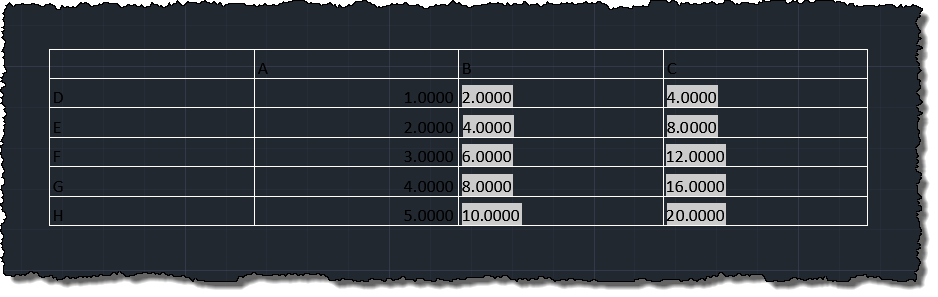
If we look at the contents of a particular cell, we see it has embedded formatting codes, such as this: "{\\fCalibri|b0|i0|c0;\\c0;A"

To remove this formatting, I adopted the technique suggested by Tony Tanzillo in an earlier comment on that post – and that I've looked at in some depth in this other post – to get at each cell's unformatted contents. The code uses an MText object to strip off the formatting rather than the MText editor.

Here's the C# code:

using Autodesk.AutoCAD.ApplicationServices;

using Autodesk.AutoCAD.DatabaseServices;

using Autodesk.AutoCAD.EditorInput;

using Autodesk.AutoCAD.Runtime;


namespace TableFormatting

{

  public class Commands

  {

    [CommandMethod("STF")]

    public static void StripTableFormatting()

    {

      Document doc =

        Application.DocumentManager.MdiActiveDocument;

      Editor ed = doc.Editor;


      // Ask the user to select a table


      var peo = new PromptEntityOptions("\nSelect table");

      peo.SetRejectMessage("\nMust be a table.");

      peo.AddAllowedClass(typeof(Table), false);

      peo.AllowNone = false;

      var per = ed.GetEntity(peo);

      if (per.Status != PromptStatus.OK)

        return;


      var tabId = per.ObjectId;


      using (var tr = doc.TransactionManager.StartTransaction())

      {

        // Open the table for write


        var tab = tr.GetObject(tabId, OpenMode.ForWrite) as Table;

        if (tab == null)

          return;


        // Start by clearing any style overrides


        tab.Cells.ClearStyleOverrides();


        // We'll use an MText object to strip embedded formatting


        using (var mt = new MText())

        {

          for (int r = 0; r < tab.Rows.Count; r++)

          {

            for (int c = 0; c < tab.Columns.Count; c++)

            {

              // Get the cell and its contents


              var cell = tab.Cells[r, c];

              mt.Contents = cell.TextString;


              // Explode the text fragments


              mt.ExplodeFragments(

                (a, b) =>

                {

                  if (a != null)

                  {

                    // Assuming we have a fragment, use its text

                    // to set the cell contents


                    cell.TextString = a.Text;

                  }

                  return MTextFragmentCallbackStatus.Continue;

                }

              );

            }

   &
#160;      }

        }

        tr.Commit();

      }

    }

  }

}

Sure enough, we can run the STF command and select our table to strip away its formatting:
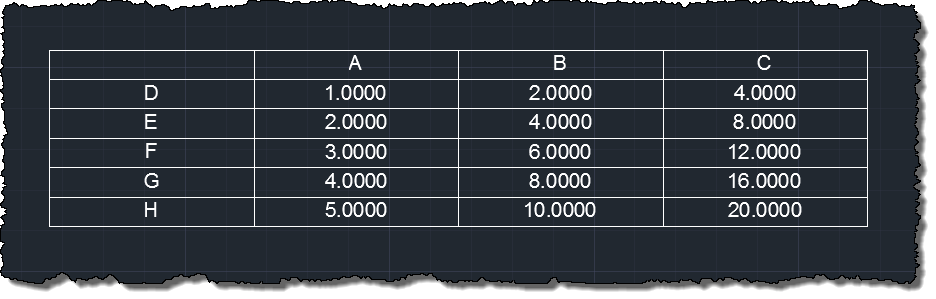
Table without formatting

14 responses to “Stripping formatting from AutoCAD tables pasted from Excel using .NET”

  1. Awesome!! Thanks Kean!!

  2. Can this be done with a LISP routine instead of C#?

  3. Possibly. You can get at the contents of the table quite easily, but stripping formatting is likely to be more challenging.

    Kean

  4. George Herrman Avatar

    i hate to ask this, but how do you get the C+ code, into autocad 2014 lt? i am not a programmer, and have never put code in cad. or perhaps you could send me a link on how to do this? thank you

  5. Hi George,

    Basically you need to copy and paste the code into a .cs file in a Class Library project inside Visual C# Express (any version) and add a few project references (to acmgd.dll, acdbmgd.dll and accoremgd.dll). These can be found in the AutoCAD program folder or in the ObjectARX SDK's inc folder.

    This post may be of some help:

    http://through-the-interfac...

    You might also check the "My First Plug-in" for AutoCAD, as well as other resources on the AutoCAD Developer Center:

    http://autodesk.com/develop...

    Kean

  6. Often borrowed and thought Id give back.

    I've converted to VB and tested the following for those like me who like to work that way

    --------------------------------------------------------------------

    Imports Autodesk.AutoCAD.Runtime

    Imports Autodesk.AutoCAD.ApplicationServices

    Imports Autodesk.AutoCAD.EditorInput

    Imports Autodesk.AutoCAD.DatabaseServices

    Public Class TT_Fix_Table_Format

    <commandmethod("tt_fix_table_format")> Public Sub TT_Fix_Table_Format()

    Dim Doc As Document = Application.DocumentManager.MdiActiveDocument

    Dim Ed As Editor = Doc.Editor

    ' --- Select Table

    ' --- Set up prompt

    Dim PromptOps As New PromptEntityOptions("Select Table")

    With PromptOps

    .SetRejectMessage("You must select Table")

    .AllowNone = False

    End With

    Dim GetResult As PromptEntityResult = Ed.GetEntity(PromptOps)

    If Not GetResult.Status = PromptStatus.OK Then

    Return

    End If

    Dim CTableID As ObjectId = GetResult.ObjectId

    Using trans = Doc.TransactionManager.StartTransaction

    Dim Ctable As Table = trans.GetObject(CTableID, OpenMode.ForWrite)

    If IsNothing(Ctable) Then Return

    For Crow = 0 To Ctable.Rows.Count - 1

    For CCol = 0 To Ctable.Columns.Count - 1

    Dim CurCell As Cell = Ctable.Cells(Crow, CCol)

    Dim CMtext As New MText

    CMtext.Contents = CurCell.TextString

    CMtext.ExplodeFragments(Function(Frag As MTextFragment, userData As Object)

    CurCell.TextString = Frag.Text

    Return MTextFragmentCallbackStatus.Continue

    End Function)

    Next

    Next

    trans.Commit()

    End Using

    End Sub

    End Class

    1. Kean Walmsley Avatar

      Thanks, Tim!

      Kean

  7. Thats helpful, but does it strip the font?
    eg. if the drawing's table style is set to ISOCP, you wouldnt want to see Calibri

    Every other 'remove format' function removes everything except this...

    1. It does strip the font: if you need to maintain it you'll have to reapply it.

      Kean

  8. Gnarly Gorilla Avatar
    Gnarly Gorilla

    Kean,
    I'm not sure which .dll file to load in AutoCAD. I navigate back to the project folder created by Visual Studio, but there are numerous STF.dll files. I've loaded two, and both will allow AutoCAD to run the STF command, but after picking the table, I get the "Application does not support just-in-time (JIT) debugging. See the end of this message for details.......below is the Exception Text

    Then of course, at the end of the file the error shows all the loaded assemblies is this -

    ************** JIT Debugging **************

    Application does not support Windows Forms just-in-time (JIT)

    debugging. Contact the application author for more

    information.

    ************** Exception Text **************

    Autodesk.AutoCAD.Runtime.Exception: eIsWriteProtected

    at Autodesk.AutoCAD.DatabaseServices.Cell.set_TextString(String value)

    at TableFormatting.Commands.<>c__DisplayClass1.<striptableformatting>b__0(MTextFragment a, Object b) in c:\Users\chris.waggoner\Documents\Visual Studio 2013\Projects\STF\STF\Class1.cs:line 64

    at AcDbMText.explodeFragments(AcDbMText* , IntPtr , Void* , AcGiWorldDraw* )

    at Autodesk.AutoCAD.DatabaseServices.MText.ExplodeFragments(MTextFragmentCallback enumerator, Object userData, WorldDraw context)

    at TableFormatting.Commands.StripTableFormatting() in c:\Users\chris.waggoner\Documents\Visual Studio 2013\Projects\STF\STF\Class1.cs:line 56

    at Autodesk.AutoCAD.Runtime.CommandClass.InvokeWorker(MethodInfo mi, Object commandObject, Boolean bLispFunction)

    at Autodesk.AutoCAD.Runtime.CommandClass.InvokeWorkerWithExceptionFilter(MethodInfo mi, Object commandObject, Boolean bLispFunction)

    at Autodesk.AutoCAD.Runtime.CommandClass.CommandThunk.Invoke()

    1. Gnarly Gorilla Avatar
      Gnarly Gorilla

      Also, by setting the Any CPU to x64 and moving the STF.dll from the Release Folder of the project over to Program Files\AutoDesk\AutoCAD 2016\ folder...it cleaned up all CPU errors but still does not work after picking the table.

      ************** Exception Text **************

      Autodesk.AutoCAD.Runtime.Exception: eIsWriteProtected

      at Autodesk.AutoCAD.DatabaseServices.Cell.set_TextString(String value)

      at TableFormatting.Commands.<>c__DisplayClass1.<striptableformatting>b__0(MTextFragment a, Object b)

      at AcDbMText.explodeFragments(AcDbMText* , IntPtr , Void* , AcGiWorldDraw* )

      at Autodesk.AutoCAD.DatabaseServices.MText.ExplodeFragments(MTextFragmentCallback enumerator, Object userData, WorldDraw context)

      at TableFormatting.Commands.StripTableFormatting()

      at Autodesk.AutoCAD.Runtime.CommandClass.InvokeWorker(MethodInfo mi, Object commandObject, Boolean bLispFunction)

      at Autodesk.AutoCAD.Runtime.CommandClass.InvokeWorkerWithExceptionFilter(MethodInfo mi, Object commandObject, Boolean bLispFunction)

      at Autodesk.AutoCAD.Runtime.CommandClass.CommandThunk.Invoke()

      1. Gnarly Gorilla Avatar
        Gnarly Gorilla

        Nevermind....I just figured out the problem. The "TYPE" of table I was using this on was not created using the method you explained in the beginning of the article. The table I was using it on was originally created with a datalink and later that datalink was removed. If however, you create a table, and copy and paste cells into that blank table. This tool shown here does work.

  9. Hi thx for the post Mr Kean

    in this bit of code: mt.ExplodeFragments( (a, b) ..................... etc)

    re: that call back function: what do the parameters a and b mean? the objectARX documentation suggests that it is an MTextFragmentCallback enumerator but i don't get it.

    on another note I sincerely wish you had called the function thus: "StripTableFormattingUnsullied" 😉

    chrs

    1. Yes, the docs are a bit lacking, it seems. The first is an MTextFragment - which you can use to get the information about that piece of the MText - but I don't recall what the second was. I suggest setting a breakpoint and running it from the debugger.

      Kean

Leave a Reply

Your email address will not be published. Required fields are marked *