A different approach for using Leap Motion with AutoCAD

I mentioned a presentation I gave in Singapore a few weeks that talked about integrating Kinect and Leap Motion with AutoCAD. After the session I had a good conversation (in person and then by email) with Nagappan Nachiappan. Nagappan is a talented young software engineer working on AutoCAD's JavaScript API, but has a strong interest in HCI (his final year degree project used computer vision techniques to implement a virtual mouse that moves with your hand).

Nagappan was responding to concerns I'd raised about the ergonomic impact of hovering your hand above the device. His primary question was "can the Leap Motion controller see through glass?". We had some fun trying it out, there and then, but we didn't make much progress: the glass tables in the meeting room were too opaque and trying it with the window didn't work (the Singapore sunshine was just too bright).

I gave it a try on returning home with a piece of Plexiglas and found that – while the sensitivity is reduced somewhat – it did work, and it would absolutely be feasible to implement an approach where the Leap Motion is covered by a piece of glass (or Plexiglas) which is then used as a surface for user input.
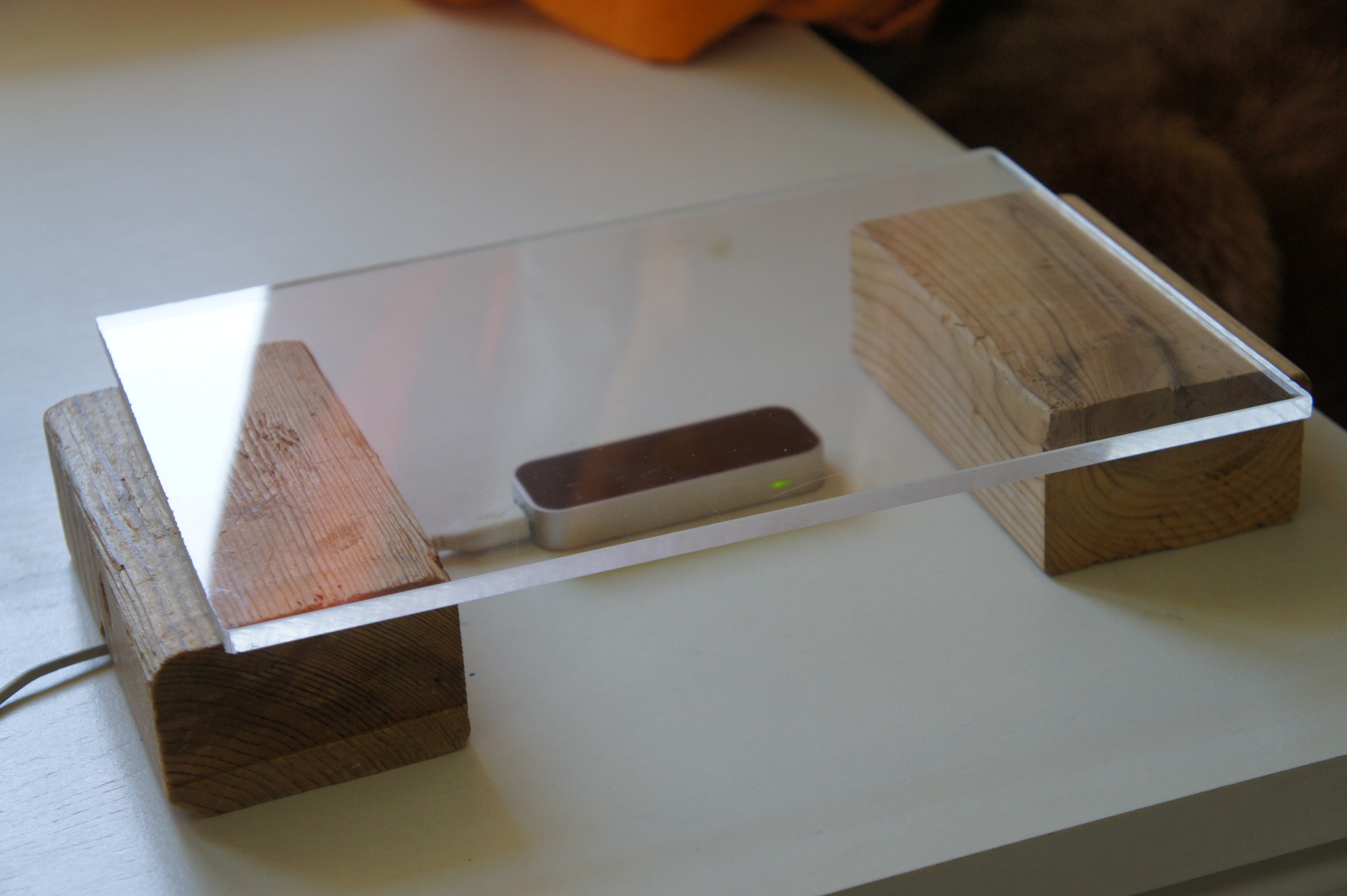
The Leap Motion surface (and yes, I even cut a groove for the cable!)

That's where things got interesting: for this week's internal technical summit, I threw together a prototype that showed just that in action. After calibrating the level of the glass (by tapping it or pointing to it and hitting the space bar), it's possible to draw circles and other shapes on the surface that can then be extruded vertically by lifting your hand away from the surface. Fun stuff!

Here's the updated source project – I took the opportunity to refactor the code, so it's looking a lot cleaner – and here's a video I took of the surface in action:

I think the results are pretty interesting. While not perfect – it's probably worth experimenting with different materials, to improve the sensitivity and therefore the user's control – it does show one possible approach for mitigating some of the ergonomic issues the Leap Motion device presents. Having a hard surface makes a huge difference from a usability perspective. Thanks for the inspiration, Nagappan!

9 responses to “A different approach for using Leap Motion with AutoCAD”

  1. Tony Tanzillo Avatar

    "it does show one possible approach for mitigating some of the ergonomic issues the Leap Motion device presents"

    Hi Kean.

    What ergonomic issues are you referring to?

  2. Kean Walmsley Avatar

    Hi Tony,

    The issues are mainly around hovering your hand in the air for any length of time: without support or haptic feedback this gets tiring very quickly.

    Kean

  3. Hi Kean

    Great work with the concept. I would love to talk with you directly about this. Would you be able to contact me kiwi_at_leapmotion_com.

  4. Hi Kean. I don't think there are any issues with hovering your hand in the air for any length of time, because with software that is designed for a device like that, you wouldn't have to hover your hand in the air very long.

    The same holds true for haptic feedback. Your ideas about how a device like the Leap should work, are in terms of today's software, which was designed to work primarily with 2D input.

    The way it will eventually work (with 3D modeling software at least), is that your hand will become just another 3D object in the model, tracked in real time, and interference-checked with other nearby objects in real time. You will see your hand in the model, and you will see other model elements change appearance when your hand (or one or more fingers) interferes with (e.g. 'touches') their volume. You will be able to reach into the model, grab things, move/rotate them using your hand, and for precision, there will be plenty of assistance from the software, not unlike the 2D drafting aids we have now (objects snapping into place or aligning themselves or 'mating' with other objects as they are being moved, etc).

    IMO, your point of view, and what you perceive to be issues, are a product of your attempts to use the Leap device as little more than a 3D digitizer.

    The mouse on my desk has a resolution of 1200 DPI, which makes it more sensitive than the Leap device, and I would probably have the same issues with my mouse, if were to make the mistake of trying to use it as a 2D digitizer, which isn't its primary purpose, just as the Leap device's primary purpose is not to act as a 3D digitizer, which up to this point, as you seem to think, based on your experiments and observations.

    What is going to make the Leap device fundamentally change the way we interact with computers, are the fundamental changes that will be required by software (both at the system and application level) that will more easily allow it to be used as a 3D input device, not merely as a 3D digitizer.

  5. Kean Walmsley Avatar

    Hi Tony,

    I partly agree.

    This particular avenue of research is certainly about retro-fitting this kind of input to a system that is designed around 2D input. My presentation at the Tech Summit - which will hopefully be accepted for AU 2013, in case you can make it - lists various options for integrating the technology, one of which would involve a more fundamental re-thinking of the software. That would clearly be the way to go to make optimal use of it, but is beyond the scope for near-term research.

    I did say "hover your hand for a certain length of time" in my previous comment, but that was written too quickly: this isn't an issue that relates to the need to hold your hand steady above the device - which I agree is not the way to go for a usable integration - as much as it is about moving your hands freely in the air without support. I'd be interested in hearing your thoughts once you've spent some time using the controller: my own experience is that even playing Fruit Ninja gets tiring pretty quickly, as your hands just need to be a certain distance from the device for it to pick up movement.

    I believe this type of technology has an interesting future - it seems inevitable that someone is going come up with a gesture-based system that works really well, even for existing systems not specifically designed from the ground up with them in mind - but there are some hurdles that need to be overcome in the meantime. It’s definitely going to be interesting to see how the area evolves.

    Kean

  6. Kean Walmsley Avatar

    Hi Kiwi,

    Would be happy to.

    Kean

  7. Kean Walmsley Avatar

    I should probably add that I see some interesting "sweet spots" for this technology (just as there are for Kinect, although with some differences). They'd include the more "creative" design disciplines (clay sculpting, conceptual modeling, etc.), model navigation (collaborative or otherwise) and accessibility-related interactions. I'm sure there are others out there.

    Some of these relate to AutoCAD, but not all. Other people in the company are looking at integrating Leap Motion with other Autodesk products (I would think Maya, Navisworks and InfraWorks would be good choices, for instance), but I personally don't expect it to revolutionize the way AutoCAD is used in the near-term.

    Then again, someone may well discover an approach that makes it work in a genuinely compelling way, which would be fantastic.

    Kean

  8. James Maeding Avatar

    Wouldn't you also say the future involves spoken commands? Us humans seem to never tire of words, yet our hands get weary quickly for precise movements. I wonder how good current speach recognition is, as the dictation progs I have seen have a lag. So combine that with the 3d hand movement development under way, we are just at the beginning of better interface development. Similar to how civil engineering software is also just at its beginning.

  9. Kean Walmsley Avatar

    I'd certainly agree with that (although the people in the cubes next to me might not thank you ;-).

    If you want to add audio into your NUI, using Kinect certainly has the advantage of having a consistent approach for dealing with speech (although there's clearly a trade-off with sensitivity... we'll see if the next-gen Kinect delivers accurate finger-tracking or not).

    Kean

Leave a Reply to James Maeding Cancel reply

Your email address will not be published. Required fields are marked *