AutoCAD 2015 for developers

I've just arrived home from a 10-day trip to the Bay Area. It was a really interesting visit – as usual – but I'm happy to be home (even if I'm writing this at 3am, once again fighting jetlag).

The news has started to come out about AutoCAD 2015 – much of it fed by the Autodesk bloggers' day on Monday, which I unfortunately didn't attend – so it seemed timely for me to talk about the updates more from a developer's perspective.

Let's look at the major features of AutoCAD 2015, starting with the user interface enhancements.

The most immediately visible change is the dark theme. This gives a whole new feel to AutoCAD, making it look and feel much more modern and (arguably) less straining on the eye.

A great deal of effort was needed to make this happen, and this also goes for application developers: work is clearly needed to redesign icons and implement dialogs that look good in this new mode. The runtime changes hinge around the COLORTHEME system variable – applications need to check for changes to this variable using a reactor – something we'll look at in more depth in a future post.

Dark theme

Another UI-related feature is the New Tab page. This is the default view you get on launching AutoCAD with STARTUP == 2, allowing users to create new drawings or open recently accessed ones (as well as providing info from Autodesk 360, etc.).

New Tab page

One application-level change brought about by this work, effectively providing support for non-drawing documents, is the fact that MdiActiveDocument can now be "null": it's important to check it has a valid object reference before using it, from AutoCAD 2015 onwards.

Another great enhancement is around command preview. Many commands inside AutoCAD – such as TRIM and EXTEND, to name a couple – will now preview the projected results of the operation visually depending on the object(s) being hovered over. This is in combination with more vibrant effects for selecting geometry (highlighting by obscuring is no longer the default mode).
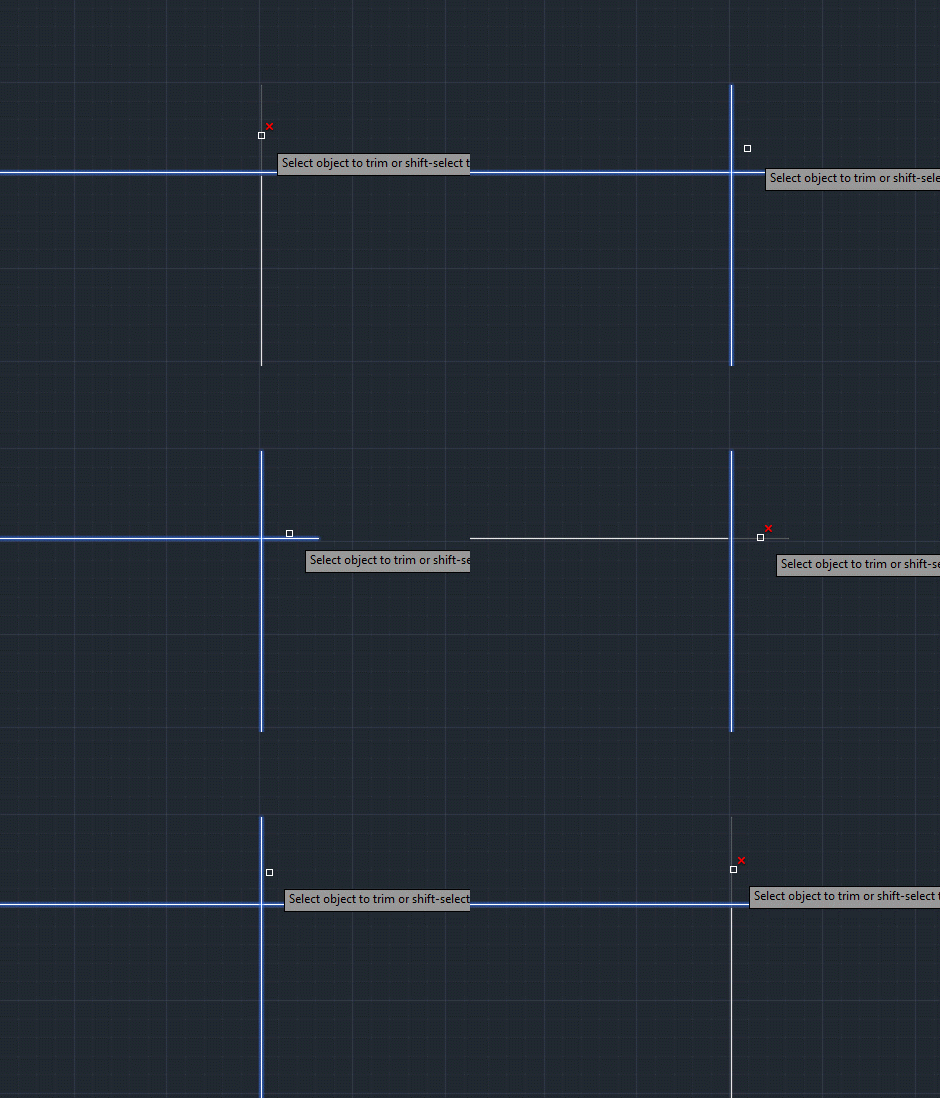
Command preview

AutoCAD users have become used to jagged diagonals, over the years, but the anti-aliasing work in this release – enabled by the LINESMOOTHING system variable – brings AutoCAD bang up to date. Here's how an angled hatch looks both with and without line smoothing applied:
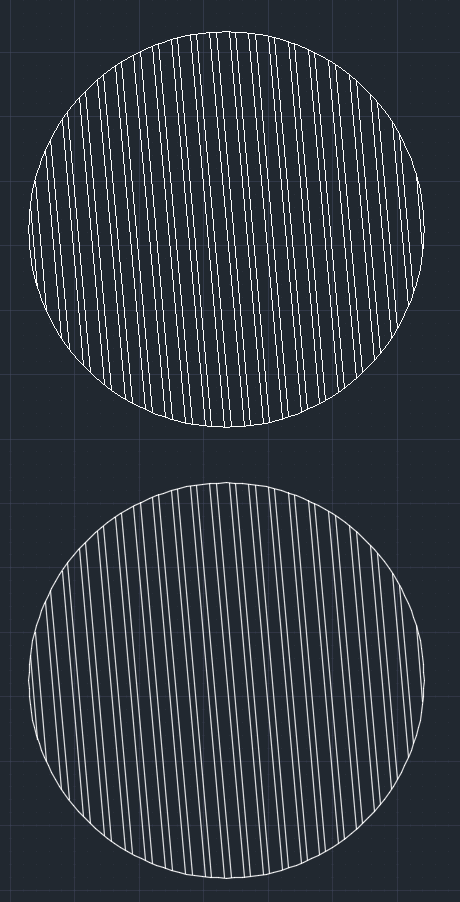
Line smoothing

AutoCAD's user interface has inevitably become more complex, over the years, as its capabilities have expanded. The UI Finder feature extends AutoCAD's Help to enable users to locate the capabilities they're reading about in the documentation automatically. It works by calling a JavaScript function that searches for the chosen macros ID via CUI, changing the currently visible ribbon in order to display the required location to the user. Very cool. This should also be something developers can hook into – for when their own documentation is visible in AutoCAD's help browser, it won't work otherwise – which is something we'll take a look at in a future post.
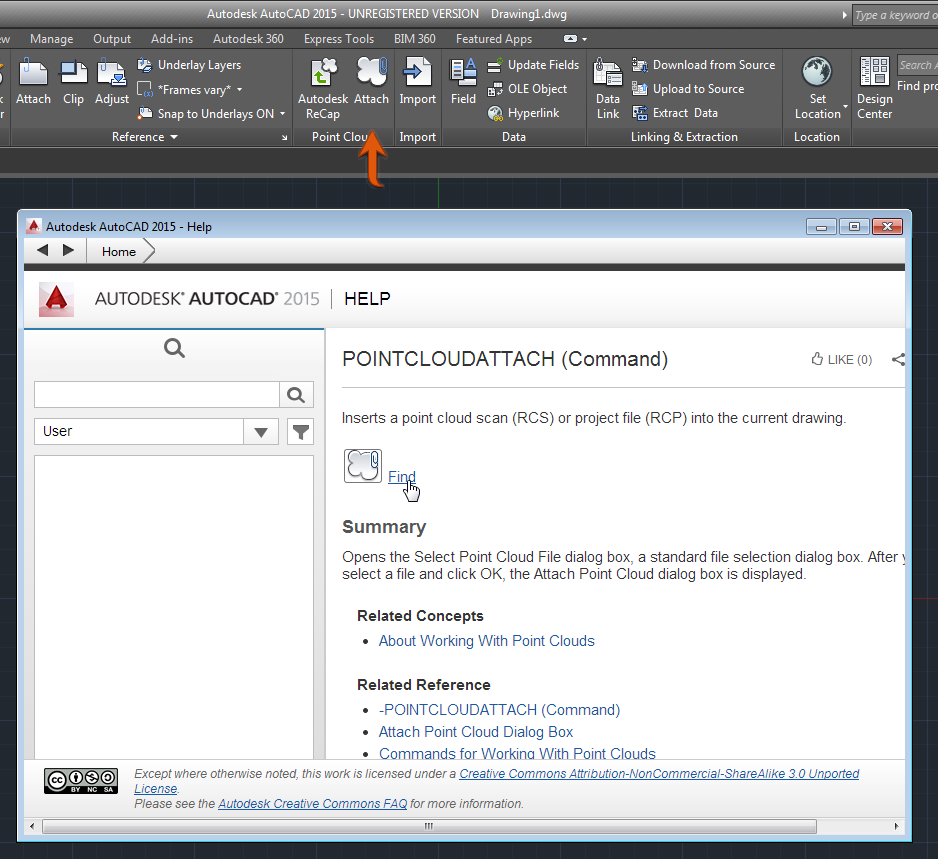
UI FinderA really important feature, from my perspective, is the enhancements to AutoCAD's point cloud capabilities: it's getting easier and easier to model against point cloud data in AutoCAD, particularly with the new ability to derive a UCS dynamically based on a plane extracted from the point cloud. This is going to add serious value to the use of point clouds in AutoCAD, whether they come from laser scanners or devices such as the Kinect.

Another change in this area is the deprecation of the POINTCLOUDINDEX command: you can no longer index text files into point cloud files (at least not right now). AutoCAD now uses the RCS format for point clouds – rather than PCG – which means that you need to use ReCap Studio to aggregate or manipulate point clouds before bringing them into AutoCAD. In time I hope it'll once again be possible to index text files directly inside AutoCAD – or have a better approach from creating RCS files on-the-fly – but in this release applications such as my sample application integrating Kinect need to be changed to write out text files to be processed separately in ReCap Studio. Less that ideal, but there you go.

Aside from dynamic UCS, the other good news around point clouds in AutoCAD is that the way they are visualized has also received significant attention in this release: the ReCap visualization engine has been integrated into AutoCAD, bringing much broader visualization options.

Kinect point cloud in AutoCAD 2015

The next major architectural change inside AutoCAD is the complete removal of Microsoft's long-deprecated fiber technology. The NEXTFIBERWORLD and FIBERWORLD system variables no longer have any influence over the use of fibers in AutoCAD: with any luck we've now addressed all the issues related to this. This means you can now debug AutoCAD much more readily from Visual Studio – no need to turn fibers off, relaunch AutoCAD from the debugger, and then remember to turn
them back on afterwards. On the subject of debugging, we've fixed the issue related to edit & continue of 64-bit .NET applications in Visual Studio 2013. This is great news for .NET developers.

The fiber removal work will also have a significant impact on developers, in that it's now completely supported to call commands from .NET (using a mechanism that's ultimately much better than Document.SendStringToExecute()), but we'll talk about that in more depth in the next post.

Another larger topic for a future post is the JavaScript API. This technology has matured beyond the "preview" stage we saw in AutoCAD 2014. Aside from general API improvements, our approach for hosting the Chromium runtime now makes use of a separate process per client instance. This makes it more reliable and fault-tolerant.

Oh, and a quick note to wrap-up… drawing bloat due to unused DGN linestyles should also no longer be an issue in AutoCAD 2015, which will also be good news for many AutoCAD users out there.

This isn't the full extent of the updates, improvements and new features in AutoCAD 2015, but hopefully it does give a feel for the magnitude of the release (from my perspective the team has done a brilliant job on a number of fronts during this release cycle).

Update:

It turns out NEXTFIBERWORLD/FIBERWORLD are still usable – primarily for QA purposes, in case issues with fiber removal require verification – so the code paths for using fibers are still there, just inactive by default. I'd recommend against switching fibers back on unless it's to help diagnose and report an issue, though. Thanks to Stephen Preston for checking on this. 🙂

27 responses to “AutoCAD 2015 for developers”

  1. .NET C# applications we use with AutoCAD 2013 should work with AutoCAD 2015?

    1. Excellent question: I didn't actually touch on app compatibility in this post - I'll be talking more about that in the next one - but let me talk about .NET quickly.

      As long as it's post-"big split" - which means for AutoCAD 2013 or 2014 - then your app *may* just work. That said, there are some APIs that have changed in this release - especially on the graphics and command invocation side of things - so thorough testing will be needed. And if you're P/Invoking acedCmd() (for example), then it will need work, as that function no longer exists.

      And 2015 targets .NET 4.5, by the way (so to make use of the newer APIs you will need to, also).

      Kean

  2. Samir Bittar Rosas Avatar
    Samir Bittar Rosas

    Amazing! Can't wait for Edit & Continue capabilities! Great job on supporting us, .NET developers! Thanks!

  3. I am very impressed with the changes the core AutoCAD teams make to solve problems and allow usage on other platforms. It shows me Autodesk does have the resources to do major architectural changes if it wants to. I always wonder about that because the C3D product needs that and I never know if its political or technical reasons that hold the (major) changes back. Its like point clouds get attention because you guys understand them. If you understood civil data sharing, you would laugh at the current systems of C3D. Its reverse optimized. I'm installing 2015 right now, can't wait to see the anti-alias effect.

  4. Thanks for the Link back to CAD Setter Out Kean - It's a shame we missed you!

    I'm really impressed with how much work the Ux team have done on 'little' features that simply make AutoCAD 2015 easier and smoother to use.

    It looks the the API team have been working just as hard under the bonnet 😉

    1. Kean Walmsley Avatar

      Yes, all in all it's a great release (although I'm certainly biased 🙂

      Kean

  5. Thanks for the information on the NEXTFIBERWORLD default change. That is very helpful to know about.

    From some testing, it seems like AcedInvoke ( Autodesk.AutoCAD.ApplicationServices.Application.Invoke) fails on Lisp commands when (Command... or (vl-cmdf... is called when FIBERWORLD is OFF, with an "AutoCAD command rejected:" error.

    Maybe I'm missing something, but this seems to be what I've found. Any thoughts on this?

    1. Kean Walmsley Avatar

      Is that with AutoCAD 2015? If it's with AutoCAD 2014 then it's not a surprise that certain things don't work. If it's 2015 then the ADN team should investigate further (hopefully you're a member), in case there's an issue.

      Kean

      1. Yes, that's with AutoCAD 2015. I'll submit a support request to ADN. Thanks.

        1. After hearing back, it seems that (command-s ...) works.

          1. Kean Walmsley Avatar

            Good to know.

            Kean

  6. Kean,

    I wanted to add a slight addendum to your statement regarding checking MDI Active Document being null. When using a ServicedComponent inherited class to communicate from COM to in-process (which you explained here: keanw.com/2009/05/interfacing-an-external-com-application-with-a-net-module-in-process-to-autocad-redux.html), MDI Active Document can be null at runtime inside command methods. Checking for null is definitely a good idea in that kind of environment, even prior to 2015.

    1. Kean Walmsley Avatar

      Yes - I can imagine that when coming in via COM - where you're in the session context - that you might hit a case where MDIActiveDocument is null. There are more cases where there's scope for this to happen in 2015.

      Thanks for mentioning this!

      Kean

  7. Edit & continue has been fixed??? AWESOME!!!!!!!!

    1. Kean Walmsley Avatar

      Yay! 🙂

      For 64-bit .NET apps, mind...

      Kean

  8. "The fiber removal work will also have a significant impact on developers" Would this also assist with allowing AutoCAD to utilize multi-core processing?

    1. Kean Walmsley Avatar
      Kean Walmsley

      Not specifically, no.

      Kean

  9. "...is the fact that MdiActiveDocument can now be "null": it's important to check it has a valid object reference before using it, from AutoCAD 2015 onwards."
    How do I check this in .NET?

    1. Kean Walmsley Avatar

      if (Application.DocumentManager.MDIActiveDocument != null)
      ...

      Kean

      1. I tried that but gets the following error using Visual Studio Express 2013:
        "Null is not declared. Null constant is no longer supported. Use System.DbNull instead."
        The automatic correction gives me DBNull.Value but that does not work either with the following error:
        "Value of type System.DBNull cannot be converted to Autodesk.AutoCAD.Runtime.DisposableWrapper"
        How do I fix this?

        1. Problem solved! The following code worked:
          If Application.DocumentManager.MdiActiveDocument IsNot Nothing Then...

  10. With IFCExport from AutoCAD Architecture 2015, do you know how to have IfcSpace, IfcQuantityArea,... like this :
    #133= IFCSPACE('3iqsOEMTT4A8ytJLMtWvgb',#41,'1',$,$,#116,#129,'Space',.ELEMENT.,.INTERNAL.,$);
    #138= IFCQUANTITYAREA('GSA Space Areas',$,$,13.3996);
    #139= IFCELEMENTQUANTITY('2omCqu11v0IfakrPwobDeQ',#41,'GSA Space Areas',$,'GSA BIM Area',(#138));
    #144= IFCRELDEFINESBYPROPERTIES('1rwHwQsRL4bu1ftus5r_Lo',#41,$,$,(#133),#139);

    Anyone have any ideas ?
    Thanks !

    1. Kean Walmsley Avatar

      Sorry - this isn't a support forum. Please post your questions to forums.autodesk.com.

      Kean

  11. Dear Mr. Kean.

    This code I test in Autocad 2010 normaly, but in the Autocad 2015 I get error with "GetGsView":

    public static void ZoomToObject(ObjectId oID)

    {

    Entity ent = vInput.Entity_FromObjectId(oID);

    Document doc = Application.DocumentManager.MdiActiveDocument;

    using (Transaction trx = doc.Database.TransactionManager.StartTransaction())

    {

    int CvId = Convert.ToInt32((Application.GetSystemVariable("CVPORT")));

    using (Autodesk.AutoCAD.GraphicsSystem.Manager gm = doc.GraphicsManager)

    using (Autodesk.AutoCAD.GraphicsSystem.View vw = gm.GetGsView(CvId, true))

    {

    Extents3d ext = ent.GeometricExtents;

    vw.ZoomExtents(ext.MinPoint, ext.MaxPoint);

    gm.SetViewportFromView(CvId, vw, true, true, false);

    }

    trx.Commit();

    }

    }

    With this exception:

    'Autodesk.AutoCAD.GraphicsSystem.Manager'
    does not contain a definition for 'GetGsView' and no extension method
    'GetGsView' accepting a first argument of type
    'Autodesk.AutoCAD.GraphicsSystem.Manager' could be found (are you missing a
    using directive or an assembly reference?)

    Google can't help. Please help me, how can fix this problem. Thank you very much!

    1. Please use the discussion groups for support in future.

      The AcGs interface has changed in 2015: try using GetCurrentAcGsView(), instead.

      Kean

  12. Hi Kean,

    i work with ACAD 2016 and Visual Studio Community 2015.
    What settings should I make to use Edit & continue??
    Thanks.

    Richard

    1. Hi Richard,

      I don't use VS Community - does this help?

      stackoverflow.com/qu...

      Regards,

      Kean

Leave a Reply to Locke Cancel reply

Your email address will not be published. Required fields are marked *