It's time to start looking in more detail at some of the new API capabilities in AutoCAD 2016. To give you a sense of what to expect in terms of a timeline, this week we'll look at a couple of uses for DocumentCollection.ExecuteInCommandContextAsync() and next week we'll look at point cloud floorplan extraction and (hopefully) security and signing.
The first use of ExecuteInCommandContextAsync() I wanted to highlight was one raised in a blog comment a couple of months ago. The idea is simple enough: we want to be able to launch a command reliably from an event handler, in our case the Click event of a ContextMenuExtension's MenuItem. Before now you would have to use Document.SendStringToExecute(), as we saw in this previous post – calling a command in another way would typically lead to an eInvalidInput exception.
There are certainly advantages to avoiding SendStringToExecute() in this scenario: while commands that use the pickfirst selection set are OK – including ones you implement yourself – using Command() or CommandAsync() gives you greater control over which entities you choose to pass entities to the command being called (whether it accepts pickfirst selection or not).
By the way, as mentioned briefly in a comment on the last post, in AutoCAD 2015 you will find the DocumentCollection.BeginExecuteInCommandContext() method, which was the former name for ExecuteInCommandContextAsync() (it's taken from the ObjectARX method it calls through to). If you try to make the below code work in AutoCAD 2015 with the previous method name, you're probably going to hit this error: 'Unknown command: "EXECUTEFUNCTION"'.
Before we look at the code, here's a recording of what we want it to do:
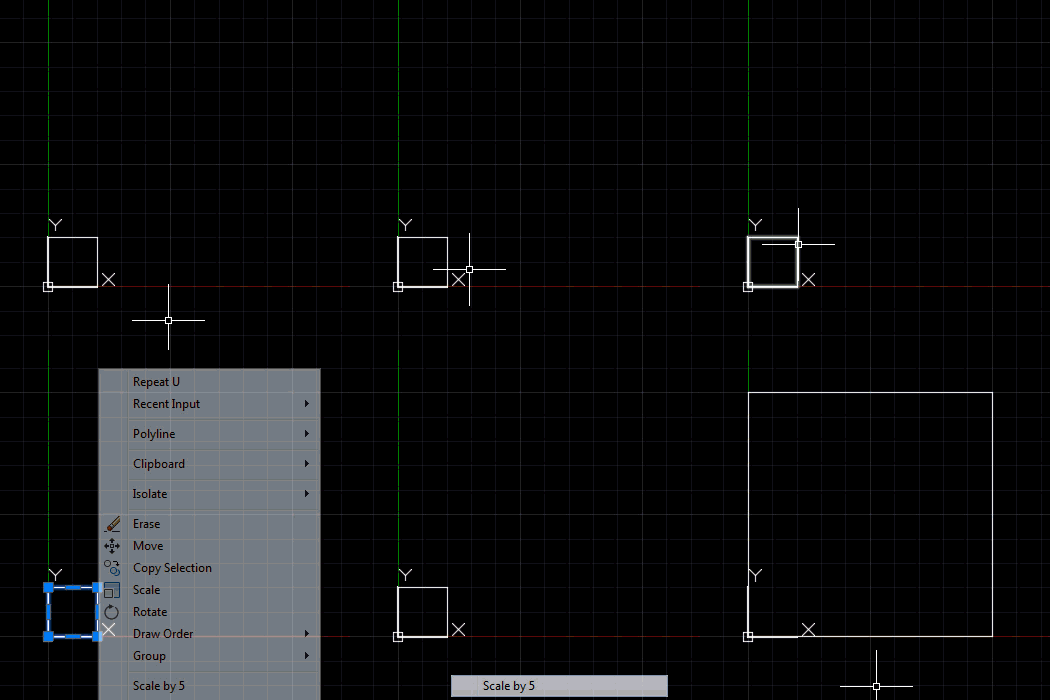
It's pretty simple in concept, at least. Here's the C# code that makes it work:
using Autodesk.AutoCAD.ApplicationServices;
using Autodesk.AutoCAD.DatabaseServices;
using Autodesk.AutoCAD.EditorInput;
using Autodesk.AutoCAD.Geometry;
using Autodesk.AutoCAD.Runtime;
using Autodesk.AutoCAD.Windows;
using System;
namespace ContextMenuApplication
{
public class Commands : IExtensionApplication
{
public void Initialize()
{
ScaleMenu.Attach();
}
public void Terminate()
{
ScaleMenu.Detach();
}
}
public class ScaleMenu
{
private static ContextMenuExtension cme;
public static void Attach()
{
if (cme == null)
{
cme = new ContextMenuExtension();
MenuItem mi = new MenuItem("Scale by 5");
mi.Click += new EventHandler(OnScale);
cme.MenuItems.Add(mi);
}
RXClass rxc = Entity.GetClass(typeof(Entity));
Application.AddObjectContextMenuExtension(rxc, cme);
}
public static void Detach()
{
RXClass rxc = Entity.GetClass(typeof(Entity));
Application.RemoveObjectContextMenuExtension(rxc, cme);
}
private static async void OnScale(Object o, EventArgs e)
{
var dm = Application.DocumentManager;
var doc = dm.MdiActiveDocument;
var ed = doc.Editor;
// Get the selected ob
jects
var psr = ed.GetSelection();
if (psr.Status != PromptStatus.OK)
return;
try
{
// Ask AutoCAD to execute our command in the right context
await dm.ExecuteInCommandContextAsync(
async (obj) =>
{
// Scale the selected objects by 5 relative to 0,0,0
await ed.CommandAsync(
"._scale", psr.Value, "", Point3d.Origin, 5
);
},
null
);
}
catch (System.Exception ex)
{
ed.WriteMessage("\nException: {0}\n", ex.Message);
}
}
}
}
We might have used Editor.Command() rather than Editor.CommandAsync(), but ExecuteInCommandContextAsync() is expecting an asynchronous task to be passed in, so doing so would lead to a warning about the async lambda running synchronously. Ultimately it works comparably, but the above code makes the C# compiler happier, so I've left it that way. I've also chosen to await the call to ExecuteInCommandContextAsync(), although for this type of operation it's probably not strictly needed.
In the next post we're going to take a look at calling AutoCAD commands based on external events: we're going to hook up a FileSystemWatcher to check for changes to a folder and call a command inside AutoCAD each time a file gets created there.


Leave a Reply