I needed to run some code from a modeless dialog, the other day, and found it was a bit of a pain to generate something quickly to do so. So I thought it might be a good idea to populate a palette dynamically with buttons that call commands and methods that were somehow tagged in the current project.
The first step was to work out how to tag them: the obvious choice being some kind of method-level designation (much as we have with the CommandMethod() attribute). I created a command – named PC, for PaletteCommands – that uses reflection on the main module of the executing assembly to extract the various commands and methods of interest. The commands get called using DocumentCollection.ExecuteInCommandContextAsync() – as we saw in this previous post, this is the way to call a command from the session context – and the methods get executed via MethodInfo.Invoke(). I've just shown one possible approach, and it's certainly open for extension, but it's pretty nice to see the dialog get populated based on the various methods flagged with the [PaletteMethod] attribute.
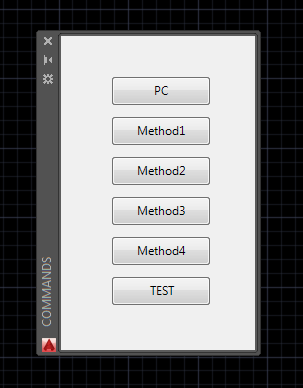
Here's the C# code implementing the PC command (which we've also flagged, even if it's a little silly to do so) as well as the various other commands and methods populating the above palette:
using Autodesk.AutoCAD.ApplicationServices;
using Autodesk.AutoCAD.Runtime;
using Autodesk.AutoCAD.Windows;
using System;
using System.Collections.Generic;
using System.Drawing;
using System.Reflection;
using WinForms = System.Windows.Forms;
namespace ModelessDialogs
{
// The basic attribute we'll use to tag the methods/commands to place
// on the palette
[AttributeUsage(AttributeTargets.Method)]
public class PaletteMethod : Attribute { }
public class Commands
{
private static PaletteSet _ps = null;
// Our main command to display a palette. This is flagged to be included
// on the palette, too, which is a bit silly, but harmless (as the
// command doesn't do anything if the palette is already available)
[PaletteMethod]
[CommandMethod("PC")]
public void PaletteCcommands()
{
if (_ps == null)
{
var doc = Application.DocumentManager.MdiActiveDocument;
if (doc == null) return;
var ed = doc.Editor;
// We're going to take a look at the various methods in this module
var asm = Assembly.GetExecutingAssembly();
var type = asm.GetType("ModelessDialogs.Commands");
if (type == null)
{
ed.WriteMessage("\nCould not find the command class.");
return;
}
// We'll create a sequence of buttons for each callable method
var bs = new List<WinForms.Button>();
var i = 1;
// Loop over each method
foreach (var m in type.GetMethods())
{
var cmdName = "";
var palette = false;
// And then all of its attributes
foreach (var a in m.CustomAttributes)
{
// Check whether we have a command and/or a "palette" attb
if (a.AttributeType.Name == "CommandMethodAttribute")
{
cmdName = (string)a.ConstructorArguments[0].Value;
}
else if (a.AttributeType.Name == "PaletteMethod")
{
palette = true;
}
}
// If we have a palette attb, then one way or another it'll be
// added to the palette
if (palette)
{
// Create our button and give it a position
var b = new WinForms.Button();
b.SetBounds(50, 40 * i, 100, 30);
// If no command name was found, use the method name and call the
// function directly in the session context
if (String.IsNullOrEmpty(cmdName))
{
b.Text = m.Name;
b.Click +=
(s, e) =>
{
var b2 = (WinForms.Button)s;
var mi = type.GetMethod(b2.Text);
if (mi != null)
{
// Use reflection to call the method with no arguments
mi.Invoke(this, null);
}
};
}
else
{
// Otherwise we use the command name as the button text and
// execute the command in the command context asynchronously
b.Text = cmdName;
b.Click +=
async (s, e) =>
{
var dm = Application.DocumentManager;
var doc2 = dm.MdiActiveDocument;
if (doc2 == null) return;
// We could also use SendStringToExecute for older versions
// doc2.SendStringToExecute(
// "_." + cmdName + " ", false, false, true
// );
var ed2 = doc2.Editor;
await dm.ExecuteInCommandContextAsync(
async (obj) =>
{
await ed2.CommandAsync("_." + cmdName);
},
null
);
};
}
bs.Add(b);
i++;
}
}
// Create a user control and add all our buttons to it
var uc = new WinForms.UserControl();
uc.Controls.AddRange(bs.ToArray());
// Create a palette set and add a palette containing our control
_ps = new PaletteSet("PC", new Guid("87374E16-C0DB-4F3F-9271-7A71ED921566"));
_ps.Add("CMDPAL", uc);
_ps.MinimumSize = new Size(200, (i + 1) * 40);
_ps.DockEnabled = (DockSides)(DockSides.Left | DockSides.Right);
}
_ps.Visible = true;
}
// Helper function to display a message and post a command prompt
// (if there's an active document available)
private static void DisplayMessage(string str, bool postPrompt = true)
{
var doc = Application.DocumentManager.MdiActiveDocument;
if (doc == null) return;
doc.Editor.WriteMessage("\n{0}\n", str);
if (postPrompt)
doc.Editor.PostCommandPrompt();
}
// A bunch
of test methods and a single proper AutoCAD command
// (it's a bit misleading to think of the
[PaletteMethod]
public void Method1()
{
DisplayMessage("Method 1");
}
[PaletteMethod]
public void Method2()
{
DisplayMessage("Method 2");
}
[PaletteMethod]
public void Method3()
{
DisplayMessage("Method 3");
}
[PaletteMethod]
public void Method4()
{
DisplayMessage("Method 4");
}
[PaletteMethod]
[CommandMethod("TEST")]
public static void CommandTest()
{
DisplayMessage("This is a command!", false);
}
}
}
I'm really not sure if this will be of use to other people, but I certainly expect to use it from time to time to test problems that specifically need to be called from the session context to reproduce and diagnose. It'll certainly save the effort of generating a UI behind which to place the code.


Leave a Reply to EL AHMADI ISSAM Cancel reply