Right then, time for the big reveal. We've had three parts in this series discussing one basic approach for aggregating stereo panoramas from A360 cloud rendering into a site that uses krpano.
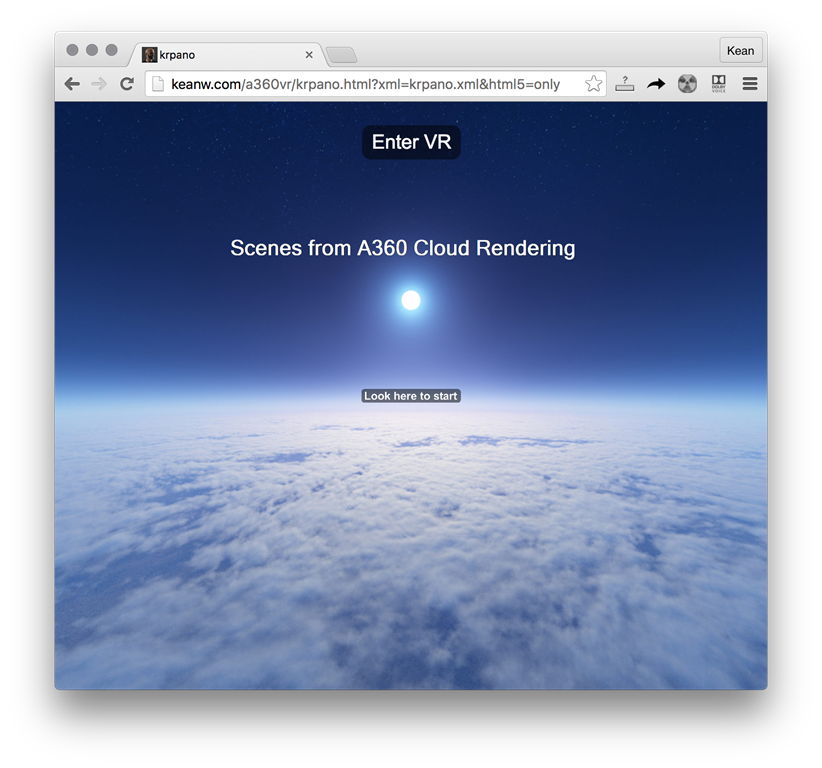
Today we're going to see the code itself, and discuss where the project might go from here. If you're more interested in this discussion, scroll down past the code. 🙂
Firstly, though, here's a quick demo of the site, recorded using my Nexus 5X mobile phone.
Something I like about the krpano viewer is that you can view in VR as well as non-VR mode, and tweak settings that make sure your phone works well in VR mode with your particular Cardboard device (this was a one-time setup – the viewer remembered it subsequently).
Here's the project on GitHub. I've posted krpano runtime files that I've bound specifically to my own web-site: to run the output on your own site, you'll need to license krpano and generate your own .js file(s).
Here's the C# code-behind for the main form:
using System;
using System.Collections.Generic;
using System.Drawing;
using System.Drawing.Drawing2D;
using System.Drawing.Imaging;
using System.IO;
using System.Net;
using System.Reflection;
using System.Text;
using System.Threading.Tasks;
using System.Windows.Forms;
namespace RaaS2Krpano
{
public partial class MainForm : Form
{
public MainForm()
{
InitializeComponent();
}
private static int _total = 0;
private static int _processed = 0;
private void ProcessButton_Click(object sender, EventArgs e)
{
ProcessButton.Enabled = false;
// Set up some paths based on the location of the executable
var asm = Assembly.GetExecutingAssembly();
var loc = Path.GetDirectoryName(asm.Location);
var output = loc + "\\output";
var template = loc + "\\template";
var panos = output + "\\panos";
// Copy the template files across to our output folder
if (Directory.Exists(template))
{
DirectoryCopy(template, output, true);
LogText("Copied template files");
}
if (!Directory.Exists(panos))
Directory.CreateDirectory(panos);
// Create the overall welcome text image
SaveLabelText(welcomeBox.Text, 72, output + "\\label.png");
LogText("Created welcome text");
// Collections for the names and URLs in our form
var names = new List<String>();
var urls = new List<String>();
// The controls containing the names and URLs
var nameBoxes =
new TextBox[] { name1, name2, name3, name4, name5, name6, name7 };
var urlBoxes =
new TextBox[] { url1, url2, url3, url4, url5, url6, url7 };
// We'll filter out any null entries (either name or URL)
for (int i = 0; i < nameBoxes.Length; i++)
{
if (
!String.IsNullOrEmpty(nameBoxes[i].Text) &&
!String.IsNullOrEmpty(urlBoxes[i].Text)
)
{
names.Add(nameBoxes[i].Text);
urls.Add(urlBoxes[i].Text);
}
}
// Generate the strings to insert into our XML scene
var callWiths = new StringBuilder();
var panels = new StringBuilder();
// We'll fill the thumbnails within the angle specified in our form
double fovThumbs = (double)thumbnailAngle.Value;
// Calculate the start angle and the increnement based on the
// number of scenes we have and the overall angle to fill
double fovStart = (names.Count == 1 ? 0 : fovThumbs / -2);
double fovInc =
(names.Count == 1 ? fovThumbs : fovThumbs / (names.Count - 1));
// Set a total entries target at 2 x the number of panos to process
// (we process a file for both Left and Right)
_total = 2 * names.Count;
// Loop through, extracting the cube data and gathering entries
// for our XML scene
for (int i = 0; i < names.Count; i++)
{
ExtractCube(panos, names[i], urls[i], () => ProcessButton.Enabled = true);
// Firstly the JavaScript animation for when the cursor is hovering
callWiths.AppendFormat(
"\t\tcallwith(hotspot[p{0}], copy(ty,start_ty); tween(alpha|ty," +
" 0.5|75, get(start_tt), easeOutQuad|easeOutQuint); );\r\n" +
"\t\tcallwith(hotspot[p{0}_thumb], copy(ty,start_ty); tween(alpha|ty," +
" 1.0|75, get(start_tt), easeOutQuad|easeOutQuint, set(enabled,true) ); );\r\n" +
"\t\tcallwith(hotspot[p{0}_txt], copy(ty,start_ty); tween(alpha|ty," +
" 1.0|75, get(start_tt), easeOutQuad|easeOutQuint); );\r\n",
i + 1
);
// Secondly the panel hotspot elements themselves
panels.AppendFormat(
"\t<!-- Panel {0} -->\r\n" +
"\t<hotspot name=\"p{0}\" style=\"panel\" ath=\"{1}\" atv=\"0\" />\r\n" +
"\t<hotspot name=\"p{0}_thumb\" style=\"thumb\" zorder=\"3\" ath=\"{1}\"" +
" atv=\"0\" url=\"panos/{2}/thumb.png\" scale=\"0.3\" ox=\"0\" oy=\"-10\"" +
" onclick=\"changepano( loadpanoscene('%CURRENTXML%/panos/{2}/tour.xml'," +
" 0, null, MERGE|KEEPVIEW|KEEPMOVING, BLEND(1)); set(webvr.worldscale,0.5); );\" />\r\n" +
"\t<hotspot name=\"p{0}_txt\" style=\"thumb\" zorder=\"2\" ath=\"{1}\"" +
" atv=\"0\" url=\"panos/{2}/text.png\" scale=\"0.3\" oy=\"+82\" enabled=\"false\" />\r\n\r\n",
i + 1, (int)(fovStart + (i * fovInc)), names[i]
);
}
// Now we'll write our XML scene file
var xmlFile = output + "\\krpano.xml";
// We'll replace some placeholders with our collected strings
const string callWithPlaceholder = "%%CALLWITH%%";
const string panelsPlaceholder = "%%PANELS%%";
if (File.Exists(xmlFile))
{
// Read in the file, then loop through it
var xml = File.ReadAllLines(xmlFile);
for (int i=0; i < xml.Length; i++)
{
// Replace our placeholders, if they exist
if (xml[i].Contains(callWithPlaceholder))
xml[i] = xml[i].Replace(callWithPlaceholder, callWiths.ToString());
if (xml[i].Contains(panelsPlaceholder))
xml[i] = xml[i].Replace(panelsPlaceholder, panels.ToString());
}
// Write the file back
File.WriteAllLines(xmlFile, xml);
LogText("Updated XML file");
}
}
private async void ExtractCube(
string root, string name, string panoUrl, Action afterLast = null
)
{
LogText("Extracting cube map for " + name);
var dir = root + "\\" + name;
if (!Directory.Exists(dir))
Directory.CreateDirectory(dir);
var leftFile = String.Format("{0}\\{1}-L.jpg", dir, name);
var rightFile = String.Format("{0}\\{1}-R.jpg", dir, name);
var leftDir = String.Format("{0}\\{1}-L.tiles", dir, name);
var rightDir = String.Format("{0}\\{1}-R.tiles", dir, name);
var leftUrl = GetImageUrl(panoUrl, true);
var rightUrl = GetImageUrl(panoUrl, false);
SaveLabelText(name, 56, dir + "\\text.png");
LogText("Created label text");
GeneratePanoXml(name, dir);
LogText("Created XML file");
var files = new String[] { leftFile, rightFile };
var urls = new String[] { leftUrl, rightUrl };
var dirs = new String[] { leftDir, rightDir };
LogText("Downloading files");
using (var wc = new WebClient())
{
for (int i = 0; i < files.Length; i++)
{
var url = urls[i];
var file = files[i];
var tgtDir = dirs[i];
await ExtractCubeSides(wc, dir, url, file, tgtDir);
_processed++;
// Peform the "everything's done" operation to re-enable the UI
if (_processed == _total && afterLast != null)
{
afterLast();
LogText("We are done!");
}
// Refresh the UI from time to time
Application.DoEvents();
File.Delete(file);
LogText("Downloaded file deleted");
}
}
LogText("Cube map extracted");
}
private async Task ExtractCubeSides(
WebClient wc, string dir, string url, string file, string tgtDir
)
{
const int mobRes = 1024;
const int thumbWidth = 512;
const int thumbHeight = 288;
var cube = new String[] { "l", "f", "r", "b", "d", "u" };
var preview = new String[] { "l", "f", "r", "b", "u", "d" };
await wc.DownloadFileTaskAsync(url, file);
LogText("Downloaded " + url);
using (var orig = new Bitmap(file))
{
int x = orig.Height;
if (orig.Width == orig.Height * cube.Length)
{
if (!Directory.Exists(tgtDir))
{
Directory.CreateDirectory(tgtDir);
LogText("Created folder: " + tgtDir);
}
// Create a cropped thumbnail (a JPG)
var rect = new Rectangle(0, x / 4, x, x / 2);
using (var cropped = orig.Clone(rect, orig.PixelFormat))
using (var thumb = new Bitmap(cropped, thumbWidth, thumbHeight))
{
var thumbFile = String.Format("{0}\\thumb.jpg", dir);
thumb.Save(thumbFile, ImageFormat.Jpeg);
LogText("Saved thumbnail image");
}
// And also a rounded thumbnail (a PNG for the transparent border)
var rect2 = new Rectangle(0, 0, x, x);
using (var thumb2 = orig.Clone(rect, orig.PixelFormat))
using(var thumb3 = new Bitmap(thumb2, thumbWidth, thumbWidth))
using (var thumb5 = RoundCorners(thumb3, thumbWidth / 2, Color.Transparent))
{
var roundFile = String.Format("{0}\\thumb.png", dir);
thumb5.Save(roundFile, ImageFormat.Png);
LogText("Saved rounded thumbnail image");
}
// Extract each side of the cube map
var sides = new Dictionary<string, Bitmap>();
for (int j = 0; j < cube.Length; j++)
{
rect = new Rectangle(j * x, 0, x, x);
using (var pano = orig.Clone(rect, orig.PixelFormat))
{
var panoFile = String.Format("{0}\\pano_{1}.jpg", tgtDir, cube[j]);
pano.Save(panoFile, ImageFormat.Jpeg);
LogText("Extracted pano cube side: " + cube[j]);
var mobile = new Bitmap(pano, mobRes, mobRes);
var mobFile = String.Format("{0}\\mobile_{1}.jpg", tgtDir, cube[j]);
mobile.Save(mobFile, ImageFormat.Jpeg);
LogText("Extracted mobile cube side: " + cube[j]);
// Add the smaller image to a map to create the preview at the end
sides.Add(cube[j], mobile);
}
}
// Generate a lower-resolution preview cube map image
var px = 256;
var prev = new Bitmap(px, px * preview.Length);
var prevFile = tgtDir + "\\preview.jpg";
using (var g = Graphics.FromImage(prev))
{
for (int j = 0; j < preview.Length; j++)
{
rect = new Rectangle(0, j * px, px, px);
g.DrawImage(
sides[preview[j]], rect, new Rectangle(0, 0, mobRes, mobRes),
GraphicsUnit.Pixel
);
}
prev.Save(prevFile, ImageFormat.Jpeg);
}
}
}
}
private void LogText(string message)
{
logText.AppendText(message + "\r\n");
}
private static void DirectoryCopy(
string src, string dest, bool copySubDirs = true
)
{
// Get the subdirectories for the specified directory
var dir = new DirectoryInfo(src);
if (!dir.Exists)
{
throw new DirectoryNotFoundException(
"Source directory does not exist or could not be found: "
+ src);
}
var dirs = dir.GetDirectories();
// If the destination directory doesn't exist, create it
if (!Directory.Exists(dest))
{
Directory.CreateDirectory(dest);
}
// Get the files in the directory and copy them to the new location
var files = dir.GetFiles();
foreach (var file in files)
{
string temppath = Path.Combine(dest, file.Name);
file.CopyTo(temppath, true);
}
// If copying subdirectories, copy them and their contents to new location
if (copySubDirs)
{
foreach (DirectoryInfo subdir in dirs)
{
string temppath = Path.Combine(dest, subdir.Name);
DirectoryCopy(subdir.FullName, temppath, copySubDirs);
}
}
}
private static void GeneratePanoXml(string name, string dir)
{
var xmlFile = dir + "\\tour.xml";
var xml =
@"<krpano>
<scene name='{0}'>
<preview url='{0}-L.tiles/preview.jpg' />
<image stereo='true' stereolabels='L|R'>
<cube url='{0}-%t.tiles/pano_%s.jpg' />
<cube url='{0}-%t.tiles/mobile_%s.jpg' devices='iOS' />
</image>
</scene>
</krpano>";
using (var sw = new StreamWriter(xmlFile))
{
sw.Write(String.Format(xml, name));
}
}
private static string GetImageUrl(string panoUrl, bool left = true)
{
var url = "";
const string prefix = "?url=";
// We'll use the Uri object to analyse the resource information
var uri = new Uri(panoUrl);
// If we have exactly 2 Uri segments, we'll assume we have a preview URL
var preview = uri.Segments.Length == 2;
if (uri.Query.StartsWith(prefix))
{
// Create the URL string based on our Uri
url =
String.Format(
"{0}://{1}/{2}{3}{4}.jpg",
uri.Scheme,
uri.Host,
preview ? "" : uri.Segments[1],
uri.Query.Substring(prefix.Length),
String.Format(preview ? "{0}" : "/image{0}.0", left ? "L" : "R")
);
}
return url;
}
public static Image RoundCorners(Image img, int rad, Color col)
{
rad *= 2;
var b = new Bitmap(img.Width, img.Height);
using (var g = Graphics.FromImage(b))
{
g.Clear(col);
g.SmoothingMode = SmoothingMode.HighQuality;
g.CompositingQuality = CompositingQuality.HighQuality;
g.InterpolationMode = InterpolationMode.HighQualityBicubic;
using (var brush = new TextureBrush(img))
{
using (var gp = new GraphicsPath())
{
gp.AddArc(-1, -1, rad, rad, 180, 90);
gp.AddArc(0 + b.Width - rad, -1, rad, rad, 270, 90);
gp.AddArc(0 + b.Width - rad, 0 + b.Height - rad, rad, rad, 0, 90);
gp.AddArc(-1, 0 + b.Height - rad, rad, rad, 90, 90);
g.FillPath(brush, gp);
}
}
return b;
}
}
private void SaveLabelText(string txt, int size, string file)
{
var font =
new Font(
FontFamily.GenericSansSerif, size, FontStyle.Bold, GraphicsUnit.Pixel
);
// Draw our text with a transparent background and save to a file format
// that supports transparency
var label = DrawText(txt, font, Color.White, Color.Transparent);
label.Save(file, ImageFormat.Png);
}
private Image DrawText(String text, Font font, Color textCol, Color bgCol)
{
SizeF textSize;
// Create a dummy bitmap to get a graphics object
using (var b = new Bitmap(1, 1))
using (var g = Graphics.FromImage(b))
{
// Measure the string to see how big the image needs to be
textSize = g.MeasureString(text, font);
}
// Create a new image of the right size
var b2 = new Bitmap((int)textSize.Width, (int)textSize.Height);
using (var g2 = Graphics.FromImage(b2))
{
// Paint the background
g2.Clear(bgCol);
// Create a brush for the text
using (var textBrush = new SolidBrush(textCol))
{
g2.DrawString(text, font, textBrush, 0, 0);
g2.Save();
}
}
return b2;
}
}
}
The previous posts in the series should go some may towards explaining the approach taken. The code comments should also help. Otherwise please post a comment and I'll explain what's going on.
Regarding future directions…
Right now we have a single scene aggregating multiple panoramas… one possible future direction is technology-centric: rather than having an executable that does all this work on a desktop, why not have a web-site (and associated web-service) that generates the requisite files using Node.js, not only creating a ZIP for download but hosting them directly for preview?
The other direction I'm thinking of is a more fundamental shift. We've really focused on linking multiple scenes into a single top-level scene. But what if we allowed the linking of scenes together in a more flexible way? For example: we could show a building floorplan and allow selection of locations for which to generate stereo panoramas. The knowledge of how these rooms relate to each other spatially could let us decide how to connect the rooms together automatically via hotspot "portals". Or get us part of the way there, allowing the user to specify the location of such portals manually, too.
What do you think? How else might we connect – and encourage navigation between – stereo panoramas to help compensate for their somewhat fixed nature?


Leave a Reply