
May the Forth be with you!

Star Wars Day - May The Fourth

No, that isn't a typo. As it's May the Fourth – yes, Star Wars Day – I thought I'd have a little fun and see what I could write using the venerable stack-based programming language, Forth. For those of you who aren't aware, Forth has a long history with Autodesk and , having been at the core of ATLAST, the Autodesk Threaded Language Application System Toolkit. ATLAST had noble intentions: to allow host applications to expose a common API or macro language that executed efficiently and with very low memory overhead.

By the time I joined Autodesk it was unfortunately no longer a thing, but 30 years later I thought it was probably time to have a crack at writing some Forth code. I found an online Forth interpreter, and started having a go.

Here's what I came up with – you can open the code and run it yourself, if you're interested. It's a very rudimentary representation of a TIE fighter, in case you couldn't tell.
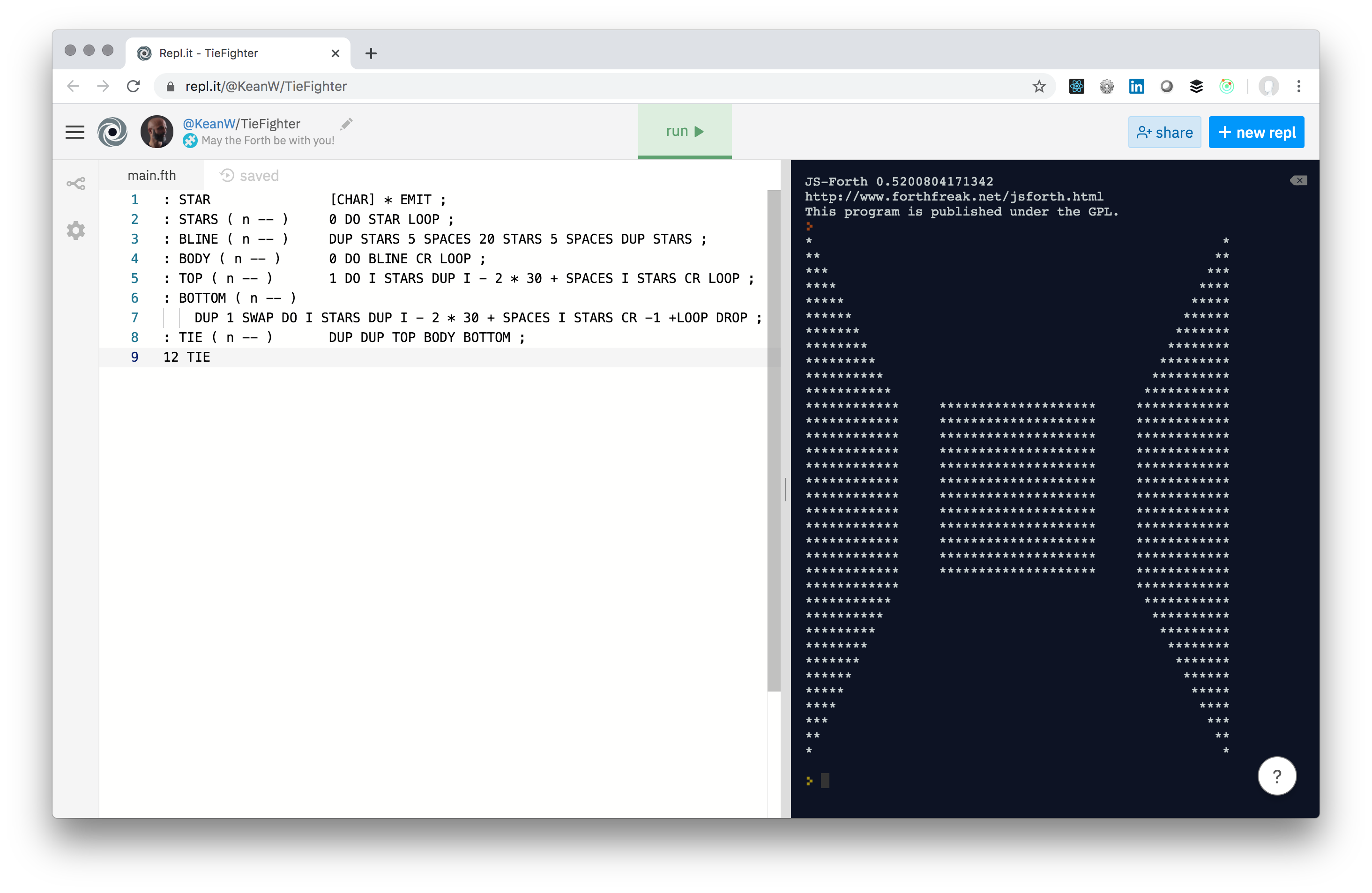
TIE Fighter created in Forth

Forth is a tricky language, in that data needs to be placed on a global stack before being operated upon. So you can create sub-routines, but it's a gnarly business to maintain and reuse the values on the stack within it. I'm sure there are ways I could have made the above code more maintainable (there's lots of hardcoded nastiness) but I managed to get something working, at least.

So, with that… May the Forth be with you, always!

One response to “May the Forth be with you!”

  1. Here is some pretty heavily commented Forth code from RoCAD experiment back in 1994, in case of interest... based on Atlast... as you see, it can do pretty much anything you want an be pretty readable to boot... may the forth be with you indeed:

    \ pipe.atl
    \
    \ Jeremy Tammik, RoCAD Informatik, 94-10-20
    \
    \ Experiments on defining a pipe for RoParts

    2variable l
    2variable r

    2.0 l 2!
    0.2 r 2!

    \ assume turtle pen is up initially

    \ assume turtle is at pipe connection point
    \ pointing in connection direction
    \ with up direction according to pipe insertion orientation

    \ assume l and r have been set appropriately

    : ip ( move to insertion point: -- )
    l 2@ 0.5 f* forward
    ;

    \ assume ct is pushed before we start drawing and popped afterwards
    \ do we need to restore turtle position at end of draw method?

    : top ( draw top view starting at insertion point )
    l 2@ 0.5 f* back
    pendown
    90. right
    r 2@ forward
    90. left
    l 2@ forward
    90. left
    r 2@ 2. f* forward
    90. left
    l 2@ forward
    90. left
    r 2@ forward
    penup
    90. left
    l 2@ 0.5 f* forward
    ;

    \ 94-10-20:
    \
    \ the application will have a method such as
    \ part.draw(kTop) which will ultimately come here ...
    \ what parameters etc. do we need to expect?
    \ The application knows the position and orientation,
    \ so it can set up an appropriate transformation
    \ matrix before calling our method.
    \ Let's say the part should appear at (5,4) with
    \ L=2 and R=0.2 at a 45 degree angle.
    \ Then, the application should set the ct using
    \
    \ Part:
    \ Connection list:
    \ Connection ... transformation matrix from what to what?
    \
    \ from insertion point to centre? Such that
    \ multiplied with the current transformation,
    \
    \ At last connection, move to ip using connection's
    \ transformation information.
    \
    \ Insert the part.
    \
    \ Use the second connection's transformation info to
    \ move to new connection.
    \
    \ 94-10-21:
    \
    \ Now I have it: the part knows its own transformation,
    \ and each insertion point knows its transformation relative
    \ to the part. Then, if we are at part A and its connection
    \ Ca, with Ta the part's insertion transformation and Tca
    \ the connection's relative to a, then at the insertion
    \ point itself we have a global transformation of Tca*Ta.
    \
    \ Now comes part B and wants to hook up its connection Cb
    \ to Ca. Assuming it fits, we find B's insertion transformation
    \ to be
    \ -1
    \ Tb = Tcb * Tca * Ta
    \
    \ Now we just need to teach this to the turtle ...
    \
    \ First, let's test it. In 2D, for simplicity's sake, but using
    \ full 3D transformation matrices. Let's set

    matrix tmp
    matrix Ta
    matrix Tca
    matrix Tb
    matrix Tcb
    Ta matident
    5.0 3.0 0.0 tmp mattran \ translate to (5,3,0)
    tmp Ta Ta matmul
    45. 2 tmp matrot \ rotate 45 degrees
    tmp Ta Ta matmul

    1.0 0.0 0.0 Tca mattran

    -1.0 0.0 0.0 Tcb mattran

    \ hmm, now first of all I need to be able to invert a matrix ...
    \ added MATINVERSE to Atlast.

    matrix Tcbinv
    Tcb Tcbinv matinverse

    Tca Ta Tb matmul
    Tcbinv Tb Tb matmul

    tmp mat? \ this is our candudate for Tb

    \ some confusion on the order of composition of transformations,
    \ and the conventions of multiplying multiple matrices of
    \ matrices and vectors ... we will adhere to the conventions
    \ explained by Foley and van Dam, Chapter 7, Geometrical
    \ Transformations, i.e. we transform a vector v by a
    \ transformation T using the convention
    \
    \ v' = v * T
    \
    \ Then, if we have multiple successive transformations T1, T2, T3 ...
    \ we can calculate the resulting vector as
    \
    \ v'' = v * T1 * T2 * T3 ...
    \
    \ Using this convention, our attempt above becomes

    matrix tmp
    matrix Ta
    matrix Tca
    matrix Tb
    matrix Tcb
    Ta matident
    5.0 3.0 0.0 tmp mattran \ translate to (5,3,0)
    Ta tmp Ta matmul
    45. 2 tmp matrot \ rotate 45 degrees
    Ta tmp Ta matmul

    1.0 0.0 0.0 Tca mattran

    -1.0 0.0 0.0 Tcb mattran

    \ hmm, now first of all I need to be able to invert a matrix --
    \ done, added MATINVERSE to Atlast.
    \ Also, I need to allow the output argument in matmul to be
    \ identical with one of the input arguments -- done.
    \ Some sorting out of push and pop order in matget, matput
    \ and xget, xput required -- done.
    \ Changed the rotation direction for rotation matrices from
    \ clockwise (Johny W.) to counter-clockwise (Foley & van Dam).

    matrix Tcbinv
    Tcb Tcbinv matinverse

    Ta Tca Tb matmul
    Tb Tcbinv Tb matmul

    Tb mat? \ this is our candidate for Tb

    \ Now let's start actually constructing objects.
    \ Assume our part is a cube, and its connections are its faces.
    \ Then let's set Ta according to above:

    \ insert part a using insertion transformation Ta:

    matrix Ta
    matrix tmp
    Ta matident
    kPiQuarter 2 tmp matrot \ rotate 45 degrees
    Ta tmp Ta matmul
    5.0 3.0 0.0 tmp mattran \ translate to (5,3,0)
    Ta tmp Ta matmul
    ta mat@ x! \ set sglib current transformation matrix
    cube

    \ determine transformation Tb using Ta, Tca and Tcb:

    matrix Tca
    matrix Tcb
    matrix Tb

    1.0 0.0 0.0 Tca mattran \ front face of A
    -1.0 0.0 0.0 Tcb mattran \ back face of B

    matrix Tcbinv
    Tcb Tcbinv matinverse

    Tca Ta Tb matmul
    Tcbinv Tb Tb matmul

    \ insert part B:

    tb xmat!
    cube

    \ almost, but not quite. The problem here is that the
    \ connection transformation still do not take the
    \ rotation of the parts into account. Maybe we should
    \ separate the position and rotation components of the
    \ parts? But then we should use a 3x3 matrix instead
    \ of 4x4 ...
    \
    \ Ta = R(45) * T(5,3)
    \ Tca = T(1,0) locally in A
    \ Tca = T(1,0) * R(45) * T(5,3)
    \
    \ I was multiplying them in the wrong order above!
    \ After changing the order, it works ...
    \
    \ To avoid unnecessary copying back and forth of lumps of
    \ 16 doubles, I introduced a new Atlast primitive xmat!
    \ to replace the consecutive calls to mat@ and x! so that
    \ now 'tb mat@ x!' can be replaced by 'tb xmat!'.
    \
    \ Also, I really hate the usage of 'get' and 'put' in Atlast,
    \ since when you 'get' some data item, it is really Atlast
    \ that is 'getting' it, and you are 'putting' (supplying) it.
    \ Now I replaced them in the user interface by '!' to set a value
    \ and '@' to retrieve a value, and renamed the internal functions
    \ to use 'at' and 'bang' suffixes.
    \
    \ Another open question: arlib and AutoCAD use M_TIMES_V
    \ convention for multiplying matrices and vectors. Sglib
    \ seems to assumes V_TIMES_M ... which should we go for?
    \
    \ Fixed another problem with the order of pushes and pops
    \ in mat! and mat@.
    \
    \ Added turtlex@, turtlexx!, turtlexmat! and mat4p to calculate
    \ a transformation matrix from a point and three vectors,
    \ especially from the turtle position and heading, left and up
    \ directions.
    \
    \ Now, we can use either an explicit matrix representation
    \ and x!, or a turtle movement and turtlexx! to store
    \ a transformation in the sglib current transformation
    \ matrix.
    \
    \ Added atl_ct to read the sglib current transformation
    \ matrix from external programs.
    \

Leave a Reply to jeremy tammik Cancel reply

Your email address will not be published. Required fields are marked *