Last week I posted about how roll-ups in the time-series back-end used by Project Dasher enable some interesting visualization opportunities. When my colleague Hali Larsen saw the post, she made a really interesting suggestion:
It would be cool if the user could select whether the heatmap visualizes the Max, Min, or Average of the data for the selected rollup. (Yet another drop down...) The advantage would be that someone looking for a feature in the data would see the "spikes" whereas when you use the rollups as they currently work you lose a lot of the variability of colour due to the smoothing out of the values associated with the rolled up data through averaging.
This was one of those insightful comments that I simply couldn't ignore… I could immediately see a lot of potential for this mechanism (without knowing how it might be implemented). One great example – that we'll come back to later – being the ability to scan the maximum values of "Presence" data for long periods to understand which areas in a building might be empty for complete days, perhaps over weekends, etc.
Anyway, the mental wheels started turning, and so I dove into what it would take to implement it.
First off, I needed to dig into the data returned for a typical call to our back-end. Here's a quick view in the debugger of some typical time-series data we receive back when querying the readings for a set of sensors:
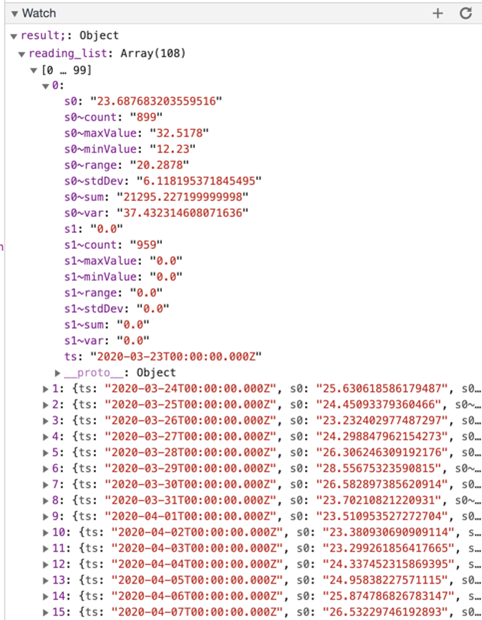
You can see that for this first sensor we have values with '~minValue' and '~maxValue' as suffixes which provide the data we would want to cache. Bear in mind that other systems will no doubt have different approaches to summarise data – and to communicate minimum and maximum data ranges – so this is probably very specific to our implementation.
I had a couple of options for making this data available: one would be to extend our existing cache to contain minimum and maximum range values. This would have the advantage of being populated once – as the data is returned in response to each REST call for a particular sensor/roll-up combination, we wouldn't need to go back and ask again – but it would lead to some memory overhead as we'd be storing three doubles per reading rather than just one.
The option I ended up going with was to have multiple caches, one to store each of the average (i.e. the standard one we use today), the minimum and the maximum values. These latter two caches are optional: they only get populated when the dropdown is used to choose either 'minimum' or 'maximum'. As I don't think this is going to be a feature that is used heavily – it's really just something you will want occasionally for niche exploration tasks – I think it's better not to keep the data in memory "just-in-case", and that we query the data "just-in-time" should we need to populate one or both of these optional caches.
A side-note: you may remember having seen minimum and maximum range values in the Splash graphing module (see the below image for an example of this – you can see the min/max ranges in pale blue). Splash manages its own cache that's essentially independent of the one used elsewhere in Dasher (which hinges heavily on the time range selected in the timeline).
This has been a lot of detail on how I approached implementing this, but let's now go back and reconsider the example workflow I mentioned at the beginning to illustrate how it might be useful.
In the NEST dataset we have a number of "Presence" sensors, which return Boolean values indicating whether spaces are empty (0) or occupied (1). The raw data – which appears to have a 1-minute granularity – is simply 0s and 1s, but as soon as we get into the higher-level roll-ups (i.e. 15M and above) the values get averaged across that particular time period.
Here's a 10-day view of data from one presence sensor, and we can see that the averaged values give a sense of the overall occupancy:
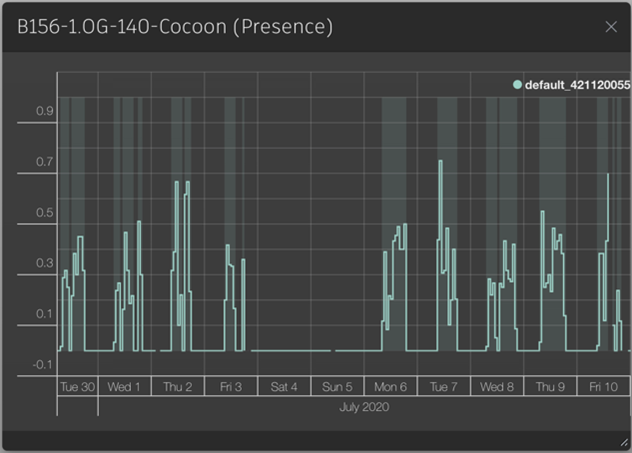
This is interesting, but when we look at the way this appears during surface shading, it's hard to get much direct value from visualising the rolled-up data. Here's the standard, averaged data shown with a 1-hour resolution:

If you want to see this view yourself, here's a link to bring it up inside Dasher (I implemented the resolution parameter in the API to allow this to be selected in a custom URL).
Using the latest feature that's been added to Project Dasher (and is now live via the NEST demo for you to try), we can enable the Avg/Min/Max dropdown during surface shading via the application settings:
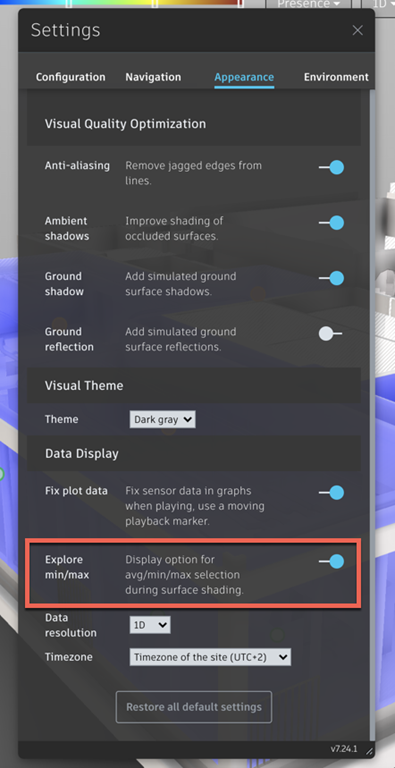
Then we can try again by looking at the Maximum values for the same time period, this time using the 1-day data resolution. We can immediately see areas that have gone full days without being occupied – and yes, this is most obvious from the dark blue coverage during weekends where the maximum Presence value for most sensors is zero.

And as I went ahead and implemented an URL parameter API for the Avg/Min/Max option, too, you can try this for yourself via this link.
Hopefully you can see that adjusting the roll-up and choosing to view the upper or lower end of its range can help get a different sense of what's been captured in the data. Thanks again for the suggestion, Hali – I agree that this could b
e very useful!
A quick side note on some additional work that's been done in this update: while I was implementing this mechanism, I ended up digging more into our caching code – which admittedly I've done my best to stay away from until now. When updating the cache, we were querying the sensor readings for groups of sensors in a single REST call, but only those with a single type (Temperature, CO2, Humidity, etc.). I adjusted the mechanism to batch up requests into larger groups across sensor types – as well as adjusting the timing of when the cache gets updated – which seems to be more efficient. I'd been seeing some strange behaviour where the "Loading Sensor Data" message gets stuck on certain requests: eventually the request gets processed, but I still don't have a sense of where it's getting stuck (I have a feeling it's because we have some legacy code that uses $.ajax() to get our time-series data. I may have to dig more into this, at some point, but for now reducing the number of calls does seem to help.)
Leave a Reply