A couple of weeks ago I mentioned the news that Typepad has (finally) decided to get out of the blog hosting game, after 22 years. The platform had steadily become less relevant, and from my side I was forever fighting with silly technical issues - mostly related to images, for some reason - so a) I'm not surprised and b) I won't miss the platform at all.
The timing was insane, though: they basically gave a month's notice for the remaining blogs to figure something out. Even accessing the old content in the days after the announcement proved to be a pain, as effectively they had kicked off a bank run on blog content.
You'll be reading this on the new site - whether you realize it or not - so the below is really some detail on what I did, in case it's of interest to anyone. I'm really happy to have made this shift, although I would rather not have had to during the weeks leading up to Autodesk University 2025 (and ANFA 2025, which is in some ways taking more of my time).
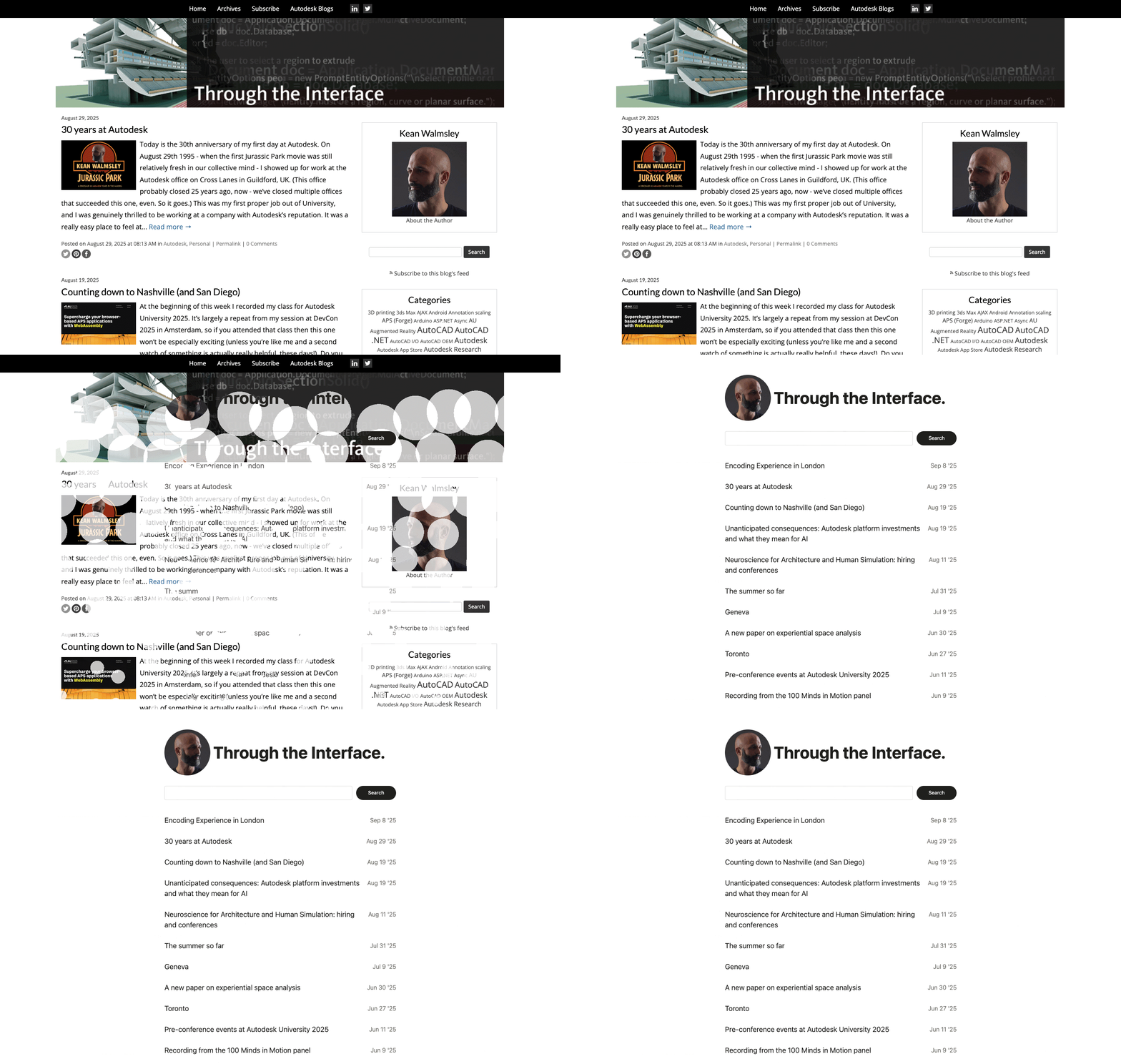
I decided to use this challenge as an opportunity to finally dust off my Cursor license and chat my way to a new blog. This seemed like an ideal use for vibe-coding, as the code didn't need to live on beyond the migration and the results would be relatively obvious if things weren't working.
I started by implementing a crawler to pull down all the content linked to via the Typepad post export: all the images and downloads that were referenced. I thought this bit would be easy, but as Typepad is (or was, depending on when you read this) protected by Cloudflare, it proved quite a bit more complicated than expected to scrape the blog's content. I think I could probably have spoofed some headers to get past the crawling protections, but in the end we (me and my AI) found a solution involving connecting to Chrome via a debug port and, after I'd passed the "are you human?" test, the Python script would pull down images, one by one, via that browser session.
It perhaps wasn't the best solution, but oh my goodness did I love seeing 20 years of blog content coming down, image by image… it was incredibly nostalgic and actually really rewarding. It reminded me of how fun this blog has been to create - and hopefully how valuable it's been to people - and how enjoyable the interactions with readers have been since its inception in 2006. A great feeling.
So getting the content was one thing… and quite a big one. The content on Typepad didn't have file extensions, so one of the things I wanted to do was to given them the right ones. I didn't rename the files themselves - that seemed unnecessary - but it's certainly something that was feasible.
I decided on WordPress as the target environment for the new blog (that seems fairly classic, as these choices go). I was able to set up an instance with similar permalink structure, to maintain as much compatibility as I could. There are some exceptions - such as categories of posts - but in many cases I could set up URL redirections. For links to the old Typepad.com host there was literally nothing I could do: the Typepad people could have given the option to implement a permanent redirect for those unfortunate souls like myself who didn't start with a custom domain from Day 1. Ah well.
I also wanted to make sure that the mobile experience was excellent - this was always a pain with my previous blog template. I opted to really streamline the navigation experience: a list of recent posts with pagination to go all the way back to the beginning of time (i.e. 2006 :-)) and search to dig into specific areas. No exposed category list: this can be clicked through after search or from a specific post. No side-bars… just content. Some social links in the footer - and hopefully sufficiently discrete-yet-obvious sharing buttons at the top and bottom of each post - but nothing too cluttering.
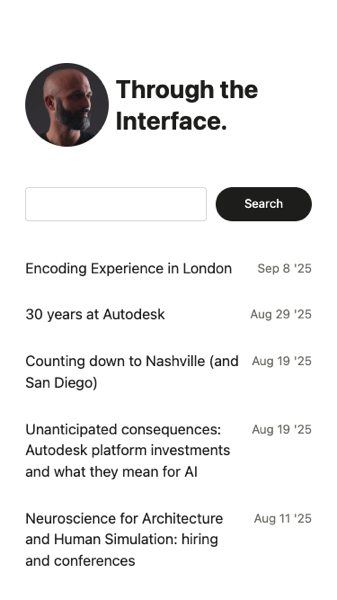
I hope you like it. If you have feedback, please send it my way. I'm sure there are tweaks that might help.
Comments were an interesting challenge. There's so much valuable knowledge in the comments on this blog's posts that I really didn't want to lose. Some were originally from the Typepad comment system which had then migrated to Disqus, relatively early on. I originally thought I'd just integrate Disqus into my blog, which seemed an OK approach to start with but at some point I realised I just wanted to be free of it.
I therefore spent a long time transferring comments from a Disqus export into a WordPress import format, which I could then import into the blog and deal with things like avatar downloads, threading and some bizarre auto-linking issues. I also realised there was a lot of spam in the Disqus export, so I had to jump through some crazy hoops to clean all that up.
Some interesting side-quests:
- Figuring out how to properly disable the wptexturize() process which converts normal quotes and apostrophes to their curly equivalents
- This is a really bad thing for coding blogs!
- None of the conventional approaches - such as the wpuntexturize plugin - worked, so Cursor helped me with a "nuclear" option that meant changing some PHP files.
- Disabling the make_clickable() process that automagically converts URLs into links, even when they're part of an HTML fragment. Argh!
Some statistics:
- 2,300+ posts (in a ~50 MB text dump from Typepad)
- 12,000+ comments
- 7 GB of media content (mostly images)
Some plugins I used and dropped (once they were no longer needed):
- Movable Type / Typepad importer
- WordPress importer (for Disqus comments translated into the WP format)
And some keepers:
- Redirection
- Social Icons & Sharing Buttons by WPZOOM
- Tooltips
- Akismet Anti-spam
- WPCode Lite
- Disqus Avatars for WordPress (this one is actually one I created with Cursor)
Aside from a bunch of Python scripts - very few of which I actually looked at, which is in itself crazy - I ended up using a whole lot of SQL to make direct database changes. All created by Cursor with the odd tweak by yours truly.
It was a fascinating journey, and I have to say I feel very good about the results. The blog is much simpler from a visual perspective, I find it much more interesting to navigate. I also feel an immense sense of freedom from being out from beneath an aging infrastructure… WordPress is an open system with a vibrant plugin ecosystem.
The old blog is still live for a few more days, but I do have the content backed up, in case. If you check the new site out and find something that you don't like - or miss from the old blog - please do let me know. I'd love to hear your feedback!
Breaking news!
Madhu (from our Developer Advocacy and Support team, who also have a bunch of Typepad blogs to migrate) tells me that Typepad is partnering with WordPress.com who will help people migrate to that platform. This is really good news for folks, although I'm happy I managed to work through the process myself: it was a chance to reconcile some things that had been annoying me for some time, and I have definitely gained a more intimate knowledge of the hosting infrastructure than I ever did with Typepad.


Leave a Reply