I mentioned recently that I'd hit a limitation with the amount of data that could be passed as embedded JSON data to an AutoCAD I/O Activity, and so decided to rearchitect my site to post the data at a URL and have the Activity download and use the data from there.
The system worked well until a security flaw was fixed by the AutoCAD I/O team, earlier this week: it turns out the approach of manually downloading the additional payload from the Activity itself wasn't supposed to work. And now, sure enough, it doesn't. 🙂
This video does a great job of describing the architecture of AutoCAD I/O, with a demo of the sample posted on GitHub that I modified to create our JigsawActivity. It goes into the specifics of the sandboxing implementation, and explains the limitations imposed on Activities.
The correct approach, in our situation, is to add a new parameter type to the Activity. Our JigsawActivity previously took two parameters: a HostDwg – which we just pointed at a publicly-posted drawing template – and some embedded JSON parameters (it was in these parameters that we first attempted to pass our engraving pixel data… but > ~30K caused a failure). The various parameters are downloaded and stored in the local file system by a process called the CoreEngineRunner: we need to add an additional InputParameter – another URL – which the CoreEngineRunner can download and make available in the same way.
Here's the relevant section of C# code – modified in the sample mentioned earlier – that creates our Activity:
static AIO.Activity CreateActivity(AIO.AppPackage package)
{
Console.WriteLine("Creating/Updating Activity...");
var activity = new AIO.Activity()
{
UserId = "",
Id = ActivityName,
Version = 1,
Instruction = new AIO.Instruction()
{
Script = "_jigio params.json pixels.json outputs\n"
},
Parameters = new AIO.Parameters()
{
InputParameters =
{
new AIO.Parameter()
{
Name = "HostDwg", LocalFileName = "$(HostDwg)"
},
new AIO.Parameter()
{
Name = "Params", LocalFileName = "params.json"
},
new AIO.Parameter()
{
Name = "PixelsUrl", LocalFileName = "pixels.json"
}
},
OutputParameters = {
new AIO.Parameter()
{
Name = "Results", LocalFileName = "outputs"
}
}
},
RequiredEngineVersion = "20.0"
};
container.AddToActivities(activity);
container.SaveChanges(
System.Data.Services.Client.SaveChangesOptions.PatchOnUpdate
);
// Establish link to package
container.AddLink(activity, "AppPackages", package);
container.SaveChanges();
return activity;
}
You can see the additional parameter named PixelsUrl, whose contents will be downloaded and stored in a local file pixels.json which in turn gets passed through to the JIGIO command via our embedded script.
Inside the JIGIO command, of course, we now need to read the contents of the local file and make sense of them. Here's the updated C# source file (which contains other commands that aren't strictly needed by the Activity, of course).
using Autodesk.AutoCAD.ApplicationServices.Core;
using Autodesk.AutoCAD.Colors;
using Autodesk.AutoCAD.DatabaseServices;
using Autodesk.AutoCAD.EditorInput;
using Autodesk.AutoCAD.Geometry;
using Autodesk.AutoCAD.Runtime;
using Newtonsoft.Json;
using System;
using System.Collections.Generic;
using System.IO;
[assembly: CommandClass(typeof(JigsawGenerator.Commands))]
[assembly: ExtensionApplication(null)]
namespace JigsawGenerator
{
public class Pixel
{
public int X { get; set; }
public int Y { get; set; }
}
public class Parameters
{
public double Width { get; set; }
public double Height { get; set; }
public int Pieces { get; set; }
public int XRes { get; set; }
public int YRes { get; set; }
public Pixel[] Pixels { get; set; }
}
public class XPixels : Dictionary<int, string>
{ }
public class Commands
{
// The WIGL command asks the user to enter this value (which
// influences the extent of the "wiggle"). For the JIG, JIGG
// and JIGL commands we just use this hardcoded value.
// We could certainly ask the user to enter it or get it
// from a system variable, of course
const double wigFac = 0.8;
// We'll store a central random number generator,
// which means we'll get more random results
private Random _rnd = null;
// Constructor
public Commands()
{
_rnd = new Random();
}
void ChangeBackground()
{
var cs = AutoCADColors.GetCurrentColors();
// Make both background colours white (the 3D
// background isn't currently being picked up)
cs.dwGfxModelBkColor = 16777215;
cs.dwGfxLayoutBkColor = 16777215;
//cs.dwParallelBkColor = 16777215;
// Set the modified colours
AutoCADColors.SetCurrentColors(cs);
}
[CommandMethod("JIG")]
public void JigEntity()
{
var doc = Application.DocumentManager.MdiActiveDocument;
if (null == doc)
return;
var db = doc.Database;
var ed = doc.Editor;
// Select our entity to create a tab for
var peo = new PromptEntityOptions("\nSelect entity to jig");
peo.SetRejectMessage("\nEntity must be a curve.");
peo.AddAllowedClass(typeof(Curve), false);
var per = ed.GetEntity(peo);
if (per.Status != PromptStatus.OK)
return;
// We'll ask the user to select intersecting/delimiting
// entities: if they choose none we use the whole length
ed.WriteMessage(
"\nSelect intersecting entities. " +
"Hit enter to use whole entity."
);
var pso = new PromptSelectionOptions();
var psr = ed.GetSelection();
if (
psr.Status != PromptStatus.OK &&
psr.Status != PromptStatus.Error // No selection
)
return;
using (var tr = doc.TransactionManager.StartTransaction())
{
// Open our main curve
var cur =
tr.GetObject(per.ObjectId, OpenMode.ForRead) as Curve;
double start = 0, end = 0;
bool bounded = false;
if (cur != null)
{
// We'll collect the intersections, if we have
// delimiting entities selected
var pts = new Point3dCollection();
if (psr.Value != null)
{
// Loop through and collect the intersections
foreach (var id in psr.Value.GetObjectIds())
{
var ent = (Entity)tr.GetObject(id, OpenMode.ForRead);
cur.IntersectWith(
ent,
Intersect.OnBothOperands,
pts,
IntPtr.Zero,
IntPtr.Zero
);
}
}
ed.WriteMessage(
"\nFound {0} intersection points.", pts.Count
);
// If we have no intersections, use the start and end
// points
if (pts.Count == 0)
{
start = cur.StartParam;
end = cur.EndParam;
pts.Add(cur.StartPoint);
pts.Add(cur.EndPoint);
bounded = true;
}
else if (pts.Count == 2)
{
start = cur.GetParameterAtPoint(pts[0]);
end = cur.GetParameterAtPoint(pts[1]);
bounded = true;
}
// If we have a bounded length, create our tab in a random
// direction
if (bounded)
{
var left = _rnd.NextDouble() >= 0.5;
var sp = CreateTab(cur, start, end, pts, left);
var btr =
(BlockTableRecord)tr.GetObject(
SymbolUtilityServices.GetBlockModelSpaceId(db),
OpenMode.ForWrite
);
btr.AppendEntity(sp);
tr.AddNewlyCreatedDBObject(sp, true);
}
}
tr.Commit();
}
}
[CommandMethod("JIGL")]
public void JigLines()
{
var doc = Application.DocumentManager.MdiActiveDocument;
if (null == doc)
return;
var db = doc.Database;
var ed = doc.Editor;
// Here we're going to get a selection set, but only care
// about lines
var psr = ed.GetSelection();
if (psr.Status != PromptStatus.OK)
return;
using (var tr = doc.TransactionManager.StartTransaction())
{
var btr =
(BlockTableRecord)tr.GetObject(
SymbolUtilityServices.GetBlockModelSpaceId(db),
OpenMode.ForWrite
);
// We'll be generating random numbers to decide direction
// for each tab
foreach (var id in psr.Value.GetObjectIds())
{
// We only care about lines
var ln = tr.GetObject(id, OpenMode.ForRead) as Line;
if (ln != null)
{
// Get the start and end points in a collection
var pts =
new Point3dCollection(
new Point3d[] {
ln.StartPoint,
ln.EndPoint
}
);
// Decide the direction (randomly) then create the tab
var left = _rnd.NextDouble() >= 0.5;
var sp =
CreateTab(ln, ln.StartParam, ln.EndParam, pts, left);
btr.AppendEntity(sp);
tr.AddNewlyCreatedDBObject(sp, true);
}
}
tr.Commit();
}
}
[CommandMethod("JIGG")]
public void JigGrid()
{
var doc = Application.DocumentManager.MdiActiveDocument;
if (null == doc)
return;
var db = doc.Database;
var ed = doc.Editor;
// Get overall dimensions of the puzzle
var pdo = new PromptDoubleOptions("\nEnter puzzle width");
pdo.AllowNegative = false;
pdo.AllowNone = false;
pdo.AllowZero = false;
var pdr = ed.GetDouble(pdo);
if (pdr.Status != PromptStatus.OK)
return;
var width = pdr.Value;
pdo.Message = "\nEnter puzzle height";
pdr = ed.GetDouble(pdo);
if (pdr.Status != PromptStatus.OK)
return;
var height = pdr.Value;
// Get the (approximate) number of pieces
var pio =
new PromptIntegerOptions("\nApproximate number of pieces");
pio.AllowNegative = false;
pio.AllowNone = false;
pio.AllowZero = false;
var pir = ed.GetInteger(pio);
if (pir.Status != PromptStatus.OK)
return;
var pieces = pir.Value;
RectangularJigsaw(
ed, db,
new Parameters()
{ Width = width, Height = height, Pieces = pieces },
null
);
}
[CommandMethod("JIGIO")]
public void JigGridIo()
{
var doc = Application.DocumentManager.MdiActiveDocument;
if (doc == null)
return;
var db = doc.Database;
var ed = doc.Editor;
try
{
ChangeBackground();
}
catch (System.Exception ex)
{
ed.WriteMessage(
"Exception setting background: {0}, {1}", ex.Message, ex.StackTrace
);
}
// Get input parameters
var pfnr = ed.GetFileNameForOpen("\nSpecify parameter file");
if (pfnr.Status != PromptStatus.OK)
return;
var paramFile = pfnr.StringResult;
// Get input parameters
var pfnr2 = ed.GetFileNameForOpen("\nSpecify pixel file");
if (pfnr2.Status != PromptStatus.OK)
return;
var pixelFile = pfnr2.StringResult;
// Get the output folder
var pr = ed.GetString("\nSpecify output folder");
if (pr.Status != PromptStatus.OK)
return;
string outFolder = pr.StringResult;
try
{
// Get our parameters from the JSON provided
var contents = File.ReadAllText(paramFile);
var parameters = JsonConvert.DeserializeObject<Parameters>(contents);
var pixels =
pixelFile != null ?
JsonConvert.DeserializeObject<XPixels>(File.ReadAllText(pixelFile)) :
null;
ed.WriteMessage("\nArguments: {0}", contents);
// The "essential" parameters are height, width & number
// of pieces (but we pass in the whole object)
if (
parameters.Height > 0 &&
parameters.Width > 0 &&
parameters.Pieces > 0
)
{
RectangularJigsaw(ed, db, parameters, pixels);
// If we have a valid output folder...
if (!String.IsNullOrEmpty(outFolder) || Directory.Exists(outFolder))
{
var dwgOut = Path.Combine(outFolder, "jigsaw.dwg");
var pngOut = Path.Combine(outFolder, "jigsaw.png");
// Save the DWG to it...
db.SaveAs(dwgOut, DwgVersion.Current);
// ... and create a PNG in the same location
ed.Command("_grid", "_off");
ed.Command("_zoom", "_extents");
ed.Command("_pngout", pngOut, "");
}
}
}
catch (System.Exception e)
{
ed.WriteMessage("Error: {0}", e);
}
}
private void RectangularJigsaw(
Editor ed, Database db, Parameters args, XPixels xpix
)
{
var width = args.Width;
var height = args.Height;
var pieces = args.Pieces;
var aspect = height / width;
var piecesY = Math.Floor(Math.Sqrt(aspect * pieces));
var piecesX = Math.Floor(pieces / piecesY);
ed.WriteMessage(
"\nPuzzle will be {0} x {1} ({2} in total).",
piecesX, piecesY, piecesX * piecesY
);
using (var tr = db.TransactionManager.StartTransaction())
{
// Get or create the layers for our geometry and engraving
const string puzLayName = "Puzzle";
const string engLayName = "Engraving";
var puzLayId = ObjectId.Null;
var engLayId = ObjectId.Null;
var lt =
(LayerTable)tr.GetObject(
db.LayerTableId, OpenMode.ForRead
);
puzLayId =
GetOrCreateLayer(
tr, lt, puzLayName,
Color.FromColorIndex(ColorMethod.ByAci, 8) // dark grey
);
engLayId =
GetOrCreateLayer(
tr, lt, engLayName,
Color.FromColorIndex(ColorMethod.ByAci, 7) // white (i.e. black)
);
var btr =
(BlockTableRecord)tr.GetObject(
SymbolUtilityServices.GetBlockModelSpaceId(db),
OpenMode.ForWrite
);
// Create the outline and internal lines of the puzzle
CreatePuzzleLines(
tr, btr, puzLayId, width, height, piecesY, piecesX
);
// If we have some additional pixel data, create an
// engraving layer
var pix = xpix == null ? null : Decompress(xpix);
if (pix != null && args.XRes > 0 && args.YRes > 0)
{
CreatePuzzleEngraving(
tr, btr, engLayId, pix,
width / args.XRes, height / args.YRes, height
);
}
tr.Commit();
}
}
private Pixel[] Decompress(
Dictionary<int, string> dictionary, bool byX = false
)
{
// !byX: ordered by row
// byX: ordered by column
var pixels = new List<Pixel>();
foreach (var entry in dictionary)
{
var vals = entry.Value.Split(",".ToCharArray());
foreach (var ord in vals)
{
pixels.Add(
new Pixel {
X = byX ? entry.Key : Int32.Parse(ord),
Y = byX ? Int32.Parse(ord) : entry.Key
}
);
}
}
return pixels.ToArray();
}
private static ObjectId GetOrCreateLayer(
Transaction tr, LayerTable lt, string layName, Color col
)
{
// If the layer table contains our layer, return its ID
if (lt.Has(layName))
{
return lt[layName];
}
else
{
// Otherwise create a new layer, add it to the layer table
// and the transaction
bool upgraded = false;
var ltr = new LayerTableRecord();
ltr.Name = layName;
ltr.Color = col;
if (!lt.IsWriteEnabled)
{
lt.UpgradeOpen();
upgraded = true;
}
var id = lt.Add(ltr);
tr.AddNewlyCreatedDBObject(ltr, true);
// If we had to open for write, downgrade the open status
// (not strictly needed, but seems cleaner to leave things
// as we found them)
if (upgraded)
{
lt.DowngradeOpen();
}
return id;
}
}
private void CreatePuzzleLines(
Transaction tr, BlockTableRecord btr,
ObjectId layId,
double width, double height,
double piecesY, double piecesX
)
{
var incX = width / piecesX;
var incY = height / piecesY;
var tol = Tolerance.Global.EqualPoint;
for (double x = 0; x < width - tol; x += incX)
{
for (double y = 0; y < height - tol; y += incY)
{
var nextX = x + incX;
var nextY = y + incY;
// At each point in the grid - apart from when along
// the axes - we're going to create two lines, one
// in the X direction and one in the Y (along the axes
// we'll usually be creating one or the other, unless
// at the origin 🙂
if (y > 0)
{
var sp =
CreateTabFromPoints(
new Point3d(x, y, 0),
new Point3d(nextX, y, 0)
);
sp.LayerId = layId;
btr.AppendEntity(sp);
tr.AddNewlyCreatedDBObject(sp, true);
}
if (x > 0)
{
var sp =
CreateTabFromPoints(
new Point3d(x, y, 0),
new Point3d(x, nextY, 0)
);
sp.LayerId = layId;
btr.AppendEntity(sp);
tr.AddNewlyCreatedDBObject(sp, true);
}
}
}
// Create the puzzle border as a closed polyline
var pl = new Polyline(4);
pl.AddVertexAt(0, Point2d.Origin, 0, 0, 0);
pl.AddVertexAt(1, new Point2d(width, 0), 0, 0, 0);
pl.AddVertexAt(2, new Point2d(width, height), 0, 0, 0);
pl.AddVertexAt(3, new Point2d(0, height), 0, 0, 0);
pl.Closed = true;
pl.LayerId = layId;
btr.AppendEntity(pl);
tr.AddNewlyCreatedDBObject(pl, true);
}
private void CreatePuzzleEngraving(
Transaction tr, BlockTableRecord btr, ObjectId layId,
Pixel[] pixels, double xfac, double yfac, double height
)
{
foreach (var pixel in pixels)
{
// Get the X and Y values for our pixel
// Y is provided from the top, hence our need to invert
var x = pixel.X * xfac;
var y = height - ((pixel.Y + 1) * yfac);
var sol =
new Solid(
new Point3d(x, y, 0),
new Point3d(x + xfac, y, 0),
new Point3d(x, y + yfac, 0),
new Point3d(x + xfac, y + yfac, 0)
);
sol.LayerId = layId;
btr.AppendEntity(sol);
tr.AddNewlyCreatedDBObject(sol, true);
}
}
private Curve CreateTabFromPoints(Point3d start, Point3d end)
{
using (var ln = new Line(start, end))
{
// Get the start and end points in a collection
var pts =
new Point3dCollection(new Point3d[] { start, end });
// Decide the direction (randomly) then create the tab
var left = _rnd.NextDouble() >= 0.5;
return CreateTab(ln, ln.StartParam, ln.EndParam, pts, left);
}
}
[CommandMethod("WIGL")]
public void AdjustTabs()
{
var doc = Application.DocumentManager.MdiActiveDocument;
if (null == doc)
return;
var db = doc.Database;
var ed = doc.Editor;
// Here we're going to get a selection set, but only care
// about splines
var pso = new PromptSelectionOptions();
var psr = ed.GetSelection();
if (psr.Status != PromptStatus.OK)
return;
var pdo = new PromptDoubleOptions("\nEnter wiggle factor");
pdo.DefaultValue = 0.8;
pdo.UseDefaultValue = true;
pdo.AllowNegative = false;
pdo.AllowZero = false;
var pdr = ed.GetDouble(pdo);
if (pdr.Status != PromptStatus.OK)
return;
using (var tr = doc.TransactionManager.StartTransaction())
{
foreach (var id in psr.Value.GetObjectIds())
{
// We only care about splines
var sp = tr.GetObject(id, OpenMode.ForRead) as Spline;
if (sp != null && sp.NumFitPoints == 6)
{
// Collect the fit points
var pts = sp.FitData.GetFitPoints();
// Adjust them
AddWiggle(pts, pdr.Value);
// Set back the top points to the spline
// (we know these are the ones that have changed)
sp.UpgradeOpen();
sp.SetFitPointAt(2, pts[2]);
sp.SetFitPointAt(3, pts[3]);
}
}
tr.Commit();
}
}
private Curve CreateTab(
Curve cur, double start, double end, Point3dCollection pts,
bool left = true
)
{
// Calculate the length of this curve (or section)
var len =
Math.Abs(
cur.GetDistanceAtParameter(end) -
cur.GetDistanceAtParameter(start)
);
// We're calculating a random delta to adjust the location
// of the tab along the length
double delta = 0.01 * len * (_rnd.NextDouble() - 0.5);
// We're going to offset to the side of the core curve for
// the tab points. This is currently a fixed tab size
// (could also make this proportional to the curve)
double off = 0.2 * len; // was 0.5
double fac = 0.5 * (len - 0.5 * off) / len;
if (left) off = -off;
// Get the next parameter along the length of the curve
// and add the point associated with it into our fit points
var nxtParam = start + (end - start) * (fac + delta);
var nxt = cur.GetPointAtParameter(nxtParam);
pts.Insert(1, nxt);
// Get the direction vector of the curve
var vec = pts[1] - pts[0];
// Rotate it by 90 degrees in the direction we chose,
// then normalise it and use it to calculate the location
// of the next point
vec = vec.RotateBy(Math.PI * 0.5, Vector3d.ZAxis);
vec = off * vec / vec.Length;
pts.Insert(2, nxt + vec);
// Now we calculate the mirror points to complete the
// splines definition
nxtParam = end - (end - start) * (fac - delta);
nxt = cur.GetPointAtParameter(nxtParam);
pts.Insert(3, nxt + vec);
pts.Insert(4, nxt);
AddWiggle(pts, wigFac);
// Finally we create our spline
return new Spline(pts, 1, 0);
}
private void AddWiggle(Point3dCollection pts, double fac)
{
const double rebase = 0.3;
// Works on sets of six points only
//
// 2--------3
// | |
// | |
// 0-----------1 4-----------5
if (pts.Count != 6)
return;
// Our spline's direction, tab width and perpendicular vector
var dir = pts[5] - pts[0];
dir = dir / dir.Length;
var tab = (pts[4] - pts[1]).Length;
var cross = dir.RotateBy(Math.PI * 0.5, Vector3d.ZAxis);
cross = cross / cross.Length;
// Adjust the "top left" and "top right" points outwards,
// multiplying by fac1 and the random factor (0-1) brought
// back towards -0.5 to 0.5 by fac2
pts[2] =
pts[2]
- (dir * tab * fac * (_rnd.NextDouble() - rebase))
+ (cross * tab * fac * (_rnd.NextDouble() - rebase));
pts[3] =
pts[3]
+ (dir * tab * fac * (_rnd.NextDouble() - rebase))
+ (cross * tab * fac * (_rnd.NextDouble() - rebase));
}
}
}
It makes perfect sense that this type of security model is in place for an Activity: it simply shouldn't have unfettered access to outside resources.
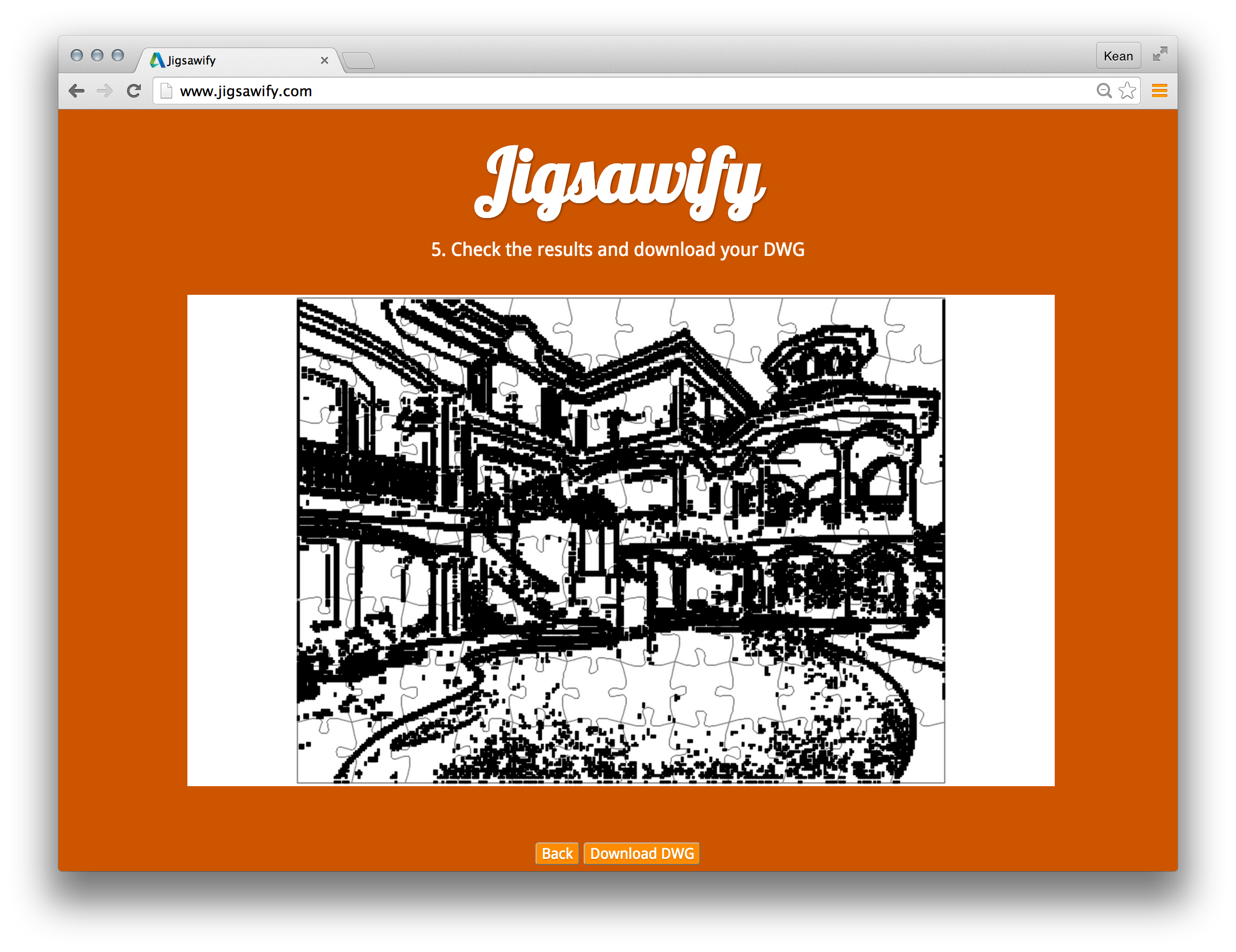
To show the code still works well, here's a quick puzzle I generated for a nice house photo I found on the internet. (If you try it for yourself you can take a look at the DWG file that gets generated. 🙂
Leave a Reply