After the last post, where we saw some code that creates an AutoCAD table based on the blocks in a drawing, in this post we're going to modify our table, adding a new, initial column that numbers the contents.
Here's what we want to create using our new MBT command:
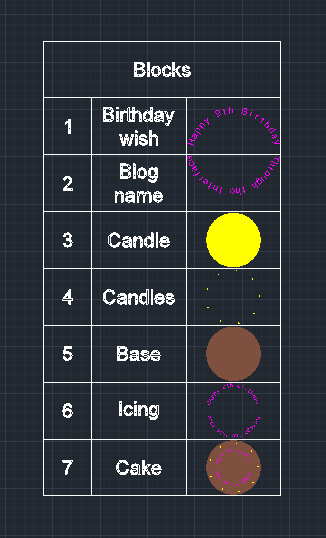
Here's the way the command looks when it runs:

And, finally, here's the updated C# code with our new MBT command:
using Autodesk.AutoCAD.ApplicationServices;
using Autodesk.AutoCAD.DatabaseServices;
using Autodesk.AutoCAD.EditorInput;
using Autodesk.AutoCAD.Runtime;
namespace TableCreationAndModification
{
public class Commands
{
const double rowHeight = 3.0, colWidth = 5.0;
const double textHeight = rowHeight * 0.25;
[CommandMethod("MBT")]
static public void ModifyBlockTable()
{
var doc = Application.DocumentManager.MdiActiveDocument;
if (doc == null)
return;
var ed = doc.Editor;
// Let's start by asking for a table to be selected
var per = ed.GetEntity("\nSelect table");
if (per.Status != PromptStatus.OK)
return;
// Start our transaction
using (var tr = doc.TransactionManager.StartTransaction())
{
// Open the object and see whether it's table...
var tb = tr.GetObject(per.ObjectId, OpenMode.ForRead) as Table;
if (tb != null)
{
// If it is, we need to be able to modify it
tb.UpgradeOpen();
// Insert our column, making it a bit skinnier than the others
tb.InsertColumns(0, colWidth * 0.5, 1);
// Populate the cells in this new column (starting with 1,
// as if we ask for 0 we'll get the header cell, too)
for (int i=1; i < tb.Rows.Count; i++)
{
// Insert the index into the cell with appropriate text size
// and justification
var num = tb.Cells[i, 0];
num.Value = i;
num.Alignment = CellAlignment.MiddleCenter;
num.TextHeight = textHeight;
}
}
// Commit the transaction
&
#160; tr.Commit();
}
}
[CommandMethod("CBT")]
static public void CreateBlockTable()
{
var doc = Application.DocumentManager.MdiActiveDocument;
if (doc == null)
return;
var db = doc.Database;
var ed = doc.Editor;
var pr = ed.GetPoint("\nEnter table insertion point");
if (pr.Status != PromptStatus.OK)
return;
using (var tr = doc.TransactionManager.StartTransaction())
{
var bt = (BlockTable)tr.GetObject(db.BlockTableId, OpenMode.ForRead);
// Create the table, set its style and default row/column size
var tb = new Table();
tb.TableStyle = db.Tablestyle;
tb.SetRowHeight(rowHeight);
tb.SetColumnWidth(colWidth);
tb.Position = pr.Value;
// Set the header cell
var head = tb.Cells[0, 0];
head.Value = "Blocks";
head.Alignment = CellAlignment.MiddleCenter;
head.TextHeight = textHeight;
// Insert an additional column
tb.InsertColumns(0, colWidth, 1);
// Loop through the blocks in the drawing, creating rows
foreach (var id in bt)
{
var btr = (BlockTableRecord)tr.GetObject(id, OpenMode.ForRead);
// Only care about user-insertable blocks
if (!btr.IsLayout && !btr.IsAnonymous)
{
// Add a row
tb.InsertRows(tb.Rows.Count, rowHeight, 1);
var rowIdx = tb.Rows.Count - 1;
// The first cell will hold the block name
var first = tb.Cells[rowIdx, 0];
first.Value = btr.Name;
first.Alignment = CellAlignment.MiddleCenter;
first.TextHeight = textHeight;
// The second will contain a thumbnail of the block
var second = tb.Cells[rowIdx, 1];
second.BlockTableRecordId = id;
}
}
// Now we add the table to the current space
var sp =
(BlockTableRecord)tr.GetObject(db.CurrentSpaceId, OpenMode.ForWrite);
sp.
AppendEntity(tb);
// And to the transaction, which we then commit
tr.AddNewlyCreatedDBObject(tb, true);
tr.Commit();
}
}
}
}
We could, of course, have applied different operations to the table, such as updating it based on the current contents of the block table, or perhaps deleting a row and its corresponding block from the drawing. But this simple example should serve as a basis for people wanting to operate upon tables in various ways.
Leave a Reply