I'm not sure why it's taken me so long to get around to posting this code. It was originally developed by Philippe Leefsma for last year's Developer Days, to demonstrate a very interesting API added to AutoCAD 2012. Looking back, it appears it was covered in this DevTV session, posted when AutoCAD 2012 was announced, so the information has been there for some of you to find, at least.
Anyway, as many of you will know, associative arrays are an extremely powerful feature within AutoCAD that allow you to create impressive results. You can create rectangular, polar and path-based arrays, and not just in 2D: in 3D, too.
My ultimate goal is to do something fun with arrays from inside a jig (yes, being driven by Kinect ;-). But let's start, today, with a simple array along a path with hardcoded parameter values.
Here's a subset of Philippe's original code that creates a simple associative array of multiple entities (a line and circle) along a spline path:
using Autodesk.AutoCAD.ApplicationServices;
using Autodesk.AutoCAD.DatabaseServices;
using Autodesk.AutoCAD.Geometry;
using Autodesk.AutoCAD.Runtime;
namespace AssociativeArrays
{
public class Commands
{
[CommandMethod("AAP")]
public void CreateAssocArrayPath()
{
Database db =
Application.DocumentManager.MdiActiveDocument.Database;
Transaction tr =
db.TransactionManager.StartTransaction();
using (tr)
{
BlockTable bt =
(BlockTable)tr.GetObject(
db.BlockTableId, OpenMode.ForRead
);
BlockTableRecord btr =
(BlockTableRecord)tr.GetObject(
bt[BlockTableRecord.ModelSpace],
OpenMode.ForWrite
);
// Add profile entities: a Circle and a Line
Circle cir =
new Circle(
new Point3d(-10, 0, 0),
new Vector3d(0, 0, 1),
1.0
);
cir.ColorIndex = 3; // Green
btr.AppendEntity(cir);
tr.AddNewlyCreatedDBObject(cir, true);
Line ln =
new Line(
new Point3d(-11, -1, 0),
new Point3d(-9, 1, 0)
);
ln.ColorIndex = 3; // Green
btr.AppendEntity(ln);
tr.AddNewlyCreatedDBObject(ln, true);
// Add path entity: a Spline, in this case
double fitTol = 0.0;
int order = 4;
// An array of doubles to define the points
// in our spline
double[] ptAr =
new double[]{
-6.8447, 0.9430, 0,
-5.1409, -3.0562, 0,
-2.4095, 2.1049, 0,
3.4590, -3.9479, 0,
7.1370, 6.3472, 0
};
// We'll add the points to a collection
Point3dCollection pts = new Point3dCollection();
for (int i = 0, j = 0; i < ptAr.Length / 3; i++)
{
pts.Add(new Point3d(ptAr[j++], ptAr[j++], ptAr[j++]));
}
// Create the spline path and add it to the database
Spline sp = new Spline(pts, order, fitTol);
btr.AppendEntity(sp);
tr.AddNewlyCreatedDBObject(sp, true);
// Offset the Circle, Line and Spline by a fixed amount
Matrix3d offset =
Matrix3d.Displacement(new Vector3d(60, 10, 0));
cir.TransformBy(offset);
ln.TransformBy(offset);
sp.TransformBy(offset);
ObjectIdCollection srcEnts = new ObjectIdCollection();
srcEnts.Add(cir.ObjectId);
srcEnts.Add(ln.ObjectId);
// Take the base point as the center of our Circle
VertexRef basePt = new VertexRef(cir.Center);
// Set some variables to define parameters for our path
int itemCount = 6;
double itemSpacing =
sp.GetDistanceAtParameter(sp.EndParam) / itemCount;
double rowSpacing = 0.0;
double levelSpacing = 0.0;
int rowCount = 0;
int levelCount = 0;
double rowElevation = 0.0;
// Create the parameters for our associative path array
AssocArrayPathParameters pars =
new AssocArrayPathParameters(
itemSpacing,
rowSpacing,
levelSpacing,
itemCount,
rowCount,
levelCount,
rowElevation
);
pars.Method =
AssocArrayPathParameters.MethodType.Measure;
pars.Path = new EdgeRef(sp);
// Create the associative array itself
AssocA
rray array =
AssocArray.CreateArray(
srcEnts,
basePt,
pars
);
// Evaluate the array
AssocManager.EvaluateTopLevelNetwork(db, null, 0);
tr.Commit();
}
}
}
}
Here's what's created by the AAP command:

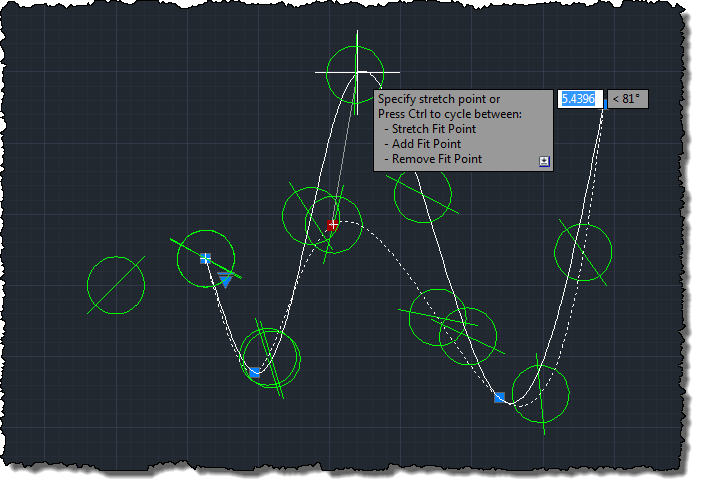
And just to show it's associative, here's what happens when we grip-stretch the spline path:


Leave a Reply