Brent Burgess commented on this previous post showing how to extend lines in AutoCAD:
Is there a different process for shortening lines, or is it similar syntax?
A very valid question… unfortunately the Curve.Extend() method only works with points or parameters that are outside the current definition of the curve, so we need to find another way (if you try, you'll get an eInvalidInput, at least that's what I found :-).
I chose the approach of using Curve.GetSplitCurves() on each line, passing in an array of parameters at which to split the curve. I calculate the start parameter as 25% along the length, and the end parameter as being at the same point from the end. Which means each line will end up being half its original size. Lines are generally parameterised between 0 and 1, so we'll be passing an array containing 0.25 and 0.75 to the GetSplitCurves() method, which should consequently return an array of exactly three objects: lines from 0 to 0.25, 0.25 to 0.75 and from 0.75 to 1. We will therefore discard the first and last lines and use the middle one.
So what shall we do with this line? We could add it to the modelspace, but we really want it to replace the old one. We can use DbObject.HandOverTo() to replace the original line with this new one, retaining the original line's XData and Extension Dictionary. To make use of this function, we need to open the original line using an open/close transaction (as the "normal" type of transaction will cause the function to return eInvalidContext), and then call Dispose() on the original object, once done.
Here's the C# code that now contains commands to extend and shorten lines, with a shared function to handle the object selection:
using Autodesk.AutoCAD.Runtime;
using Autodesk.AutoCAD.ApplicationServices;
using Autodesk.AutoCAD.DatabaseServices;
using Autodesk.AutoCAD.EditorInput;
using Autodesk.AutoCAD.Geometry;
namespace GeometryExtension
{
public class Commands
{
[CommandMethod("EXL")]
public void ExtendLines()
{
Document doc =
Application.DocumentManager.MdiActiveDocument;
Database db = doc.Database;
Editor ed = doc.Editor;
// Call a function to return a selection set of lines
SelectionSet ss =
SelectLines(ed, "\nSelect lines to extend: ");
if (ss != null)
{
// Start our transaction
Transaction tr =
db.TransactionManager.StartTransaction();
using (tr)
{
// Edit each of the selected lines
foreach (SelectedObject so in ss)
{
// We're assuming only lines are in the selection-set
// Could also use a more defensive approach and
// use a dynamic cast (Line ln = xxx as Line;)
Line ln =
(Line)tr.GetObject(
so.ObjectId,
OpenMode.ForWrite
);
// We'll extend our line by a quarter of the
// existing length in each direction
Vector3d ext = ln.Delta / 4;
// First the start-point
ln.Extend(true, ln.StartPoint - ext);
// And then the end-point
ln.Extend(false, ln.EndPoint + ext);
}
// Mustn't forget to commit
tr.Commit();
}
}
}
[CommandMethod("SHL")]
public void ShortenLines()
{
Document doc =
Application.DocumentManager.MdiActiveDocument;
Database db = doc.Database;
Editor ed = doc.Editor;
// Call a function to return a selection set of lines
SelectionSet ss =
SelectLines(ed, "\nSelect lines to shorten: ");
if (ss != null)
{
// Start our transaction
// (Needs to be Open/Close to avoid an eInvalidContext
// from HandOverTo())
Transaction tr =
db.TransactionManager.StartOpenCloseTransaction();
using (tr)
{
// Edit each of the selected lines
foreach (SelectedObject so in ss)
{
// We're assuming only curves are in the selection-set
// Could also use a more defensive approach and
// use a dynamic cast (Curve cur = xxx as Curve;)
Curve cur =
(Curve)tr.GetObject(
so.ObjectId,
OpenMode.ForWrite
);
double sp = cur.StartParam,
ep = cur.EndParam,
delta = (ep-sp) * 0.25;
DoubleCollection dc = new DoubleCollection();
dc.Add(sp + delta);
dc.Add(ep - delta);
DBObjectCollection objs = cur.GetSplitCurves(dc);
if (objs.Count == 3)
{
Entity ent = (Entity)objs[1];
cur.HandOverTo(ent, true, true);
tr.AddNewlyCreatedDBObject(ent, true);
cur.Dispose();
objs[0].Dispose();
objs[2].Dispose();
}
}
// Mustn't forget to commit
tr.Commit();
}
}
}
// Helper function to select a set of lines
private SelectionSet SelectLines(Editor ed, string msg)
{
// We only want to select lines...
// Use an options object to specify how the
// selection occurs (in terms of prompts)
PromptSelectionOptions pso =
new PromptSelectionOptions();
pso.MessageForAdding =
(string.IsNullOrEmpty(msg) ? "\nSelect lines: " : msg);
// Use a filter to specify the objects that
// get included in the selection set
TypedValue[] tvs =
new TypedValue[1] {
new TypedValue(
(int)DxfCode.Start,
"LINE"
)
};
SelectionFilter sf = new SelectionFilter(tvs);
// Perform our restricted selection
PromptSelectionResult psr = ed.GetSelection(pso, sf);
if (psr.Status != PromptStatus.OK || psr.Value.Count <= 0)
return null;
return psr.Value;
}
}
}
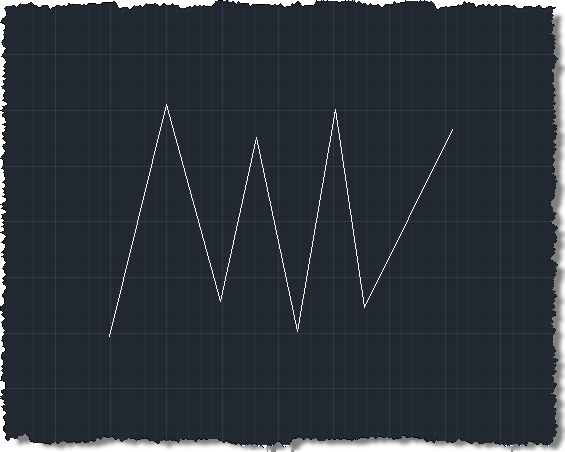
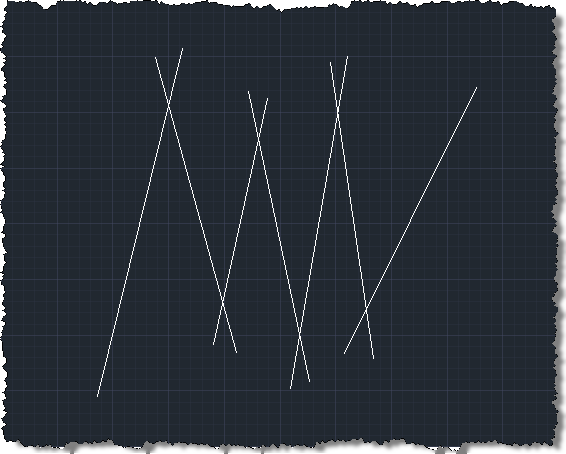
Let's see our re-factored EXL command working on a set of lines.
Before…
After…
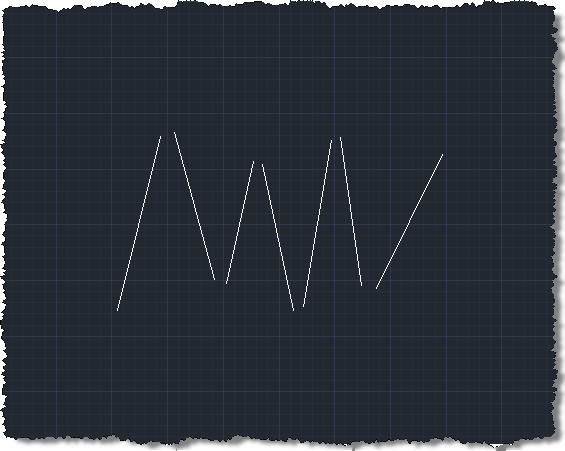
Now when we shorten these same lines using the SHL command, we see them shrink back, but not quite to the same place (as 25% is relatively to the current length of the line, of course):
We could clearly extend this code to work with other curve types (I did test the shorten command to work with Arcs, for instance), but that's left as an exercise for the reader. If anyone has an approach they prefer to use for addressing this requirement, be sure to post a comment.


Leave a Reply