Preview of August’s Plugin of the Month: RefUcsSpy

AutoCAD users who work with multiple reference files – whether DWG, DWF, DGN, PDF, PCG files or raster images – usually want them to be oriented in space (and to overlay) properly. One common way to make this happen is to set the various files up in world coordinates and then attach them at the origin of the referencing drawing's WCS. A common issue related to this approach is if the user happens to be in a local UCS: the file will get attached relative to that UCS rather than to the WCS.

Glenn Ryan, who generously provided April's very useful Plugin of the Month, XrefStates, has another cool little utility that we're planning to publish in August: Reference UCS Spy, or RefUcsSpy, for short. Once loaded, this tool sits there and waits for the user to execute an "attach" command – whether XATTACH, IMAGEATTACH, DWFATTACH, DGNATTACH, PDFATTACH or POINTCLOUDATTACH – and, should the user be in a coordinate system other than WCS, the plugin will prompt the user whether to change the UCS to WCS for the duration of the command, changing back to the prior UCS afterwards.

There are – once again – some very interesting things about Glenn's implementation, in particular the elegant way he's opted to handle document-level events using a class that gets attached to each open document via its UserData property.

The below C# code is a "flattened" version of what will probably be the published project: I've merged various source files into one and replaced the use of string resources with literals. I've also not included the demand-loading set-up code and associated removal command, which will, of course, be in the published project.

using System;

using System.Collections;

using System.Collections.Generic;

using System.Reflection;

using System.Runtime.InteropServices;

using System.Text;

using System.Windows.Forms;


using Autodesk.AutoCAD.ApplicationServices;

using Autodesk.AutoCAD.DatabaseServices;

using Autodesk.AutoCAD.EditorInput;

using Autodesk.AutoCAD.Geometry;

using Autodesk.AutoCAD.Runtime;

using Autodesk.Windows;


using acadApp = Autodesk.AutoCAD.ApplicationServices.Application;


namespace RefUcsSpy

{

  /// <summary>

  /// General utility functions called throughout the application.

  /// </summary>


  internal class Utils

  {

    /// <summary>

    /// Gets a value indicating whether a script is active.

    /// </summary>

    /// <returns>

    /// True if a script is active, false otherwise.

    /// </returns>


    internal static bool ScriptActive

    {

      get

      {

        return (

          ((short)acadApp.GetSystemVariable("CMDACTIVE") & 4)

            == 4

        );

      }

    }


    /// <summary>

    /// Gets a value indicating whether the current UCS is

    /// equivalent to the WCS.

    /// </summary>


    internal static bool WcsCurrent

    {

      get

      {

        return (short)acadApp.GetSystemVariable("WORLDUCS") == 1;

      }

    }


    /// <summary>

    /// Gets or sets a value indicating whether UCSFOLLOW is on or

    /// off.

    /// </summary>


    internal static bool UcsFollow

    {

      get

      {

        return (short)acadApp.GetSystemVariable("UCSFOLLOW") == 1;

      }


      set

      {

        acadApp.SetSystemVariable("UCSFOLLOW", value ? 1 : 0);

      }

    }

  }


  /// <summary>

  /// Per-document data and event registration.

  /// </summary>


  internal class DocData

  {

    /// <summary>

    /// Gets or sets a value indicating the application ID

    /// </summary>


    internal static readonly Guid AppId;


    /// <summary>

    /// Gets the Document that data is stored for

    /// and events are registered upon.

    /// </summary>


    internal readonly Document Document;


    /// <summary>

    /// List of command names that we monitor.

    /// </summary>


    private static readonly List<string> commandNames;


    /// <summary>

    /// Initializes static members of the DocData class.

    /// </summary>


    static DocData()

    {

      string cmdsToWatch =

        "XATTACH,IMAGEATTACH,DWFATTACH,DGNATTACH," +

        "PDFATTACH,POINTCLOUDATTACH";

      DocData.commandNames =

        new List<string>(cmdsToWatch.Split(','));

      DocData.AppId = new Guid();


      acadApp.DocumentManager.DocumentCreated += (sender, e) =>

      {

        e.Document.UserData.Add(

          DocData.AppId, new DocData(e.Document)

        );

      };

    }


    /// <summary>

    /// Initializes a new instance of the DocData class.

    /// Main constructor. initialises all the event registrations.

    /// </summary>

    /// <param name="doc">Document to register events upon.</param>


    internal DocData(Document doc)

    {

      this.Document = doc;


      this.CurrentUCS = Matrix3d.Identity;


      this.Document.CommandWillStart +=

        new CommandEventHandler(this.Document_CommandWillStart);

      this.Document.CommandCancelled += this.Doc_CommandFinished;

      this.Document.CommandEnded += this.Doc_CommandFinished;

      this.Document.CommandFailed += this.Doc_CommandFinished;

    }


    /// <summary>

    /// Gets or sets the current UCS matrix for

    /// restoration at completion of commands.

    /// </summary>


    private Matrix3d CurrentUCS { get; set; }


    /// <summary>

    /// Gets or sets a value indicating whether

    /// the UCS has been changed.

    /// </summary>


    private bool ChangedUCS { get; set; }


    /// <summary>

    /// Gets or sets a value indicating whether the

    /// UCSFOLLOW system variable has been changed.

    /// </summary>


    private bool ChangedUcsFollow { get; set; }


    /// <summary>

    /// Called upon first time load to register events upon

    /// all open documents.

    /// </summary>


    internal static void Initialise()

    {

      foreach (Document doc in acadApp.DocumentManager)

      {

        doc.UserData.Add(DocData.AppId, new DocData(doc));

      }

    }


    /// <summary>

    /// Event handler for CommandWillStart. It checks if the command

    /// starting is of interest and if the WCS is not current, then

    /// prompts the user to change the UCS.

    /// </summary>

    /// <param name="sender">Document this command started in</param>

    /// <param name="e">

    /// Arguments for the event including the name of the command

    /// </param>


    private void Document_CommandWillStart(

      object sender, CommandEventArgs e

    )

    {

      // Get the 'can we run' conditionals out of the way

      // first up, is this a command of interest?


      < /span>if (!DocData.commandNames.Contains(e.GlobalCommandName))

        return;


      // Next, is the WCS already current?


      if (Utils.WcsCurrent)

        return;


      // Lastly, is a script active? If it is then we don't want

      // to interrupt it with a dialog box


      if (Utils.ScriptActive)

        return;


      // Check if UCSFOLLOW is on and turn it off


      if (Utils.UcsFollow)

      {

        Utils.UcsFollow = false;

        this.ChangedUcsFollow = true;

      }


      // To use a MessageBox implementation instead of a TaskDialog,

      // uncomment the following MessageBox region and comment out

      // the TaskDialog region as well as removing the reference to

      // AdWindows.dll and the "using Autodesk.Windows;" statement


      #region MessageBox warning implementation

      /*


      DialogResult ret = MessageBox.Show(

        "The current UCS is not equivalent to the WCS.\n" +

        "Do you want to change to the WCS for the duration " +

        "of this command?",

        "RefUcsSpy",

        MessageBoxButtons.YesNo,

        MessageBoxIcon.Question

      );


      if (ret == DialogResult.Yes)

      {

        // Grab the old coordsys to restore later


        this.CurrentUCS =

          this.Document.Editor.CurrentUserCoordinateSystem;


        // Reset the current UCS to WCS


        this.Document.Editor.CurrentUserCoordinateSystem =

          Matrix3d.Identity;


        // Update our flag to say we've made a change that

        // needs restoring when the command finishes


        this.
ChangedUCS = true;

      }

      */

      #endregion


      #region TaskDialog implementation

      /* */


      // Spin up a new taskdialog instead of a messagebox


      TaskDialog td = new TaskDialog();


      td.WindowTitle = "Reference UCS Spy - UCS Active";

      td.MainIcon = TaskDialogIcon.Warning;

      td.MainInstruction =

        "The current UCS (User Coordinate System) does not " +

        "match the WCS (World Coordinate System).\nWhat do " +

        "you want to do?";

      td.ContentText =

        "Attaching reference files using a coordinate system " +

        "other than the WCS can lead to undesirable results";

      td.UseCommandLinks = true;

      td.AllowDialogCancellation = true;


      td.FooterIcon = TaskDialogIcon.Information;

      td.FooterText =

        "It is common to have reference files drawn to a " +

        "specific coordinate system (WCS) and then inserted at " +

        "0,0,0 to allow all files that share the same coordinate " +

        "system to overlay each other";


      td.Buttons.Add(

        new TaskDialogButton(

          0,

          "Change UCS to WCS for this attachment"

        )

      );

      td.Buttons.Add(

        new TaskDialogButton(

          1,

          "Ignore current UCS and continue"

        )

      );


      // Set default to change


      td.DefaultButton = 0;


      td.Callback =

        (ActiveTaskDialo
g
tskDlg,

        TaskDialogCallbackArgs eventargs,

        object s) =>

        {

          if (eventargs.Notification ==

              TaskDialogNotification.ButtonClicked)

          {

            switch (eventargs.ButtonId)

            {

              case 0:


                // Grab the old coordsys to restore later


                this.CurrentUCS =

                  this.Document.Editor.CurrentUserCoordinateSystem;


                // Reset the current UCS to WCS


                this.Document.Editor.CurrentUserCoordinateSystem =

                  Matrix3d.Identity;


                // Update our flag to say we've made a change that

                // needs restoring when the command finishes


                this.ChangedUCS = true;


                break;

              case 1:

                // ignore it

                break;

              default:

                break;

            }

          }


          return false;

        };


      td.Show(acadApp.MainWindow.Handle);


      /* */

      #endregion

    }


    /// <summary>

    /// Event handler for CommandEnded, CommandCancelled and

    /// CommandFailed.

    /// Resets the UCS to what was stored previously before

    /// reference file attachment.

    /// </summary>

    /// <param name="sender">

    /// The document this event is registered upon.

    /// </param>

    /// <param name="e">Arguments for this event.</param>


    private void Doc_CommandFinished(

      object sender, CommandEventArgs e

    )

    {

      if (this.ChangedUCS)

      {

        this.ChangedUCS = false;

        this.Document.Editor.CurrentUserCoordinateSystem =

          this.CurrentUCS;

        this.CurrentUCS = Matrix3d.Identity;

      }


      if (this.ChangedUcsFollow)

      {

        Utils.UcsFollow = true;

        this.ChangedUcsFollow = false;

      }

    }

  }


  /// <summary>

  /// Main entrypoint of the application. Initialises document

  /// creation/destruction event hooks.

  /// </summary>


  public class Entrypoint : IExtensionApplication

  {

    #region IExtensionApplication members


    /// <summary>

    /// Startup member - called once when first loaded.

    /// </summary>


    void IExtensionApplication.Initialize()

    {

      DocData.Initialise();

    }


    /// <summary>

    /// Shutdown member - called once when AutoCAD quits.

    /// </summary>


    void IExtensionApplication.Terminate()

    {

    }


    #endregion

  }

}

To see this code in action, build it into a DLL and NETLOAD it. Then you simply have to change the UCS to something non-standard (I tend to use 3DORBIT followed by "UCS V" to change the UCS to the current view) before launching XATTACH or one of the other monitored commands. You should then see this task dialog:
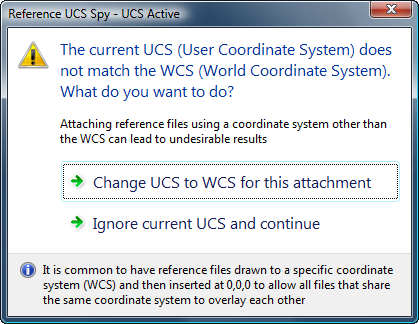
RefUcsSpy task dialog What happens next will depend on the choice made, of course, and should be obvious from the wording of the dialog (and from the contents of this post).

The task dialog implementation was introduced in AutoCAD 2009, and is part of the AdWindows.dll (which will need to be added as a project reference). If you're using a prior version of AutoCAD, then all is not lost: you can comment out the task dialog implementation and uncomment the one using a standards Windows message-box, which will lead this being shown instead:
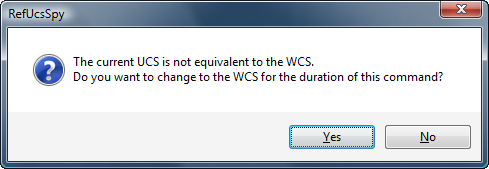
RefUcsSpy message box

Thanks again for a great little utility, Glenn! If anyone has feedback or comments prior to the final release of this plugin, please do post a comment.

10 responses to “Preview of August’s Plugin of the Month: RefUcsSpy”

  1. Tony Tanzillo Avatar

    I believe it was one of your colleages (Cyrille Fauvel) who once noted in the comments included with some sample code he wrote, that reactors/events are expensive, and that they should only be enabled when absolutely necessary.

    The command-related events are particularly expensive because they can impose noticible overhead on scripting that executes commands at a high frequency.

    Sorry to have to say it, but this code demonstrates pointless and wasteful event handling.

    If you think about it, there is no need to continuously handle the Command ended/cancelled/failed events. You can add handlers for those three events from the CommandWillStart event handler, only when a 'command of interest' starts, and have those same event handlers remove themselves from the event they handle when they're invoked.

    In other words, from the CommandWillStart event handler, if the command is one of the commands that you are watching, then you add event handlers for the Command ended/failed/cancelled events.

    When any of those same three events fires, the event handler removes the handlers for those same events so they do not fire continuously for commands that you are not interested in watching.

    That pattern allows you to get control when certain commands start and end, while only having to continuously monitor a single event (CommandWillStart).

    You can see a formalization of that pattern, along with an example of a managed 'per-Document' data class in the sample code here:

    caddzone.com/CommandEventsSample.zp

  2. Useful advice as always Tony. Thanks!

    It's probably too late for you to edit it, but your CommandEventsSample link doesn't work unless you and an "i" to the .zp like so:

    http://www.caddzone.com/CommandEventsSample.zip

  3. Tony Tanzillo Avatar

    Hi Alex. Thanks for pointing out the typo in the URL.

  4. Cyrille Fauvel Avatar
    Cyrille Fauvel

    There is no good answer to that problem: it really depends on what you are doing behind the scene. It is true monitoring all commands has a cost, but in case of a command reactor, it usually resumes in a callback function call and a string compare. Most of the ‘reactor’ impact on execution resides in what the reactor does after. If you have command reactor doing a 1 second treatment for all commands each time, this will have a major impact on script execution time versus doing an interactive execution. Adding a reactor, when a specific command starts can be a solution, but one need to know it cost more time to add and remove a reactor than doing a simple reactor callback and a string compare (Note the number of active reactors also have an impact).

    More but not always. Again it all depends what you do. If you add/remove the additional reactor only for a command you may use only once in a while, this approach will save you time, but if you do this for many commands, a simple string compare in a common reactor will be better. My personal recommendation is to build a reactor scheme for each application by analyzing how many time the reactor will be called, and what you’ll be doing with it. A lengthy operation is never good in a reactor ! Althought, to monitor reactors, you need a reactor, so you see what I mean 😉

    Here we talked about a command reactor (a simple callback function). When it comes to an object reactor (or database reactor) the impact on how you implement your reactor scheme is more important and you should really pay attention on what you are doing. This is usually where monitoring on object versus all objects takes all its importance.

  5. Tony Tanzillo Avatar

    Hi Cyrille.

    The sample code I was referring to was written by you, and it does exactly what I described (adds the commandEnded/Failed/Cancelled event handlers in the commandWillStart event handler, and removes them in the latter event handler.

    Insofar as there not being a good answer to that problem, in general yes it depends on what you're doing, but I was referring to the code presented in this post, and IMO, the problem there is very clear.

    But, I think it's a bit silly to debate the overhead of leaving the end-command event handlers running all the time, when you consider that the author of the code uses List<t>.Contains() to test whether the command starting and ending is one of the commands he wants to watch.

    List<t>.Contains() is notoriously slow (Google it), which operates at O(n), and also suffers from the use of the Generic IEqualityComparer<t> by default, while the Contains() method of a more appropriate container like HashSet<t>, operates at O(1).

    I suppose that I should have been critical of this aspect of the code first, before calling into question the wasteful use of event handlers.

  6. Hi Tony,

    I've finally got around to catching up on this after my trip to the US.

    I see your point, in the sense that - generally speaking - there's a difference in performance between List.Contains() and HashSet.Contains().

    But the reality is that the list of commands is currently at 6 items. It's populated from a string resource (i.e. it's not user-configurable), so the developer has complete control over whether this list grows. Even with the generic equality operator, we're talking about at most 6 string comparisons. It would be pretty surprising to me if this resulted in any measurable delay in execution.

    That said, it's trivial to change the List to a HashSet - and doesn't make the code less readable - so I'll go ahead and do so.

    Kean

  7. " It would be pretty surprising to me if this resulted in any measurable delay in execution."

    That depends on the scenaro. Is a LISP appliation that executes a command hundreds or thousands of times in a matter of a few seconds going to be affected? I say it will, but in the larger picture, the question of whether the difference will be perceptible or not is really not the point.

    As a general principle, regardless of whether the difference is noticable or not, one should always use the most efficient/least-costly code, especially when it imposes no additional complexity or have any other cost. We don't emply best practices only when we have to, we strive to do that all the time, when there is no cost from doing so.

    I just recently published a simple example showing LISP programmers why iterative use of (strcat) can be close to 100x slower at incremental string building, verses a different, list-based approach that involves little additional code complexity.

    In the conclusion of that article, I also stressed the same philisophical point, that even when there is no perceviable difference between doing it the wrong way verses the right way, that does not justify doing it the wrong way:

    caddzone.com/StringBuildingTest.lsp

  8. I'm pretty sure I understand where you're coming from, Tony: you'e a purist at heart and it bothers you when people don't do things in the best possible way. I also have purist tendencies - I fully admit - but I get the feeling my world-view contains a few more shades of grey: there are a lot of "good enough" approaches out there, too.

    There's a balance to be struck between complexity and efficiency: while I agree that - if all else is equal - we should strive for the most efficient possible solution, all else is rarely equal. Code readability and maintainability play a part, for instance, and need to be considered.

    One of the core goals of the Plugin of the Month initiative is simplicity: it's intended to lower the barrier of entry for people interested in developing for our products. We want to encourage (not discourage) this, and so have very deliberately aimed for providing simple solutions wherever possible.

    Now clearly there's the odd, non-complex enhancement that can be made (the choice of a HashSet vs. a List is a good example, and we made that change), but whenever significant complexity is looking to be introduced by a particular "best possible" technique, it deserves careful consideration of the relative pros and cons.

    Thanks for the interesting discussion,

    Kean

  9. "...but I get the feeling my world-view contains a few more shades of grey: there are a lot of "good enough" approaches out there, too."

    Well, the only problem I have with that point of view, is that 'good enough' doesn't foster the development of the type of skills that are crucial in those cases where merely 'good enough' isn't good enough.

    Striving to always write the best possible code is how one gains the skills and knowledge needed to write even better code, and when 'even better code' is necessary to solve a given problem, I'll put my money on the one that always trys to produce the best possible solution, even when 'good enough' will do.

  10. Well yes, but then the "best" solution depends on a lot of different criteria, doesn't it? And some of those are rather subjective. The choice of language or technique depends on the knowledge and experience of the programmer. Should someone have to learn C++ because it's "better"?

    If I were a "better" programmer, perhaps I'd write the code for these blog posts in assembly language. 🙂

    To a large extent I agree with you - none of us should strive for mediocrity - but there's clearly a balance, especially when dealing with a readership that includes lots of people who are not professional programmers, and will never become bit-twiddlers. Better that people understand the code they copy & paste than simply trust it to execute as they'd like to, forever.

    Kean

Leave a Reply

Your email address will not be published. Required fields are marked *