Creating an AutoCAD MText object containing different colours using .NET

Some weeks ago we received this question via ADN support:

My string contains several sentences and I need to make 2 of these sentences Red. I know that I could use a separate Mtext for the red portion; however, I was wondering if there was a way to programatically do this using just one Mtext?

A big thanks to Varadarajan Krishnan, from our DevTech team in India, for providing the code that formed the basis for the below solution. I decided to spice things up slightly by adding some additional per-phrase and per-word colouring.

Here's the C# code:

using Autodesk.AutoCAD.ApplicationServices;

using Autodesk.AutoCAD.EditorInput;

using Autodesk.AutoCAD.DatabaseServices;

using Autodesk.AutoCAD.Runtime;

using Autodesk.AutoCAD.Geometry;


namespace MTextCreation

{

  public class Commands

  {

    [CommandMethod("COLTXT")]

    static public void CreateColouredMText()

    {

      Document doc =

        Application.DocumentManager.MdiActiveDocument;

      Database db = doc.Database;

      Editor ed = doc.Editor;


      // Variables for our MText entity's identity

      // and location


      ObjectId mtId;

      Point3d mtLoc = Point3d.Origin;


      Transaction tr =

        db.TransactionManager.StartTransaction();

      using (tr)

      {

        // Create our new MText and set its properties


        MText mt = new MText();

        mt.Location = mtLoc;

        mt.Contents =

          "Some text in the default colour...\\P" +

          "{\\C1;Something red}\\P" +

          "{\\C2;Something yellow}\\P" +

          "{\\C3;And} {\\C4;something} " +

          "{\\C5;multi-}{\\C6;coloured}\\P";


        // Open the block table, the model space and

        // add
our MText


        BlockTable bt =

          (BlockTable)tr.GetObject(

            db.BlockTableId,

            OpenMode.ForRead

          );


        BlockTableRecord ms =

          (BlockTableRecord)tr.GetObject(

            bt[BlockTableRecord.ModelSpace],

            OpenMode.ForWrite

          );


        mtId = ms.AppendEntity(mt);

        tr.AddNewlyCreatedDBObject(mt, true);


        // Finally we commit our transaction


        tr.Commit();

      }

    }

  }

}

All very simple stuff… using the formatting codes in the Contents property the COLTXT command creates an MText entity with per-phrase – and, at times, per-word – colouring:
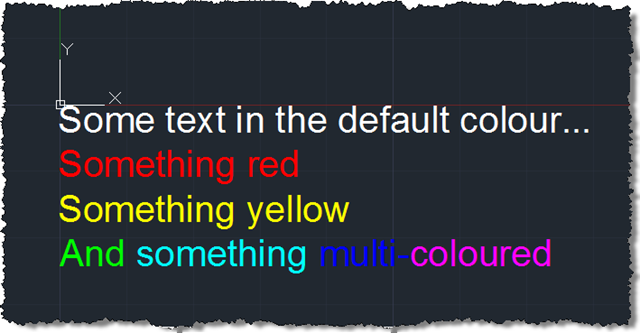
Multi-coloured multi-line text

In the next post we'll look at a somewhat more interactive approach to positioning this text, which could ultimately be applied to the positioning of any object in the current user coordinate system.

8 responses to “Creating an AutoCAD MText object containing different colours using .NET”

  1. Hi kean ,

    I have a custom object like a factory bend and i need to create a object arx application which will change the properties of the bend dynamically like ..if the custom object is line and arc combination then by right clicking the object i should able to see a properties windows..whic will show the standard properties along with the properties which i wish to change like Bend Angle and other properties...Can this be done

  2. Hi Rakesh,

    This isn't a forum for support.

    Your comment doesn't appear to relate to this post, so please submit your question to the ADN team, if you're a member, or otherwise the AutoCAD .NET Discussion Group.

    Kean

  3. Hi.

    How can I change " mt.TextStyleId = db.Textstyle;" I means TextStyleId to create a new mtext with Arial font?

    Thanks.

    1. I'm not sure I understand... please post with more information on the AutoCAD .NET Discussion Group.

      (You may just be asking how to create a new text style using Arial and apply it to a new MText object? Anyway - best to ask on the forums.)

      Kean

      1. well, I only want apply a text style called Arial to a new MText object.
        Thanks.

        1. Arial is a font, not a text style (at least not as far as AutoCAD is concerned). You need to create a new text style that uses the Arial font. For more information, please post to the discussion group.

          Kean

  4. hi Mr Kean thx for the post ..........it's curious that the Mtext color is defined within the contents of the string rather than in an mtext color property. seems quite a pain to add: {\\C1;Something red}\\P" - all that extra formatting when writing to mxtext. is there an easier way?

    1. You can script the IPE (in-page editor) but that's less elegant. If you want formatting in your text, this is the best way.

      Kean

Leave a Reply

Your email address will not be published. Required fields are marked *