Adding and removing AutoCAD layer filters using .NET

This question came in by email last week:

The last two days I am struggling with adding a new LayerGroup to HostApplicationServices.WorkingDatabase.LayerFilters.Root. I simply cannot get it working. Is it possible to write a blog item with example on this?

An interesting question and it can indeed be quite tricky to understand how this works. For those of you who are ADN members, here's a DevNote covering the basics, which I've taken and extended for this post.

When working with LayerFilters, it's important to know that the Database property providing access to the list of current LayerFilters does so by value (i.e. you have to get a copy of the current set of LayerFilters, manipulate it, and then set it back on the Database object to have them picked up by the system).

The below C# code implements commands to list the existing layer filters (LLFS), create three new layer filters (CLFS), and delete a layer filter selected by the user (DLF):

using Autodesk.AutoCAD.ApplicationServices;

using Autodesk.AutoCAD.DatabaseServices;

using Autodesk.AutoCAD.EditorInput;

using Autodesk.AutoCAD.Runtime;

using Autodesk.AutoCAD.LayerManager;

namespace LayerFilters

{

  public class Commands

  {

    [CommandMethod("LLFS")]

    static public void ListLayerFilters()

    {

      Document doc =

        Application.DocumentManager.MdiActiveDocument;

      Database db = doc.Database;

      Editor ed = doc.Editor;

      // List the nested layer filters

      LayerFilterCollection lfc =

        db.LayerFilters.Root.NestedFilters;

      for (int i = 0; i < lfc.Count; ++i)

      {

        LayerFilter lf = lfc[i];

        ed.WriteMessage(

          "\n{0} - {1} (can{2} be deleted)",

          i + 1,

          lf.Name,

          (lf.AllowDelete ? "" : "not")

        );

      }

    }

    [CommandMethod("CLFS")]

    static public void CreateLayerFilters()

    {

      Document doc =

        Application.DocumentManager.MdiActiveDocument;

      Database db = doc.Database;

      Editor ed = doc.Editor;

      try

      {

        // Get the existing layer filters

        // (we will add to them and set them back)

        LayerFilterTree lft =

          db.LayerFilters;

        LayerFilterCollection lfc =

          lft.Root.NestedFilters;

        // Create three new layer filters

        LayerFilter lf1 = new LayerFilter();

        lf1.Name = "Unlocked Layers";

        lf1.FilterExpression = "LOCKED==\"False\"";

        LayerFilter lf2 = new LayerFilter();

        lf2.Name = "White Layers";

        lf2.FilterExpression = "COLOR==\"7\"";

        LayerFilter lf3 = new LayerFilter();

        lf3.Name = "Visible Layers";

        lf3.FilterExpression =

          "OFF==\"False\" AND FROZEN==\"False\"";

        // Add them to the collection

        lfc.Add(lf1);

        lfc.Add(lf2);

        lfc.Add(lf3);

        // Set them back on the Database

        db.LayerFilters = lft;

        // List the layer filters, to see the new ones

        ListLayerFilters();

      }

      catch (Exception ex)

      {

        ed.WriteMessage(

          "\nException: {0}",

          ex.Message

        );

      }

    }

    [CommandMethod("DLF")]

    static public void DeleteLayerFilter()

    {

      Document doc =

        Application.DocumentManager.MdiActiveDocument;

      Database db = doc.Database;

      Editor ed = doc.Editor;

      ListLayerFilters();

      try

      {

        // Get the existing layer filters

        // (we will add to them and set them back)

        LayerFilterTree lft =

          db.LayerFilters;

        LayerFilterCollection lfc =

          lft.Root.NestedFilters;

        // Prompt for the index of the filter to delete

        PromptIntegerOptions pio =

          new PromptIntegerOptions(

          "\n\nEnter index of filter to delete"

          );

        pio.LowerLimit = 1;

        pio.UpperLimit = lfc.Count;

        PromptIntegerResult pir =

          ed.GetInteger(pio);

        // Get the selected filter

        LayerFilter lf = lfc[pir.Value - 1];

        // If it's possible to delete it, do so

        if (!lf.AllowDelete)

        {

          ed.WriteMessage(

            "\nLayer filter cannot be deleted."

          );

        }

        else

        {

          lfc.Remove(lf);

          db.LayerFilters = lft;

          ListLayerFilters();

        }

      }

      catch(Exception ex)

      {

        ed.WriteMessage(

          "\nException: {0}",

          ex.Message

        );

      }

    }

  }

}

Here's what happens when we run the various commands:

Command: LLFS

1 - All Used Layers (cannot be deleted)

2 - Unreconciled New Layers (cannot be deleted)

3 - Viewport Overrides (cannot be deleted)

Command: CLFS

1 - Unlocked Layers (can be deleted)

2 - White Layers (can be deleted)

3 - Visible Layers (can be deleted)

4 - All Used Layers (cannot be deleted)

5 - Unreconciled New Layers (cannot be deleted)

6 - Viewport Overrides (cannot be deleted)

Command: DLF

1 - Unlocked Layers (can be deleted)

2 - White Layers (can be deleted)

3 - Visible Layers (can be deleted)

4 - All Used Layers (cannot be deleted)

5 - Unreconciled New Layers (cannot be deleted)

6 - Viewport Overrides (cannot be deleted)

Enter index of filter to delete: 1

1 - White Layers (can be deleted)

2 - Visible Layers (can be deleted)

3 - All Used Layers (cannot be deleted)

4 - Unreconciled New Layers (cannot be deleted)

5 - Viewport Overrides (cannot be deleted)

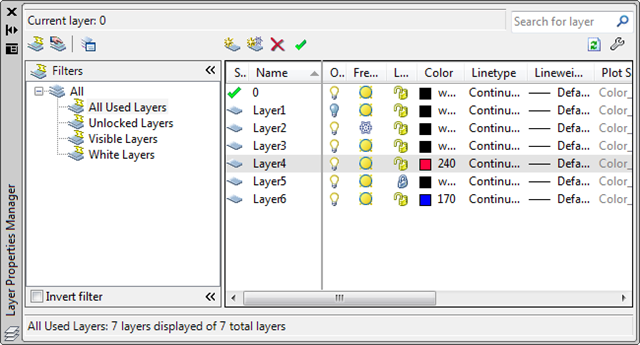
You can see the three new filters (before you delete any with the DLF command) in the LAYER dialog. To see them work, create a bunch of layers, changing the colour of some and turning off/freezing/locking others:
Layer Filters

20 responses to “Adding and removing AutoCAD layer filters using .NET”

  1. Patrick Ottenschläger Avatar
    Patrick Ottenschläger

    Hallo Kean,

    Thank you for that great posting, but I've one more question to this topic:
    Is it possible to set a layerfilter activ using .NET API?

    thanks in advance,
    Patrick

  2. Kean Walmsley Avatar

    Hi Patrick,

    I don't believe so. The ADN team, or someone on the discussion groups, may know differently, though.

    Regards,

    Kean

  3. Kean,
    You entries have been great with helping me get started with Acad Programming. Your example above shows how to create a property type filter, how do you add layers to a group type filter (LayerGroup class)? I can create the group filter but can't figure out how to add layers to the group. The filterexpression method is available but doesn't seem to work (at least not like with the LayerFilter object)

    i.e.
    Dim lyrGrp As New LayerGroup
    Dim lyrFltr As New LayerFilter
    lyrFltr.FilterExpression = "NAME==""LayerName""" 'works
    lyrGrp.FilterExpression = "NAME==""LayerName""" 'does not work

    Thanks,
    Mike

  4. Mike,

    Check the blog tomorrow for a post detailing how to do this.

    Thanks for the question!

    Kean

  5. Hi Kean,

    I've trying to set a layerFilter active.
    Using the name property of the Root/Current only renames the current one. And because the Root and Current are readonly you can't set a object to it (LayerFilter), But the new method accepts a Root and current LayerFilter objects, I've tried it and it does the trick.

    Michel

  6. Great - thanks, Michel!

    Kean

  7. Hi,

    Well, spoke to soon.
    The LayerFilter needs to be accessed once thruw the layermanager. (per drawing). After this the "new method" works. ??

    Michel

  8. Hi Kean,

    Very good post. I have a question.In DeleteLayerFilter instead of reading index to be filtered is it possible to read layername and delete

  9. Kean Walmsley Avatar

    I don't know of a reason why that wouldn't work. You would either need to index into the LayerFilterCollection via a string or - if that's not possible - iterate through the LayerFilters and check for one with the Name you're after before deleting it.

    Kean

  10. Hi Kean,

    Is it possible to have multiple filtering items per Filter Name.

    Example:
    Filter Name = Border
    Items to be filtered = SHBR, SHBT, SHBL, SHBSCALE

    lf1.Name = "BORDER";
    lf1.FilterExpression = "NAME==\"SHBR\"";

    Thanks,
    Eugene

  11. Hi Eugene,

    Have you tried ORing them together?

    lf1.Name = "BORDER";
    lf1.FilterExpression =
    "NAME==\"SHBR\" OR NAME==\"SHBT\" OR NAME==\"SHBL\" OR NAME==\"SHBSCALE\"";

    Please note: I haven't actually tested this myself (it's Sunday, after all :-).

    Kean

  12. Kean,

    That worked great.
    I tried using AND but that did not work.

    Thank you very much.
    Eugene

  13. Kean,

    I am trying to remove all the layer filter before applying the new ones to prevent doubbling up. This is a modified version of your code with out the selection. This code runs but does not remove any filters.

    Thanks,
    Eugene

    static public void DeleteLayerFilter()

    {Document doc = Application.DocumentManager.MdiActiveDocument;
    Database db = doc.Database;
    Editor ed = doc.Editor;

    { LayerFilterTree lft = db.LayerFilters; }

    LayerFilterCollection lfc = db.LayerFilters.Root.NestedFilters;

    for (int i = 0; i < lfc.Count; ++i)

    { LayerFilter lf = lfc[i];

    if (lf.AllowDelete)
    lfc.Remove(lfc[i]) ;
    }
    }

  14. Eugene,

    You need to remove the curly brackets around the lft assignment (which makes that variable exist only in a very short local scope), and then you can set lfc relative to lft and, at the end, set db.LayerFilters to be lft (just as I did in the above sample).

    You should probably only delete the layer filters your application has created (by retrieving them by name rather than index) otherwise you're likely to trash any that have been added by the user or another application.

    Kean

  15. Albert Conques Avatar

    Hi Kean,

    Will be possible to export/import the layer filter list to be used in a different file. This is possible with Architecture desktop but unfortunately NOT yet in AutoCAD.

  16. Hi Albert,

    I don't know whether this is planned. I suggest posting your request for it via the appropriate online discussion forum.

    Regards,

    Kean

    1. Hi Kean,

      I would like to get list of layers to put them in some gridview. This code workes,but it returns always complete list no matter if some filter is active or not.

      Database database = HostApplicationServices.WorkingDatabase;
      {using (Transaction acTrans = database.TransactionManager.StartTransaction())
      {LayerTable acLyrTbl;
      acLyrTbl = acTrans.GetObject(database.LayerTableId, OpenMode.ForRead) as LayerTable;
      foreach (ObjectId acObjId in acLyrTbl)

      {
      LayerTableRecord acLyrTblRec;
      acLyrTblRec = acTrans.GetObject(acObjId, OpenMode.ForRead) as LayerTableRecord;
      // do somthing
      }
      }
      }

      What should be changed to take only list of layers that are in active filter?
      Thanks
      Marek

      1. Kean Walmsley Avatar

        Hi Marek,

        LayerFilters are really a UI-centric concept. If you want them to apply to your own internal queries you would have to apply them yourself.

        You could actually generate an intermediate mechanism that abstracts away the UI and database stuff, if you really wanted to use a common mechanism. But that would be for you to implement...

        Regards,

        Kean

  17. Jürgen A. Becker Avatar
    Jürgen A. Becker

    Hi Kean,
    great post that I needed, because some old Lisp should be throw away.
    But:
    Not all layer filter cought not been deleted. Maybe after a second round.

    Can we refresh the layer Manager palette when ist open.

    Have a great weekend in Berlin at the aechackathon.

    Cheers Jürgen

    1. Kean Walmsley Avatar

      Thanks, Jürgen! It was a great weekend. 🙂

      Strange about the filters not being deleted... please post to the AutoCAD .NET forum if you haven't fixed it.

      Kean

Leave a Reply

Your email address will not be published. Required fields are marked *