Using standard AutoCAD dialogs to select colors, linetypes and lineweights with .NET

AutoCAD has a number of handy dialogs available in the "Autodesk.AutoCAD.Windows" namespace. The following code shows how to use three, in particular: ColorDialog, LinetypeDialog and LineWeightDialog. These three classes allow you to very easily implement user-interfaces selecting their corresponding properties.

Here's the C# code:

using Autodesk.AutoCAD.Runtime;

using Autodesk.AutoCAD.ApplicationServices;

using Autodesk.AutoCAD.DatabaseServices;

using Autodesk.AutoCAD.EditorInput;

using Autodesk.AutoCAD.Windows;

namespace AutoCADDialogs

{

  public class Commands

  {

    [CommandMethod("CDL")]

    public void ShowColorDialog()

    {

      Document doc =

        Application.DocumentManager.MdiActiveDocument;

      Database db = doc.Database;

      Editor ed = doc.Editor;

      ColorDialog cd = new ColorDialog();

      System.Windows.Forms.DialogResult dr =

        cd.ShowDialog();

      if (dr == System.Windows.Forms.DialogResult.OK)

      {

        ed.WriteMessage(

          "\nColor selected: " +

          cd.Color.ToString()

        );

      }

    }

    [CommandMethod("LTDL")]

    public void ShowLinetypeDialog()

    {

      Document doc =

        Application.DocumentManager.MdiActiveDocument;

      Database db = doc.Database;

      Editor ed = doc.Editor;

      LinetypeDialog ltd = new LinetypeDialog();

      System.Windows.Forms.DialogResult dr =

        ltd.ShowDialog();

      if (dr == System.Windows.Forms.DialogResult.OK)

      {

        ed.WriteMessage(

          "\nLinetype selected: " +

          ltd.Linetype.ToString()

        );

      }

    }

    [CommandMethod("LWDL")]

    public void ShowLineWeightDialog()

    {

      Document doc =

        Application.DocumentManager.MdiActiveDocument;

      Database db = doc.Database;

      Editor ed = doc.Editor;

      LineWeightDialog lwd = new LineWeightDialog();

      System.Windows.Forms.DialogResult dr =

        lwd.ShowDialog();

      if (dr == System.Windows.Forms.DialogResult.OK)

      {

        ed.WriteMessage(

          "\nLineweight selected: " +

          lwd.LineWeight.ToString()

        );

      }

    }

  }

}

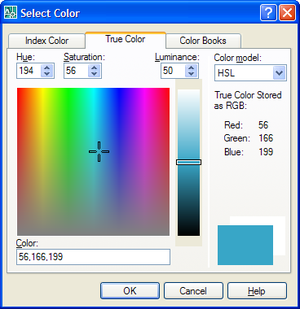
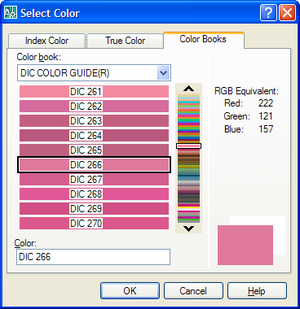
When we run the CDL command, we have three tabs available:
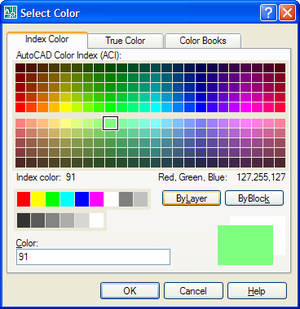
Color_dialog_1

Color_dialog_2

Color_dialog_3

Here's the dialog shown by the LTDL command:
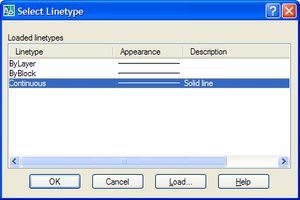
Linetype_dialog

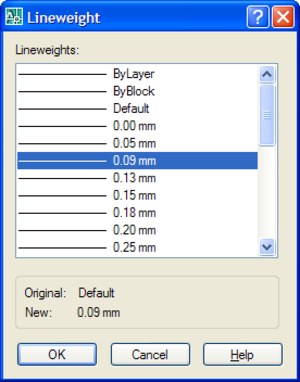
And the LWDL command:

Lineweight_dialog

And here is the command-line output for selecting each of the above items:

Command: CDL

Color selected: 91

Command: CDL

Color selected: 56,166,199

Command: CDL

Color selected: DIC 266

Command: LTDL

Linetype selected: (2130316464)

Command: LWDL

Lineweight selected: LineWeight009

In the next post we'll look at at how to use these dialogs in a more realistic way.

18 responses to “Using standard AutoCAD dialogs to select colors, linetypes and lineweights with .NET”

  1. Hi Kean,

    Can be these dialogs called from ObjectARX C++ API?

  2. Hi Fernando,

    The following colour-related functions are in the ObjectARX SDK, in aced.h:

    acedSetColorDialog()
    acedSetColorDialogTrueColor()
    acedSetColorDialogTrueColorWithCallback()

    The linetype and lineweight dialogs are not officially exposed via ObjectARX, but they are exported off acad.exe as:

    acedLinetypeDialog()
    acedLineWeightDialog()

    If you're skilled with function de-decorating/unmangling, then you should be able to work out how to call them from the dumpbin output. This isn't supported, however.

    Oh, and you can certainly invoke the managed versions from C++, although I haven't done so myself.

    Cheers,

    Kean

  3. Hello Kean,

    These controls are great, but what I would really like, are Combobox versions of them as that is more appropriate on a form. I know ActiveX versions are available, but, from my experience they are not overly reliable in a .NET environment. Maybe you could show how to create Colour\Linetpye controls as Combos in .NET?

    Cheers

    Martin.

  4. Hi Martin,

    As you've mentioned, combobox versions of the AutoCAD controls (layer, linetype, lineweight, layer, UCS) as well as additional ActiveX controls for other types of content (DWG thumbnail, hatch-pattern, slide) are available for ADN members from here.

    The effort to re-create these in .NET would be non-trivial: if you have any feedback on using them from a .NET environment, please let us know via the ADN site, and we'll do our best to fix them.

    Regards,

    Kean

  5. Excellent example, thank you.
    I am implementing these dialogs in a Layer Standards dialog (VB.NET) and have managed to pass a color to the color dialog and return user selected. (using color convertor)
    However, with the linetype dialog (as with your example) the string returned is in an user-unfriendly format. I am assuming that it is possible to look at the linetype table record to get a description or like, but there does not seem to be an easy way to accomplish this.

  6. It's an ObjectID: if you use it inside a transaction to get the LinetypeTableRecord (by calling GetObject()), you can then access a more friendly identifier by the Name property.

    Kean

  7. Hi Kean,

    This question is not related to the above mentioned topic. I would like to know if it's possible to view sld files as thumbnails in listview control using C#. If not, what is the other method? Hope you will help me out.

    Thanks

  8. Hi,
    i tried to look up some more dialogs in Autodesk.AutoCAD.Windows, but I didn't find a dialog for choosing Point Style, is there such?

    Thanks

  9. I don't know - I suggest submitting your question to the ADN team, if you're a member, or otherwise the AutoCAD .NET Discussion Group.

    Kean

  10. From what I see the LineTypeDialog only functions as an existing linetype selector. The Load from a selection made to a *.lin file portion of the interface does not result in the selected linetype being loaded into the active file. Is there a way to make that work without having to take the returned linetype name and then rolling one's own load? If I had to do that then I might as well create a proper linetype selector interface.

  11. Kean Walmsley Avatar

    Correct. You would have to fire off the load (most easily via a standard command) after the selection.

    You might find it harder than you think to implement your own linetype selector interface, but feel free to do so.

    Kean

  12. Mateusz Andrzejczak Avatar
    Mateusz Andrzejczak

    Hi Kean,

    I have problem with LineTypeDialog. Your part of the code is working perfectly, but i have problem with modifying the values. I have a SelectionSet that holds all object that are selected with using a filter. I want to use LineTypeDialog to select linetype and then accept so all the object in selection set will change to selected linetype. I'm working with this for a few hours and it's not working. Any tip for me?

  13. Hi Mateusz,

    Does this post help, at all?

    keanw.com/2008/02/modifying-the-c.html

    Regards,

    Kean

  14. Hi Kean,
    Excuse me. the following is my program environmemt setting:
    C# Code:
    using Autodesk.AutoCAD.ApplicationServices;
    using Autodesk.AutoCAD.DatabaseServices;
    using Autodesk.AutoCAD.EditorInput;
    using Autodesk.AutoCAD.Runtime;

    using AcadApp = Autodesk.AutoCAD.ApplicationServices.Application;

    namespace tEST
    {
    public partial class Form1 : Form
    {
    public Form1()
    {
    InitializeComponent();
    }

    private void Form1_Load(object sender, EventArgs e)
    {
    Document acDoc = AcadApp.DocumentManager.MdiActiveDocument;

    }
    }
    }

    when I executed my code(when Form1_Load), and it happened:
    Error:Unhandled Exception, Common Language Runtime invalid program exception.

    what issues do I have to notice?
    Thanks for your help.

    Best regards.
    Elaine
    **************************************************************************************************************************
    Environment:
    AutoCAD 2016
    Visual Studio 2013
    .Net Framework Version 4.5.51641

    1. Kean Walmsley Avatar

      Hi Elaine,

      Sorry - this appears to be a generic support question. Please post it to one of our discussion forums.

      Regards,

      Kean

  15. I opened the LineType Dialog using the above code. However, in the Select LineType window, when I am clicking Load... and selecting a linetype, then the ltd.Linetype is giving a null reference.

    1. Kean Walmsley Avatar

      Please post your support questions to the AutoCAD .NET forum.

      Kean

Leave a Reply

Your email address will not be published. Required fields are marked *