Creating a complex AutoCAD linetype containing text using .NET

In my last post we saw some code to create a simple linetype using .NET. As a comment on that post, Mark said:

Kean, i tried you code and it works great and it also got me thinking... is it possible to programmitically add text in as well? I've tried using ltr.SetTextAt(1, "TEST") but so far i've had no luck, any suggestions???

It turned out to be quite a bit more complicated to make a linetype containing text than merely calling SetTextAt() on one of the segments. In order to understand what properties needed setting, I first loaded the HOT_WATER_SUPPLY linetype from acad.lin (using the LINETYPE command):
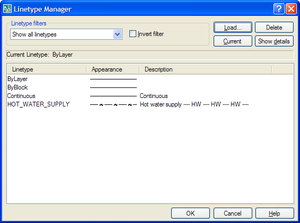
Loaded_linetype

I then looked at the contents of the linetype table using ArxDbg (the ObjectARX SDK sample that is very helpful for understanding drawing structure). Here's what the SNOOPDB command - defined by the ArxDbg application - showed for the loaded linetype:
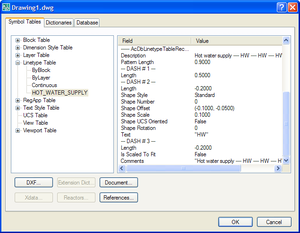
Snooped_linetype

From there it was fairly straightforward to determine the code needed to create our own complex linetype containing text segments. I decided to call the new linetype "COLD_WATER_SUPPLY", and have it resemble the original in every way but placing "CW" in the middle segment, rather than "HW" (with the descriptions updated to match, of course). As I've simply copied the properties of an existing linetype, please don't ask me to explain what they all mean. 🙂

Here's the C# code:

using Autodesk.AutoCAD.Runtime;

using Autodesk.AutoCAD.ApplicationServices;

using Autodesk.AutoCAD.DatabaseServices;

using Autodesk.AutoCAD.Geometry;

using Autodesk.AutoCAD.EditorInput;

namespace Linetype

{

  public class Commands

  {

    [CommandMethod("CCL")]

    public void CreateComplexLinetype()

    {

      Document doc =

        Application.DocumentManager.MdiActiveDocument;

      Database db = doc.Database;

      Editor ed = doc.Editor;

      Transaction tr =

        db.TransactionManager.StartTransaction();

      using (tr)

      {

        // We'll use the textstyle table to access

        // the "Standard" textstyle for our text

        // segment

        TextStyleTable tt =

          (TextStyleTable)tr.GetObject(

            db.TextStyleTableId,

            OpenMode.ForRead

          );

        // Get the linetype table from the drawing

        LinetypeTable lt =

          (LinetypeTable)tr.GetObject(

            db.LinetypeTableId,

            OpenMode.ForWrite

          );

        // Create our new linetype table record...

        LinetypeTableRecord ltr =

          new LinetypeTableRecord();

        // ... and set its properties

        ltr.Name = "COLD_WATER_SUPPLY";

        ltr.AsciiDescription =

          "Cold water supply ---- CW ---- CW ---- CW ----";

        ltr.PatternLength = 0.9;

        ltr.NumDashes = 3;

        // Dash #1

        ltr.SetDashLengthAt(0, 0.5);

        // Dash #2

        ltr.SetDashLengthAt(1, -0.2);

        ltr.SetShapeStyleAt(1, tt["Standard"]);

        ltr.SetShapeNumberAt(1, 0);

        ltr.SetShapeOffsetAt(1, new Vector2d(-0.1,-0.05));

        ltr.SetShapeScaleAt(1, 0.1);

        ltr.SetShapeIsUcsOrientedAt(1, false);

        ltr.SetShapeRotationAt(1, 0);

        ltr.SetTextAt(1, "CW");

        // Dash #3

        ltr.SetDashLengthAt(2, -0.2);

        // Add the new linetype to the linetype table

        ObjectId ltId = lt.Add(ltr);

        tr.AddNewlyCreatedDBObject(ltr, true);

        // Create a test line with this linetype

        BlockTable bt =

          (BlockTable)tr.GetObject(

            db.BlockTableId,

            OpenMode.ForRead

          );

        BlockTableRecord btr =

          (BlockTableRecord)tr.GetObject(

            bt[BlockTableRecord.ModelSpace],

            OpenMode.ForWrite

          );

        Line ln =

          new Line(

            new Point3d(0, 0, 0),

            new Point3d(10, 10, 0)

          );

        ln.SetDatabaseDefaults(db);

        ln.LinetypeId = ltId;

        btr.AppendEntity(ln);

        tr.AddNewlyCreatedDBObject(ln, true);

        tr.Commit();

      }

    }

  }

}

And here's the result of calling the CCL command and zooming in on the created line:
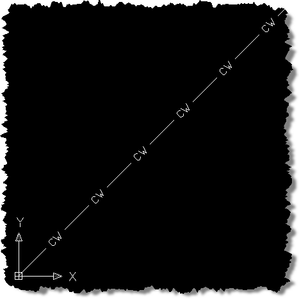
Linetype_with_text

24 responses to “Creating a complex AutoCAD linetype containing text using .NET”

  1. Kean,

    Is it poosible to create a LineType that has, say 16 characters (--- Blah Blah McBlah ---), that will actually conform to the form(circumference) of a circle? Regardless the radius of the circle.

  2. I don't think you you can do this with a linetype, but you should check out the CurveText sample on the ObjectARX SDK.

    Regards,

    Kean

  3. Kean,

    Your code works great, but it cause an error when the linetype with the same name already exist in the table. My workaround is wrap the "add code" with if(LinetypeTable.Has("Name")), but is there a way to erase the existing one, and then add it back (replacing)?

    Evo

  4. Evo,

    You should be able to open the linetype for write and erase it prior to adding the new one.

    Regards,

    Kean

  5. Jim Dowthwaite Avatar
    Jim Dowthwaite

    Is it possible to create a custom line type that contains arrows (non-text based) to draw something like direction of flow?

  6. Kean Walmsley Avatar

    I just copied the standard acad.lin file and edited it, adding my own custom linetype to the end. I added a couple of Unicode arrows("»→"), to test it out, replacing the HW in the standard HOT WATER sample linetype:

    *ARROW_TEST,Arrows showing flow ---- »→ ---- »→ ---- »→ ----
    A,.5,-.2,["»→",STANDARD,S=.1,R=0.0,X=-0.1,Y=-.05],-.2

    I had to changed the file encoding to Unicode for it to save properly, but AutoCAD understood the file when loading it via the LINETYPE command, and it appears to display as I'd expect when applied to a line.

    It's a text-based solution, but at least it's not using < or >.

    Regards,

    Kean

  7. Hi,
    I hope you can help me , I am going crazy with this problem,I am trying to create a linetype with a E like this -----E-----, this is what i am entering in my comand line A,.5,-.2,["E",STANDARD,S=.1,R=0.0,X=-0.1,Y=-.05],-.2 but i keep getting this message... Invalid number or bad continuation. What can i do ????
    i am saving the file in acad.lin

    Please Please can you help me ,

    Thank you ,
    Sonia

  8. Kean Walmsley Avatar

    Firstly, linetype definition is really not my specialty, so I'd really recommend hitting the discussion groups if my advice doesn't help.

    The linetype definition worked fine for me (I only tested in AutoCAD 2009). I preceded your line with this one:

    *E_TEST,E on a line ---- E ---- E ---- E ----

    Regards,

    Kean

  9. Kean,
    Using VB.NET, how can I create a linetype using shape definitions from a shape file?

  10. Hi Kean,

    Very useful post. I want to assign batting linetype to a line. What is the linetype for batting

    Regards,
    Saranya.N

  11. Kean Walmsley Avatar

    Hi Saranya,

    Sorry - I don't understand the question. You might try posting to one of our discussion groups.

    Regards,

    Kean

  12. dear sir

    how can i decode autocade lisp file
    i get autocad lisp .lsp file and i like to change block
    name
    the file text is coded
    plase how can i open the text
    regards

  13. Your question is not related to this post (and this is not a discussion forum). Please repost it to one of our online discussion groups.

    Kean

  14. Nebojsa Otasevic Avatar

    Hi Kean,

    I am a beginner to AutoCAD.NET programming.I have following problem:I want to create complex line type 'dash-circle-dash'.This line already exists in acad.lin, but I need to create it programmatically. The problem is I do not now how.Your help would be welcome.
    Best regards,
    Nebojsa

  15. Hi Nebosa,

    So maybe you just need to load the linetype?

    Take a look at the code in this post, in case it helps.

    Regards,

    Kean

  16. Rodrigo Araújo Avatar
    Rodrigo Araújo

    In Autocad 2011 the code runs, but not shows "CW", shows only a commom line.

  17. Kean Walmsley Avatar

    Strange - it works for me on both AutoCAD 2011 and 2012.

    Kean

  18. Bojan Petkovic Avatar
    Bojan Petkovic

    Hi Kean
    I Hawe problem creating linetype like this ". ____ ." - line with spaces between two start and end point. I hawe this folowing code but when my line is longer than PaternLenght i get line with dashed with dots how can i use scale to get my line always be shape i draw above?
    my code is:

    [CommandMethod("GlinijaTip")]
    static public void Glinija()
    {
    Document acDoc = Application.DocumentManager.MdiActiveDocument;
    Database acCurDb = acDoc.Database;
    Transaction acTrans = acCurDb.TransactionManager.StartTransaction();
    {
    LinetypeTable acLintypeTbl = acCurDb.LinetypeTableId.GetObject(OpenMode.ForWrite) as LinetypeTable;
    LinetypeTableRecord Linija = new LinetypeTableRecord();
    Linija.Name = "Glinija";
    Linija.Comments = "Geodetska linija";
    Linija.AsciiDescription = "Linija sa razmakom od pikira";
    Linija.NumDashes = 5; // broj elemenata

    //PRVI ELEMENT
    Linija.SetDashLengthAt(0, 0);// tacka

    //DRUGI ELEMENT
    Linija.SetDashLengthAt(1, -0.25); //prazna msjeta
    //TRECI ELEMENT

    Linija.SetDashLengthAt(2, 0.50);//povlake
    //DOATNA POVLAKA
    Linija.SetDashLengthAt(3, -0.25);
    Linija.SetDashLengthAt(4, 0);
    Linija.PatternLength = 1; //duzina linije

    //Dodavanje stila linije:
    acLintypeTbl.Add(Linija);
    acTrans.AddNewlyCreatedDBObject(Linija, true);
    acTrans.Commit();
    }
    }

  19. Hi Bojan,

    I'm afraid I don't have time to provide support.

    Please submit your question to the ADN team, if you're a member, or otherwise the AutoCAD .NET Discussion Group.

    Regards,

    Kean

  20. Bojan Petkovic Avatar
    Bojan Petkovic

    Tnx for reply.
    Best Regards

  21. Hi Kean
    I am a beginner to AutoCAD.NET programming.I have following problem:I want to achieve linetype appearance, like appearance in the "load or reload linetypes" window.
    Please Please can you help me ,

    Thank you

    fulton

  22. Hi Kean
    I'm sorry, is not like appearance in the "load or reload linetypes" window, is like appearance in the "linetype manager".

    Thank you

    fulton

  23. Hi Kean
    I have following problem:
    I want to add items to the "Linetype filters" ComboBox in the "Linetype Manager" Window. But I don't know how to achieve it.
    Please Please can you help me ,

    Thank you

    fulton

  24. Hi fulton,

    This is not a support forum.

    If this post doesn't help, please submit your question via ADN (if you're a member) or to the AutoCAD .NEt Discussiong Group.

    keanw.com/2010/03/loading-multiple-linetypes-into-autocad-using-net.html

    Regards,

    Kean

Leave a Reply

Your email address will not be published. Required fields are marked *