Creating a table of block attributes in AutoCAD using .NET - Part 1

This post was inspired by suggestions from a few different people (you know who you are! :-). I'm going to take it in two parts: this post will focus on creating a table automatically that lists the values of attribute references included in block references in the modelspace that point to a particular block table record selected by the user. Phew. The next post will add some functionality to create a "total" of one of the columns in the table we create, by using a table formula that performs a sum of the appropriate cells.

The below code is actually quite similar in behaviour to the Table sample on the ObjectARX SDK and also the EATTEXT command inside AutoCAD - both of which will help you create tables from block attributes. I wrote this code in AutoCAD 2007 (and it should work just fine in 2008, also). I haven't tested against prior versions.

One item of note is the ability to either embed or link the data placed in the table. "Embedding" means we just take a copy of the attribute values and place them as plain text in the cells; "linking" means we use a field to create a reference from the cell to the attribute's value (using the technique shown in the previous post).

The code is quite lengthy, but I've done my best to comment it to make it more clear what's going on. Here's the C# code:

using Autodesk.AutoCAD.ApplicationServices;

using Autodesk.AutoCAD.DatabaseServices;

using Autodesk.AutoCAD.EditorInput;

using Autodesk.AutoCAD.Geometry;

using Autodesk.AutoCAD.Runtime;

using System.Collections.Specialized;

using System;

namespace TableCreation

{

  public class Commands

  {

    // Set up some formatting constants

    // for the table

    const double colWidth = 15.0;

    const double rowHeight = 3.0;

    const double textHeight = 1.0;

    const CellAlignment cellAlign =

      CellAlignment.MiddleCenter;

    // Helper function to set text height

    // and alignment of specific cells,

    // as well as inserting the text

    static public void SetCellText(

      Table tb,

      int row,

      int col,

      string value

    )

    {

      tb.SetAlignment(row, col, cellAlign);

      tb.SetTextHeight(row, col, textHeight);

      tb.SetTextString(row, col, value);

    }

    [CommandMethod("BAT")]

    static public void BlockAttributeTable()

    {

      Document doc =

        Application.DocumentManager.MdiActiveDocument;

      Database db = doc.Database;

      Editor ed = doc.Editor;

      // Ask for the name of the block to find

      PromptStringOptions opt =

        new PromptStringOptions(

          "\nEnter name of block to list: "

        );

      PromptResult pr = ed.GetString(opt);

      if (pr.Status == PromptStatus.OK)

      {

        string blockToFind =

          pr.StringResult.ToUpper();

        bool embed = false;

        // Ask whether to embed or link the data

        PromptKeywordOptions pko =

          new PromptKeywordOptions(

            "\nEmbed or link the attribute values: "

          );

        pko.AllowNone = true;

        pko.Keywords.Add("Embed");

        pko.Keywords.Add("Link");

        pko.Keywords.Default = "Embed";

        PromptResult pkr =

          ed.GetKeywords(pko);

        if (pkr.Status == PromptStatus.None ||

            pkr.Status == PromptStatus.OK)

        {

          if (pkr.Status == PromptStatus.None ||

              pkr.StringResult == "Embed")

            embed = true;

          else

            embed = false;

        }

        Transaction tr =

          doc.TransactionManager.StartTransaction();

        using (tr)

        {

          // Let's check the block exists

          BlockTable bt =

            (BlockTable)tr.GetObject(

              doc.Database.BlockTableId,

              OpenMode.ForRead

            );

          if (!bt.Has(blockToFind))

          {

            ed.WriteMessage(

              "\nBlock "

              + blockToFind

              + " does not exist."

            );

          }

          else

          {

            // And go through looking for

            // attribute definitions

            StringCollection colNames =

              new StringCollection();

            BlockTableRecord bd =

              (BlockTableRecord)tr.GetObject(

                bt[blockToFind],

                OpenMode.ForRead

              );

            foreach (ObjectId adId in bd)

            {

              DBObject adObj =

                tr.GetObject(

                  adId,

                  OpenMode.ForRead

                );

              // For each attribute definition we find...

              AttributeDefinition ad =

                adObj as AttributeDefinition;

              if (ad != null)

              {

                // ... we add its name to the list

                colNames.Add(ad.Tag);

              }

            }

            if (colNames.Count == 0)

            {

              ed.WriteMessage(

                "\nThe block "

                + blockToFind

                + " contains no attribute definitions."

              );

            }

            else

            {

              // Ask the user for the insertion point

              // and then create the table

              PromptPointResult ppr =

                ed.GetPoint(

                  "\nEnter table insertion point: "

                );

              if (ppr.Status == PromptStatus.OK)

              {

                Table tb = new Table();

                tb.TableStyle = db.Tablestyle;

                tb.NumRows = 1;

                tb.NumColumns = colNames.Count;

                tb.SetRowHeight(rowHeight);

                tb.SetColumnWidth(colWidth);

                tb.Position = ppr.Value;

                // Let's add our column headings

                for (int i = 0; i < colNames.Count; i++)

                {

                  SetCellText(tb, 0, i, colNames[i]);

                }

                // Now let's search for instances of

                // our block in the modelspace

                BlockTableRecord ms =

                  (BlockTableRecord)tr.GetObject(

                    bt[BlockTableRecord.ModelSpace],

                    OpenMode.ForRead

                  );

                int rowNum = 1;

                foreach (ObjectId objId in ms)

                {

                  DBObject obj =

                    tr.GetObject(

                      objId,

                      OpenMode.ForRead

                    );

                  BlockReference br =

                    obj as BlockReference;

                  if (br != null)

                  {

                    BlockTableRecord btr =

                      (BlockTableRecord)tr.GetObject(

                        br.BlockTableRecord,

                        OpenMode.ForRead

                      );

                    using (btr)

                    {

                      if (btr.Name.ToUpper() == blockToFind)

                      {

                        // We have found one of our blocks,

                        // so add a row for it in the table

                        tb.InsertRows(

                          rowNum,

                          rowHeight,

                          1

                        );

                        // Assume that the attribute refs

                        // follow the same order as the

                        // attribute defs in the block

                        int attNum = 0;

                        foreach (

                          ObjectId arId in

                          br.AttributeCollection

                        )

                        {

                          DBObject arObj =

                            tr.GetObject(

                              arId,

                              OpenMode.ForRead

                            );

                          AttributeReference ar =

                            arObj as AttributeReference;

                          if (ar != null)

                          {

                            // Embed or link the values

                            string strCell;

                            if (embed)

                            {

                              strCell = ar.TextString;

                            }

                            else

                            {

                              string strArId =

                                arId.ToString();

                              strArId =

                                strArId.Trim(

                                  new char[] { '(', ')' }

                                );

                              strCell =

                                "%<\\AcObjProp Object("

                                  + "%<\\_ObjId "

                                  + strArId

                                  + ">%).TextString>%";

                            }

                            SetCellText(

                              tb,

                              rowNum,

                              attNum,

                              strCell

                            );

                          }

                          attNum++;

                        }

                        rowNum++;

                      }

                    }

                  }

                }

                tb.GenerateLayout();

                ms.UpgradeOpen();

                ms.AppendEntity(tb);

                tr.AddNewlyCreatedDBObject(tb, true);

                tr.Commit();

              }

            }

          }

        }

      }

    }

  }

}

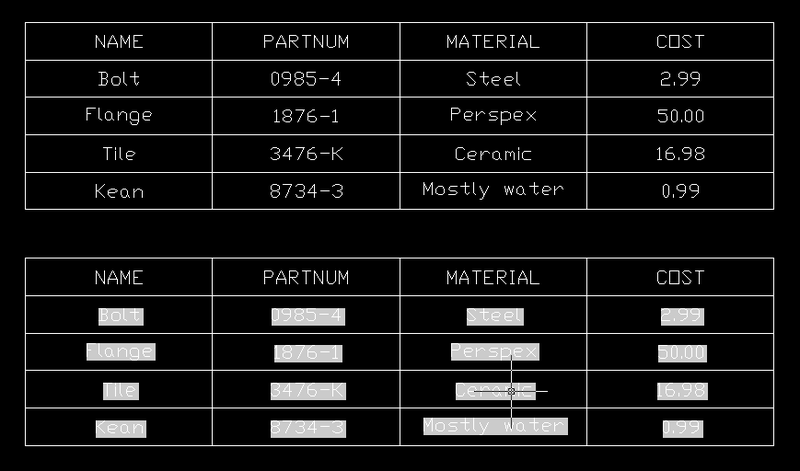
To test the code, I created a block called "DATA" containing attribute definitions for NAME, PARTNUM, MATERIAL and COST. I then created blocks corresponding to the data we had previously hard-coded.

Here's what happens when I used the BAT command on this data to create two tables - the top with "embedded" values, the bottom with them "linked":
Attribute_table_1

In the next post we'll add a "Total" row at the bottom of the table, and use a formula to calculate the sum of a particular column (the logical one being COST, as it's numerical).

26 responses to “Creating a table of block attributes in AutoCAD using .NET - Part 1”

  1. How would handle a column for multiple quantities of the same block? Example: A drawing with say 50 bolts.

  2. Kean Walmsley Avatar

    That's up to you. It's certainly possible to do; the specific changes would depend on how you want to handle it (whether you want multiple table columns, etc.).

    Kean

  3. Do I have to add to the lisp as I am gatting an error no function definition:table

  4. Dolan -

    Not sure what you mean by LISP (this is C# code) and I haven't come across that error.

    Kean

  5. Sorry Kean my mistake. I am not sure how to use C#code with AutoCAD.

  6. Dolan -

    I suggest starting with the resources posted on the AutoCAD Developer Center, where you'll find the AutoCAD .NET Labs.

    Regards,

    Kean

  7. Hey Kean,

    I am building a small application and came to the point where i have to populate a table with information I got stored in a List. Basically I want to embed my X, Y, Z coordinates of points, stored in that list, in the table.

    I started to go through the Autocad library myself first exploring all the Table Methods and properties to get the job done.

    Problem I have is putting text in the rows. I can create the table/write that entity to db and adjust its features (with,height).

    After wondering what i was doing wrong i read your post and simplified my code so I could present my problem as good as possible.

    This is my code : problem at the point i insert text into my newly created row.

    const double colWidth = 15.0;
    const double rowHeight = 3.0;

    Document doc = Autodesk.AutoCAD.ApplicationServices.Application.DocumentManager.MdiActiveDocument;
    Database db = doc.Database;

    Table tb = new Table();

    tb.NumRows = 1;

    tb.NumColumns = 1;

    tb.SetRowHeight(rowHeight);

    tb.SetColumnWidth(colWidth);
    tb.TableStyle = db.Tablestyle;

    Point3d p3d = new Point3d(0, 0,0);

    tb.Position = p3d;
    MessageBox.Show("start add text columns");
    //Here is where I get a exception and where I am clueless why it doesnt work
    SetCellText(tb, 0, 1, "test");

    PS. I ofcourse used the method SetCellText you provided me in my class. Even if I try to alter the table's SetTextString I get a error.

    I know you are a bussy man and this is an old post, but any help would be much appreciated.

  8. Dear Kean,

    I found the solution. The problem was my own stupidity. The first column is 0 not 1.

    I will take advantage of this posting to thank you for your lovely input you are giving us through this blog. I am a huge fan of your blog and am sure I will use more of your input in the future as I am making a application for my final at school.

  9. The Solution.

    public static Table CreateAcadTable(List<point2dv> list, string layerName)
    {
    MessageBox.Show("Creating Layer");
    AcadLayer.AddLayer(layerName);
    MessageBox.Show("Layer Created");

    Table table = new Table();
    //MessageBox.Show("Assign Created");
    table.Layer = layerName;
    //MessageBox.Show("Assigning number of columns");
    table.NumColumns = 3;
    table.NumRows = list.Count;
    //MessageBox.Show("Assigning number of rows - " + list.Count.ToString());
    //table.ColumnWidth(colWidth);
    //table.RowHeight(rowHeight);
    table.SetRowHeight(rowHeight);
    table.SetColumnWidth(colWidth);

    SetCellText(table, 0, 0, "X");
    SetCellText(table, 0, 1, "Y");
    SetCellText(table, 0, 2, "V");

    for (int i = 1; i < list.Count; i++)
    {
    //MessageBox.Show("start loop - add text no " + i.ToString());
    SetCellText(table,i, 0, list[i].X.ToString("#.###"));
    SetCellText(table, i, 1, list[i].Y.ToString("#.###"));
    SetCellText(table, i, 2, list[i].V.ToString("#.###"));
    }
    //MessageBox.Show("loop ended");

    //MessageBox.Show("Add table to db");
    AcadDb.AddEntity(table);
    //MessageBox.Show("Table Added");
    return table;
    }

    static public void SetCellText(Table tb,int row,int col,string value)
    {
    tb.SetAlignment(row, col, cellAlign);
    tb.SetTextHeight(row, col, textHeight);
    tb.SetTextString(row, col, value);
    }

  10. Great - thanks for letting us know the solution to your problem. 🙂

    Kean

  11. Hi Kean I have experienced this codes VBA before ,If I try own table add from autocad I was getting error limiting data (data means is number of table rows)
    is there any limits of data for adding autocad table
    in Autocad.Net plaform(cause sometime our material table list has big count)

    When I draw our material table with adding simple line and text the codes works very well and better than adding from autocad self table

  12. Not that I'm aware of. I suggest posting a reproducible case (using a simple loop to create a huge table, showing the problem) to ADN or the AutoCAD .NET Discussion Group.

    Kean

  13. Dear Kean,

    Could you please clarify me whether "Is it possible to place dimension by referencing Block Attributes Co-Ordinates" For ex: If we have two block attributes and wants to place aligned dimension extension line in the attributes co-ordinates.

  14. Kean Walmsley Avatar

    Dear Ranjan,

    You should be able to get the location information from the specific attribute references. It may be harder to make the dimension associative.

    I suggest posting follow-up questions via the AutoCAD .NET Discussion Group or the ADN team.

    Best regards,

    Kean

  15. xanhnhnn280683@gmail.com Avatar
    xanhnhnn280683@gmail.com

    hello forum, I would like for example to specify two identical objects in one drawing

  16. Nope, this is not a forum. Try here.

    Kean

  17. xanhnhnn280683@gmail.com Avatar
    xanhnhnn280683@gmail.com

    hello forum, I would like for example to find two identical objects in one drawing

    tell its meaning

  18. No, still not a forum. Once more and you're blocked.

    Kean

    1. This code not getting all my attribute.tag values. I have 5 tags in the drawing but in table only one is display with a single row on top of the table.

      1. This is a really old post... can you post the DWG and the code to the AutoCAD .NET Forum?

        Kean

        1. Where exactly post it?

        2. forums.autodesk.com/

          Here is whole question please suggest me solution its too urgent.

      2. Can you please send me the link of the forum

          1. forums.autodesk.com/

            here is my solution

  19. Hi kean,

    I am trying to add the multiple attribute to block but not getting the solution.
    I am using this code to add attribute as give below:

    using (BlockTableRecord acBlkTblRec = new BlockTableRecord())
    {
    acBlkTblRec.Name = "CircleBlockWithAttributes";

    // Set the insertion point for the block
    acBlkTblRec.Origin = new Point3d(0, 0, 0);

    // Add a circle to the block
    using (Circle acCirc = new Circle())
    {
    acCirc.Center = new Point3d(0, 0, 0);
    acCirc.Radius = 2;

    acBlkTblRec.AppendEntity(acCirc);

    // Add an attribute definition to the block
    using (AttributeDefinition acAttDef = new AttributeDefinition())
    {
    acAttDef.Position = new Point3d(0, 0, 0);
    acAttDef.Prompt = "Door #: ";
    acAttDef.Tag = "Door#";
    acAttDef.TextString = "DXX";
    acAttDef.Height = 1;
    acAttDef.Justify = AttachmentPoint.MiddleCenter;
    acBlkTblRec.AppendEntity(acAttDef);

    acBlkTbl.UpgradeOpen();
    acBlkTbl.Add(acBlkTblRec);
    acTrans.AddNewlyCreatedDBObject(acBlkTblRec, true);
    }
    }

    blkRecId = acBlkTblRec.Id;
    }

    How can i add multiple attributes with same Block Table, so that i will be able to read the block table with all attribute from code.

    Thanks in advance.

Leave a Reply

Your email address will not be published. Required fields are marked *