Leap Motion
-
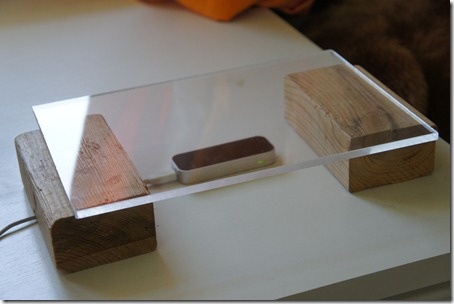
I mentioned a presentation I gave in Singapore a few weeks that talked about integrating Kinect and Leap Motion with AutoCAD. After the session I had a good conversation (in person and then by email) with Nagappan Nachiappan. Nagappan is a talented young software engineer working on AutoCAD's JavaScript API, but has a strong interest in HCI (his final year degree project used computer vision techniques to implement a virtual mouse that moves with your hand). Nagappan was responding to concerns I'd raised about the ergonomic impact of hovering your hand above the device. His primary question was "can the…
-

I'm currently in Boston for an internal technical summit where I'll be presenting sessions on Kinect Fusion and Leap Motion (which will the sessions I've submitted - and will hopefully get accepted - for AU 2013). I arrived a day early and rented a bicycle from the hotel, taking the opportunity to cycle through the MIT and Harvard campuses (both of which are in Cambridge, where the summit is taking place) and then on to downtown Boston. It was really great being back in Boston after probably five years - it's still one of my favourite cities in the US.…
-

I arrived back safely in Switzerland on Saturday night. It was a pretty good trip to the Bay Area, this time: most surprisingly this is the first time ever I've managed to sleep through until 6am (or thereabouts) on every single day of a trip to California. But then I – like many people – do find going west to be easier than going east, jetlag-wise. I certainly found that I couldn't get back to sleep when I woke up at home on Sunday morning at 3am, which made for a very long day (especially as we participated in the…
-
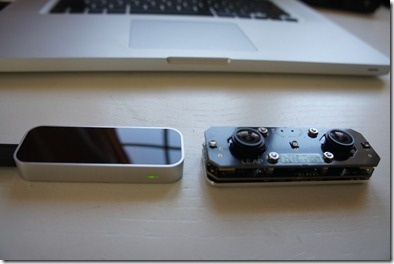
It's been a good week for gadgets. Aside from getting a Netduino and some additional accessories through the post, I also received a newer version of the Leap Motion controller. The last one I had was a 0.4 version (at least that's what was written on the box) and the new one is a 0.6.5. Here they are, side-by-side. The one on the left is the newer one, of course, although I quite like the Johnny 5 look of the older one, myself. I went ahead and installed the latest SDK – which took me from 0.7.1 up to 0.7.3…
-

It's been a fun week of blogging about the Leap Motion controller, but now it's finally time to Leap to a conclusion (groan). We started the week by introducing the device and we then used it to navigate models, interact with AutoCAD commands and draw 3D geometry. Today's post is an attempt to summarise the impressions I've formed from working with the Leap Motion controller, and take a shot at predicting (no doubt inaccurately) where it's going to make most impact. Let me start by saying that the Leap Motion controller does what it says on the tin. It's extremely…
-
After cranking out a post per day so far this week on my exploratory integration of AutoCAD with the Leap Motion controller, it's time to wrap up the technical portion of my "Leap Week" (a bit like a Leap Year, geddit? 😉 with a nice, juicy topic: creating 3D geometry inside AutoCAD using the Leap Motion controller. The Leap Motion controller has a couple of key selling points for interacting in 3D space. It's both highly reactive – they've done a great job of minimising any processing lag to allow you to build highly responsive systems – and very accurate.…
-
After introducing Leap Motion and seeing some code to make view changes inside AutoCAD, now it's time to start thinking about geometry creation. We'll see two different approaches to compare and contrast. The first – covered in today's post – is a very generic integration at the Windows Message-level: as the user's hand hovers over the device, a component inside AutoCAD translates this into cursor movements. Quick and dirty, but hey – it's in the second approach (probably in the next post) that we'll see an ultimately more compelling, higher-level integration. With the first approach the user will see the…
-
Now that we've introduced the Leap Motion controller, it's time to do something interesting with it. [If you want to cut to the chase, scroll down to the bottom of the post for a video of the results.] The team at Leap Motion has provided a very decent set of language options via the controller's SDK, including Java, JavaScript, Python, C++ and C#. In order to prototype a quick (and perhaps just a little dirty) integration with AutoCAD, I've gone ahead and used C#. I'm currently using v0.7.1 of the SDK, having started with v0.6.6 and migrated my code to…
-

I've been alluding somewhat vaguely (and sometimes more specifically) to an interesting integration project I've been working on recently. The project is to integrate the Leap Motion controller into AutoCAD, to explore the possibilities of this device. For those of you who haven't yet heard about the Leap Motion controller, this could well be the hottest tech gadget of 2013. At last week's CES, the BBC interviewed Avinash Dabir from Leap Motion to understand the potential for the device and a little about how the technology works. And here's a very quick demo video: So what could this mean for…