A colleague of mine in one of our Engineering teams just shared this tip that I'm in turn sharing with you...
I was implementing an override of the abstract class Autodesk.AutoCAD.DatabaseServices.DwgFiler, which has about 40 abstract functions that have to be overridden. Since there are no header files in C#, I couldn't just cut and paste all the signatures as a template, like I would in C++. As I was manually typing in each signature, I noticed that Intellisense was keeping track of which signatures I had already accounted for. I thought… if it can do that, why can't it just fill them all in for me?
Took some poking around, but you can right-click on the parent class name in your class declaration and use the option "Implement Abstract Class". It fills in all the signatures automatically complete with "not implemented yet" stubs. It even knew to skip the ones I had already done manually.
Brilliant!
I tried it out with our old friend the IExtensionApplication interface, and it worked a charm (jn my case I hovered over and left-clicked the little glyph that appeared by the classname - although I forget what those things are called...):
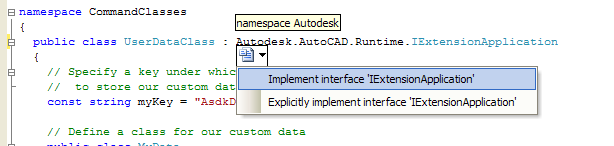
It generates the code at the end of your class, complete with function stubs:
#region IExtensionApplication Members
public void Initialize()
{
throw new System.Exception("The method or operation is not implemented.");
}
public void Terminate()
{
throw new System.Exception("The method or operation is not implemented.");
}
#endregion
Anyway - this is probably old news to many of you (which is why I chose not to reveal the identity of my friend - I'd rather not expose him to ridicule if this ends up being something everyone takes for granted when working with C#).
If you have your own tip to share with the readership of this blog, please post a comment!


Leave a Reply