Linking Circles, Part 1: Using .NET events to relate AutoCAD geometry

I received this question some time ago from Paul Richardson from CAD System Engineering:

I have never been sure when to update objects programmatically. An example would be a user edits an entity that I'm tracking and I need to edit another entity in reaction to that change. Is there a standard used to cache the handle, and make the change.

Doesn't seem editing of entities should be done in the event that is watching for the change. When/how does one do it? Doesn't seem to be any info on a standard for this.

This is such an excellent question I'm going to spend a number of posts answering it. 🙂

Introduction

But first, time for a little nostalgia. One of my first ObjectARX projects was back in 1996 - I'd been using LISP and ADS for several years by that point, but I decided what I really needed was a nice, juicy problem to help me immerse myself in ObjectARX. Along with a colleague at the time, I came up with the idea of using ObjectARX's notification mechanism to link circles together in a chain.

The idea was essentially that you "link" sets of two circles together, and whenever you move one of these circles, the other circle moves in the most direct line to stay attached to it. You would then be able to build up "chains" of linked circles, and the movement of the head of the chain would cause the rest of the chain to follow, with a ripple of notification events modifying one circle after the other.

It was my first major ObjectARX undertaking, so I was fairly heavy-handed with the architecture: each "link" was maintained by two persistent reactors - one attached to each of the linked entities. There were also a number of other reactors and objects involved in the whole system which, in spite of it's weight, worked pretty well. I demoed the sample to developers at a number of different events, to show the power of ObjectARX, and also built it into my first AutoCAD OEM demo application (called SnakeCAD :-).

Anyway - I hadn't thought about this code for several years, but then I received Paul's question and by chance stumbled across the source attached to an old email, so thought I'd spend some time reimplementing the system in .NET. I was able to recode the whole thing in less than a day, partly thanks to the additional experience of being 10 years longer-in-the-tooth, but mainly because of the advantages of using a much more modern development environment.

I'm going to serialize the code over a few posts. The first shows the basic implementation, which should allow you to focus on how the events do their stuff, and I'll later on deal with persistence of our data and some more advanced features (such as automatic linking and support for other circular - even spherical - objects).

The Basic Application

For this application I'm going to try something different, by putting line numbers in the below code (to make the explanation simpler) and providing the main class file as a download.

First, a little on the approach:

The basic application defines one single command - "LINK" (lines 162-194). This command asks the user to select two circles, which it then links together. It does this by using a special "link manager" object (the LinkedObjectManager class is defined from lines 23 to 115), which is used to maintain the references between the various circles.

This LinkedObjectManager stores one-to-many relationships by maintaining a Dictionary, mapping between ObjectIds and ObjectIdCollections. This means that any particular circle can be linked to multiple other circles. The relationships also get added bi-directionally, so the LinkedObjectManager will create a backwards link when it creates the forwards one (lines 37-38).

The linking behaviour is maintained by two main event callbacks: the first is Database.ObjectModified(), which is called whenever an object stored in the active drawing has been changed in some way. This event callback is implemented between lines 196 and 206. All it does is check whether the object that has been modified is one that is being "managed" by our link manager - if so, we add its ID to the list of entities to update later on (the collection that is declared on line 122).

This is really the answer to Paul's question: we store the ObjectId in a list that will get picked up in the Editor.CommandEnded() callback, where we go and update the various objects. My original implementation didn't do that: it opened the objects directly using Open()/Close() (which are marked as obsolete in the .NET API, as we're encouraging the use of Transactions instead), and made the changes right then. Overall the implementation in this version is safer and, I feel, more elegant - CommandEnded() is really the way to go for this kind of operation.

[Aside: for those of you that are ADN members, you should find additional information on this limitation on the ADN website. Here's an article that covers this for VBA, for instance: How to modify an object from object's Modified or document's ObjectAdded, ObjectModified, and so on events.]

The Editor.CommandEnded() callback is implemented between lines 219 and 227, and calls through to another function (UpdateLinkedEntities()) to do the heavy lifting (lines 230-316). This function checks the geometry of the linked objects - I've tried to keep the code fairly generic to make it easier for us to extend this later to handle non-circles - and moves the second one closer to the first one. This in turn fires the Database.ObjectModified() event again, which adds this entity's ObjectId into the list of entities to update. What's interesting about this implementation is that the foreach loop that is making the calls to UpdateLinkedEntities() for each object in the list (lines 222-225), will also take into account the newly added entities. This allows the change to ripple through the entire chain of circles.

Here's the C# code:

    1 using System;

    2 using System.Collections;

    3 using System.Collections.Generic;

    4 using Autodesk.AutoCAD.Runtime;

    5 using Autodesk.AutoCAD.ApplicationServices;

    6 using Autodesk.AutoCAD.DatabaseServices;

    7 using Autodesk.AutoCAD.EditorInput;

    8 using Autodesk.AutoCAD.Geometry;

    9

   10 [assembly:

   11   CommandClass(

   12     typeof(

   13       AsdkLinkingLibrary.LinkingCommands

   14     )

   15   )

   16 ]

   17

   18 namespace AsdkLinkingLibrary

   19 {

   20   /// <summary>

   21   /// Utility class to manage links between objects

   22   /// </summary>

   23   public class LinkedObjectManager

   24   {

   25     Dictionary<ObjectId, ObjectIdCollection> m_dict;

   26

   27     // Constructor

   28     public LinkedObjectManager()

   29     {

   30       m_dict =

   31         new Dictionary<ObjectId,ObjectIdCollection>();

   32     }

   33

   34     // Create a bi-directional link between two objects

   35     public void LinkObjects(ObjectId from, ObjectId to)

   36     {

   37       CreateLink(from, to);

   38       CreateLink(to, from);

   39     }

   40

   41     // Helper function to create a one-way

   42     // link between objects

   43     private void CreateLink(ObjectId from, ObjectId to)

   44     {

   45       ObjectIdCollection existingList;

   46       if (m_dict.TryGetValue(from, out existingList))

   47       {

   48         if (!existingList.Contains(to))

   49         {

   50           existingList.Add(to);

   51           m_dict.Remove(from);

   52           m_dict.Add(from, existingList);

   53         }

   54       }

   55       else

   56       {

   57         ObjectIdCollection newList =

   58           new ObjectIdCollection();

   59         newList.Add(to);

   60         m_dict.Add(from, newList);

   61       }

   62     }

   63

   64     // Remove bi-directional links from an object

   65     public void RemoveLinks(ObjectId from)

   66     {

   67       ObjectIdCollection existingList;

   68       if (m_dict.TryGetValue(from, out existingList))

   69       {

   70         m_dict.Remove(from);

   71         foreach (ObjectId id in existingList)

   72         {

   73           RemoveFromList(id, from);

   74         }

   75       }

   76     }

   77

   78     // Helper function to remove an object reference

   79     // from a list (assumes the overall list should

   80     // remain)

   81     private void RemoveFromList(

   82       ObjectId key,

   83       ObjectId toremove

   84     )

   85     {

   86       ObjectIdCollection existingList;

   87       if (m_dict.TryGetValue(key, out existingList))

   88       {

   89         if (existingList.Contains(toremove))

   90         {

   91           existingList.Remove(toremove);

   92           m_dict.Remove(key);

   93           m_dict.Add(key, existingList);

   94         }

   95       }

   96     }

   97

   98     // Return the list of objects linked to

   99     // the one passed in

  100     public ObjectIdCollection GetLinkedObjects(

  101       ObjectId from

  102     )

  103     {

  104       ObjectIdCollection existingList;

  105       m_dict.TryGetValue(from, out existingList);

  106       return existingList;

  107     }

  108

  109     // Check whether the dictionary contains

  110     // a particular key

  111     public bool Contains(ObjectId key)

  112     {

  113       return m_dict.ContainsKey(key);

  114     }

  115   }

  116   /// <summary>

  117   /// This class defines our commands and event callbacks.

  118   /// </summary>

  119   public class LinkingCommands

  120   {

  121     LinkedObjectManager m_linkManager;

  122     ObjectIdCollection m_entitiesToUpdate;

  123

  124     public LinkingCommands()

  125     {

  126       Document doc =

  127         Application.DocumentManager.MdiActiveDocument;

  128       Database db = doc.Database;

  129       db.ObjectModified +=

  130         new ObjectEventHandler(OnObjectModified);

  131       db.ObjectErased +=

  132         new ObjectErasedEventHandler(OnObjectErased);

  133       doc.CommandEnded +=

  134         new CommandEventHandler(OnCommandEnded);

  135

  136       m_linkManager = new LinkedObjectManager();

  137       m_entitiesToUpdate = new ObjectIdCollection();

  138     }

  139

  140     ~LinkingCommands()

  141     {

  142       try

  143       {

  144         Document doc =

  145           Application.DocumentManager.MdiActiveDocument;

  146         Database db = doc.Database;

  147         db.ObjectModified -=

  148           new ObjectEventHandler(OnObjectModified);

  149         db.ObjectErased -=

  150           new ObjectErasedEventHandler(OnObjectErased);

  151         doc.CommandEnded +=

  152           new CommandEventHandler(OnCommandEnded);

  153       }

  154       catch(System.Exception)

  155       {

  156         // The document or database may no longer

  157         // be available on unload

  158       }

  159     }

  160

  161     // Define "LINK" command

  162     [CommandMethod("LINK")]

  163     public void LinkEntities()

  164     {

  165       Document doc =

  166         Application.DocumentManager.MdiActiveDocument;

  167       Database db = doc.Database;

  168       Editor ed = doc.Editor;

  169

  170       PromptEntityOptions opts =

  171         new PromptEntityOptions(

  172           "\nSelect first circle to link: "

  173         );

  174       opts.AllowNone = true;

  175       opts.SetRejectMessage(

  176         "\nOnly circles can be selected."

  177       );

  178       opts.AddAllowedClass(typeof(Circle), false);

  179

  180       PromptEntityResult res = ed.GetEntity(opts);

  181       if (res.Status == PromptStatus.OK)

  182       {

  183         ObjectId from = res.ObjectId;

  184         opts.Message =

  185           "\nSelect second circle to link: ";

  186         res = ed.GetEntity(opts);

  187         if (res.Status == PromptStatus.OK)

  188         {

  189           ObjectId to = res.ObjectId;

  190           m_linkManager.LinkObjects(from, to);

  191           m_entitiesToUpdate.Add(from);

  192         }

  193       }

  194     }

  195

  196     // Define callback for Database.ObjectModified event

  197     private void OnObjectModified(

  198       object sender, ObjectEventArgs e)

  199     {

  200       ObjectId id = e.DBObject.ObjectId;

  201       if (m_linkManager.Contains(id) &&

  202           !m_entitiesToUpdate.Contains(id))

  203       {

  204         m_entitiesToUpdate.Add(id);

  205       }

  206     }

  207

  208     // Define callback for Database.ObjectErased event

  209     private void OnObjectErased(

  210       object sender, ObjectErasedEventArgs e)

  211     {

  212       if (e.Erased)

  213       {

  214         m_linkManager.RemoveLinks(e.DBObject.ObjectId);

  215       }

  216     }

  217

  218     // Define callback for Document.CommandEnded event

  219     private void OnCommandEnded(

  220       object sender, CommandEventArgs e)

  221     {

  222       foreach (ObjectId id in m_entitiesToUpdate)

  223       {

  224         UpdateLinkedEntities(id);

  225       }

  226       m_entitiesToUpdate.Clear();

  227     }

  228

  229     // Helper function for OnCommandEnded

  230     private void UpdateLinkedEntities(ObjectId from)

  231     {

  232       Document doc =

  233         Application.DocumentManager.MdiActiveDocument;

  234       Editor ed = doc.Editor;

  235       Database db = doc.Database;

  236

  237       ObjectIdCollection linked =

  238         m_linkManager.GetLinkedObjects(from);

  239

  240       Transaction tr =

  241         db.TransactionManager.StartTransaction();

  242       using (tr)

  243       {

  244         try

  245         {

  246           Point3d firstCenter;

  247           Point3d secondCenter;

  248           double firstRadius;

  249           double secondRadius;

  250

  251           Entity ent =

  252             (Entity)tr.GetObject(from, OpenMode.ForRead);

  253

  254           if (GetCenterAndRadius(

  255                 ent,

  256                 out firstCenter,

  257                 out firstRadius

  258               )

  259           )

  260           {

  261             foreach (ObjectId to in linked)

  262             {

  263               Entity ent2 =

  264                 (Entity)tr.GetObject(to, OpenMode.ForRead);

  265               if (GetCenterAndRadius(

  266                     ent2,

  267                     out secondCenter,

  268                     out secondRadius

  269                   )

  270               )

  271               {

  272                 Vector3d vec = firstCenter - secondCenter;

  273                 if (!vec.IsZeroLength())

  274                 {

  275                   // Only move the linked circle if it's not

  276                   // already near enough               

  277                   double apart =

  278                   vec.Length - (firstRadius + secondRadius);

  279                   if (apart < 0.0)

  280                     apart = -apart;

  281

  282                   if (apart > 0.00001)

  283                   {

  284                     ent2.UpgradeOpen();

  285                     ent2.TransformBy(

  286                       Matrix3d.Displacement(

  287                         vec.GetNormal() * apart

  288                       )

  289                     );

  290                   }

  291                 }

  292               }

  293             }

  294           }

  295         }

  296         catch (System.Exception ex)

  297         {

  298           Autodesk.AutoCAD.Runtime.Exception ex2 =

  299             ex as Autodesk.AutoCAD.Runtime.Exception;

  300           if (ex2 != null &&

  301               ex2.ErrorStatus != ErrorStatus.WasOpenForUndo)

  302           {

  303             ed.WriteMessage(

  304               "\nAutoCAD exception: {0}", ex2

  305             );

  306           }

  307           else if (ex2 == null)

  308           {

  309             ed.WriteMessage(

  310               "\nSystem exception: {0}", ex

  311             );

  312           }

  313         }

  314         tr.Commit();

  315       }

  316     }

  317

  318     // Helper function to get the center and radius

  319     // for all supported circular objects

  320     private bool GetCenterAndRadius(

  321       Entity ent,

  322       out Point3d center,

  323       out double radius

  324     )

  325     {

  326       // For circles it's easy...

  327       Circle circle = ent as Circle;

  328       if (circle != null)

  329       {

  330         center = circle.Center;

  331         radius = circle.Radius;

  332         return true;

  333       }

  334       else

  335       {

  336         // Throw in some empty values...

  337         // Returning false indicates the object

  338         // passed in was not useable

  339         center = Point3d.Origin;

  340         radius = 0.0;

  341         return false;

  342       }

  343     }

  344   }

  345 }

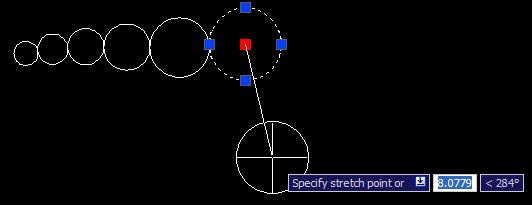
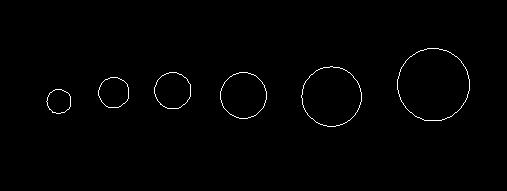
Here's what happens when you execute the LINK command on some circles you've drawn...

Some circles:
Linkedcircles_1_prelinking_1

After the LINK command has been used to link them together, two-by-two:
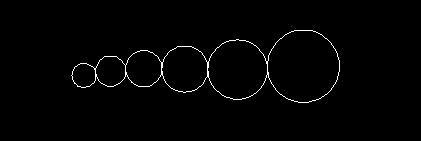
Linkedcircles_1_postlinking 

Now grip-move the head of the chain:

Linkedcircles_1_prestretch

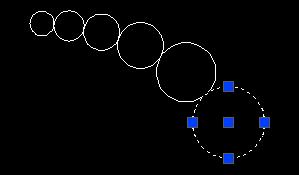
And here's the result - the chain moves to remain attached to the head:
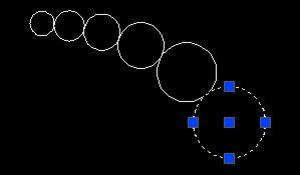
Linkedcircles_1_poststretch_1

18 responses to “Linking Circles, Part 1: Using .NET events to relate AutoCAD geometry”

  1. We use a similar mechanism extensively (with ObjectARX) for updating various relationships between objects.

    It would be interesting to get better (or 'clearer') information from AutoCAD in the case of copy operations (like 'onEndDeepClone()'). It can get more difficult if multiple databases are involved (e.g. copy'n'paste).

    Good topic! Looking forward to your next articles!

  2. Thanks, Stephan!

    What is it you'd like to receive in that event, beyond the final, translated idMapping? (which doesn't appear to be passed to the .NET version of the callback - a separate issue I'm looking into).

    Regards,

    Kean

    1. Hello Kean,
      Is this dynamic linking possible with 2 points? I have tried it but my condition to reduce the apart distance is not working.

      1. Hi Harsh,

        I'm afraid I'm not working with AutoCAD, these days. Please post your support requests to the AutoCAD .NET forum.

        Thank you,

        Kean

  3. It gets difficult to trace changes as the different cloning and copying mechanisms (copy'n'paste, insert, etc) use (slightly) different 'paths' through the code and, more importantly, also through the available callbacks.

    We solved it for now by storing ids of modified objects and handling various interactions in a 'commandEnded' callback.

    While this works fine for most cases, it breaks down for certain special copying operations. Supporting all of them is a pain. Furthermore, some operations would profit from access to a geometric acceleration structure.

    Anyway, a more pressing issue is that while curve-curve intersections can be done quite nicely through the AcGe API (though with a few workarounds for bugs in it) the support for curve-surface and especially surface-surface intersections seems not to be very good. This is very unfortunate. I'm currently evaluating different options (including AcBr) but it's difficult to get a feel for it as the docs leave a few interesting points out. 😉 Well, this is pretty off-topic. But maybe it's worth a blog entry in the future. 🙂

    Cheers

  4. I was hoping to work out how to get the Entity from the handle and then erase it, from your posts, I've learned a lot but not found the answer to this one yet, I still have a mountain to climb. (I'm using VB.NET, I've done it in VB6 +COM, even in Lisp but .NET ....)

  5. Hi Brian,

    Please see this post from today - I hope it answers your question:

    keanw.com/...

    Regards,

    Kean

  6. Sir
    My query is if i open a Auto CAD drawing and i want to transfer the dimesions from the drawing into an excel sheet using a .NET program.
    I was bit confused from where to start. can u please suggest me any thing regarding this
    Thanks
    Sridhr

  7. Hi Sridhar,

    You need to:

    1) Open the block table of the database.
    2) Open tha appropriate block table record or "space", whether modelspace or a layout.
    3) Iterate through the block table record (e.g. with a foreach statement), checking each object to see whether it's a dimension.
    4) Extract the infornation you want from each dimension, adding it to the Excel spreadsheet.

    The Ents sample (under samples/dotNet/Ents on the ObjectARX SDK) should show you how to use GetObject() on the BlockTable and the modelspace (although you will only need to open each "for read").

    Regards,

    Kean

  8. Hello,
    In this tutorial you created the LinkedObjectManager class in order to link 2 entities. Is there something already existing in Autocad classes (maybe ObjectARX) allowing to do the same ?

  9. No, there isn't, so I created a simple manager class to help with (and encapsulate) the lower-level linking functions/methods you need to call.

    Kean

  10. SUBIR KUMAR DUTTA Avatar
    SUBIR KUMAR DUTTA

    For those who want to copy paste this code and run but don't have time to clean by deleting the line numbers. Thanks to WORD VBA

    using System;
    using System.Collections;
    using System.Collections.Generic;
    using Autodesk.AutoCAD.Runtime;
    using Autodesk.AutoCAD.ApplicationServices;
    using Autodesk.AutoCAD.DatabaseServices;
    using Autodesk.AutoCAD.EditorInput;
    using Autodesk.AutoCAD.Geometry;

    [assembly:
    CommandClass(
    typeof(
    AsdkLinkingLibrary.LinkingCommands
    )
    )
    ]

    namespace AsdkLinkingLibrary
    {
    /// <summary>
    /// Utility class to manage links between objects
    /// </summary>
    public class LinkedObjectManager
    {
    Dictionary<objectid, objectidcollection=""> m_dict;

    // Constructor
    public LinkedObjectManager()
    {
    m_dict =
    new Dictionary<objectid,objectidcollection>();
    }

    // Create a bi-directional link between two objects
    public void LinkObjects(ObjectId from, ObjectId to)
    {
    CreateLink(from, to);
    CreateLink(to, from);
    }

    // Helper function to create a one-way
    // link between objects
    private void CreateLink(ObjectId from, ObjectId to)
    {
    ObjectIdCollection existingList;
    if (m_dict.TryGetValue(from, out existingList))
    {
    if (!existingList.Contains(to))
    {
    existingList.Add(to);
    m_dict.Remove(from);
    m_dict.Add(from, existingList);
    }
    }
    else
    {
    ObjectIdCollection newList =
    new ObjectIdCollection();
    newList.Add(to);
    m_dict.Add(from, newList);
    }
    }

    // Remove bi-directional links from an object
    public void RemoveLinks(ObjectId from)
    {
    ObjectIdCollection existingList;
    if (m_dict.TryGetValue(from, out existingList))
    {
    m_dict.Remove(from);
    foreach (ObjectId id in existingList)
    {
    RemoveFromList(id, from);
    }
    }
    }

    // Helper function to remove an object reference
    // from a list (assumes the overall list should
    // remain)
    private void RemoveFromList(
    ObjectId key,
    ObjectId toremove
    )
    {
    ObjectIdCollection existingList;
    if (m_dict.TryGetValue(key, out existingList))
    {
    if (existingList.Contains(toremove))
    {
    existingList.Remove(toremove);
    m_dict.Remove(key);
    m_dict.Add(key, existingList);
    }
    }
    }

    // Return the list of objects linked to
    // the one passed in
    public ObjectIdCollection GetLinkedObjects(
    ObjectId from
    )
    {
    ObjectIdCollection existingList;
    m_dict.TryGetValue(from, out existingList);
    return existingList;
    }

    // Check whether the dictionary contains
    // a particular key
    public bool Contains(ObjectId key)
    {
    return m_dict.ContainsKey(key);
    }
    }
    /// <summary>
    /// This class defines our commands and event callbacks.
    /// </summary>
    public class LinkingCommands
    {
    LinkedObjectManager m_linkManager;
    ObjectIdCollection m_entitiesToUpdate;

    public LinkingCommands()
    {
    Document doc =
    Application.DocumentManager.MdiActiveDocument;
    Database db = doc.Database;
    db.ObjectModified +=
    new ObjectEventHandler(OnObjectModified);
    db.ObjectErased +=
    new ObjectErasedEventHandler(OnObjectErased);
    doc.CommandEnded +=
    new CommandEventHandler(OnCommandEnded);

    m_linkManager = new LinkedObjectManager();
    m_entitiesToUpdate = new ObjectIdCollection();
    }

    ~LinkingCommands()
    {
    try
    {
    Document doc =
    Application.DocumentManager.MdiActiveDocument;
    Database db = doc.Database;
    db.ObjectModified -=
    new ObjectEventHandler(OnObjectModified);
    db.ObjectErased -=
    new ObjectErasedEventHandler(OnObjectErased);
    doc.CommandEnded +=
    new CommandEventHandler(OnCommandEnded);
    }
    catch(System.Exception)
    {
    // The document or database may no longer
    // be available on unload
    }
    }

    // Define "LINK" command
    [CommandMethod("LINK")]
    public void LinkEntities()
    {
    Document doc =
    Application.DocumentManager.MdiActiveDocument;
    Database db = doc.Database;
    Editor ed = doc.Editor;

    PromptEntityOptions opts =
    new PromptEntityOptions(
    "\nSelect first circle to link: "
    );
    opts.AllowNone = true;
    opts.SetRejectMessage(
    "\nOnly circles can be selected."
    );
    opts.AddAllowedClass(typeof(Circle), false);

    PromptEntityResult res = ed.GetEntity(opts);
    if (res.Status == PromptStatus.OK)
    {
    ObjectId from = res.ObjectId;
    opts.Message =
    "\nSelect second circle to link: ";
    res = ed.GetEntity(opts);
    if (res.Status == PromptStatus.OK)
    {
    ObjectId to = res.ObjectId;
    m_linkManager.LinkObjects(from, to);
    m_entitiesToUpdate.Add(from);
    }
    }
    }

    // Define callback for Database.ObjectModified event
    private void OnObjectModified(
    object sender, ObjectEventArgs e)
    {
    ObjectId id = e.DBObject.ObjectId;
    if (m_linkManager.Contains(id) &&
    !m_entitiesToUpdate.Contains(id))
    {
    m_entitiesToUpdate.Add(id);
    }
    }

    // Define callback for Database.ObjectErased event
    private void OnObjectErased(
    object sender, ObjectErasedEventArgs e)
    {
    if (e.Erased)
    {
    m_linkManager.RemoveLinks(e.DBObject.ObjectId);
    }
    }

    // Define callback for Document.CommandEnded event
    private void OnCommandEnded(
    object sender, CommandEventArgs e)
    {
    foreach (ObjectId id in m_entitiesToUpdate)
    {
    UpdateLinkedEntities(id);
    }
    m_entitiesToUpdate.Clear();
    }

    // Helper function for OnCommandEnded
    private void UpdateLinkedEntities(ObjectId from)
    {
    Document doc =
    Application.DocumentManager.MdiActiveDocument;
    Editor ed = doc.Editor;
    Database db = doc.Database;

    ObjectIdCollection linked =
    m_linkManager.GetLinkedObjects(from);

    Transaction tr =
    db.TransactionManager.StartTransaction();
    using (tr)
    {
    try
    {
    Point3d firstCenter;
    Point3d secondCenter;
    double firstRadius;
    double secondRadius;

    Entity ent =
    (Entity)tr.GetObject(from, OpenMode.ForRead);

    if (GetCenterAndRadius(
    ent,
    out firstCenter,
    out firstRadius
    )
    )
    {
    foreach (ObjectId to in linked)
    {
    Entity ent2 =
    (Entity)tr.GetObject(to, OpenMode.ForRead);
    if (GetCenterAndRadius(
    ent2,
    out secondCenter,
    out secondRadius
    )
    )
    {
    Vector3d vec = firstCenter - secondCenter;
    if (!vec.IsZeroLength())
    {
    // Only move the linked circle if it's not
    // already near enough
    double apart =
    vec.Length - (firstRadius + secondRadius);
    if (apart < 0.0)
    apart = -apart;

    if (apart > 0.00001)
    {
    ent2.UpgradeOpen();
    ent2.TransformBy(
    Matrix3d.Displacement(
    vec.GetNormal() * apart
    )
    );
    }
    }
    }
    }
    }
    }
    catch (System.Exception ex)
    {
    Autodesk.AutoCAD.Runtime.Exception ex2 =
    ex as Autodesk.AutoCAD.Runtime.Exception;
    if (ex2 != null &&
    ex2.ErrorStatus != ErrorStatus.WasOpenForUndo)
    {
    ed.WriteMessage(
    "\nAutoCAD exception: {0}", ex2
    );
    }
    else if (ex2 == null)
    {
    ed.WriteMessage(
    "\nSystem exception: {0}", ex
    );
    }
    }
    tr.Commit();
    }
    }

    // Helper function to get the center and radius
    // for all supported circular objects
    private bool GetCenterAndRadius(
    Entity ent,
    out Point3d center,
    out double radius
    )
    {
    // For circles it's easy...
    Circle circle = ent as Circle;
    if (circle != null)
    {
    center = circle.Center;
    radius = circle.Radius;
    return true;
    }
    else
    {
    // Throw in some empty values...
    // Returning false indicates the object
    // passed in was not useable
    center = Point3d.Origin;
    radius = 0.0;
    return false;
    }
    }
    }
    }

  11. Subir - the source file is linked to for download from within the post.

    Kean

  12. Cad Customizations Avatar
    Cad Customizations

    Hi Kean, In the Sample projects that come with ObjectARX SDK, there is a sample known as EventsWatcher. I had done some changes and it worked fine for ObjectAdded and ObjectErased. But for ObjectModified, I am getting a crash even if I only start a transaction and displose it with out even doing anything. Can you give me a quick tip, what I am missing here.

    private void callback_ObjectModified(object sender, ObjectEventArgs e)
    {
    WriteLine(String.Format("ObjectModified - {0} {1}", e.DBObject.ToString(), e.DBObject.Id.ToString()));

    Autodesk.AutoCAD.EditorInput.Editor ed = Application.DocumentManager.MdiActiveDocument.Editor;
    Transaction trans = ed.Document.Database.TransactionManager.StartTransaction();

    try
    {

    }
    catch (System.Exception ex)
    {

    }
    finally
    {
    trans.Dispose();
    }

    }

    Thanks

    Subir

  13. Hi Subir,

    Firstly, please post your questions via ADN or the AutoCAD .NET discussion group unless it's specifically related to code in one of my posts.

    Next, creating a transaction on object modified may seem innocuous, but it's actually a really bad idea. Objects are modified all the time inside AutoCAD, and you will create all kinds of problems doing this. You should queue up changes until CommandEnded (or a omparable event), and also look at StartOpenCloseTransaction(), which is safer when called from notification callbacks.

    Regards,

    Kean

  14. Hi Kean,

    I'm very interested in the code in this post. I'm trying to translate it to VB.NET, but I'm having problems with the following lines:

    126 Document doc =
    127 Application.DocumentManager.MdiActiveDocument;
    128 Database db = doc.Database;
    129 db.ObjectModified +=
    130 new ObjectEventHandler(OnObjectModified);
    131 db.ObjectErased +=
    132 new ObjectErasedEventHandler(OnObjectErased);
    133 doc.CommandEnded +=
    134 new CommandEventHandler(OnCommandEnded);

    Because the Database object doesn' have the ObjectModified property. Has it changed since you wrote this post?

    Regards,

    Gustavo Barreto

    1. Hi Kean,

      I could solve it on my own. I changed the lines for:

      AddHandler db.ObjectModified, New ObjectEventHandler(AddressOf OnObjectModified)

      AddHandler db.ObjectErased, New ObjectErasedEventHandler(AddressOf OnObjectErased)

      AddHandler doc.CommandEnded, New CommandEventHandler(AddressOf OnCommandEnded)

      And it worked perfectly. Thanks anyway.

      Regards,

      Gustavo

  15. this looks very very interesting 🙂

Leave a Reply to Brian Cancel reply

Your email address will not be published. Required fields are marked *