Showing AutoCAD's hatch dialog from a .NET application

This question was posted by csharpbird:

How to get the Hatch dialog using .NET? It seems that there is no such class in the .NET API?

It's true there is no public class - or even a published function - to show the hatch dialog inside AutoCAD. It is, however, possible to P/Invoke an unpublished (and therefore unsupported and liable to change without warning) function exported from acad.exe.

Here's some C# code that shows how. The code works for AutoCAD 2007, but will be different for AutoCAD 2006: the function takes and outputs strings, so the change to Unicode in 2007 will have modified the function signature.

using Autodesk.AutoCAD.Runtime;

using Autodesk.AutoCAD.EditorInput;

using Autodesk.AutoCAD.DatabaseServices;

using Autodesk.AutoCAD.ApplicationServices;

using System.Reflection;

using System.Runtime.InteropServices;

namespace HatchDialogTest

{

  public class Commands

  {

    [DllImport(

        "acad.exe",

        EntryPoint =

          "?acedHatchPalletteDialog@@YA_NPB_W_NAAPA_W@Z",

        CharSet = CharSet.Auto

      )

    ]

    static extern bool acedHatchPalletteDialog(

      string currentPattern,

      bool showcustom,

      out string newpattern

    );

    [CommandMethod("SHD")]

    static public void ShowHatchDialog()

    {

      string sHatchType;

      string sNewHatchType;

      bool bRet;

      sHatchType = "ANGLE";

      bRet =

        acedHatchPalletteDialog(

          sHatchType,

          true,

          out sNewHatchType

        );

      if (bRet)

      {

        Editor ed =

          Application.DocumentManager.MdiActiveDocument.Editor;

        ed.WriteMessage(

          "\nHatch type selected: " + sNewHatchType

        );

      }

    }

  }

}

Here's what happens when you run the code:

Command: SHD
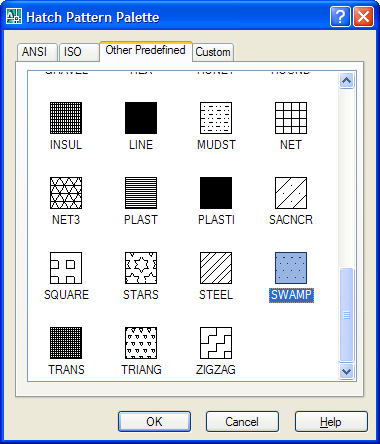
Hatch_dialog

Hatch type selected: SWAMP

Update

Someone asked me for the VB.NET code for this one (it was quite tricky to marshall the new string being returned). As I'd put it together, I thought I'd post it here:

Imports Autodesk.AutoCAD.ApplicationServices

Imports Autodesk.AutoCAD.Runtime

Imports Autodesk.AutoCAD.EditorInput

Imports System.Text

Namespace HatchDialogTest

  Public Class Commands

    Private Declare Auto Function acedHatchPalletteDialog _

    Lib "acad.exe" _

    Alias "?acedHatchPalletteDialog@@YA_NPB_W_NAAPA_W@Z" _

    (ByVal currentPattern As String, _

    ByVal showcustom As Boolean, _

    ByRef newpattern As StringBuilder) As Boolean

    <CommandMethod("SHD")> _

    Public Sub ShowHatchDialog()

      Dim sHatchType As String = "ANGLE"

      Dim sNewHatchType As New StringBuilder

      Dim bRet As Boolean = _

        acedHatchPalletteDialog(sHatchType, _

          True, sNewHatchType)

      If bRet And sNewHatchType.ToString.Length > 0 Then

        Dim ed As Editor

        ed = _

          Application.DocumentManager.MdiActiveDocument.Editor

        ed.WriteMessage( _

          vbLf + "Hatch type selected: " + _

          sNewHatchType.ToString)

      End If

    End Sub

  End Class

End Namespace

Update 2

I've recently come back to this post at the prompting of a colleague who was struggling to get it working with AutoCAD 2010. Sure enough, the dialog would appear but the marshalling back of the return string to AutoCAD is now causing a problem, for some unknown reason (at least it's unknown to me :-).

Anyway - to address the issue I've updated the code to perform the string marshalling a little more explicitly, and it now works. This may also address the issue one of the people commenting on this post experienced trying to get the code to work with AutoCAD 2009 (although I do remember testing it there and having no issues, which has me scratching my head somewhat).

Here's the updated C# code:

using Autodesk.AutoCAD.ApplicationServices;

using Autodesk.AutoCAD.Runtime;

using Autodesk.AutoCAD.EditorInput;

using System.Runtime.InteropServices;

using System;


namespace HatchDialogTest

{

  public class Commands

  {

    [DllImport(

        "acad.exe",

        EntryPoint =

          "?acedHatchPalletteDialog@@YA_NPB_W_NAAPA_W@Z",

        CharSet = CharSet.Auto

      )

    ]

    static extern bool acedHatchPalletteDialog(

      string currentPattern,

      bool showcustom,

      out IntPtr newpattern

    );


    [CommandMethod("SHD")]

    static public void ShowHatchDialog()

    {

      string sHatchType = "ANGLE";

      IntPtr ptr;

      bool bRet =

        acedHatchPalletteDialog(

          sHatchType,

          true,

          out ptr

        );

      if (bRet)

      {

        string sNewHatchType = Marshal.PtrToStringAuto(ptr);

        if (sNewHatchType.Length > 0)

        {

          Editor ed =

            Application.DocumentManager.MdiActiveDocument.Editor;

          ed.WriteMessage(

            "\nHatch type selected: " + sNewHatchType

          );

        }

      }

    }

  }

}

And here's the updated VB code:

Imports Autodesk.AutoCAD.ApplicationServices

Imports Autodesk.AutoCAD.Runtime

Imports Autodesk.AutoCAD.EditorInput

Imports System.Runtime.InteropServices

Imports System


Namespace HatchDialogTest


  Public Class Commands


    Private Declare Auto Function acedHatchPalletteDialog _

    Lib "acad.exe" _

    Alias "?acedHatchPalletteDialog@@YA_NPB_W_NAAPA_W@Z" _

    (ByVal currentPattern As String, _

    ByVal showcustom As Boolean, _

    ByRef newpattern As IntPtr) As Boolean


    <CommandMethod("SHD")> _

    Public Sub ShowHatchDialog()


      Dim sHatchType As String = "ANGLE"

      Dim ptr As IntPtr

      Dim bRet As Boolean = _

        acedHatchPalletteDialog(sHatchType, _

          True, ptr)

      If bRet Then

        Dim sNewHatchType As String = _

          Marshal.PtrToStringAuto(ptr)

        If sNewHatchType.ToString.Length > 0 Then

          Dim ed As Editor

          ed = _

            Application.DocumentManager.MdiActiveDocument.Editor

          ed.WriteMessage( _

            vbLf + "Hatch type selected: " + sNewHatchType)

        End If

      End If


    End Sub


  End Class


End Namespace

One response to “Showing AutoCAD's hatch dialog from a .NET application”

  1. Dear Kean
    Thanks again for an example
    it worked like a charm
    Here is VB.NET version I used

    [Code deleted by Kean at the request of Fatty]

  2. Oops...
    the code uploaded incorrectly
    remove it please

    Oleg

  3. Kean,

    Is there .Net interface for autocad command "DrawOrder"? For example: after solid-hatch a polyline, need to reorder polyline and hatch, how to make it happen using .NET? Thanks!

  4. Limin,

    The short answer is that it should be possible, using Autodesk.AutoCAD.DatabaseServices.DrawOrderTable.

    When I have some time I'll take a look into creating some sample code. In this case do you want to put the hatch behind the boundary? They don't typically intersect, so that change won't be very visible... unless you mean they need to be reordered relative to other entities.

  5. Kean, thanks for the quick response.

    Actually it's not only pline boundary. I have some furniture inside that polyline. So after running the hatch, I want them behind hatch. When you start working on draworder example, can you also include some code add xdata? I have tried hatch.XData.add(ResultBuffer), it always retruns error like following:

    System.Reflection.TargetInvocationException: Exception has been thrown by the target of an invocation. ---> System.NullReferenceException: Object reference not set to an instance of an object.

    Have a great trip to China. I have some good friends in Beijing, if you need some help, please let me know.

  6. I've created a new post on this:

    keanw.com/...

    Regarding the XData issue... it's not specifically relevant to the topic, so I've left it off. There are two likely reasons for your error: either the Registered Appication has not been added properly, or the list of typed values you're passing in via the ResultBuffer is malformed, in some way.

    Thanks for your kind offer, by the way. My Autodesk colleagues in Beijing have been incredibly welcoming and helpful, but I'll certainly let you know if I need additional help.

  7. This example doesn't work on Autocad 2009. Can I use this method to show hatch dialog with Autocad 2009 and VB.net 2008?

  8. It worked fine for me with AutoCAD 2009.

    Kean

  9. Hi Kean,

    I have been attempting to follow the same path for showing the text style dialog. I can get the Dialog to show but it doesn't initialise properly. Any pointers gratefully received.

    Imports Autodesk.AutoCAD.ApplicationServices
    Imports Autodesk.AutoCAD.Runtime

    Namespace TextStyleDialogTest

    Public Class Commands
    Private Declare Auto Sub acedTextStyleDialog2006 Lib "acad.exe" Alias "?invokeTextStyleDialog@@YAXPAVAcDbDatabase@@PAV?$CStringT@DV?$StrTraitMFC@DV?$ChTraitsCRT@D@ATL@@@@@ATL@@@Z" (ByVal AcadDatabase As IntPtr, ByVal StyleName As String)
    Private Declare Auto Sub acedTextStyleDialog2007 Lib "acad.exe" Alias "?invokeTextStyleDialog@@YAXPAVAcDbDatabase@@PAV?$CStringT@_WV?$StrTraitMFC_DLL@_WV?$ChTraitsCRT@_W@ATL@@@@@ATL@@@Z" (ByVal AcadDatabase As IntPtr, ByVal StyleName As String)

    <commandmethod("std")> Public Sub ShowTextStyleDialog()
    Dim db As Autodesk.AutoCAD.DatabaseServices.Database
    db = Application.DocumentManager.MdiActiveDocument.Database
    If Autodesk.AutoCAD.ApplicationServices.Application.Version.Major > 16 Then
    acedTextStyleDialog2007(db.UnmanagedObject, "Standard")
    Else
    acedTextStyleDialog2006(db.UnmanagedObject, "Standard")
    End If

    End Sub

    End Class

    End Namespace

    Thanks

    Adam

  10. Kean Walmsley Avatar

    Hi Adam,

    Sorry - nothing immediately obvious springs to mind.

    I suggest posting your question via ADN, if you're a member, of otherwise the AutoCAD .NET Discussion Group.

    Regards,

    Kean

  11. Hi Kean,

    Thanks for the speedy reply.

    I tried ADN and was given pointers to either Send command or recreating the dialog in .NET.
    Fine, but as was so near with InvokeTextStyleDialog and you obviously have coerced AutoCAD with other dialogs I thought I would post just in case it was something obvious 🙂

    I will try the .NET forums.

    Thanks

    Adam

  12. Kean Walmsley Avatar

    Hi Adam,

    OK, I just unmangled the name using DependencyWalker, and see the signature is more complex than you thought:

    void invokeTextStyleDialog(class AcDbDatabase *,class ATL::CStringT<wchar_t,class StrTraitMFC_DLL<wchar_t,class ATL::ChTraitsCRT<wchar_t> > > *)

    I think the chances of calling this unpublished function via P/Invoke are slim to none, I'm afraid. And much closer to none than slim, speaking frankly. At least it's not something I'd attempt, personally.

    Regards,

    Kean

  13. Hi Kean,

    No problem - I thought I was close but obviously not 🙂
    Still I learnt today that you can Undecorate a name in Dependency Walker which makes it all worthwhile.

    Thanks again,

    Adam

  14. Hi Kean,

    Just in case someone else needs this...
    Essentially it's just a wrapper round some MFC code. The mixed managed code is just to prove it works.
    Thanks to Alexander Rivilis for the initial ARX code.
    #pragma once

    using namespace System;
    using namespace System::Runtime::InteropServices;

    extern void invokeTextStyleDialog(AcDbDatabase *AcadDatabase, CString *StyleName);

    #pragma unmanaged
    void UnmanagedInvokeTextStyleDialog()
    {
    AcDbDatabase *db = curDoc()->database();
    AcDbObjectId Id = curDoc()->database()->textstyle();
    AcDbObjectPointer<acdbtextstyletablerecord> textstyleRec(Id,AcDb::kForRead);
    ACHAR *pName;
    textstyleRec->getName(pName);
    CString s;
    s.Format(_T("%s"),pName);
    invokeTextStyleDialog(db, &s)
    }
    #pragma managed

    namespace TextStyleDialog
    {

    public ref class Commands
    {
    public:

    [Autodesk::AutoCAD::Runtime::CommandMethod("STD")]
    static void ShowDialog()
    {
    UnmanagedInvokeTextStyleDialog();
    }
    };
    }

  15. Hi Kean,

    I tried to run the C# code (Update 2)
    in Windows XP (x86) with AutoCAD 2010 it works good.
    But the same did not run in Windows 7 (x64) AutoCAD 2010 (x64)

    ************** Exception Text **************
    System.EntryPointNotFoundException: Unable to find an entry point named '?acedHatchPalletteDialog@@YA_NPB_W_NAAPA_W@Z' in DLL 'acad.exe'.

    Can you help me is this regard.
    Thanks.

  16. You should be able to identify the correct function to call on 64-bit systems by following the steps in this post:

    keanw.com/2006/07/calling_objecta.html

    Kean

  17. That post worked well for me, thanks Kean.

    Seeing as I have the magical number to hand I thought I would post it.

    64- bit version is: "?acedHatchPalletteDialog@@YA_NPEB_W_NAEAPEA_W@Z"

  18. Thanks, Mathew!

    Kean

  19. I try running the update in VBA code. Unfortunetaly, the type IntPtr does not exist in VBA. Do you know if it's possible to achieve this in VBA?

    Thanks,
    Maxime

  20. Kean Walmsley Avatar

    The two versions of the code are for C# and VB.NET. You might try posting a link to the AutoCAD VBA Discussion Group, in case someone there has (or wants to create) equivalent VBA code.

    Kean

  21. Using depends.exe I found the signature for bool acedHatchPalletteDialog(wchar_t const *,bool,wchar_t * &)

    I suspect that the wchar_t *& implies I am responsible for deleting the string memory after I have used it. In your .Net interface this would be a memory leak. I doubt .Net knows about the unmanaged memory deallocation requirements. How do you work around this?

  22. I expect the only way is to expose the function via your own C++/CLI wrapper. That way you can copy the data into a value that can be managed inside .NET before freeing the unmanaged memory.

    This isn't the kind of function you're going to call in a loop, so I doubt the majority of developers will choose to go down this path for the sake of a few bytes, but that would seem to be the way to go if this is important to you.

    Before doing that you may also want to check in with ADN to see whether this has been exposed via an API in the last 6+ years since I posted this. I couldn't find one when I just had a quick check, but then you never know. 🙂

    Kean

    1. Julian Genchev Avatar
      Julian Genchev

      Just add CallingConvention = CallingConvention.Cdecl at end of dllimport directive

      [DllImport("acad.exe", EntryPoint = "?acedHatchPalletteDialog@@YA_NPB_W_NAAPA_W@Z", CharSet = CharSet.Auto, CallingConvention = CallingConvention.Cdecl)]

      This solve my problem with unbalancing stack error. (VS 2013, Autocad 2015)

      1. Kean Walmsley Avatar

        Great - thanks, Julian!

        Kean

  23. Hi guys,
    I know, it's been a lots of years since last post. ^^'
    Been trying to use Kean's code with Autocad 2024 and C#, found the entry point, etc. And the
    "bool bRet = acedHatchPalletteDialog(sHatchType, true, out ptr);" call just does nothing. Any ideas?

Leave a Reply to Maxime Cancel reply

Your email address will not be published. Required fields are marked *