Hatches
-
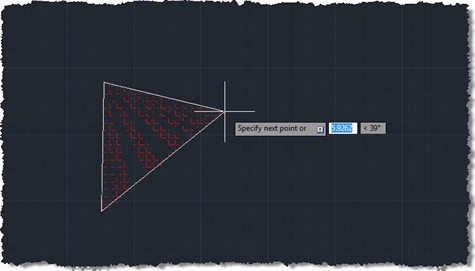
This question came in a few weeks ago, which I thought worth addressing: Hi, Kean! I have a question - how can we create hatch during jig? The code in this post endeavours to do just that, but – be warned – isn't fully successful. The problem I chose to interpret this as is "how do you jig the creation of a polyline, using it as the boundary for an associative hatch?", and it's not an easy one to solve. I started by taking Philippe Leefsma's code from this previous post, which jigs a polyline (including arc segments). I switched…
-

As promised and reported on, and then announced by Scott on his blog, the QR Codes application for AutoCAD is now live on Autodesk Labs as December's Plugin of the Month. You may have seen my original implementation, but it's come a long way thanks to the efforts of Augusto Gonçalves, a member of DevTech based in São Paulo. While I had developed the original implementation to create and embed raster images using the Google Chart API, Augusto extended that implementation to create native hatches for QR Codes. And while my implementation focused on a command-line UI, Augusto implemented a…
-
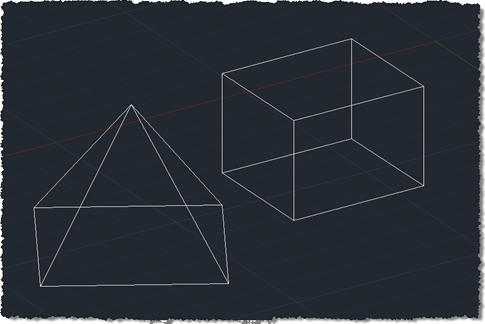
I finally came up with a succinct title for this post after struggling with "Shading a face of an AutoCAD solid with a transparent hatch pumped through the transient graphics sub-system using .NET". Or words to that effect. 🙂 So yes, this post shows how to create a temporary hatch with transparent shading that then gets drawn as transient graphics at the right place in the model: in this case, the face selected using the approach shown in this previous post (which later evolved into a "look at" type feature). The post was inspired by an email I received a…
-

In the last post we used an API introduced in AutoCAD 2011 to trace boundaries defined by geometry in a drawing. In this post we're going to use these boundaries to define the limits of solid hatch objects which we will – using another new capability in AutoCAD 2011 - make transparent. Here's the updated C# code to define our TBH command with new/changed lines in red (you can also get the source file without line numbers here): 1 using Autodesk.AutoCAD.ApplicationServices; 2 using Autodesk.AutoCAD.EditorInput; 3 using Autodesk.AutoCAD.DatabaseServices; 4 using Autodesk.AutoCAD.Runtime; 5 using Autodesk.AutoCAD.Colors; 6 7 namespace TraceBoundaryWithHatch 8 {…
-

As promised in the last post, we're now going to look at how to change the code to make the colour averaging routine work in parallel. The overall performance is marginally better on my dual-core machine, but I fully expect it to get quicker and quicker as the number of cores multiply. To start with, though, here's the modified "synchronous" version of the code - as I went through making the code work in parallel, I noticed a bunch of general enhancements that were applicable to both versions. Here's the updated F# code: // Use lightweight F# syntax #light…
-

A friend and esteemed colleague asked - very validly - why I decided to use circles on a grid to display the results of a mathematical function in this last post, rather than using a linear object of some kind. Well I did, in fact, have a plan in mind... 🙂 This post extends the concept, introduced in that post, of displaying data in a grid of solid-hatched circles. This post focuses on importing a bitmap image from a file, pixelizing the contents and using the "averaged" pixel colours to modify our grid. The idea actually came to me during…
-
I had too much fun with the last post just to let it drop: I decided to port the main command to F#, to show how it's possible to combine C# and F# inside a single project. The premise I started with was that the point-in-curve.cs library is something that we know works - and don't want to re-write - but would like to use from a new application we're developing in F#. This also gives us the chance to compare the performance between C# and F# when solving the same problem (although as we'll be calling through to some…
-

This may strike you as a fairly bizarre title for a post, but I was inspired to develop the below code by a robotic lawnmower we bought about a year ago. This fantastic tool bounces around our garden, changing direction randomly when it hits the lawn's boundary. I got to thinking how to implement a similar technique to hatch a boundary with a polyline. While this is mostly for fun, I can see a few interesting potential uses: you might use the technique to test randomly generated paths of, for example, a robot or you might simply want to supplement…
-
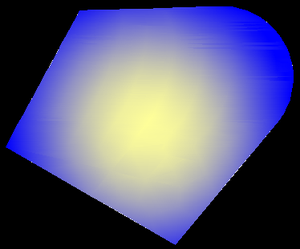
So, back in the saddle after an eventful week off, back in the UK. Aside from the extremely changeable weather (even by British standards) and the heightened security at UK airports, the week went swimmingly... 🙂 It's now Friday night, and disappointingly I've spent nearly two days regaining control of my inbox. I really wanted to make a quick post before the weekend, so rather than diving into the issue I'd planned on tackling (Palettes), I decided to take a shot at a request I'd received by email a few weeks ago: to show how to create a gradient fill…
-
This question came in from Limin as a comment in this previous post: Is there .Net interface for autocad command "DrawOrder"? For example: after solid-hatch a polyline, need to reorder polyline and hatch, how to make it happen using .NET? I've put together some C# code to demonstrate how to do this: using Autodesk.AutoCAD.ApplicationServices; using Autodesk.AutoCAD.DatabaseServices; using Autodesk.AutoCAD.EditorInput; using Autodesk.AutoCAD.Runtime; namespace HatchDrawOrder { public class Commands { [CommandMethod("HDO")] static public void HatchDrawOrder() { Document doc = Application.DocumentManager.MdiActiveDocument; Editor ed = doc.Editor; // Ask…